


 Video Converter Ultimate
 ضبط صفحه
 تعمیر ویدیو
فشرده سازی فایل های ویدئویی TS - نحوه فشرده سازی فایل های TS به اندازه های کوچکتر
هنگامی که از DVD ها چند فایل video_ts دارید ، اندازه پرونده ها بزرگ است و فضای هارد دیسک را می خورد. در صورت نیاز به ذخیره فایل های TS در NAS یا کتابخانه رسانه ، فشرده سازی فیلم های TS ضروری است. البته کمپرسور ویدئویی TS آنلاین باید انتخاب اولیه باشد. اما اکثر سرویس های آنلاین محدودیتی در اندازه فیلم ندارند. شما می توانید از کمپرسور TS آنلاین رایگان و ابزار حرفه ای این مقاله دیدن کنید.

قسمت 1: نحوه فشرده سازی رایگان فایلهای TS بصورت آنلاین
آیا فشردهسازی آنلاین فایلهای ویدیویی TS امکانپذیر است؟ از آنجا که فایلهای TS حجم بالایی دارند، پیدا کردن یک فشردهساز آنلاین TS بدون محدودیت حجمی کار دشواری است. Free Video Compressor یک فشردهساز آنلاین TS چندکاره است که از فایلهای بزرگ TS بدون هیچ محدودیتی پشتیبانی میکند. این ابزار فقط حجم ویدیوهای TS را کاهش میدهد اما کیفیت اصلی ویدیو را حفظ میکند.
- 1. فیلم های TS را با وضوح 4K با کیفیت خیره کننده فشرده کنید.
- 2. به پرونده های ویدئویی فشرده شده TS هیچ علامت اضافه نکنید
- 3. دسته ای فایل های TS را با سرعت 30 برابر سریعتر از ابزارهای دیگر فشرده کنید.
- 4. برای محافظت از اطلاعات خود ، توابع امنیتی حریم خصوصی را ارائه دهید.
مرحله 1: با هر مرورگر وبی به فشردهساز ویدیوی آنلاین بروید، میتوانید روی دکمه Add Files to Compress کلیک کنید تا نصبکننده را دانلود نمایید. سپس دوباره روی دکمه کلیک کنید تا فایل TS را بدون محدودیت حجم در فشردهساز ویدیوی آنلاین وارد کنید.

مرحله 2: پس از اینکه فایلهای TS را به صورت آنلاین آپلود کردید، میتوانید پارامترهای مختلفی مانند Size، Format، Resolution و Bitrate را برای رسیدن به حجم دلخواه ویدیو تنظیم کنید. بعد از آن میتوانید روی دکمه Compress کلیک کنید تا ویدیوهای TS خود را به صورت رایگان فشرده کنید.

قسمت 2: نحوه فشرده سازی فایلهای TS بدون افت کیفیت
وقتی نیاز دارید کلیپهای مختلف فیلم را از چند فایل TS به هم وصل کنید، فایلهای TS را برای گوشیهای اندرویدی فشرده کنید، یا حتی فایلهای TS را به MP4 یا MKV تبدیل نمایید، Video Converter Ultimate یک فشردهساز TS چندمنظوره است که با استفاده از الگوریتمهای پیشرفته، حجم ویدیو را کاهش میدهد. این برنامه همچنین به شما امکان میدهد بخشهای ناخواسته را حذف کرده و کلیپهای ویدیویی را در یک فیلم واحد ادغام کنید.
دانلود رایگانبرای ویندوز 7 یا بالاتردانلود امن
دانلود رایگانبرای MacOS 10.7 یا بالاتردانلود امن
مرحله 1: Video Converter Ultimate را در رایانه خود دانلود و نصب کنید، سپس برنامه را در رایانه اجرا کنید. روی منوی Converter کلیک کرده و دکمه Add Files را برای وارد کردن فایلهای TS انتخاب کنید.
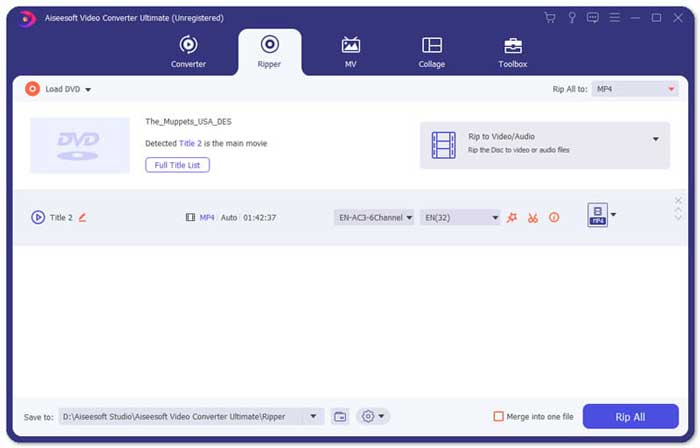
مرحله 2: پس از وارد کردن فایلهای TS، میتوانید به منوی Tool رفته و روی گزینه Video Compressor کلیک کنید. کافی است اندازه، نام، فرمت، رزولوشن و بیتریت فایل هدف را تغییر دهید. وقتی به حجم ویدیوی دلخواه رسیدید، میتوانید روی دکمه Compress کلیک کنید تا فایلهای TS را فشرده کنید.

مرحله 3: همچنین میتوانید MKV یا MP4 را بهعنوان فرمت خروجی انتخاب کنید. در این حالت، فایل TS با حجمی نسبتاً کمتر به MKV یا MP4 فشرده میشود. با کلیک روی آیکون Scissors میتوانید بخشهای دلخواه فایل TS را برش دهید. همچنین میتوانید با گزینه Merge into one چند کلیپ TS مختلف را در یک فایل واحد ترکیب کنید.
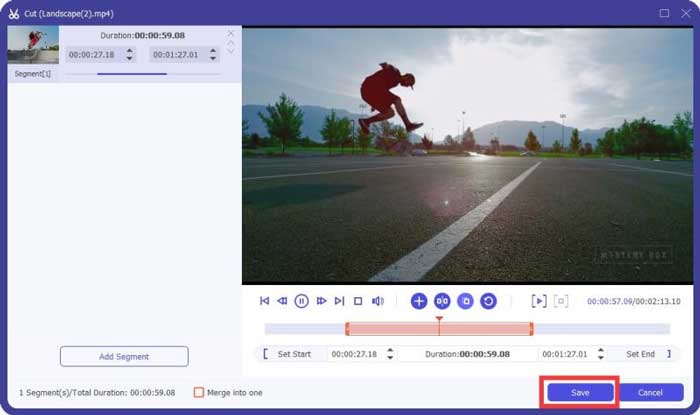
مرحله 4: هنگامی که از ویدیوی فشردهشده راضی بودید، میتوانید یک پوشه مقصد برای ویدیوهای TS فشرده انتخاب کنید. سپس روی دکمه Convert All کلیک کنید تا بدون از دست دادن کیفیت اصلی، فشردهسازی فایلهای TS دیویدی خود را آغاز نمایید.

قسمت 3: سQالات متداول نحوه فشرده سازی فایلهای ویدئویی TS
1. قالب پرونده TS چیست؟
TS ، کوتاهتر از Transport Stream که یک قالب بسته است. نام کامل TS MPEG2-TS است ، که یک قالب استاندارد داده برای انتقال و ذخیره صدا ، ویدئو ، برنامه و ... است و عمدتا در سیستم های پخش دیجیتال مانند DVB ، ATSC و IPTV استفاده می شود.
2. آیا باید TS را به MP4 یا MKV فشرده کنم؟
آره. در صورت نیاز به حفظ کیفیت اصلی فیلم ، می توانید TS را با کدک ویدیوی اصلی به MKV فشرده کنید. اما اگر می خواهید TS را برای تلفن Android یا iPhone فشرده کنید ، MP4 باید یکی از بهترین گزینه ها باشد.
3. فشرده سازی پرونده های .TS با استفاده از H.264 چه مدت طول می کشد؟
این به اندازه پرونده پرونده .TS شما بستگی دارد. در مورد H.264 با 15 MBPS Bitrate فشرده سازی ، که فشرده سازی آن کمتر از 2 دقیقه طول می کشد. این یک پرونده فشرده 484 مگابایتی ایجاد می کند. اگر شما نیاز به فشرده سازی TS از یک دی وی دی 9 گیگابایتی دارید ، ممکن است حدود یک ساعت طول بکشد.
نتیجه
در این مقاله 2 روش عملی برای فشرده سازی فایلهای ویدئویی TS به اشتراک گذاشته شده است. برای فشرده سازی فایل های بزرگ TS بدون محدودیت می توانید از کمپرسور ویدئو رایگان استفاده کنید. هنگامی که نیاز به فشرده سازی فایل های TS خود دارید بدون افت کیفیت ، در این صورت Video Converter Ultimate همیشه باید بهترین انتخاب باشد.
-
 نحوه تبدیل TS به AVI / MKV / MOV / WMV آنلاین و رایگان در Win / Mac
 آیا می خواهید پرونده های TS را به سرعت به AVI / MKV / MOV / WMV تبدیل کنید؟ این مقاله مبدل های ویدیویی آنلاین و آفلاین را با راهنمای کامل نشان می دهد. شاید بتوانید بهترین مبدل TS رایگان را از اینجا دریافت کنید.
-
 MTS VS M2TS - تفاوت بین MTS و M2TS
 پرونده MTS یا M2TS چیست؟ تفاوت M2TS با MTS چیست؟ چگونه می توانم فایل فیلمبرداری ضبط شده MTS یا M2TS را تماشا کنم؟ تمام پاسخ ها را در این پست پیدا کنید.
-
 10 روش رایگان برای تبدیل فایل TS به MP3 ، AIFF ، ALAC ، FLAC و موارد دیگر
 چگونه فایل TS را به MP3 به صورت رایگان تبدیل کنیم؟ در این راهنما ، 11 روش آسان برای استخراج صدا از فایل TS با TS به نرم افزار رایگان صوتی و ابزارهای تبدیل آنلاین پیدا خواهید کرد.
