


 Video Converter Ultimate
 ضبط صفحه
 تعمیر ویدیو
با 4 روشی که باید بدانید، واترمارک Dreamstime را حذف کنید
اگر برای ارائه یا پروژه خود به تصاویر آماده برای استفاده نیاز دارید، هرگز نمی توانید با انتخاب Dreamstime اشتباه کنید. این برنامه میتواند عکسهای استوک بدون حق امتیاز را در اختیار شما قرار دهد تا در هر زمان از آنها استفاده کنید. این در حال حاضر به کاربرانی که به دنبال تصویری خاص با خروجی با کیفیت بالا و قیمت پایین هستند کمک می کند. اگرچه می توانید 15 تصویر را به صورت رایگان در اینجا دانلود کنید، این محصول زمانی که از تصویری که در اینجا دانلود می کنید استفاده می کنید، علامت واترمارکی برای تبلیغ برنامه به جا می گذارد.
نمیتوان منکر شد که کاربردپذیری این وبسایت عالی است و قیمت تصاویر آن پایین است، اما همهی ما توان خرید اعتبار در آن را نداریم. دیگر نگران نباشید! چون ما هوایتان را داریم. اطلاعاتی که در ادامه آوردهایم روشهایی هستند که میتوانید برای حذف واترمارک Dreamstime که روی خروجی نهایی باقی میماند، از آنها استفاده کنید.

قسمت 1. نحوه حذف واترمارک Dreamstime با خرید اعتبار
ما نمی توانیم گزینه خرید را پشت سر بگذاریم زیرا این گزینه موثرترین گزینه حذف علامت Dreamstime است که می توانید استفاده کنید. قبل از اینکه ادامه دهیم، باید بدانید که Dreamstime به شما نیاز دارد تا بتوانید تصویری را بدون واترمارک خریداری کنید. نام اعتبار یک ارز Dreamstime است. از پول واقعی استفاده می کند و آن را به دیجیتالی تبدیل می کند که Dreamstime آن را می پذیرد. فرض کنید اعتباری در Dreamstime ندارید. در این صورت می توانید مراحل زیر را برای خرید اعتبار برای دانلود و داشتن تصویر بدون هیچ نشانی از محصولات دنبال کنید.
مرحله 1. وبسایت رسمی Dreamstime را باز کنید، سپس باید قبل از خرید اعتبار در Dreamstime یک حساب کاربری بسازید. اگر از قبل در اینجا حساب دارید، ابتدا باید وارد شوید تا بتوانید بهدرستی از آن استفاده کنید.
مرحله 2. وقتی در Dreamstime وارد حساب کاربری خود شدید، روی Price and Download Plans کلیک کرده، سپس به بخش Credit Package بروید تا ببینید چه نرخهایی در آن موجود است.
مرحله 3. تمام جزئیات اطلاعاتی را که از شما میخواهد بهطور کامل وارد کنید، سپس روی Complete Checkout کلیک کنید تا پرداختی را که در ابزار ثبت کردهاید پردازش کند. به همین سادگی، اکنون اعتبار بهعنوان واحد خرید تصویر در Dreamstime تهیه کردهاید.
قسمت 2. نحوه حذف واترمارک Dreamstime به صورت رایگان در وب
FVC Free Watermark Remover Online
یکی از شناختهشدهترین حذفکنندههای واترمارک Dreamstime آنلاین که میتوانید از آن استفاده کنید، چیزی نیست جز FVC Free Watermark Remover Online. شما می توانید از این ابزار برای حذف واترمارکی که در تصویری که دارید استفاده کنید. از نظر عملکرد، این ابزار آنلاین توانایی بیشتری در برداشتن آنچه شما فکر می کنید، به خصوص در حذف لوگو، واترمارک، تمبر، تاریخ، شی و غیره روی تصویر دارد. آیا هنوز به این ابزار شک ندارید؟ در این صورت، مراحلی را که در زیر اضافه کردهایم بخوانید، و میتوانید برای حذف واترمارکی که Dreamstime اضافه کرده است، آنها را دنبال کنید.
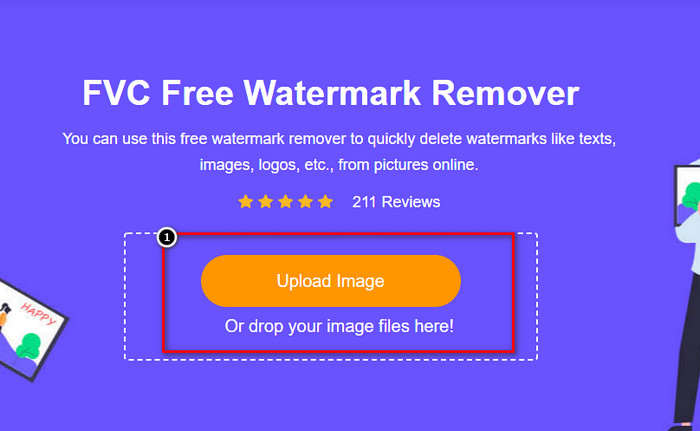
مرحله 1. با کلیک روی این لینک، یک برگهی جدید در مرورگر شما باز خواهد شد.
مرحله 2. روی Upload Image کلیک کنید تا عکسهایی را که از Dreamstime با واترمارک خروجی گرفتهاید، وارد کنید.
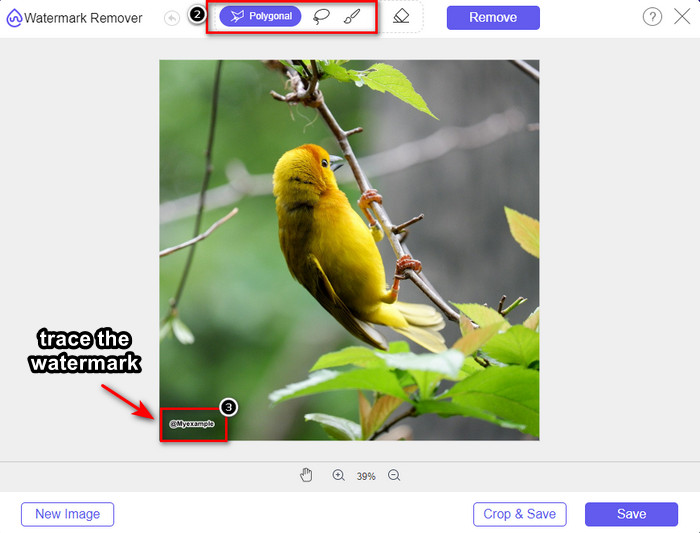
مرحله 3. میتوانید از ابزارهایی برای ردیابی واترمارک استفاده کنید، یکی را انتخاب کرده و سپس با آن واترمارک را ردیابی کنید.
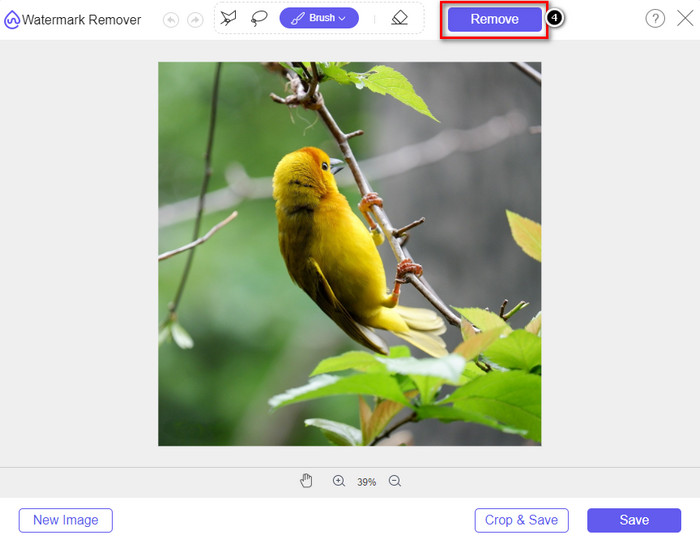
مرحله 4. پیش از آنکه سراغ خروجی گرفتن تصویر بروید، ابتدا روی آیکون Remove کلیک کنید.
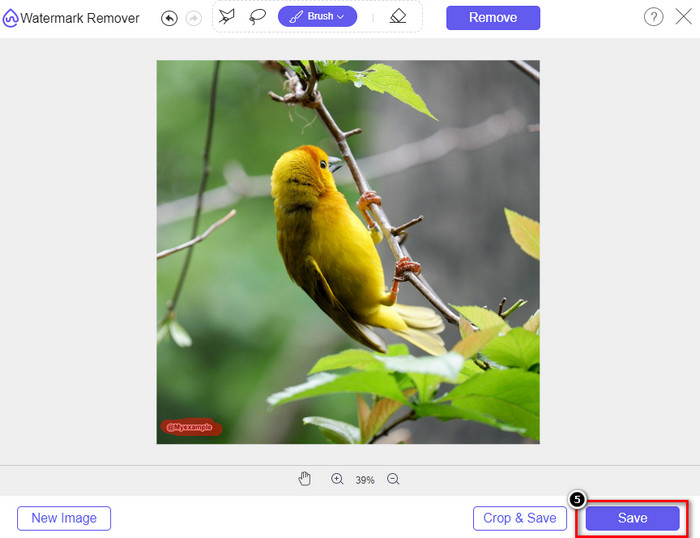
مرحله 5. در نهایت، روی Download کلیک کنید تا تصویر را بدون واترمارکِ جاسازیشدهای که اینجا مشخص کردهاید ذخیره کنید.
WatermarkRemover.IO
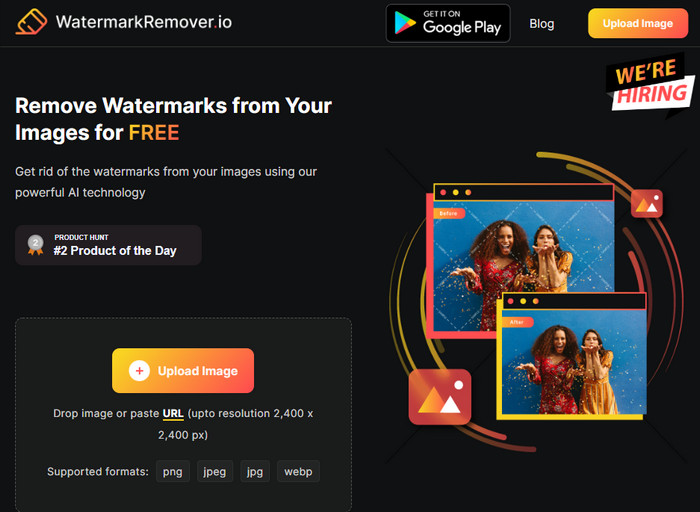
WatermarkRemover.io ابزاری آنلاین برای حذف واترمارک از عکسهای Dreamstime است که میتوانید در این مسیر از آن کمک بگیرید. این ابزار مانند اولین حذفکنندهی واترمارک آنلاین ذکرشده، رایگان است. نیازی نیست بابت ثبتنام در این ابزار نگران باشید، زیرا در هر مرورگری قابل استفاده است. همچنین از فناوری هوش مصنوعی برای حذف واترمارک از تصاویر شما زمانی که از این ابزار استفاده میکنید بهره میبرد. برای اینکه بتوانید این کار را انجام دهید، باید به خواندن اطلاعات بعدی که در ادامه آمده است ادامه دهید.
مرحله 1. وبسایت رسمی این حذفکنندهی واترمارک را با جستوجو در مرورگر خود باز کنید.
مرحله 2. روی آیکون Upload Image کلیک کنید تا عکسی را که میخواهید واترمارک آن را حذف کنید بارگذاری کنید.
مرحله 3. پس از آنکه بارگذاری تصویرِ دارای واترمارک پایان یافت، روی Download Image بزنید، زیرا واترمارکِ روی تصویر شما بهطور خودکار حذف خواهد شد.
قسمت 3. نحوه حذف واترمارک Dreamstime در ویدیوها با استفاده از راه حل نهایی
میتوانید یک ابزار حذف واترمارک Dreamstime برای ویدیوها دانلود کنید، مانند FVC Video Converter Ultimate. این ابزار بسیار انعطافپذیر است، همیشه آمادهی استفاده است و هر زمان کار را به پایان میرساند. این نرمافزار با مشکلاتی که ممکن است در ویدیوها با آن روبهرو شوید مانند کیفیت پایین صدا، وضوح تصویر، ناسازگاری فرمت و واترمارکهای آزاردهنده سروکار دارد. در مقایسه با نرمافزارهایی که میتوانید برای حذف واترمارک نصب کنید، این یکی از نظر عملکرد، سرعت پردازش و کاربری فوقالعاده عمل میکند. با ما همراه بمانید، چون در ادامه بهصورت گامبهگام نشان میدهیم چگونه واترمارک را از ویدیوهای خود حذف کنید.
مرحله 1. پیش از هر چیز، باید با کلیک روی دکمهی دانلودی که در پایین ارائه شده، نرمافزار را روی رایانهی خود دانلود کنید. لطفاً نسخهی درست را برای نصب انتخاب کنید، مراحل نصب سریع را طی کرده و نرمافزار را اجرا کنید.
دانلود رایگانبرای ویندوز 7 یا بالاتردانلود امن
دانلود رایگانبرای MacOS 10.7 یا بالاتردانلود امن
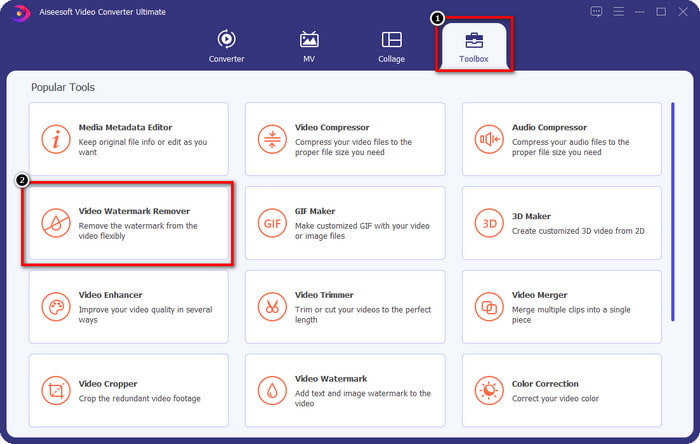
مرحله 2. Toolbox چندکارهای را که این نرمافزار دارد باز کنید، سپس Video Watermark Remover را انتخاب کنید.
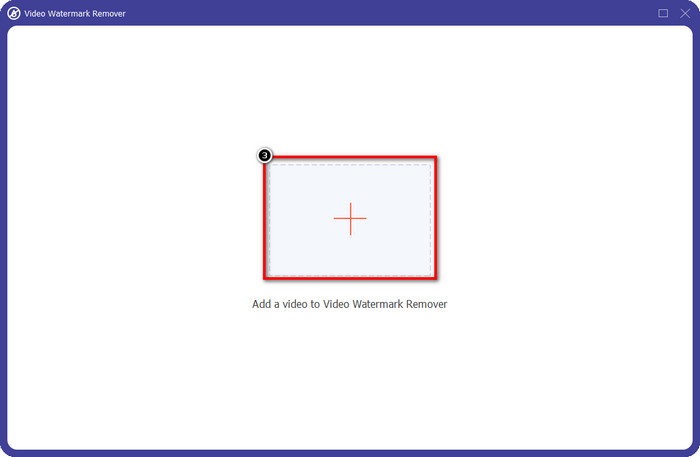
مرحله 3. پس از آن، روی آیکون + کلیک کنید تا ویدیویی را که دانلود کردهاید بارگذاری کرده و فرایند حذف واترمارک Dreamstime را آغاز کنید.
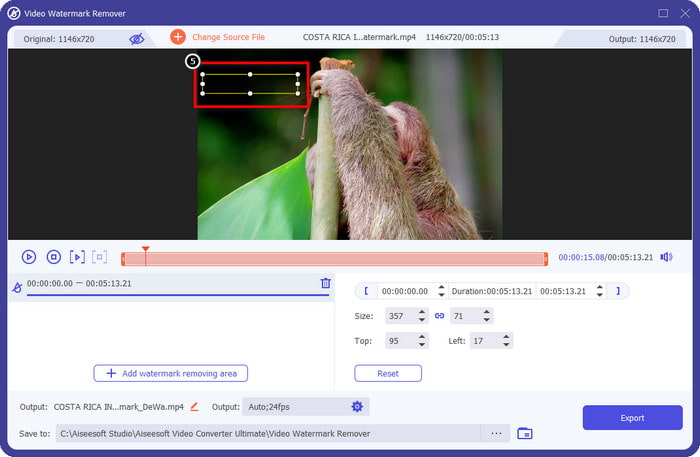
مرحله 4. سپس روی Add Watermark Removing Area کلیک کنید تا ناحیهی انتخاب روی واترمارک قرار گیرد.
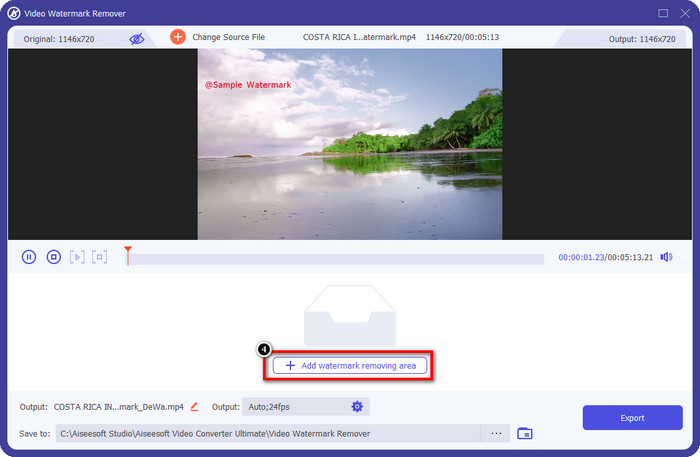
مرحله 5. پس از کلیک روی Add Watermark Removing Area، یک شکل مستطیلی روی صفحهی شما ظاهر میشود؛ آن را روی واترمارک قرار دهید تا حذف شود.
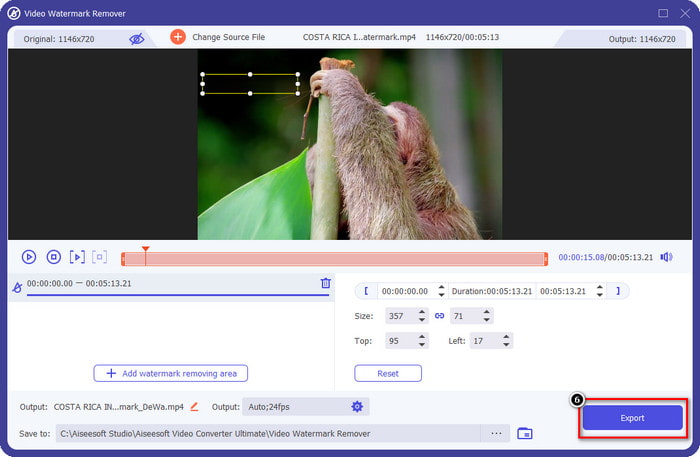
مرحله 6. روی دکمهی Export کلیک کنید تا ویدیو را بدون واترمارک Dreamstime دانلود کنید.
مرتبط:
بخش 4. سوالات متداول در مورد نحوه حذف واترمارک Dreamtime
آیا می توانم پس از خرید واترمارک در Dreamtime به صورت نامحدود آن را حذف کنم؟
اگر اعتباری خریداری کرده باشید، نمی توانید، اما می توانید ادامه دهید و کمی بیشتر به پایین بروید، و خواهید دید که دسترسی نامحدودی به تصویر وجود دارد که اگر به طور منظم از آن استفاده می کنید، می توانید از آن استفاده کنید. قیمت آن در مناطق یا مکان های مختلف در سراسر جهان یکسان نیست.
Dreamstime چه نوع کارتی را پشتیبانی می کند؟
اکنون که تصمیم به خرید اعتبار یا هزینه اشتراک در اینجا گرفته اید، می توانید از Master Card، Visa، AMEX و سایر کارت های اعتباری اصلی خود استفاده کنید. می توانید آن را در وب سایت رسمی بررسی کنید تا دیگران را بشناسید.
آیا می توانم از اعتبار در Dreamstime برای خرید ویدیوهای بدون واترمارک استفاده کنم؟
برای خرید ویدیو یا هر محصولی که این پلتفرم دارد می توانید از اعتبار استفاده کنید. هدف اعتبار فقط برای تصاویر و فیلم ها نیست. شما همچنین می توانید از آن برای خرید صدا از اینجا استفاده کنید.
نتیجه
چگونه واترمارک Dreamstime را حذف کنیم؟ خوب، شما قبلاً میدانید که چگونه با دو ابزاری که ما استفاده میکنیم و ویدیو با حذف کننده نهایی واترمارک که میتوانید استفاده کنید، با واترمارک در تصاویر خود مقابله کنید. بنابراین، اگر مشکل واترمارک روی ویدیوها یا تصاویر دارید، میتوانید آزادانه از نرمافزار فوق استفاده کنید و آموزشی که اضافه کردیم را دنبال کنید. با مشکل خداحافظی نکنید چون حل شده است!
-
 2 راه برای حذف سریع واترمارک VSDC در ویندوز و مک
 آیا به دنبال راهی برای حذف واترمارک VSDC در ویدیوهای خود هستید؟ با این مقاله، ابزارهایی را ارائه می دهیم که می توانید از آنها برای خلاص شدن از شر واترمارک استفاده کنید.
-
 به راحتی و به طور موثر واترمارک Animoto را در ویدیوها حذف کنید
 چگونه واترمارک Animoto را روی ویدیو حذف کنیم؟ به خواندن این مقاله ادامه دهید زیرا ما یک آموزش کامل در مورد نحوه انجام آن ارائه کرده ایم.
-
 نحوه حذف واترمارک از ویدیو با استفاده از Final Cut Pro [راهنمای کامل]
 آیا با واترمارک روی ویدیوها مشکلی دارید؟ دیگر نگفتیم، زیرا ما آموزشی در مورد نحوه حذف واترمارک از ویدیو با استفاده از Final Cut Pro ارائه کردیم.
