


 Video Converter Ultimate
 ضبط صفحه
 تعمیر ویدیو
راهنمای نحوه ویرایش متادیتا WebM برای ویندوز و مک
یکی از دلایل نیاز به ویرایش فراداده (متادیتا) فرمت WebM این است که باید برچسبی برای افزودن اطلاعات تکمیلی درباره محتوای فایل WebM درج کنیم. گاهی لازم است این اطلاعات فوراً اصلاح شوند تا برای کاربر، سیستم و برنامه قابل مشاهده باشند. یکی از هدفها این است که مشخص شود فایل دقیقاً چه محتوایی دارد. بنابراین، پیش از انتقال دادهها به صورت آنلاین، بسیار مهم است که بدانید چگونه متادیتای WebM را ویرایش کنیم. با خواندن مطلب زیر، آگاه شوید و یاد بگیرید این کار را چگونه انجام دهید.

بخش 1. سریعترین راه برای ویرایش متادیتای WebM در ویندوز و مک [نسخه آسان]
FVC Video Converter Ultimate ویرایش متادیتا را بدون دردسر و با فرایندی ساده برای کاربرانی که از آن استفاده میکنند فراهم میکند. با این ویرایشگر متادیتا، میتوانید همانند یک کاربر حرفهای بهسرعت برچسبها را روی فایلهای WebM، MOV، TS، RMVB و بیش از 1000 فرمتِ پشتیبانیشده دیگر این ابزار، ویرایش یا حذف کنید. این ابزار بهخوبی با نام و انتظارات کاربرانش همخوانی دارد؛ بنابراین اگر بهدنبال نرمافزاری مناسب برای مبتدیان و حتی کاربران حرفهای هستید، باید این ابزار را انتخاب کنید. برخلاف بسیاری از نرمافزارهای دیگر، میتوانید متادیتای WebM خود را با اطلاعات دقیق، از طریق افزودن دستی آنها، بهروز کنید.
بیشتر می خواهید؟ این ابزار در ویرایش ابرداده ها و سایر زمینه های حل مشکلات ویدیویی و صوتی برتری دارد. مانند برش، برش، ویرایش، ساخت گیف، افزایش سرعت ویدیوها و انجام کارهای بیشتر با این ابزار در کمتر از یک دقیقه. و به شما ثابت کند که نرم افزار از نظر نام و عملکرد نهایی است. نمایش نوشته شده زیر به شما آموزش می دهد که چگونه ابرداده های WebM را بدون تلاش زیاد برای این مشکل ویرایش کنید.
مراحل نحوه ویرایش برچسب های WebM با FVC Video Converter Ultimate:
گام 1. برای داشتن این نرمافزار همهکاره، روی دکمه دانلود زیر کلیک کنید و سیستمعاملی را که در حال حاضر استفاده میکنید انتخاب کنید. پس از کلیک روی فایل دانلودشده، مراحل نصب را دنبال کنید و سپس با کلیک روی «Start Now» برنامه را باز کنید.
دانلود رایگانبرای ویندوز 7 یا بالاتردانلود امن
دانلود رایگانبرای MacOS 10.7 یا بالاتردانلود امن
گام 2. بخش Toolbox را باز کنید و در فهرستی که در پایین نمایش داده میشود، گزینه Media Metadata Editor را پیدا کنید.
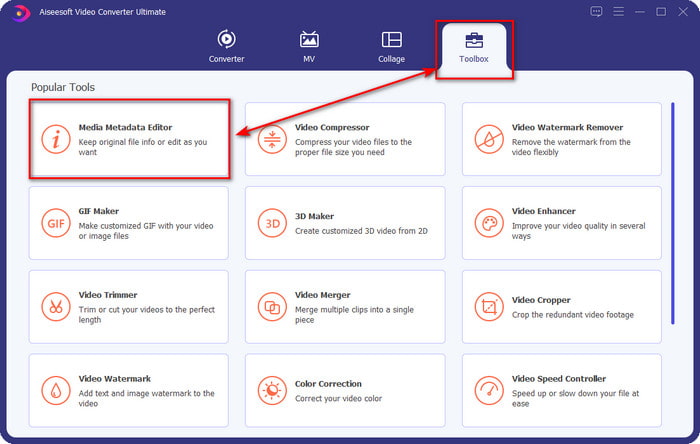
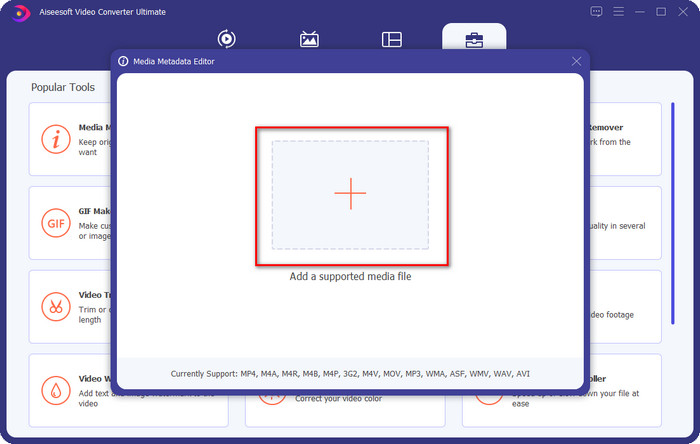
گام 3. با کلیک روی دکمه +، فایل WebM را اضافه کنید، آن را در مدیر پوشههایتان پیدا کرده و برای ادامه روی Open کلیک کنید.
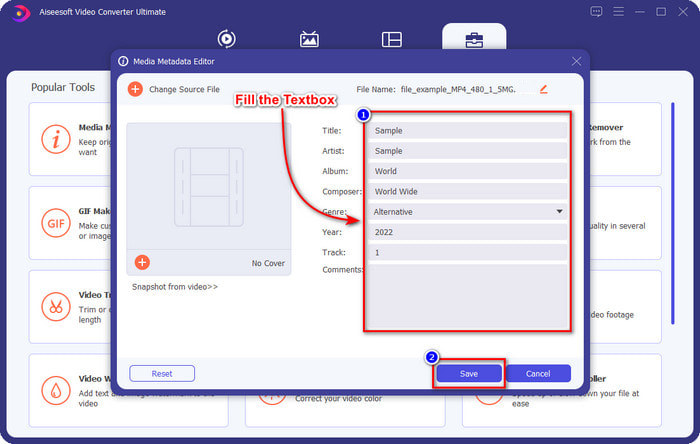
گام 4. تمام اطلاعاتی را که میخواهید بهعنوان برچسب روی فایل WebM خود اضافه کنید، در هر textbox وارد کنید. سپس، وقتی افزودن همه اطلاعات بهعنوان برچسب تمام شد، روی Save کلیک کنید. ساده نیست؟ این همان روشی است که با کمک این راهحل نهایی روی ویندوز و مک، متادیتا را به WebM خود اضافه میکنید.
قسمت 2. نحوه ویرایش متادیتا WEBM با استفاده از نرم افزار خط فرمان روی دسکتاپ
FFmpeg
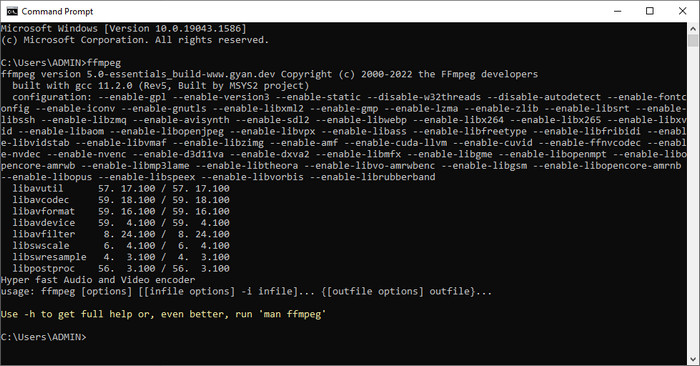
FFmpeg یک راهحل شناختهشده برای هر مشکل مرتبط با رسانه است، از جمله اصلاح متادیتا. برخلاف ابزار اول، در اینجا باید از یک کد مشخص بهعنوان دستور استفاده کنید تا کار خاصی انجام شود، مثل دستور دستی برای ویرایش متادیتای فایل موردنظر. هرچند این نرمافزار متنباز از مباحث فنی استفاده میکند که ممکن است برای برخی کاربران قابل درک نباشد، اما تواناییهایی که این ویرایشگر در اختیار ما میگذارد همچنان قابل تحسین است. برای یادگیری روش ویرایش متادیتای WebM با استفاده از یکی از نرمافزارهای خط فرمان موجود در فهرست، به خواندن ادامه دهید.
مراحل ویرایش برچسبهای WebM با Ffmpeg:
گام 1. نرمافزار را روی رایانه خود دانلود و نصب کنید. محل ذخیره فایل WebM را پیدا کرده و نام فایل را کپی کنید.
گام 2. روی Windows کلیک کرده، در بخش جستجو عبارت command prompt را تایپ کنید و برای باز کردن روی آن کلیک کنید. سپس این کد را کپی کنید: ffmpeg -i fileexample.webm -metadata title='samplemetadata' -c copy fileexample.webm و در پنجره فرمان (پرامپت) بچسبانید.
توجه: filexample.webm نام فایل webm است که برای این کار استفاده می کنیم. نام فایل آن را با توجه به نام دقیق فایل خود اضافه کنید.
گام 3. کلید Enter را فشار دهید تا فرایند آغاز شود و اجازه دهید نرمافزار روی فایل اصلی بازنویسی کند.
ابزار EXIF
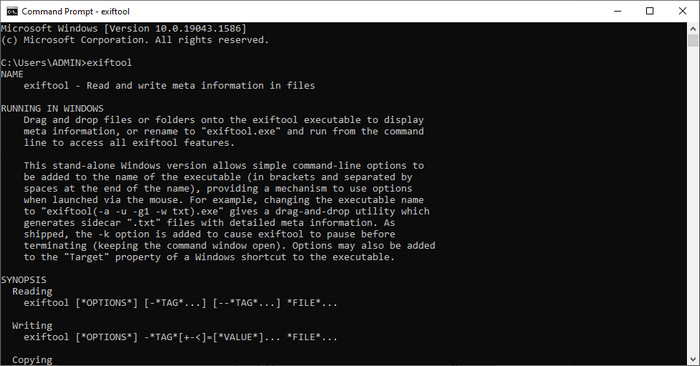
همانند FFmpeg، EXIF Tool نیز یک نرمافزار رایگانِ خط فرمان است که میتوانید آن را تقریباً روی تمام سیستمعاملهای دسکتاپ دانلود کنید. با این نرمافزار میتوانید متادیتای فایل موجود را بخوانید، ویرایش کنید و ایجاد کنید؛ امکانی که دیگر فایلهای رسانهای بهطور کامل در اختیار شما نمیگذارند. این نرمافزار میتواند برچسبهای ویدئو، صدا، تصویر و فایلهای PDF را ویرایش کند تا آنها را کاملاً دقیق سازد. پیشتر گفتیم این ابزار شبیه FFmpeg است و این درست است، اما کدهایشان متفاوتاند. پس اگر میخواهید از این ابزار استفاده کنید، باید مجموعهای دیگر از کدها را که ارتباطی با FFmpeg ندارند بیاموزید. آیا سخت است؟ خوشبختانه ما یک راهنمای گامبهگام و قابلفهم برای ویرایش متادیتای WebM با کمک این ابزار اضافه کردهایم.
مراحل ویرایش برچسبهای WebM با EXIF Tool:
گام 1. نرمافزار را از وبسایت رسمیاش دانلود کرده و سپس برای رفتن به گام بعدی آن را نصب کنید.
گام 2. مدیر فایل را باز کنید، فایل را انتخاب کرده و نام آن را کپی کنید. سپس CMD را باز کرده و این کد را تایپ کنید: exiftool –common fileexample.webm تا اطلاعات پایه مربوط به فایل WebM خود را ببینید.
توجه: CMD همان خط فرمان است. می توانید آنها را در ویندوز پیدا کنید و CDM را تایپ کنید.
گام 3. این کد را برای تغییر فایل به پنجره فرمان اضافه کنید: exiftool -filename='metadtasample' fileexample.mkv و برای آغاز فرایند افزودن متادیتا، کلید Enter را فشار دهید.
بخش 3. سوالات متداول در مورد ویرایشگر ابرداده WebM
چرا قالب WebM در وب سایت های HTML 5 محبوب است؟
فرمت WebM یکی از فرمت های حق امتیاز جایگزین با سریع ترین رشد است که حاوی عناصر ویدیویی و صوتی HTML 5 است. این فرمت از دو کدک مختلف VP8 و VP9 استفاده می کند که WebM Project توسعه داده است.
آیا می توانم فایل های WebM را ادغام کنم؟
میتوانید پیش از افزودن متادیتا، چندین فایل WebM را با هم ادغام کنید. بنابراین اگر میخواهید بدانید چگونه چند فایل WebM را بهسادگی با هم یکی کنید، روی این لینک کلیک کنید تا بیشتر بدانید.
که بهتر است؟ WebM یا MP4؟
هر دو فرمت در زمینه ذخیرهسازی فایلهای ویدئویی در نوع خود عالی هستند، اما هدف آنها با یکدیگر متفاوت است. هرچند WebM یکی از بهترین فرمتها برای اشتراکگذاری آنلاین است، همچنان نگرانیهایی درباره سازگاری آن با برخی دستگاهها وجود دارد. اگر شما هم همین مشکل را با فایل WebM دارید، پیشنهاد میکنیم فرمت را به MP4 تبدیل کنید. برای در دسترس داشتن ابزار موردنیاز، میتوانید با کلیک روی این لینک، محتوای مقاله را بخوانید.
نتیجه
اکنون که تمام اطلاعات لازم را در اختیار داریم و آموختیم چگونه متادیتای WebM را ویرایش کنیم، وقت آن است که روش مناسب را انتخاب کنیم. اگر میخواهید ابزار خط فرمان را امتحان کنید، FFmpeg و EXIF Tool بهترین راهحلها برای اصلاح متادیتای فایل WebM شما هستند. با دنبال کردن آموزشهایی که برای آنها ارائه دادهایم، میتوانید این کار را بهسرعت انجام دهید. اما اگر نسخه سادهتری از ویرایش متادیتای WebM را میخواهید، آنگاه FVC Video Converter Ultimate ابزاری است که حتماً باید داشته باشید. اگر هنوز تردید دارید، پیشنهاد میکنیم نرمافزار را روی دسکتاپ خود دانلود کنید و همین حالا آن را امتحان کنید!
-
 4 تغییر دهنده تاریخ فایل برتر برای رایانه شخصی ویندوز و مک [به روز رسانی 2022]
 آیا با تغییر برچسب های زمان و تاریخ در فایل خود مشکلی دارید؟ اگر می خواهید بدانید چگونه این کار را انجام دهید، می توانید برای دانستن این مقاله به خواندن ادامه دهید.
-
 نکات و ترفندهای ساده در مورد نحوه اضافه کردن برچسب ها به یک فایل به راحتی
 آیا می خواهید به راحتی برچسب ها را بر روی فایل ها اضافه کنید؟ سپس این مقاله بهترین و ساده ترین راه را برای شما ارائه می دهد که می توانید به سرعت به این کار وابسته شوید.
-
 3 ویرایشگر برتر فراداده FLAC در مک و ویندوز [به روز رسانی 2022]
 آیا می خواهید ابرداده FLAC را تغییر دهید؟ در این مورد، شما باید این مقاله را بخوانید زیرا ما دانش کافی در مورد آخرین ویرایشگر ابرداده FLAC برای استفاده ارائه می دهیم.
