


 Video Converter Ultimate
 ضبط صفحه
 تعمیر ویدیو
3 کمک موثر برای خروج از وضعیت تاخیر صدا
امروزه برای اینکه در این وضعیت فعلی حوصلهمان سر نرود، واقعاً دوست داریم برای گذراندن وقت ویدیو تماشا کنیم. فرقی نمیکند ژانر ویدیو چه باشد، باز هم آن را تماشا میکنیم تا در خانه کسل نشویم. در واقع، بیشتر ما مشکل ناهماهنگی صدا و تصویر را تجربه کردهایم که میتواند فوقالعاده آزاردهنده باشد، اینطور نیست؟ اما امروز به شما قول میدهیم که دیگر با این مشکل روبهرو نشوید. چون در این مقاله راهحلهایی ارائه میدهیم درباره اینکه چگونه تأخیر صدا را برطرف کنیم ویدیوهای شما و اینکه اصلاً دلیل این مشکل چیست.

قسمت 1. تاخیر صوتی چیست
تأخیر صدا در موقعیتهای مختلف، چه آنلاین و چه آفلاین، واقعاً رخ میدهد. عوامل زیادی وجود دارند که باعث میشوند در صدای شما تأخیر به وجود بیاید. همچنین، چند نمونهی خوب در فهرست زیر آوردهایم. آن را با دقت بخوانید تا بدانید دلیل مشکل چه میتواند باشد.
◆ ویدیو قبل از آپلود در صفحه وب یا پلتفرمها قبلاً آسیب دیده است که باعث عدم همگامسازی صدا و ویدیو میشود.
◆ فرآیند دانلود فایل قطع شده یا ناقص است که منجر به گم شدن یا تاخیر در فایل صوتی و تصویری می شود.
◆ نقص نرم افزار ویرایش. اگر صدا و تصویر را جداگانه ضبط کنید و آنها را با هم ترکیب کنید، می تواند دلیلی باشد.
سایر دلایل احتمالی تاخیر در این شرایط رخ می دهد:
◆ اگر تأخیر هنگام تماشای تلویزیون اتفاق می افتد، انتظار می رود که به دلیل شبکه منطقه ای بد بین کابل، ماهواره یا آنتن شما باشد.
◆ تاخیرها بهصورت آنلاین اتفاق میافتند، بهخصوص اگر ویدیوی شما روی 4k یا 1080 پیکسل تنظیم شده باشد، زیرا این کیفیت در مقایسه با صوت یا برعکس به زمان زیادی برای بارگذاری نیاز دارد.
و حالا که می دانیم دلایل چیست، اکنون می توانیم با خواندن متن زیر آن را برطرف کنیم. با این حال، 2 دلیل دیگر توسط نرم افزار زیر قابل رفع نیست. اما میتوانیم پیشنهاد کنیم اگر ویدیو و صدا بهصورت آنلاین همگام نیست، باید کیفیت را کاهش دهیم تا بهتر بارگذاری شود یا فقط اینترنت بهتر دیگری پیدا کنیم. و اگر مشکل شما در تلویزیون است، باید با ارائه دهنده کانال خود تماس بگیرید تا فوراً آن را بررسی و برطرف کنید. خب حالا بیایید به سراغ 3 راه حل برتر زیر برویم.
بخش 2. 3 راه حل برتر در مورد چگونگی رفع تاخیر صدا
1. از Video Converter Ultimate استفاده کنید
اگر به دنبال بهترین راهحل هستید، این باید اولین گزینه در فهرست ما باشد. چون این نرمافزار میتواند صدای شما را در کمتر از ۳ دقیقه بهراحتی با ویدیو هماهنگ کند، یعنی Video Converter Ultimate. این نرمافزار چندسکویی است؛ یعنی چه از مک استفاده کنید چه از رایانهی ویندوزی (PC)، میتوانید آن را دانلود کنید. همچنین، بهترین نکته درباره این ابزار این است که همهی قابلیتهای پیشرفتهی ویرایش روی PC در مک هم در دسترساند یا برعکس. عملکرد آن تاکنون به کاربران یک عامل «واو» داده و به محبوبترین انتخاب برای مبتدیها و حرفهایها تبدیل شده است. علاوه بر این، این ابزار از پردازش سریع پشتیبانی میکند، بنابراین هیچ زمانی هدر نمیرود. با این توضیحات، بیایید برویم سراغ اینکه چگونه تأخیر صدا را بهطور مؤثر برطرف کنیم؛ فقط مراحل زیر را دنبال کنید.
مراحل برطرف کردن تأخیر در Video Converter Ultimate:
مرحله ۱. اگر این اولین بار است که از این ابزار استفاده میکنید، ابتدا باید آن را دانلود کنید. بعد از پایان دانلود، آن را نصب کنید، تنظیمات اولیه را انجام دهید و روی Start Now کلیک کنید تا ادامه دهید.
دانلود رایگانبرای ویندوز 7 یا بالاتردانلود امن
دانلود رایگانبرای MacOS 10.7 یا بالاتردانلود امن
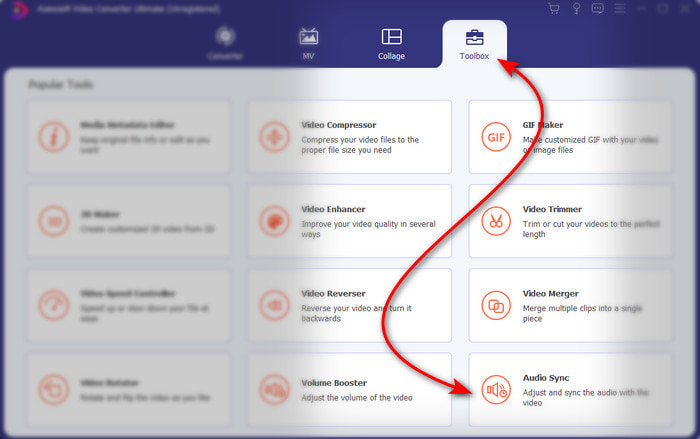
مرحله ۲. بعد از اجرای نرمافزار، به بخش Toolbox بروید و زیر آن روی Audio Sync کلیک کنید.
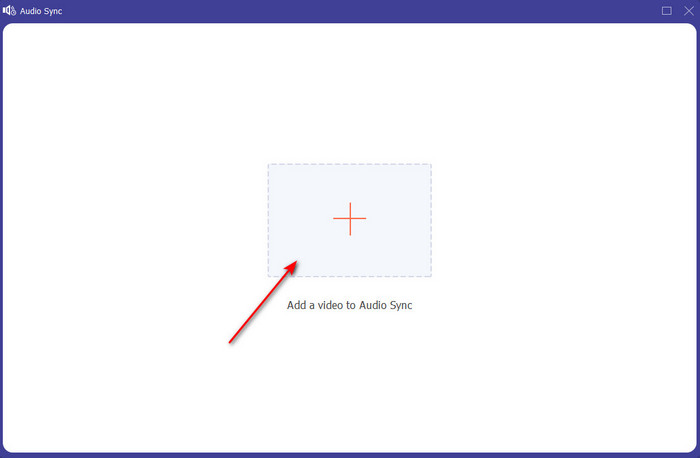
مرحله ۳. روی دکمهی + کلیک کنید تا فایلی را که میخواهید همگامسازی کنید اضافه کنید؛ سپس پوشهای نمایش داده میشود. وقتی ویدیو را پیدا کردید، روی Open کلیک کنید.
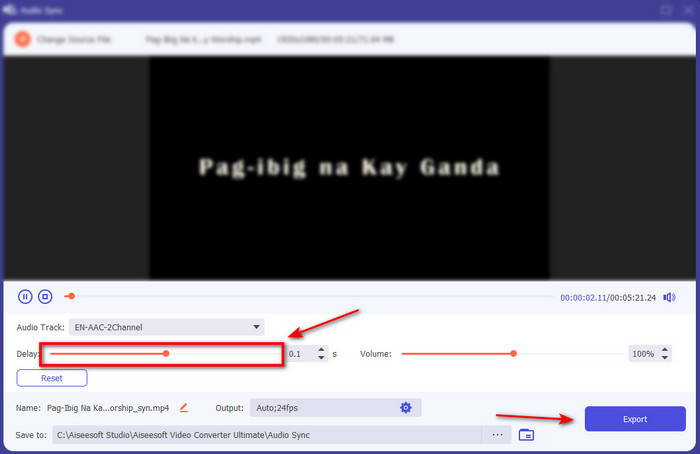
مرحله ۴. یک رابط کاربری مانند تصویر ظاهر میشود و حالا وقت آن است که نوار لغزندهی تأخیر را حرکت دهید تا صدا و تصویر هماهنگ شوند. وقتی صدا و تصویر همگام شدند، روی Export کلیک کنید تا فایل ذخیره شود.
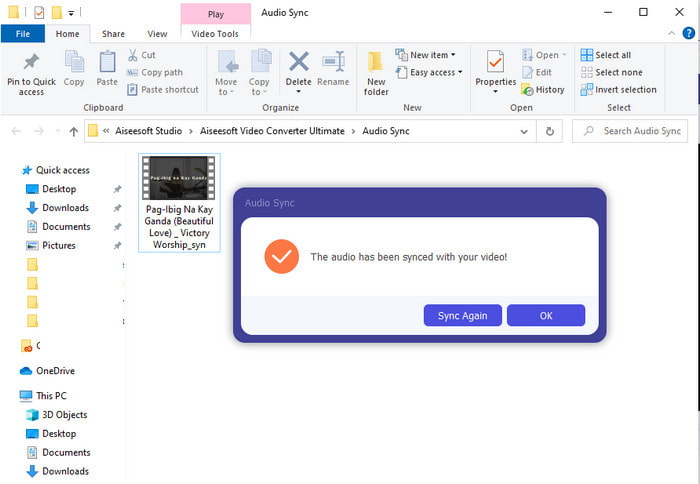
مرحله ۵. پس از اتمام پردازش، پنجرهی مرورگر فایل (File Explorer) بههمراه فایل خروجی باز میشود. روی فایل کلیک کنید، آن را تماشا کنید و از «جادویی» که با این نرمافزار ایجاد کردهاید لذت ببرید.
2. از Avidemux استفاده کنید
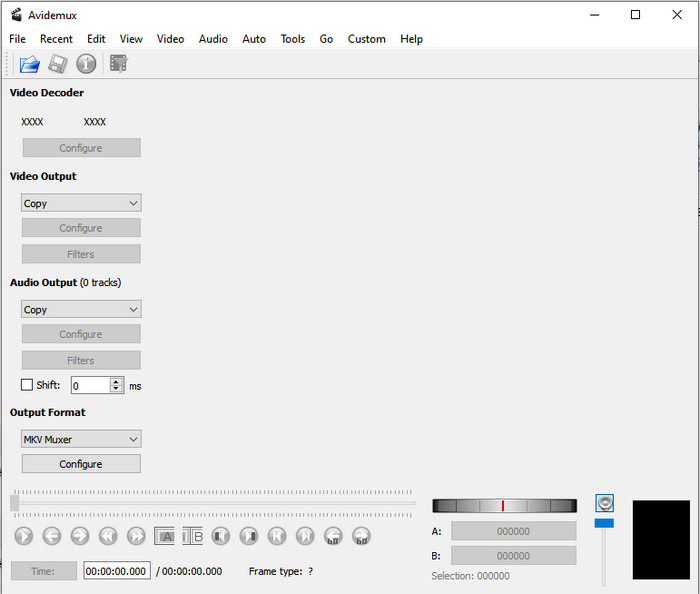
این نرمافزار میتواند به شما کمک کند تا تأخیر صدایی را که با آن مواجه شدهاید برطرف کنید. همچنین، روی تمام سکوهای مختلفی که اکنون استفاده میکنید در دسترس است. بنابراین اگر روی PC از این ابزار استفاده کنید و بعد به مک منتقل شوید، همچنان میتوانید از آن بهعنوان ویرایشگر شخصی خود استفاده کنید. با این حال، بعضی از قابلیتهای نسخهی PC در مک یا لینوکس در دسترس نیستند. همچنین، اگر قصد استفاده از این ابزار را دارید، انتظار داشته باشید با کمی دشواری روبهرو شوید، چون برخی امکانات آن ممکن است کمی گیجکننده باشند. حالا اگر میخواهید تأخیری را که در ویدیوی خود تجربه میکنید برطرف کنید، مراحل را همانطور که برایتان سادهسازی کردهایم دنبال کنید تا کاربران مانند شما بتوانند بهراحتی از آن پیروی کنند.
نحوهی همگامسازی صدا و تصویر در Avidemux:
مرحله ۱. ابتدا نرمافزار را از وبسایت اصلی دانلود کنید. آن را اجرا کرده، سپس روی File و بعد روی Open کلیک کنید تا ویدیوی موردنظر را از پوشه انتخاب کنید.
مرحله ۲. تیک گزینهی Shift را بزنید تا جابهجایی (Shift) بهصورت خودکار اعمال شود. سپس مقدار میلیثانیه (ms) موردنظر خود را وارد کنید. پیشنهاد ما این است که ابتدا از ۲۰۰+ یا ۲۰۰- شروع کنید و اگر صدا و تصویر هنوز ناهماهنگ بودند، عدد را تغییر دهید.
مرحله ۳. حالا که ویدیو و صدا بهدرستی هماهنگ شدهاند، وقت آن است که با کلیک روی دکمهی Save آن را خروجی بگیرید.
3. از Online Converter استفاده کنید
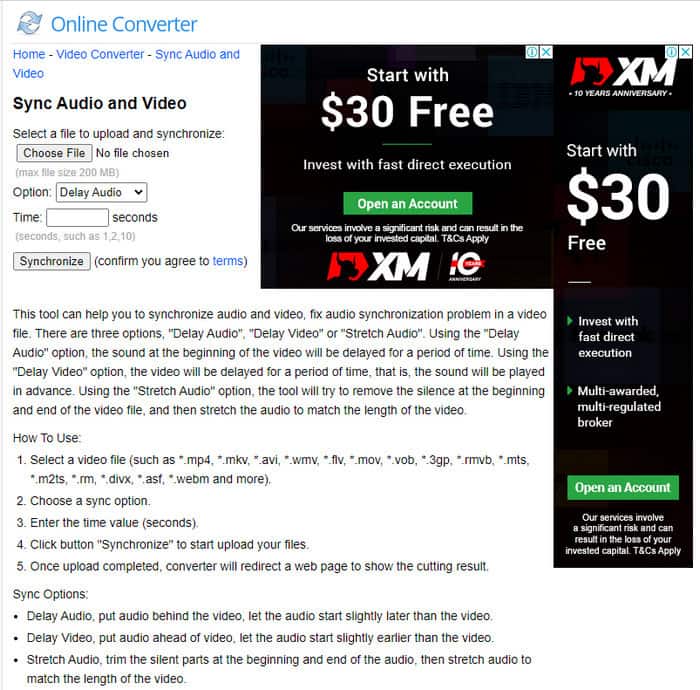
اگر نمیخواهید نرمافزار دانلود کنید، حتماً این Online Converter موجود در وب را امتحان کنید. چون رابط کاربری آن بسیار ساده و قابلفهم است و هر کسی که اینترنت پایداری داشته باشد میتواند بهراحتی از آن استفاده کند. با این حال، اگر اتصال اینترنت ندارید این ابزار بهترین انتخاب نیست، چون کاملاً به اینترنت وابسته است. حالا اگر میخواهید یاد بگیرید چگونه با Online Converter تأخیر صدا را برطرف کنید، مراحل زیر را دنبال کنید.
نحوهی برطرف کردن تأخیر صدا و تصویر با Online Converter:
مرحله ۱. صفحهی رسمی Online Converter را پیدا کنید. بعد از باز کردن وبسایت روی Choose File کلیک کنید تا ویدیوی دارای تأخیر صدا یا تصویر را وارد کنید.
مرحله ۲. در بخش Option میتوانید انتخاب کنید که میخواهید تأخیر را در صدا اصلاح کنید یا در تصویر. سپس مقدار Time را در کادر وارد کنید.
مرحله ۳. روی Synchronize کلیک کنید و صبر کنید تا پردازش به پایان برسد، سپس روی Download Now کلیک کنید تا ویدیوی همگامسازیشده را ذخیره کنید.
بخش 3. سوالات متداول در مورد رفع تاخیر صدا
آیا می توانم از Premiere pro برای رفع تاخیر صدا استفاده کنم؟
قطعاً بله، میتوانید از مشهورترین ویرایشگری که توسط Adobe توسعه داده شده استفاده کنید. بنابراین اگر ایدهای دربارهی نحوهی انجام این کار ندارید، روی این لینک کلیک کنید تا وبسایت جدیدی باز شود و تأخیر صدا را در Premiere Pro برطرف کنید.
چگونه صدا و تصویر را به درستی ادغام کنیم تا از تاخیر جلوگیری کنیم؟
پیدا کردن نرمافزار مناسب برای ادغام (مرج کردن) درست و اصولی ممکن است کمی سخت باشد. اما ما میتوانیم جستوجوی شما را سادهتر کنیم، چون ۴ روش مختلف برای اضافه کردن هر ترک صوتی به ویدیو را برایتان گردآوری کردهایم.
آیا فشرده سازی یک ویدیو می تواند منجر به تاخیر صدا شود؟
در حال حاضر، اگر یک ویدیو را فشردهسازی کنید، این کار هیچ تأثیری روی صدای آن یا ایجاد تأخیر نخواهد داشت. چون فشردهسازی روشی است برای کوچکتر کردن اندازهی فایل رسانهای، نه خراب کردن آن. بنابراین اگر بهدنبال یک فشردهساز ویدیوی امن و مطمئن هستید، روی این لینک کلیک کنید تا بدانید ۷ روش فشردهسازی ویدیو کداماند.
نتیجه
اکنون که میدانیم دلایل مختلف تأخیر صدا چیست، وقت آن رسیده با ابزارهایی که در بالا معرفی شد آن را برطرف کنیم. هرچند همهی این ابزارها یک کارکرد مشابه دارند، اما در میان سه ابزار معرفیشده، یک نرمافزار بیش از بقیه خودنمایی میکند و آن Video Converter Ultimate است. این ابزار شگفتانگیز تاکنون توسط میلیونها کاربر استفاده شده و به آنها کمک کرده است. حالا اگر میخواهید از رهایی از این مشکل لذت ببرید، همین حالا این ابزار را دانلود کنید.
-
 [رایگان و پولی] تغییر دهنده سرعت GIF: انتخاب های داغ 2025
 آیا از GIF که آنلاین ساخته اید راضی نیستید زیرا خسته کننده و کند است؟ این روز خوش شانس شما خواهد بود زیرا ما مقاله ای در مورد تغییر سرعت GIF و جزئیاتی که به شما در استفاده و تسلط بر آن کمک می کند ارائه می دهیم.
-
 4 پخش کننده ویدیوی برتر با کنترل سرعت در سال 2025
 آیا هنگام پخش ویدیو به سرعت پخش هر پخش کننده رسانه ای توجه نکرده اید؟ این مقاله برای یادگیری همه چیز در مورد پخش کننده های ویدئویی با کنترل سرعت مناسب است.
-
 3 راه برای افزایش سرعت ویدیو در آیفون [ثابت شده]
 آیا در تنظیم سرعت پخش ویدیوی خود به دلیل استفاده از آیفون مشکل دارید؟ این یک مقاله عالی برای کمک به شما در حل مشکل است.
