


 Video Converter Ultimate
 ضبط صفحه
 تعمیر ویدیو
نکات و ترفندهایی برای حذف موثر واترمارک Powtoon در ویدیوها
آیا تابهحال یک انیمیشن بینقص ساختهاید و وقتی آن را خروجی گرفتید، Powtoon روی آن واترمارک اضافه کرده است؟ این اتفاق معمولاً وقتی میافتد که از نسخه رایگان برنامه استفاده میکنید. آیا واترمارک ویدئوی شما را خراب کرده است؟ دیگر نگران نباشید! در اینجا میتوانید با روشهای مختلفی که معرفی کردهایم، یاد بگیرید چطور واترمارک Powtoon را حذف کنید.

قسمت 1. نحوه حذف واترمارک Powtoon بدون اشتراک [انتخاب ویرایشگر]
FVC Video Converter Ultimate چیزی فراتر از یک راهحل کامل است که میتوانید روی ویندوز یا مک خود دانلود کنید تا واترمارک Powtoon را حذف کنید. حتی اگر در حذف واترمارک از ویدئوهایی که میسازید تجربهای نداشته باشید، باز هم میتوانید بهراحتی این کار را اینجا انجام دهید. راحتی و سرعت همان چیزی است که FVC میخواهد هنگام استفاده از این نرمافزار تجربه کنید و در این کار هم بسیار موفق بوده است. بنابراین اگر میخواهید تجربه کنید که چطور واترمارک را حذف کنید، میتوانید مراحل زیر را که برایتان آوردهایم دنبال کنید.
مراحل حذف واترمارک Powtoon با استفاده از FVC Video Converter Ultimate:
مرحله 1. با کلیک روی دکمه دانلود زیر، قدرتمندترین نرمافزار ویرایش ویدئو را روی ویندوز و مک در اختیار خواهید داشت. پس از آن، نرمافزار را نصب کنید، تنظیمات اولیه سریع را انجام دهید و برنامه را اجرا کنید.
دانلود رایگانبرای ویندوز 7 یا بالاتردانلود امن
دانلود رایگانبرای MacOS 10.7 یا بالاتردانلود امن
مرحله 2. در بخش Toolbox روی Video Watermark Remover کلیک کنید تا واترمارکی را که Powtoon روی ویدئوی ویرایششده شما قرار داده است حذف کنید.
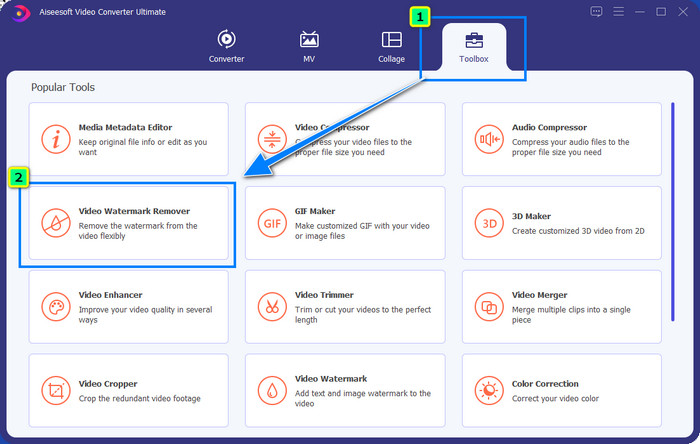
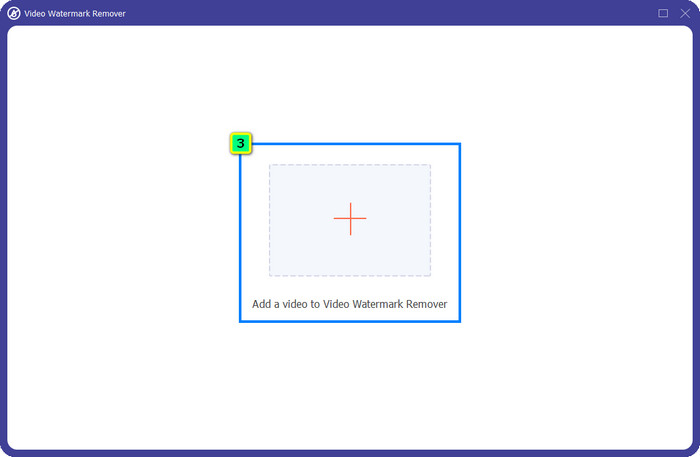
مرحله 3. سپس روی آیکون + فشار دهید تا ویدئویی را که میخواهید ویرایش کنید آپلود کنید، فایل ویدئویی را از پوشهای که ظاهر میشود انتخاب کرده و روی Open کلیک کنید.
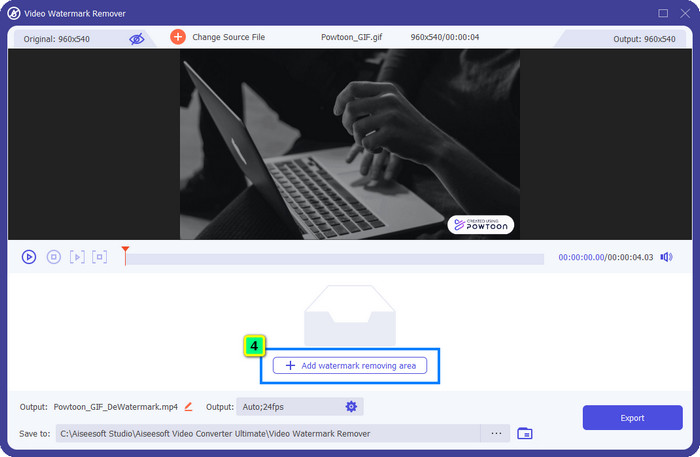
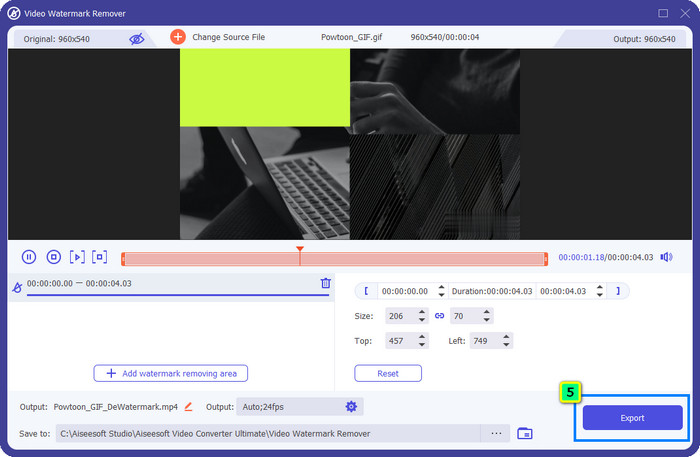
مرحله 4. روی Add Watermark Removing Area کلیک کنید و کادر انتخاب را روی واترمارک قرار دهید؛ میتوانید آن را متناسب با نیاز خود تنظیم کنید.
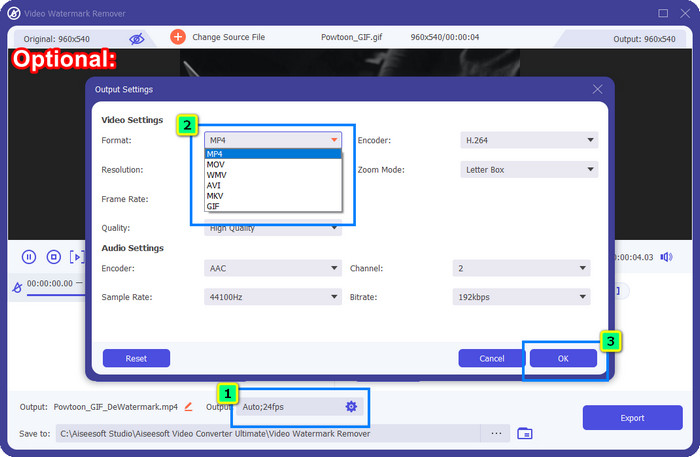
اختیاری: میخواهید خروجی نهایی را در یک فرمت جدید ذخیره کنید؟ روی Output سپس Format کلیک کرده و فرمت ویدئویی جدید موردنظر خود را انتخاب کنید. میتوانید سایر تنظیمات ویدئو و صدا را نیز تغییر دهید و برای ذخیره تغییرات روی OK کلیک کنید.
مرحله 5. روی دکمه Export کلیک کنید تا ویدئویی را که واترمارکش را حذف کردهاید دانلود کنید.
قسمت 2. نحوه حذف واترمارک Powtoon با اشتراک [بر اساس طرح]
آیا Powtoon واترمارک دارد؟ بله، وقتی از نسخه رایگان استفاده می کنید، واترمارک اضافه می کند. اما اگر Pro یا Pro+ را خریداری کنید، می توانید خروجی نهایی را بدون واترمارک صادر کنید. بنابراین، اگر می خواهید بدانید که چگونه نرم افزار را بخرید تا از ویدیویی که ویرایش کرده اید بدون واترمارک لذت ببرید، مراحل بعدی را دنبال کنید.
مراحل نحوه خرید Powtoon Pro و Pro+ Plan:
مرحله 1. وبسایت رسمی Powtoon را باز کنید و روی Pricing کلیک کنید تا قیمتهای نسخه حرفهای را ببینید.
مرحله 2. پلن موردنظر خود را، Pro یا Pro+، انتخاب کرده و روی Get Plan کلیک کنید.
مرحله 3. اطلاعات پرداخت موردنیاز را تکمیل کنید، به بخش روش پرداخت (Payment Method) بروید و روی Make Secure Payment کلیک کنید.
قسمت 3. نحوه حذف واترمارک آنلاین Powtoon به صورت رایگان [سرویس وب]
1. Media.io - Watermark Remover
Media.io - Watermark Remover میتواند واترمارک Powtoon را بهصورت رایگان حذف کند. این ابزار روی هر مرورگر وبی در دسترس است، یعنی برای استفاده از آن نیازی به دانلود برنامه ندارید. با اینکه حذف واترمارک در آن رایگان است، همچنان برای استفاده از آن به یک اتصال اینترنتی قوی نیاز دارید. فرایند آپلود و دانلود نسبت به اولین حذفکننده واترمارکی که اینجا معرفی کردیم زمان بیشتری میبرد. با این حال، این نرمافزار انتخاب بسیار خوبی برای شماست و اگر میخواهید بدانید چطور از آن استفاده کنید، مراحل زیر را دنبال کنید.
مراحل حذف واترمارک Powtoon با استفاده از Media.io:
مرحله 1. صفحه وب را باز کنید و روی Choose File کلیک کنید تا ویدئویی را که میخواهید واترمارک آن را حذف کنید اضافه کنید. منتظر بمانید تا فرایند بارگذاری انجام شود، چون بسته به سرعت اینترنت ممکن است زمانبر باشد.
مرحله 2. روی Add Area کلیک کنید و ناحیه حذف واترمارک را روی بخشی قرار دهید که واترمارک در آن است.
مرحله 3. روی Export کلیک کنید تا ویدئوی ویرایششده Powtoon را به همین سادگی روی حافظه محلی خود ذخیره کنید.
2. Kapwing
Kapwing یکی دیگر از ابزارهای تخصصی تحت وب است که میتواند با برش دادن (Crop)، واترمارک ویدئوی شما را حذف کند. همچنین امکانات ویرایشی اضافی ارائه میدهد که میتوانید از آنها برای ساخت یک ویدئوی چشمگیر، تقریباً مشابه Powtoon، استفاده کنید. برخلاف دیگر راهحلهای حذف واترمارک که معرفی کردیم، این نرمافزار به دلیل برش دادن واترمارک، ابعاد ویدئو را تغییر میدهد. اگر با کوچکتر شدن اندازه ویدئو مشکلی ندارید، مراحل زیر را برای خلاص شدن از واترمارک Powtoon دنبال کنید.
مراحل برش واترمارک Powtoon با استفاده از Kapwing:
مرحله 1. با استفاده از مرورگر خود برنامه را جستجو کرده و باز کنید.
مرحله 2. روی Add Media کلیک کنید تا ویدئویی را که میخواهید در اینجا برش دهید وارد کنید.
مرحله 3. پس از قرار دادن ویدئو، روی Crop کلیک کنید تا نسبت تصویر را براساس اندازه دلخواه خود تنظیم کنید.
مرحله 4. اگر میخواهید خروجی نهایی را ذخیره کنید، روی Done Cropping کلیک کنید.
بخش 4. سوالات متداول در مورد نحوه حذف واترمارک Powtoon
بهترین پلتفرم برای افزایش وضوح ویدئو در Powtoon چیست؟
میلیونها راه برای افزایش رزولوشن ویدئوهای ساختهشده با Powtoon وجود دارد. اما برخی از آنها آنطور که انتظار میرود عمل نمیکنند. پس بهجای اینکه بخت خود را امتحان کنید، ما کار سخت را برایتان انجام دادهایم و شما فقط چند دقیقه برای خواندن این مقاله زمان لازم دارید. از بین ۸ مبدل رزولوشن ویدئو معرفیشده، آنچه را که بیشترین تناسب را با نیازهای شما دارد انتخاب کنید.
چگونه یک واترمارک به ویدیو اضافه کنیم؟
بهترین راه برای اضافه کردن واترمارک به یک ویدئو، استفاده از نرمافزار است؛ فرقی نمیکند واترمارک متن، لوگو، مهر، تاریخ و زمان یا موارد مشابه باشد. اگر وقت اضافی دارید، میتوانید یاد بگیرید و درک کنید که چگونه بهسادگی روی پلتفرمهای مختلف واترمارک اضافه کنید.
چرا Powtoon گران است؟
Powtoon به دلیل ویرایش انیمیشنی که ارائه میکند گران شد و اکثراً نمیتوانید آن را در ویرایشگر ویدیوی دیگری، چه آنلاین یا آفلاین داشته باشید. همچنین در حال حرکت است، بنابراین برای شروع استفاده از آن نیازی به نصب لانچر ندارید. با این حال، قیمت آن برای بسیاری قابل دسترس نیست. به جای استفاده از نسخه رایگان Powtoon و داشتن واترمارک، سعی کنید از بهترین جایگزین ویرایشگر ویدیو، FVC Video Converter Ultimate استفاده کنید. بسیاری از ویژگی ها و عملکردها را ارائه می دهد که مطمئناً می توانید از استفاده از آنها لذت ببرید.
نتیجه
شما میتوانید ویدئوهای خود را از Powtoon بدون واترمارک ذخیره کنید، اما برای ذخیره ویدئوی ویرایششده بدون هیچ واترمارکی باید یک پلن خریداری کنید. از خرید پلن چندان خوشتان نمیآید؟ پس سعی کنید از حذفکنندههای واترمارکی که بهصورت آنلاین معرفی کردیم استفاده کنید. اتصال اینترنت کند است؟ در این صورت پیشنهاد میکنیم برای حذف سریع و حرفهای واترمارک از ویدئو از FVC Video Converter Ultimate استفاده کنید. در مقایسه با میلیونها نرمافزار دیگر، ویرایشگر ویدئوی FVC کارآمدترین راهحل را برای حذف هر چیزی از روی ویدئوی شما ارائه میدهد. همچنین میتوانید با استفاده از قابلیتها و امکاناتی که این نرمافزار در اختیارتان میگذارد، ویدئو را بیشتر تنظیم و شخصیسازی کنید.
-
 به راحتی واترمارک را از PDF با مراحل ساده حذف کنید
 با دنبال کردن این مراحل ساده، واترمارک را از PDF حذف کنید. یاد بگیرید چگونه با استفاده از این ابزارهای شگفت انگیز، واترمارک ها را از فایل PDF خود به راحتی حذف کنید.
-
 راه های آسان برای حذف واترمارک از تصاویر فارغ التحصیلی
 آیا می خواهید بهترین راه های حذف واترمارک از تصاویر فارغ التحصیلی را بدانید؟ با خواندن این مقاله، میتوانید نحوه حذف واترمارک روی عکسهای grad را به راحتی بدانید.
-
 نحوه حذف واترمارک از ویدیو با استفاده از Final Cut Pro [راهنمای کامل]
 آیا با واترمارک روی ویدیوها مشکلی دارید؟ دیگر نگفتیم، زیرا ما آموزشی در مورد نحوه حذف واترمارک از ویدیو با استفاده از Final Cut Pro ارائه کردیم.
