


 Video Converter Ultimate
 ضبط صفحه
 تعمیر ویدیو
نحوه عملکرد رنگساز ویدیو: 3 ابزار برتر برای استفاده در سال 2023
آیا آن ویدیوهای قدیمی را که با تُنهای سیاهوسفید ضبط شدهاند هنوز دارید؟ در حالی که یادآوری آن روزها میتوانست فقط با یکبار پخش انجام شود، حالا میتوانید با رنگیکردن آنها، ویدیوهایتان را به یک اثر ماندگار تبدیل کنید. خوشبختانه، عصر دیجیتال نوآوریهای فناورانه بسیاری به همراه آورده است، از جمله ابزاری که میتواند ویدیو سیاهوسفید را رنگی کند. در این راهنما، شما را با تعدادی از عملکرد-برترین برنامهها آشنا میکنیم که با بهرهگیری از رنگ و الگوریتمهای هوشمند، رنگهای ویدیوی شما را بهطور یکپارچه تنظیم میکنند.

قسمت 1. رنگی کردن ویدیو به صورت آفلاین
تبدیل فیلمهای قدیمی به نسخههای رنگی دیگر نباید با دردسر همراه باشد؛ فقط کافی است از نرمافزار قدرتمندی مانند Video Converter Ultimate استفاده کنید. هرچند این ابزار عمدتاً برای تبدیل ویدیو و صدا به کار میرود، اما همراه با یک ابزار ویرایش ویدیو عرضه میشود که به شما اجازه میدهد ویدیوهای سیاهوسفید را دوباره زنده کنید. افزون بر این، Video Converter Ultimate یک پنل پیشنمایش آنی در اختیارتان قرار میدهد تا حین ویرایش، تغییرات ایجادشده را ببینید. علاوه بر آن، میتوانید برای افزودن خلاقیت بیشتر، ویدیوی خود را برش دهید، بچرخانید و انواع فیلترها را روی آن اعمال کنید. برای رنگیکردن ویدیو سیاهوسفید با این ابزار عالی، راهنمای ساده زیر را دنبال کنید.
مرحله 1. اجرای بهترین رنگکننده ویدیو
ابتدا نصب کننده Video Converter Ultimate را با کلیک بر روی بهترین سیستم عامل برای دستگاه خود دانلود کنید. پس از آن، ویزارد نصب را اجرا کنید تا برنامه بر روی رایانه شما اجرا شود.
دانلود رایگانبرای ویندوز 7 یا بالاتردانلود ایمن
Free Downloadبرای macOS 10.7 یا جدیدتردانلود ایمن
مرحله 2. وارد کردن فایل در برنامه
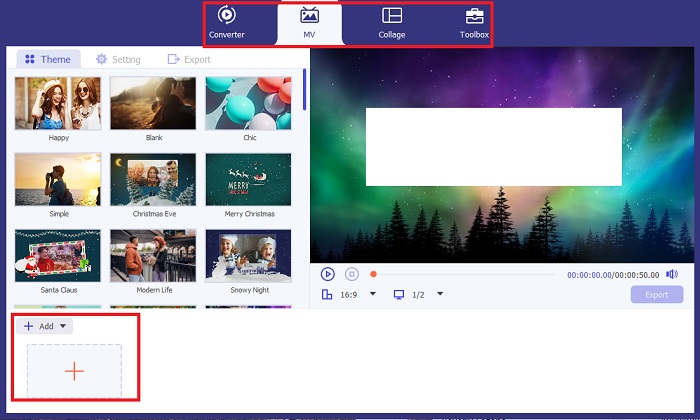
سپس به بخش MV در Video Converter Ultimate بروید تا به ویرایشگر ویدیو دسترسی پیدا کنید. از آنجا روی دکمه Plus کلیک کنید تا ویدیوی خام خود را وارد کنید و صبر کنید تا روی صفحه بارگذاری شود.
مرحله 3. رنگیکردن ویدیو
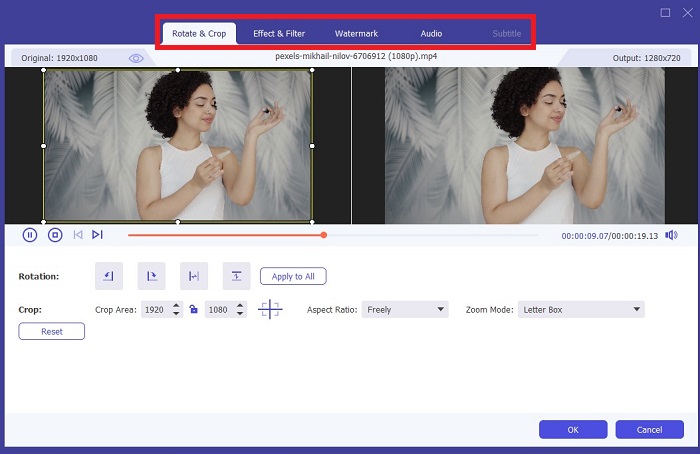
پس از آپلود فایل خود، تنظیمات رنگ را با کشیدن فلش اضافه کنید. همچنین فیلترهای از پیش تعیین شده ای برای افزودن یک جلوه فوری به ویدیوی شما وجود دارد.
گام ۴: ذخیره خروجی
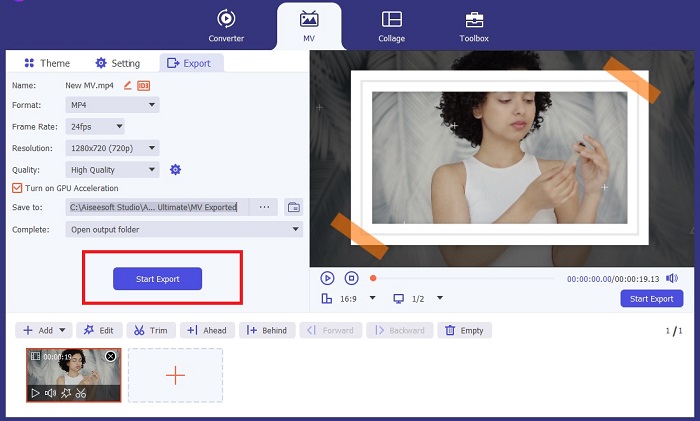
وقتی از ویدیوی رنگیشده خود راضی بودید، روی دکمه Export کلیک کنید تا به فرایند نهایی بروید. سپس فریمریت (fps)، نام، وضوح تصویر و فرمت فایل را تغییر دهید و روی Start Export بزنید تا خروجی را در حافظه محلی خود ذخیره کنید.
قسمت 2. Colorize Video Online Free
در صورت کمبود فضای ذخیره سازی برای نصب برنامه های آفلاین، ابزارهای آنلاین راه های بسیار خوبی هستند. با استفاده از فناوری هوش مصنوعی، فیلمها یا عکسهای کسلکننده شما فوراً زنده میشوند. PickFrom یک ویدیوی رنگی آنلاین رایگان است که به کاربران کمک می کند تا با استفاده از الگوریتم کالیبراسیون رنگ به فیلم خود رنگ اضافه کنند. روی اکثر مرورگرهای وب از جمله اپرا، کروم، سافاری و اینترنت اکسپلورر کار می کند. علاوه بر این، این برنامه به لطف کانال های رمزگذاری داده ها، برای جلوگیری از تهاجم داده ها، 100% درصد ایمن و ایمن است.
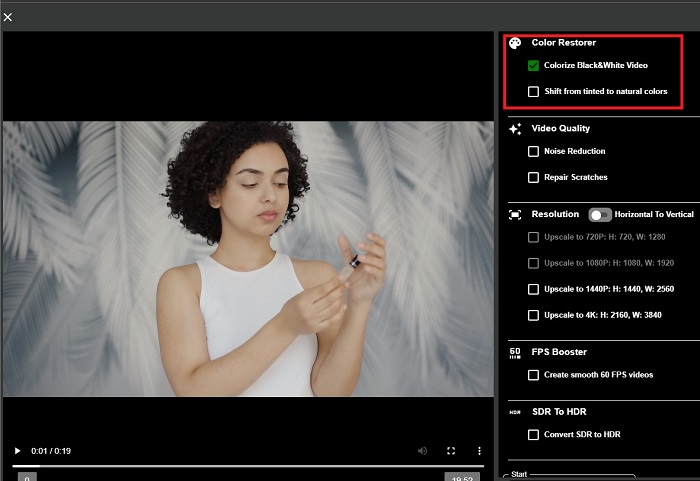
مرحله 1. ابتدا مرورگر وب خود را باز کنید و وارد وبسایت PickFrom شوید. سپس به بخش Video Colorizer بروید و روی Add Files کلیک کنید تا ویدیوی خام خود را آپلود کنید.
مرحله 2. پس از بارگذاری ویدیو، ابزار بهطور خودکار خروجی ویدیوی رنگیشده توسط هوش مصنوعی را نمایش میدهد. همچنین میتوانید منوی کشویی Settings ابزار Colorize Video را باز کرده و وضوح فایل خود را بین 780p و 1080p انتخاب کنید.
مرحله 3. در نهایت، با گسترش زبانه Format فرمت Output فایل را انتخاب کنید. میتوانید بین MP4، AVI و MKV یکی را برگزینید. پس از رضایت از خروجی، روی دکمه Start کلیک کنید تا ویدیو سیاهوسفید رنگیشده خود را دانلود کنید.
قسمت 3. رنگی کردن ویدیو در موبایل
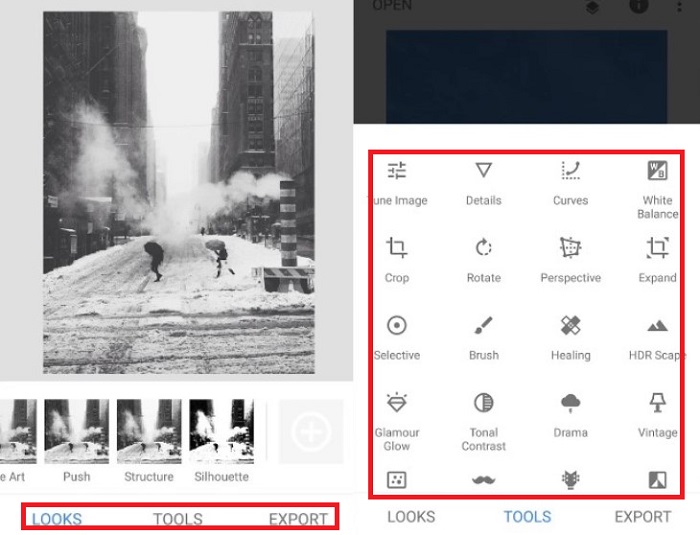
با استفاده از یک ابزار برنامه کاربردی توسعه داده شده توسط گوگل به نام Colorize، فیلم خود را هوشمندانه بچرخانید! همانطور که از نام آن پیداست، این برنامه برای کاربران iOS و اندروید از نظر اعمال رنگ در فیلم های قدیمی شما یک انتخاب عالی است. علاوه بر این، میتوانید با افزودن فیلترها و جلوههای ویژه به خروجی خود و با سفارشی کردن نسبت انتخاب خروجی، برنامه ویدیویی سیاه و سفید را به حداکثر برسانید. در اینجا راهنمای سریع اضافه کردن رنگ به فیلم سیاه و سفید با این برنامه تلفن همراه است.
مرحله 1. روی دکمه Upload در برنامه کلیک کنید و فایل سیاهوسفیدی را که میخواهید اصلاح شود انتخاب کنید.
مرحله 2. هنگام بارگذاری، ابزار بهطور خودکار رنگ را به پروژه شما اعمال میکند و مدتزمان این کار فقط به طول یا حجم فایل بستگی دارد.
مرحله 3. وقتی عکس رنگیشده ظاهر شد، میتوانید با رفتن به بخش Enhance جزئیات تصویر خود را تنظیم کنید. میتوانید تهرنگ (hue)، اشباع (saturation) و زنده بودن رنگ (vibrance) عکس را تغییر دهید. سپس روی دکمه Download بزنید تا فایل را در دستگاه خود ذخیره کنید.
مطالعه بیشتر:
راهکارهای کارآمد برای روشنتر کردن ویدیو در کمتر از یک دقیقه
5 ویرایشگر برتر ویدیو برای ویندوز همراه با نکات حرفهای و مبتدیان [2023]
بخش 4. سوالات متداول در مورد نرم افزار AI Colorize Video
مردم چگونه ویدیوهای قدیمی را رنگ آمیزی می کنند؟
رنگآمیزی فیلمها و عکسهای سیاه و سفید اکنون از طریق ابزارهای دستکاری دیجیتال، مانند رنگکننده ویدیو یا ویرایشگرهای ویدیو امکانپذیر است. گاهی اوقات، برای دستیابی به اولویت خود باید تنظیمات را به صورت دستی تنظیم کنید یا از یک نرم افزار ویدیویی رنگ آمیزی هوش مصنوعی استفاده کنید.
آیا امکان رنگی کردن فیلم سیاه و سفید وجود دارد؟
قطعا، بله! امروزه تثبیت لحن بصری فیلم شما 100% امکان پذیر است. به عنوان یک توصیه، بهتر است قبل از ویرایش، رنگ ویدیوهای خود را نرمال کنید.
چرا باید ویدیو را رنگی کنم؟
درجه بندی رنگ فرآیندی ضروری است که فیلمسازان هنگام نهایی کردن خروجی خود باید آن را اجرا کنند. با این فرآیند، آنها می توانند به یک تن رنگ ثابت دست یابند تا جلوه بصری برجسته ای را به مخاطبان خود اضافه کنند.
رنگی کردن عکس ها و فیلم ها چقدر طول می کشد؟
تا زمانی که ابزارهای مناسب را در دستگاه خود داشته باشید، رنگی کردن عکس ها و فیلم های قدیمی را می توان فوراً انجام داد. از سوی دیگر، اندازه و طول ویدیوی خود را در نظر بگیرید.
آیا ویدیوهای رنگی من دقیق هستند؟
رنگکننده ویدیو رنگ تقریباً دقیقی از ویدیو را به شما میدهد. همچنین میتوانید از متخصصان راهنمایی بخواهید تا به شما در تعیین رنگ اصلی با نقشهبرداری ویدیو کمک کنند.
نتیجه
و همین! حالا که با سه روش برتر برای رنگیکردن ویدیو سیاهوسفید به کمک ابزارهای آفلاین، آنلاین و موبایل آشنا شدید، تصمیمگیری دیگر دشوار نخواهد بود. با یک رنگکننده ویدیوی مبتنی بر هوش مصنوعی، ابزار بهطور خودکار رنگ را به ویدیوهای شما اضافه میکند، اما در عین حال اجازه نخواهد داد مانند راهحلهای آفلاینی چون Video Converter Ultimate، تنظیمات مهم رنگ را بهطور دستی تغییر دهید.
-
 روش های بدون مشکل برای تبدیل تصاویر به سیاه و سفید
 آیا می خواهید عکس های خود را نوستالژیک کنید؟ ما برای شما پاسخی داریم. این پست روش های قابل توجهی برای تبدیل یک تصویر رنگی به سیاه و سفید ارائه می دهد.
-
 راهنمای کلی: بهترین تقویت کننده 7 حجم موجود در همه پلتفرم ها
 آیا می خواهید تقویت کننده های حجم موجود در رایانه شخصی، مک، آنلاین، اندروید و iOS را بدانید؟ سپس این مقاله را با ابزارهای مختلفی که می توانید انتخاب کنید بخوانید.
-
 برترین ریسایزرهای ویدیوی اینستاگرام برای بهینه سازی محتوای اینستاگرام شما
 راهنمای ما برای تغییر اندازه ویدیوها برای اینستاگرام را بررسی کنید. بیاموزید که چگونه محتوای خود را تقویت کنید و تعامل را در محبوب ترین پلت فرم رسانه های اجتماعی جهان افزایش دهید.
