


 Video Converter Ultimate
 ضبط صفحه
 تعمیر ویدیو
تغییر اندازه ویدیو برای اینستاگرام برای افزایش تعامل و حضور در اینستاگرام
آیا از ویدیوهای برش ناخوشایند در فید اینستاگرام خود خسته و خسته شده اید؟ وقت آن است که بازی محتوای خود را تقویت کنید و ویدیوهای خود را برجسته کنید! با افزایش محتوای ویدیویی، اطمینان از بهینه سازی کامل تصاویر شما برای اینستاگرام مهم تر از همیشه است. اما نگران نباشید. برای برش دادن ویدیوهای خود مانند یک حرفه ای، لازم نیست یک ویرایشگر حرفه ای باشید.
در این راهنما، شما را با هرآنچه لازم است بدانید برای برش دادن (کراپ کردن) ویدیوها برای اینستاگرام مطابق با مشخصات موردنیاز آن آشنا میکنیم تا محتوای چشمگیری بسازید که توجه دنبالکنندگانتان را جلب کند. شروع کنیم!

قسمت 1. استاندارد نسبت تصویر اینستاگرام
استاندارد نسبت تصویر اینستاگرام 1:1 است، به این معنی که عرض و ارتفاع ویدیو باید برابر باشد. این نسبت مربعی، تنظیمات پیشفرض برای ویدیوهای اینستاگرام است و پر استفادهترین فرمت روی پلتفرم است. با این حال، اینستاگرام از نسبتهای تصویر دیگری نیز پشتیبانی میکند، از جمله 4:5، 16:9 و 9:16.
این نسبتهای مختلف به انعطافپذیری بیشتری در هنگام ایجاد ویدیو کمک میکنند، اما توجه به این نکته مهم است که نسبتهای خاص ممکن است باعث برش یا تغییر اندازه ویدیوهای شما به روشهایی شود که بر کیفیت آنها تأثیر منفی بگذارد. از این رو، این می تواند بهترین پاسخ ممکن برای کسانی باشد که سوالاتی مانند "چرا اینستاگرام ویدیوی من را برش می دهد؟" با پیروی از استاندارد نسبت تصویر اینستاگرام، می توانید اطمینان حاصل کنید که ویدیوهای خود جلا و حرفه ای به نظر می رسند و برای مشاهده در پلتفرم بهینه شده اند.
قسمت 2. تغییر اندازه ویدیو برای اینستاگرام آفلاین
FVC Video Converter Ultimate انتخابی عالی برای برش دادن ویدیوها برای اینستاگرام است. این برنامه دامنهای از قابلیتها و ابزارها را ارائه میدهد که ساخت محتوای جذاب و بهینهشده برای این پلتفرم را آسان میکند. یکی از ویژگیهای برجسته FVC Video Converter Ultimate پشتیبانی از نسبتهای ابعاد مختلف، از جمله 1:1 است که نسبت استاندارد برای اینستاگرام محسوب میشود.
این به این معنی است که میتوانید ویدیوهای خود را بدون نگرانی از افت کیفیت یا وضوح، برای اینستاگرام کاملاً برش دهید. این ابزار یک برنامه عالی برای برش ویدیوها برای اینستاگرام، به ویژه برای پست ها، حلقه ها و استوری ها است. علاوه بر این، میتوانید از نسبتهای دیگر مانند 16:9، 4:3، 21:9 و موارد دیگر بهره ببرید. این مراحل ساده را برای یادگیری نحوه برش ویدیو برای اینستاگرام دنبال کنید:
مرحله 1. دریافت و نصب برنامه
ابتدا با کلیک روی دکمه دانلود رایگان بر اساس سیستمعامل کامپیوترتان، اپ را روی رایانه دانلود کنید. سپس بعد از اتمام فرایند نصب، برنامه را نصب و اجرا کنید.
دانلود رایگانبرای ویندوز 7 یا بالاتردانلود ایمن
دانلود رایگانبرای macOS 10.7 یا بالاتردانلود ایمن
مرحله 2. رفتن به جعبهابزار و Video Cropper
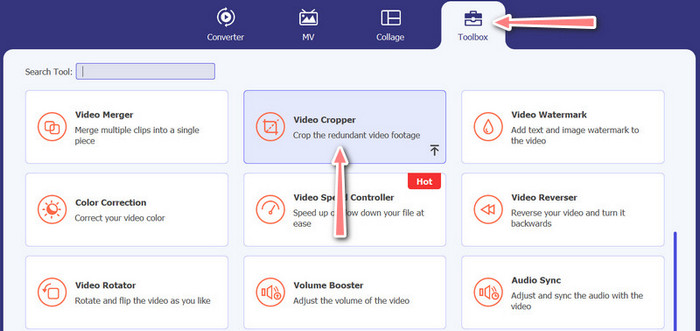
اکنون با کلیک روی تب Toolbox به جعبهابزار برنامه بروید. این بخش مجموعهای از گزینهها را به شما نشان میدهد. حال، گزینه Video Cropper را انتخاب کنید.
مرحله 3. وارد کردن ویدیو برای برش
ویدیویی را که میخواهید برش دهید، با کلیک روی دکمه علامت بعلاوه در ناحیه آپلود بخش Video Cropper اضافه کنید. سپس به صفحه دیگری منتقل میشوید که میتوانید در آن ویدیوی آپلودشده را برش دهید.
مرحله 4. برش دادن ویدیو
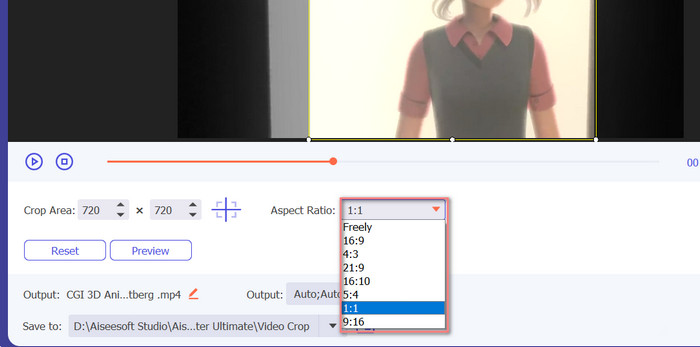
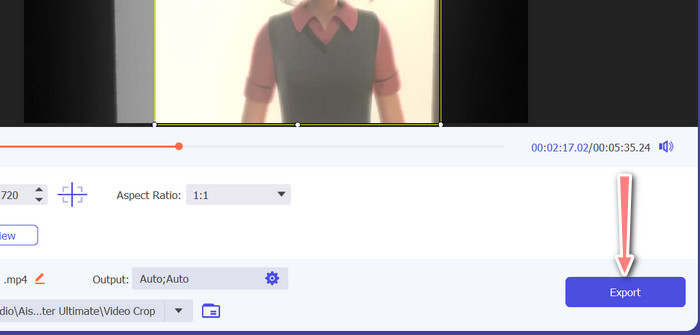
نسبت ابعادی را که میخواهید برای ویدیوی خود استفاده کنید انتخاب کنید. برای اینستاگرام، نسبتهای استاندارد 1:1 (مربعی) و 4:5 (عمودی) هستند. میتوانید نسبت موردنظر را با کلیک روی منوی کشویی زیر پیشنمایش ویدیو انتخاب کنید. برای خروجی گرفتن، دکمه Export را در گوشه پایین سمت راست رابط کاربری بزنید. سپس میتوانید ویدیو را با دنبالکنندگانتان به اشتراک بگذارید یا در حساب اینستاگرام خود منتشر کنید.
قسمت 3. برش ویدیو برای اینستاگرام آنلاین
Kapwing یک ویرایشگر ویدیوی آنلاین محبوب است که برای هرکسی که میخواهد بدون نیاز به نرمافزار پیچیده به سرعت و به راحتی ویدیوهای خود را برای اینستاگرام برش دهد، مناسب است. ناگفته نماند، Kapwing به گونه ای طراحی شده است که کاربر پسند باشد، بنابراین حتی اگر یک ویرایشگر ویدیویی با تجربه نیستید، همچنان می توانید از این پلتفرم برای ایجاد محتوای با کیفیت بالا استفاده کنید. در اینجا مراحل نحوه استفاده از Kapwing برای برش ویدیو برای اینستاگرام به صورت رایگان آورده شده است:
مرحله 1. به وبسایت Kapwing بروید و روی دکمه Start Editing کلیک کنید.
مرحله 2. ویدیویی را که میخواهید برش دهید، با کشیدن و رها کردن در ویرایشگر Kapwing یا با کلیک روی دکمه Upload و انتخاب فایل از رایانه خود آپلود کنید.
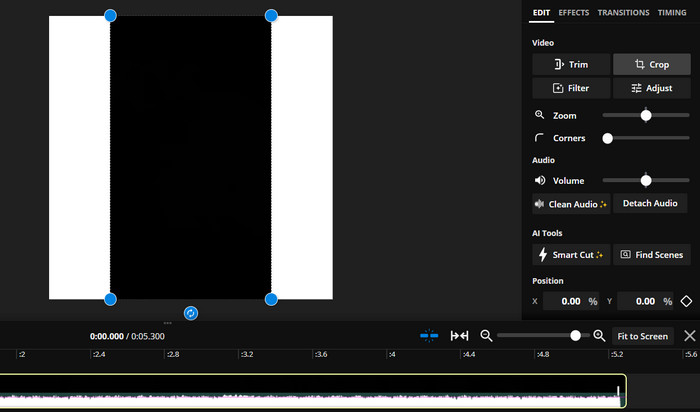
مرحله 3. از منوی سمت راست روی ابزار Crop کلیک کنید. سپس نسبت ابعادی را که میخواهید ویدیو را به آن برش دهید با انتخاب یکی از گزینههای آماده یا ساخت یک نسبت سفارشی انتخاب کنید. از دستگیرههای روی پیشنمایش ویدیو استفاده کنید تا ویدیو را به اندازه دلخواه برش دهید. توجه داشته باشید که میتوانید از همین روش برای برش ویدیوهای مناسب پستهای اینستاگرامی نیز استفاده کنید.
قسمت 4. برش ویدیوها برای اینستاگرام در اندروید
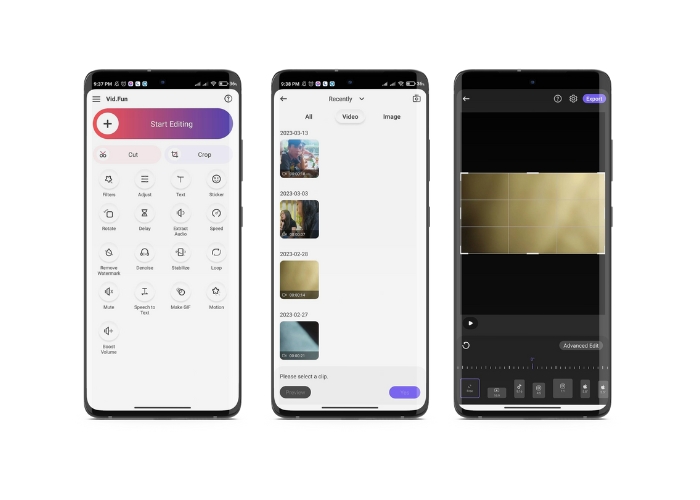
Vid.fun به شما امکان میدهد ویدیوهایتان را چه در گوشی هوشمند و چه در تبلت، دقیقاً به اندازه مناسب اینستاگرام برش دهید. این اپلیکیشن مملو از امکانات برای ساخت ویدیوهای باکیفیت است، از جمله یک ابزار قدرتمند برش ویدیو که تنها با چند لمس ساده، ویدیوی شما را کراپ میکند. علاوهبراین، نسبتهای ابعاد متنوعی برای انتخاب در اختیار شما میگذارد تا مطمئن باشید ویدیوهایتان در اینستاگرام عالی به نظر میرسند. در ادامه، راهنمای برش ویدیو برای ریلز اینستاگرام با استفاده از این اپ در دستگاه اندرویدی را میبینید.
مرحله 1. Vid.fun را از گوگلپلی دانلود و نصب کنید. بلافاصله پس از آن، برنامه را اجرا کنید. روی آیکون Crop که در صفحه اصلی قرار دارد، ضربه بزنید.
مرحله 2. با انتخاب از گالری دستگاه خود، یک فایل ویدیویی اضافه کنید. سپس با انتخاب از منوی پایین صفحه، نسبت ابعاد دلخواه را برگزینید. همچنین میتوانید با استفاده از دستگیرههای روی پیشنمایش ویدیو، ناحیه برش و موقعیت ویدیو را به شکل دلخواه تنظیم کنید.
مرحله 3. پیشنمایش ویدیوی برشخورده را ببینید تا مطمئن شوید همان چیزی است که میخواستید. وقتی از نتیجه برش راضی بودید، روی دکمه Export که در گوشه بالا سمت راست قرار دارد، ضربه بزنید.
مطالعه بیشتر:
آموزش عملی – ۲ روش برای ترکیب ویدیوها برای اینستاگرام
روشهای مختلف انتشار GIF در اینستاگرام [ابزار تحت وب و نرمافزار]
بخش 5. سوالات متداول در مورد تغییر اندازه ویدیوها برای اینستاگرام
اگر ویدیوی من با نسبت تصویر مورد نیاز اینستاگرام مطابقت نداشته باشد چه اتفاقی میافتد؟
اگر ویدیوی شما با نسبت تصویر مورد نیاز برای اینستاگرام مطابقت نداشته باشد، یا با نوارهای مشکی در طرفین یا بالا و پایین ظاهر می شود یا به طور خودکار برش داده می شود تا متناسب با کادر باشد.
آیا می توانم ویدیویی را که قبلاً در اینستاگرام آپلود شده است برش دهم؟
خیر، نمی توانید ویدیویی را که قبلاً در اینستاگرام آپلود شده است برش دهید. قبل از آپلود ویدیو در اینستاگرام، باید آن را برش دهید.
آیا می توانم یک ویدیو را بدون افت کیفیت برش دهم؟
بله، تا زمانی که زیاد برش ندهید، میتوانید بدون افت کیفیت، یک ویدیو را کراپ کنید. اگر ویدیو را بیش از حد برش دهید، کیفیت آن پایین میآید، زیرا این کار وضوح (رزولوشن) ویدیو را کاهش میدهد.
نتیجه
برش دادن ویدیو برای استوری، پستها یا ریلز اینستاگرام ضروری است تا ویدیوی شما ظاهر خوبی داشته باشد و با نسبت ابعاد موردنیاز سازگار باشد. با استفاده از ابزارهای مناسب، مثل FVC Video Converter Ultimate، Kapwing یا Vid.fun، میتوانید بهسادگی ویدیوها را برای اینستاگرام برش دهید و آنها را به نسبت ابعاد درست درآورید.
-
 نحوه افزودن و ساخت فیلتر اینستاگرام قبل از ارسال تصویر و
 فیلترهای اینستاگرام چیست؟ چگونه آن را اعمال کنیم؟ چگونه یکی بسازیم؟ این سوالات در این پست پاسخ های مستقیم خواهند داشت، پس آنها را بخوانید.
-
 بهترین تکنیک ها برای افزایش سرعت ویدیو در اینستاگرام مانند یک حرفه ای
 آیا می خواهید یک ویدیوی افزایش سرعت در اینستاگرام آپلود کنید؟ در این صورت، این مقاله بهترین تکنیک هایی را ارائه می دهد که می توانید برای افزایش سرعت ویدیوها به راحتی استفاده کنید.
-
 تغییر اندازه عکس ها برای اینستاگرام در دسکتاپ، آیفون یا اندروید
 اگر میخواهید اندازه عکسهای خود را برای اینستاگرام تغییر دهید، مراحل انجام این کار را به شما نشان میدهیم. برای یادگیری مراحل تغییر اندازه عکس ها برای اینستاگرام، بخوانید.
