


 Video Converter Ultimate
 ضبط صفحه
 تعمیر ویدیو
چگونه می توان فایل های ویدئویی MPEG را در یک - 2 روش نهایی که باید بدانید ترکیب کنید
چطور فایلهای MPEG را به هم بچسبانیم؟ شما بهتازگی یک سریال قدیمی تلویزیونی را در قالب MPEG دانلود کردهاید، مثلاً ۸ قسمت کوتاه که هرکدام تیتراژ شروع و پایان تکراری دارند. چطور این فایلهای MPEG را مثل یک فیلمِ یکتکه با هم ادغام کنید؟ چه فقط بخواهید ویدیوها را ساده در یک فایل ترکیب کنید، و چه بخواهید با امکانات پیشرفته این کار را انجام دهید، در ادامه ۲ روش مؤثر معرفی شده که نباید از دست بدهید.

قسمت 1: چگونه فایل های MPEG را به صورت آنلاین ترکیب کنیم
FVC Free Online Video Merger یک ابزار رایگان آنلاین برای چسباندن و ادغام MPEG است که به شما امکان میدهد فایلهای MPEG، MP4، AVI و فرمتهای ویدیویی دیگر را بدون محدودیت حجم با هم ترکیب کنید. با آن میتوانید چندین فایل MPEG را بدون اضافه شدن واترمارک به یک ویدیوی جذاب تبدیل کنید. علاوه بر این، فایلهای آپلودشده ظرف ۲۴ ساعت حذف میشوند تا حریم خصوصی شما حفظ شود.
مرحله ۱: با هر مرورگری وارد سایت FVC Free Online Video Merger شوید. روی دکمه Upload Videos to Merge در وسط صفحه کلیک کنید تا نصبکننده را دریافت کنید. بعد از آن، دوباره روی همین دکمه کلیک کنید تا فایلهای MPEG موردنظر برای ادغام را در برنامه آنلاین بارگذاری کنید.

مرحله ۲: وقتی وارد صفحه Merging videos شدید، میتوانید ترتیب ویدیوهای MPEG موردنظر برای ادغام را تنظیم کنید. در این قسمت میتوانید موقعیت هر ویدیو را تغییر دهید، فایل را حذف کنید یا با کلیک روی دکمه insert new در محل مناسب، فایلهای MPEG بیشتری اضافه کنید.
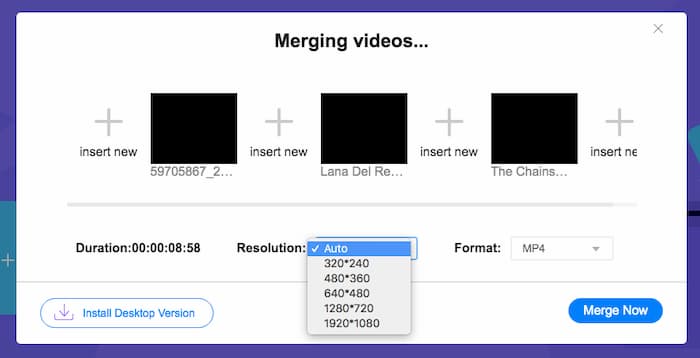
مرحله ۳: پس از آن میتوانید وضوح (رزولوشن) و فرمت ویدیوی خروجی را مشخص کنید. میتوانید قبل از کلیک روی دکمه Merge now، فایلهای MPEG را در قالب یک فایل MP4 با هم ترکیب کنید تا فرایند آغاز شود. این ابزار به شما امکان میدهد در مدت کوتاهی به ویدیوی دلخواهتان برسید.

استفاده از ترکیب کننده ویدیوی آنلاین آسان است. با این حال ، اگر می خواهید قسمتهای باز و پایان قسمتهای زائد را برش دهید ، نمی تواند بیشتر به شما کمک کند. شما باید از ادغام قدرتمندتر MPEG استفاده کنید.
مطالعه بیشتر:
قسمت 2: روش همه کاره برای ادغام فیلم های MPEG
Aiseesoft Video Converter Ultimate یک نرمافزار حرفهای برای چسباندن فایلهای MPEG است که این امکان را به شما میدهد بخشهای دلخواه از فایلهای MPEG را در قالب یک فیلم واحد با هم ترکیب کنید. با آن میتوانید قسمت موردنظر از فایلهای MPEG را برش دهید، کیفیت ویدیو را تنظیم کنید، واترمارک سفارشی اضافه کنید یا حتی با تمهای مختلف یک فیلم کامل بسازید.
- 1. فایل های MPEG را در MPEG ، MP4 و بیش از 300 فرمت ویدیویی ترکیب کنید.
- 2. وضوح تصویر را تغییر دهید یا حتی کیفیت فیلم را برای ادغام فایل افزایش دهید.
- 3. قسمتهای مورد نظر فایلهای MPEG را برش داده و در یک فیلم ترکیب کنید.
- 4. افکت ها و فیلترها را اضافه کنید و علامت های آبی را به فیلم های MPEG اختصاص دهید.
دانلود رایگانبرای ویندوز 7 یا بالاتردانلود امن
دانلود رایگانبرای MacOS 10.7 یا بالاتردانلود امن
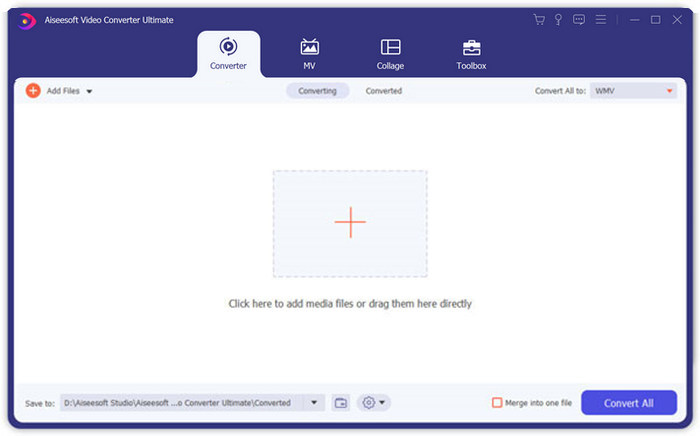
مرحله ۱: برنامه Aiseesoft Video Converter Ultimate را روی کامپیوتر خود اجرا کنید. به منوی Converter بروید و روی دکمه بزرگ “+” در وسط رابط اصلی کلیک کنید تا فایلهای MPEG موردنظر برای ادغام را اضافه کنید. روی دکمه Add Files کلیک کنید تا همه فایلهایی را که میخواهید ترکیب شوند وارد کنید.
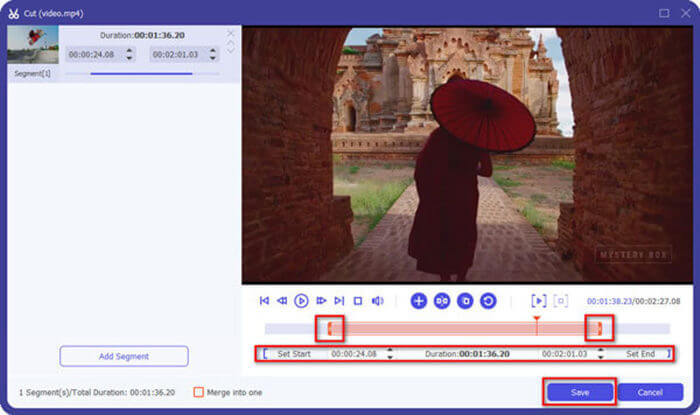
مرحله ۲: برای کلیپهای MPEG که نیاز به برش دارند، روی دکمه Cut کنار ویدیو کلیک کنید. میتوانید نقاط شروع و پایان را طوری تنظیم کنید که تیتراژهای ابتدایی و انتهایی ویدیوهای MPEG خود را حذف کنید. بعد از آن روی دکمه Save در پایین کلیک کنید تا فایل ذخیره شود.
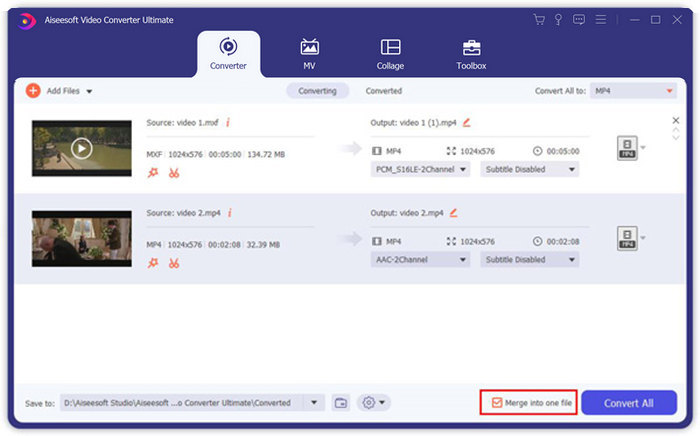
مرحله ۳: پس از آن، ویدیوی برشخورده را در برنامه قرار دهید. ترتیب ویدیوهای MPEG را تنظیم کنید. وقتی همه چیز آماده شد، تیک گزینه Merge into one file در کنار Convert All را فعال کنید. سپس روی دکمه Convert All کلیک کنید تا فرایند ادغام فایلهای MPEG آغاز شود.
قسمت 3: س FAالات متداول درباره پیوستن به پرونده های MPEG
چگونه فایل های MPEG را با بهترین کیفیت ادغام کنیم؟
وقتی می خواهید فایل های MPEG را با کیفیت مشابه ادغام کنید ، می توانید پارامترها را به عنوان فیلم اصلی انتخاب کنید. اما اگر فایل های MPEG از نظر کیفیت فیلم متفاوت هستند ، باید برخی از پرونده های MPEG را با کیفیت پایین از قبل با ترکیب کننده ویدیوی حرفه ای ارتقا دهید.
آیا می توانم فایل های MPEG را با تلفن iPhone یا Android ترکیب کنم؟
آره. قبل از بارگیری برنامه های ترکیب کننده ویدیو برای پیوستن به پرونده های MPEG ، باید مطمئن شوید که برنامه با MPEG یا سایر فیلم هایی که می خواهید ترکیب کنید سازگار است. کلیپ Adobe Premiere ، Viva Video و Splice Video موارد پیشنهادی هستند که می توانید در نظر بگیرید.
فرمت فایل MPEG چیست؟
MPEG یک فرمت فایل ویدیویی است که از فشرده سازی فایل MPEG-1 یا MPEG-2 استفاده می کند. این یک قالب محبوب برای فیلم های توزیع شده در اینترنت است که جریان و بارگیری را بسیار سریعتر از سایر قالب های ویدیویی محبوب انجام می دهد.
نتیجه
در این مقاله ، 2 روش کارآمد برای ادغام فایل های ویدئویی MPEG ، به ویژه هنگامی که نیاز به اصلاح قطعات اضافی دارید ، معرفی می شود. FVC Free Video Merger یک روش آسان برای ادغام فایل های MPEG به صورت آنلاین است ، اما شما نمی توانید کلیپ های ویدئویی را ویرایش کنید. بنابراین ، اگر می خواهید فیلم های MPEG را اصلاح و ویرایش کنید ، Aiseesoft Video Converter Ultimate باید بهترین راه حل باشد.
-
 بهترین 6 عضو ویدئو MP4 برتر برای ترکیب فیلم های MP4 به صورت رایگان
 بسیاری از وصال های MP4 برای اتصال کلیپ های مختلف MP4 در دسترس هستند. در این مقاله ، ما برخی از وصال کنندگان MP4 رایگان را برای Windows 10/8/7 و Mac انتخاب کرده ایم.
-
 چگونه می توان فایل های M4V را ادغام کرد؟ در اینجا 2 راه حل سریع وجود دارد
 اگر به دنبال راه حلی برای ترکیب فایلهای ویدئویی M4V در یک مورد هستید ، هرگز این قسمت را از دست ندهید. در اینجا ما در مورد دو بهترین روش برای ترکیب فایل های ویدئویی M4V صحبت خواهیم کرد.
-
 چگونه فیلم های 3GP را از تلفن همراه در یک فایل ادغام کنیم
 وقتی می خواهید چند فیلم 3GP از BlackBerry خود را در یک ویدیو ترکیب کنید ، می توانید در مورد 2 روش کارآمد برای ادغام فایل های 3GP از مقاله بیشتر بدانید.
