


 Video Converter Ultimate
 ضبط صفحه
 تعمیر ویدیو
4 ابزار موثر مشاهده ابرداده برای مشاهده متادیتا از فایل ها
As part of a video element, the metadata contains the data you'll need to know about the file. But the question is, how can you view the file's metadata? So, if you want to see the meta information inside your video, this is the perfect post for you. Keep on reading this article because we will review for you the best metadata viewer you can use to see the metadata, and if possible, you can edit it as well.

قسمت 1. 2 از بهترین نمایشگرهای فراداده برای ویندوز و مک در سال 2022
Video Converter Ultimate [بهترین نمایشگر و ویرایشگر فراداده ویدئو و صوتی]
Video Converter Ultimate offers you the best video metadata viewer on Mac and Windows. With this tool, you can easily add and view the metadata in all video and audio formats with just a few clicks. Even though you didn't have experience dealing with this particular task, you can depend on the best viewer to help you. Unlike the other tools that offer to view metadata, this software provides a great function to help you do more in different tasks, such as editing the metadata. Want to know what these are? If so, read the key features you can have once you attain this software.

FVC Video Converter Ultimate
5,689,200+ دانلود- این بهترین ابزار برای مشاهده و ویرایش ابرداده در هر ویدیو یا ویدیو است.
- از فرمت های رسانه های مختلف از جمله MP4، AVI، MOV، MKV، FLV و غیره پشتیبانی می کند.
- میتوانید فایلهای ویدیویی و صوتی بزرگ را در اینجا وارد کنید تا متادیتای آنها را بررسی کنید.
- برای شروع، این بهترین نمایشگر ابرداده با رابط کاربر پسند است.
- در انواع مختلف پلتفرم های دسکتاپ مانند ویندوز و مک موجود است.
دانلود رایگانبرای ویندوز 7 یا بالاتردانلود امن
دانلود رایگانبرای MacOS 10.7 یا بالاتردانلود امن
بنابراین اکنون، اگر می خواهید نحوه مشاهده متادیتا را بیاموزید، ابتدا باید ابزار را با کلیک بر روی دکمه دانلود مناسب ارائه شده در زیر دانلود کنید، سپس آن را نصب کنید، سپس آن را باز کنید.
دانلود رایگانبرای ویندوز 7 یا بالاتردانلود امن
دانلود رایگانبرای MacOS 10.7 یا بالاتردانلود امن
نحوه مشاهده متادیتا در Video Converter Ultimate
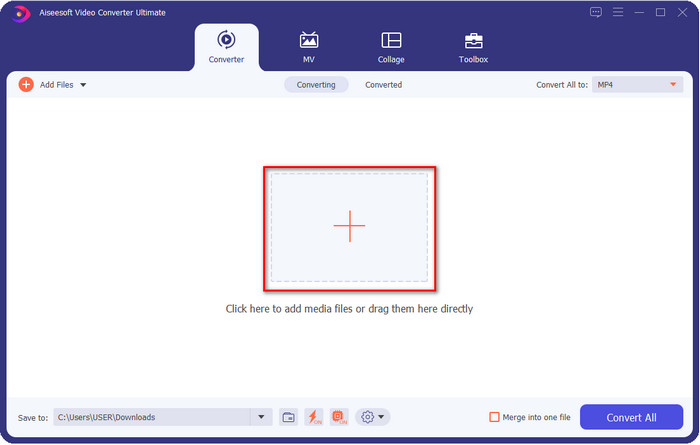
Step 1. By clicking the + button, a file folder will show on your screen where you can locate the video or audio file you want to check the metadata. Once you've chosen the file, click Open and proceed to the next step.
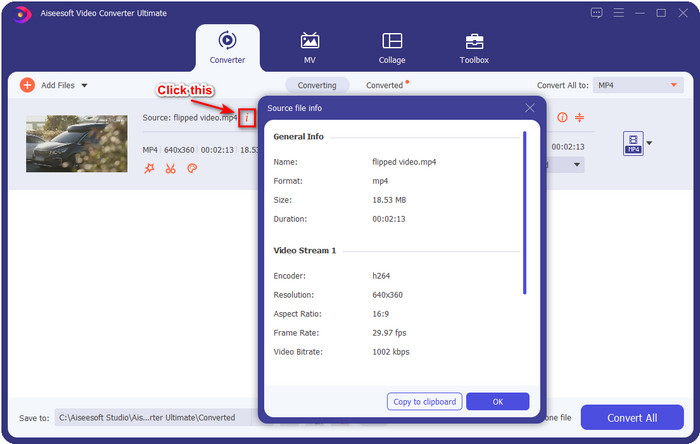
Step 2. While the file is on queue, click the i icon; voila, you have now viewed the metadata of your video file saved on your computer.
نحوه افزودن یا ویرایش متادیتای فایل ویدیویی یا صوتی با بهترین ویرایشگر متادیتا
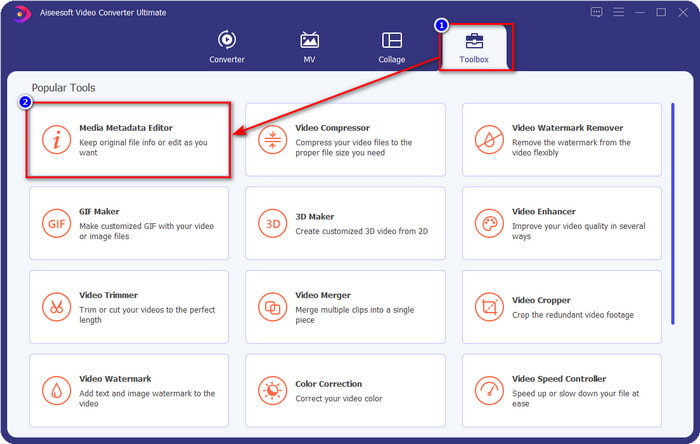
Step 1. After you've opened the software, you must go to the Toolbox section, and in that section, you will see a feature Media Metadata Editor, then click it.
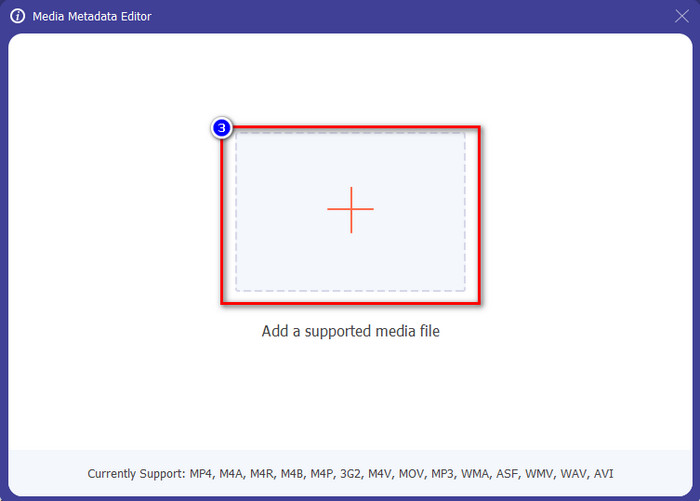
Step 2. New windows will show, click the + button, find the video or audio file on the computers folder, and click Open.
Step 3. Add or edit the data about the file according to your needs; after that, click Save to apply the changes you add.

فتوشاپ [بهترین نمایشگر متادیتا برای حرفه ای ها]
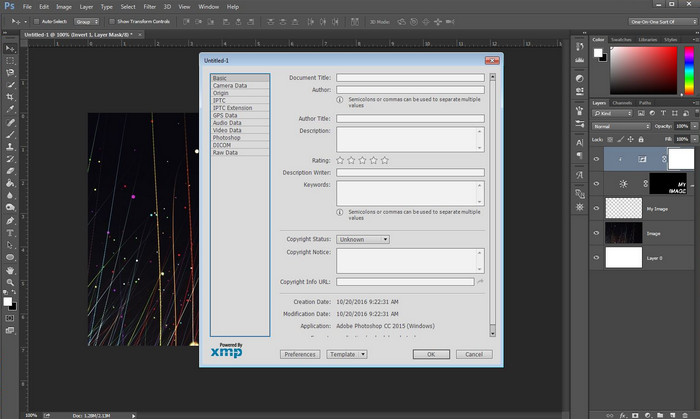
Photoshop became known as the top photo editor you can use as a professional. This tool offers users the high-end editing you will need to make your photo look better than before. Although the tool offers advanced editing, viewing the file's metadata, this tool is too expensive for some users. Maybe you are asking why we add this editor to the list, well it is popular, and many users already use this, so why not? Although it can add metadata on every PSD file, the metadata it supports is minimal, which means it is mostly about basics. So, if you want to view metadata in Photoshop, you must purchase the tool.
طرفداران
- این بهترین ویرایشگری است که می توانید در وب پیدا کنید.
- از طیف گسترده ای از فرمت های فایل تصویری پشتیبانی می کند که می توانید آن را وارد کنید و بعداً ابرداده های آن را بررسی کنید.
- انتخاب ویرایشگر برای اینکه یک نرم افزار ویرایشگر درجه یک در دسکتاپ باشد.
منفی ها
- اگر ابزار را خریداری می کنید، انتظار داشته باشید که گران باشد.
- برای داشتن تجربه بهتر در استفاده از آن به یک دسکتاپ پیشرفته نیاز دارد.
- بهترین انتخاب برای مبتدیان نیست.
مرتبط:
How to Add Watermark in Photoshop
قسمت 2. 2 نمایشگرهای فراداده رایگان موجود در وب
ویرایشگر فراداده تصویر جفری
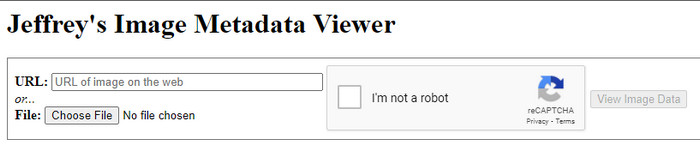
If you want a simple free metadata viewer on the web, try to use Jeffrey's Image Metadata Editor. This web tool is an effective tool to view the metadata of every media file you have for free. However, the users' interface of the web tool isn't as impressive as the others; it still serves its purpose as a metadata editor and viewer. Moreover, if you want to try and access this tool, you must beware because the website isn't protected on different web browsers, which means signing in to the website can lead to hacking or losing some files. Remember that you'll need to beware if you try to access the tool to view your metadata or edit it. So far, there aren't any reports of some who have been hacked while using the website.
طرفداران
- دسترسی رایگان در تمام مرورگرهای وب
- از فرمت های مختلف پشتیبانی می کند. می توانید ابرداده ها را آپلود و مشاهده کنید.
- برای صرفه جویی در فضا می توانید URL را به جای فایل وارد کنید.
منفی ها
- اگر می خواهید متادیتا را مشاهده کنید، کپچا کمی آزاردهنده است.
- وب سایت امن نیست
Metadata2go
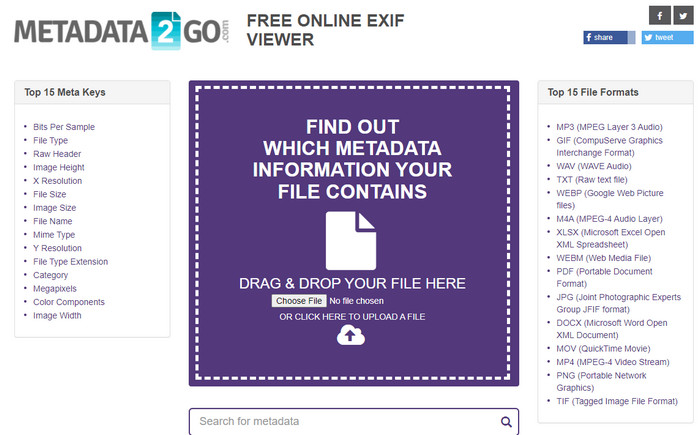
Metadat2go offers a wide range of image formats to insert and later view the metadata. Even though the GUI is much heavier than the first web tool we introduced, it is still easy to use for anyone who would like to access the tool. Although the tool is safer to use than the first one, there are some limitations on the functions, and most of the time the drag and drop function of it doesn't do well. But if you want to learn how to open and read metadata from video, this tool will suffice your needs.
طرفداران
- دسترسی به آن در موتورهای جستجوی مختلف رایگان و ایمن است.
- این کار را به آرامی انجام می دهد.
- از فرمت های تصویری متعددی پشتیبانی می کند.
منفی ها
- در برخی موارد، گزینهها به خوبی کار نمیکنند، مانند کشیدن و رها کردن.
- این فرمت های دیگر را پشتیبانی می کند، اما تعداد کمی انتخاب شده اند.
بخش 3. نمودار مقایسه در مورد 4 نمایشگر فراداده [آنلاین و آفلاین]
| امکانات | FVC Video Converter Ultimate | فتوشاپ | ویرایشگر فراداده تصویر جفری | Metadata2go |
| مشاهده و ویرایش متادیتا به راحتی |  | | | |
| ایمن برای استفاده | | |  | |
| بودجه پسند | | | | |
| کاربر پسند | | | | |
| ویژگی های پیشرفته در دسترس است | | | | |
| مبتنی بر برنامه | برنامه مبتنی بر دسکتاپ | برنامه مبتنی بر دسکتاپ | برنامه مبتنی بر وب | برنامه مبتنی بر وب |
بخش 4. سؤالات متداول در مورد نمایشگر ابرداده
داخل ابرداده چیست؟
در داخل ابرداده، مجموعه اطلاعات متفاوتی در مورد فایل مشاهده خواهید کرد، به عنوان مثال، نام نویسنده، سبک (اگر موسیقی باشد)، عنوان فایل، اندازه فایل و بسیاری موارد دیگر.
چرا باید متادیتا را ببینم؟
خوب، ابرداده به شما کمک می کند تا اطلاعات کوتاهی در مورد فایلی که نمی توانید در فایل مشاهده کنید بدانید. با مشاهده ابرداده، ایده ای در مورد داده های یک فایل خاص، چه تصویر، ویدئو، صدا، PDF یا موارد دیگر خواهید داشت.
آیا می توانم از متادیتا برای محافظت از فایل استفاده کنم؟
بله، میتوانید متادیتا اضافه کنید تا از فایلتان در برابر افرادی که میخواهند سعی کنند این را از شما بدزدند محافظت کنید. به این ترتیب، اگر کسی بخواهد آن را از شما بدزدد، میتوانید اعتبارنامههایی را که ایجاد کردهاید، داشته باشید. با این حال، تکنیک هایی برای حذف فراداده فایل وجود دارد. اگرچه کسی میتواند دادهها را حذف کند، بهترین کار این است که متادیتا را برای محافظت بیشتر و ساده به فایل اضافه کنید.
نتیجه
Now that we have the metadata viewer presented, it is time to choose one and use it to see your file's inside. Moreover, the first two tools we presented are undoubtedly the best on viewing metadata; but we can see that Photoshop is too expensive to use compared to the ultimate tool. So, therefore, if you want a cheap and safe way to view your metadata or edit it, you must use the FVC Video Converter Ultimate because it is the perfect tool for this task. Still, are you not convinced with the review we did on the tool? Well, you can download the tool on your software and try it for yourself!
-
 3 بهترین راه حل برای حذف آسان واترمارک از ویدیوها
 آیا می خواهید واترمارک مزاحم روی ویدیو را حذف کنید؟ با این وبلاگ، می توانید ایده های مختلف در مورد حذف واترمارک روی یک ویدیو را بیاموزید.
-
 4 بهترین راه برای افزودن سریع واترمارک به هر ویدیویی
 اگر این مقاله را بخوانید، بیاموزید که چگونه به هر ویدئویی در ویندوز، مک، آنلاین، iOS و اندروید با مراحل دقیق اضافه کنیم.
-
 4 روش موثر برای حذف واترمارک Tiktok از ویدیوهای Tiktok
 آیا باید واترمارک Tiktok را از ویدیوهای Tiktok صادراتی خود حذف کنید؟ شما می توانید این کار را در اینجا با کمک ابزارهایی که ارائه می دهیم انجام دهید. شما به راحتی می توانید آن را انجام دهید.
