


 Video Converter Ultimate
 ضبط صفحه
 تعمیر ویدیو
بدانید که 7 ویرایشگر برچسب موسیقی محبوب در دسترس هستند
یک پخشکنندهی رسانه معمولاً یک ویرایشگر متادیتای داخلی دارد تا بتوانید با وارد کردن نام هنرمند، عنوان و ژانر، تگهای موسیقی را ویرایش یا اضافه کنید. اما بیشترِ این پخشکنندهها امکانات محدودی برای کمک به کاربر در افزودن تگها یا فراداده دارند. آیا این آزاردهنده نیست؟ خوشبختانه، بهترین راه برای مدیریت ویرایش فراداده، استفاده از یک ویرایشگر متادیتا روی گوشی است. اما سؤال اینجاست که از کدام اپ باید استفاده کنید؟ کدام اپ برای نیاز شما در زمینه ویرایش متادیتا مناسب است؟ اگر شما هم همین سؤال را از خود میپرسید، نیازی به نگرانی نیست، زیرا امروز شش اپ برتر را که میتوانید برای ویرایش آن روی دستگاههایتان استفاده کنید، بررسی میکنیم. پس آنها را با دقت بخوانید تا با اپلیکیشنهای ویرایشگر متادیتای موسیقی بیشتری که میتوانید دانلود و استفاده کنید آشنا شوید.

قسمت 1. ویرایشگر تگ موسیقی نهایی برای استفاده در ویندوز و مک موجود است
اگر برای ویرایش متادیتا از ویندوز یا مک استفاده میکنید، از کدام ابزار باید کمک بگیرید؟ ما پیشنهاد میکنیم روی FVC Video Converter Ultimate حساب کنید. برخلاف ویرایشگرهای تگ معمولی، این ابزار تقریباً تمام نیازهای شما برای داشتن یا افزودن اطلاعات در متادیتا را تنها با چند کلیک برآورده میکند. تصور کنید همه اپهایی که میتوانستید جداگانه استفاده کنید، در این ابزار جمع شدهاند، البته بهجز تگگذاری خودکار. مهمتر از همه، میتوانید با دنبال کردن مراحل زیر، تمام تگهای موجود روی فایل صوتی را ویرایش، حذف و بهروزرسانی کنید. بنابراین، برای ویرایش تگهای موسیقی در ویندوز 10/11 یا مک، آموزش زیر شما را راهنمایی خواهد کرد.
مرحله 1. برای دانلود ویرایشگر متادیتا روی ویندوز یا مک، دکمه متناسب با سیستمعامل خود را در پایین فشار دهید. پس از اتمام دانلود، روی فایل کلیک کنید تا برنامه نصب شود، مراحل نصب را دنبال کنید و سپس ابزار را اجرا کنید.
دانلود رایگانبرای ویندوز 7 یا بالاتردانلود امن
دانلود رایگانبرای MacOS 10.7 یا بالاتردانلود امن
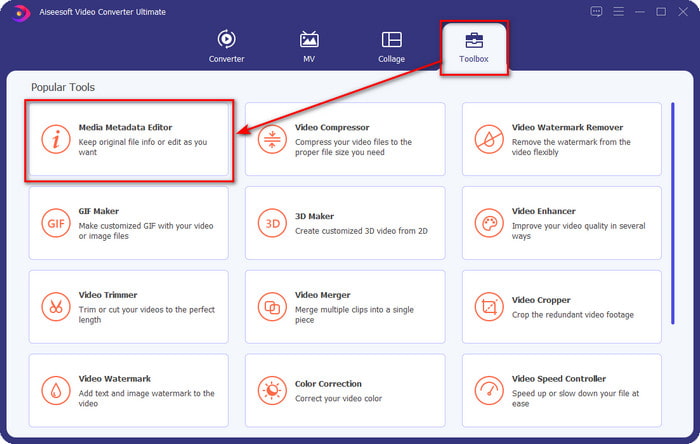
مرحله 2. روی بخش Toolbox کلیک کرده، در فهرست بازشده، گزینه Media Metadata Editor را پیدا و انتخاب کنید.
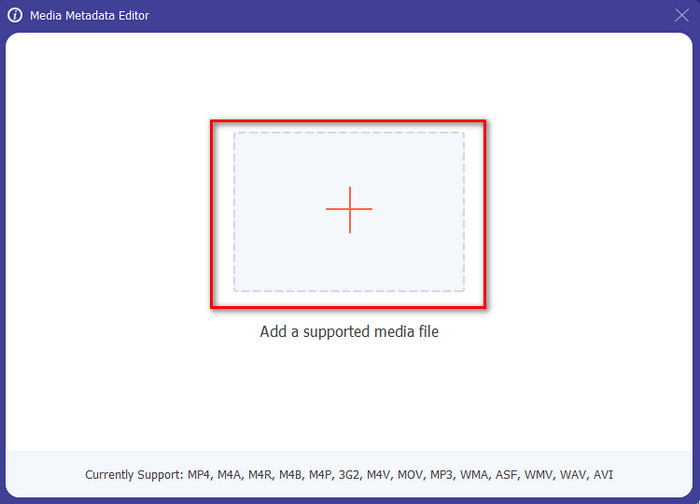
مرحله 3. با فشردن آیکون +، پوشه روی صفحه شما باز میشود؛ فایل صوتی موردنظر برای ویرایش را بیابید و روی Open کلیک کنید تا به مرحله بعد بروید.
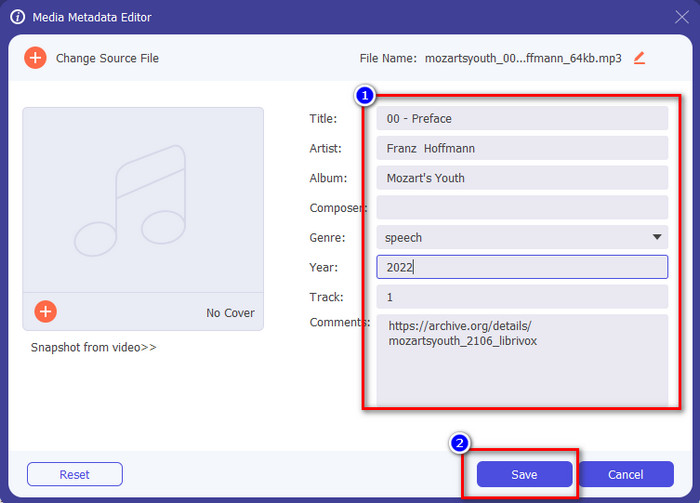
مرحله 4. تگهای فایل صوتی را با تایپ کردن در جعبه متن بهروزرسانی کنید. پس از آن، روی «Save» کلیک کنید تا تمام تگهایی که تغییر دادهاید ذخیره و بهروزرسانی شوند. حتی اگر فایل را به گوشی موبایل منتقل کنید، تگها همچنان روی فایل صوتی باقی میمانند.
مرتبط:
قسمت 2. 6 از بهترین برنامه های ویرایشگر برچسب موسیقی در دستگاه های اندروید و iOS
ویرایشگر خودکار برچسب
دستگاه پشتیبانیشده: اندروید
امتیاز در پلیاستور: 4.4 ستاره
نظرات یا تعداد امتیازدهی: 81٬332 نفر
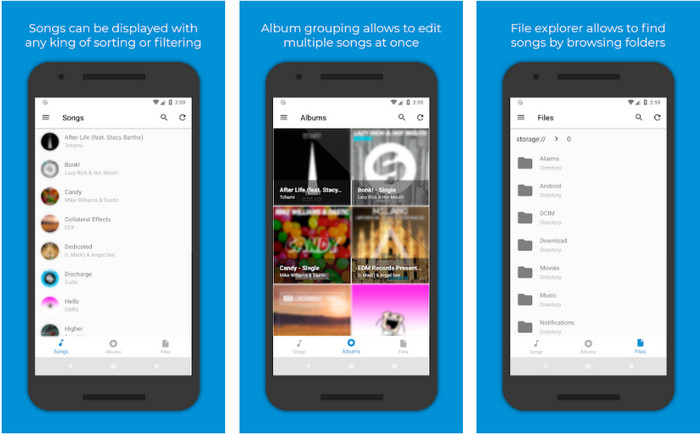
اگر کاربر اندروید هستید، میتوانید به Automatic Tag Editor بهعنوان یکی از بهترین ویرایشگرهای متادیتای موسیقی دسترسی داشته باشید. این اپ برای ویرایش تگهای فایلهای صوتی در کمتر از یک دقیقه بسیار مناسب است. ویژگی خوب دیگر این اپ این است که یک ویرایشگر متادیتای خودکار دارد که بهویژه در صورت خرید نسخه دیجیتال فایل، میتواند اطلاعات را بهطور خودکار پر یا بهروزرسانی کند. این برنامه از چندین نوع تگ مانند عنوان، ژانر، سال و موارد دیگر پشتیبانی میکند تا شناسایی فایلها برای شما سادهتر شود. در بهروزرسانی اخیر، بسیاری از کاربران گزارش دادهاند که هنگام استفاده از اپ روی اندروید، باگها و اشکالاتی رخ میدهد. همچنین این اپ از فرمتهای رایج موسیقی مانند MP3، M4A، OGG، FLAC، WMA و WAV برای آپلود پشتیبانی میکند.
ویرایشگر برچسب موسیقی ستاره
دستگاه پشتیبانیشده: اندروید
امتیاز در پلیاستور: 4.0 ستاره
نظرات یا تعداد امتیازدهی: 293٬598 نفر
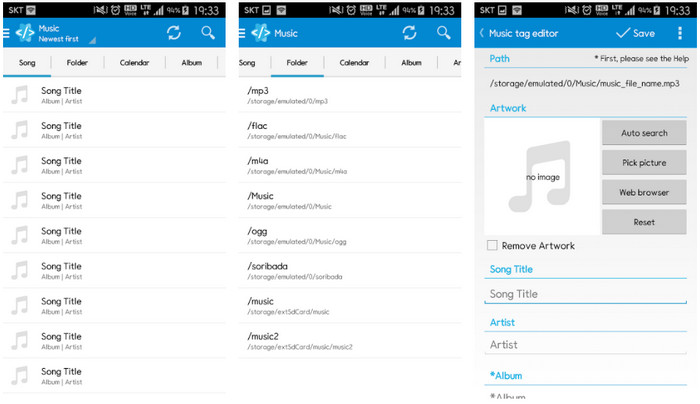
Star Music Tag Editor یکی دیگر از ویرایشگرهای تگ موسیقی است که میتوانید از پلیاستور دانلود کنید. این اپ بهدلیل ارائه یک رابط کاربری ساده، در مقایسه با برخی اپهای دیگر، درک و استفاده آسانتری دارد. همانند ابزار اول، این اپ نیز از جستوجوی خودکار برای پر کردن مؤثر تگهای موسیقی شما پشتیبانی میکند. با وجود اینکه اپ استفاده آسانی دارد و امکانات زیادی ارائه میدهد، گاهی آنطور که برخی کاربران انتظار دارند، کارآمد نیست. هنگام آزمایش ویرایش متادیتا با این اپ، گاهی تغییرات ذخیره نمیشد. همچنین وقتی قصد ذخیره متادیتا را داشتیم، یک پیام پاپآپ روی صفحه ظاهر میشد که میگفت «invalid audio frame exception» برای موسیقی جدید، به دلیل خراب بودن فایل. البته برخی کاربران چنین مشکلی را گزارش نکردهاند، بنابراین اگر میخواهید این اپ را امتحان کنید، میتوانید آن را از پلیاستور دانلود کنید.
ویرایشگر تگ موسیقی - Mp3 Tagger | ویرایشگر رایگان موسیقی
دستگاه پشتیبانیشده: اندروید
امتیاز در پلیاستور: 3.8 ستاره
نظرات یا تعداد امتیازدهی: 11٬378 نفر
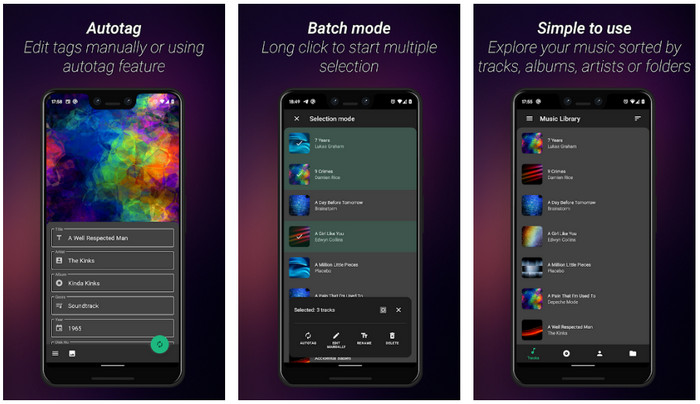
اگر با تگهای اشتباه مشکل دارید، از Music Tag Editor - Mp3 Tagger | Free Music Editor برای اصلاح سریع متادیتای موسیقی استفاده کنید. این ابزار میتواند در صورتی که ابتدا نام آهنگ و نام هنرمند را وارد کنید، سایر اطلاعات را پیدا کرده و تگهای مناسب را جستوجو و تکمیل کند. با این اپ میتوانید بهآسانی به چندین فایل صوتی بهطور همزمان تگ اضافه کنید. با این حال، جستوجوی خودکار تگها زمان زیادی برای جمعآوری اطلاعات صرف میکند و گاهی تگهای نامرتبط را هم برمیگرداند. همچنین وقتی میخواهید روی یک ترک صوتی تصویر اضافه کنید، تصویر به آن ترک ویرایششده ضمیمه نمیشود.
همیشه برچسب: ویرایشگر برچسب موسیقی 4+
دستگاه پشتیبانیشده: iOS
امتیاز در پلیاستور: 4.7 ستاره
نظرات یا تعداد امتیازدهی: 1.1k نفر
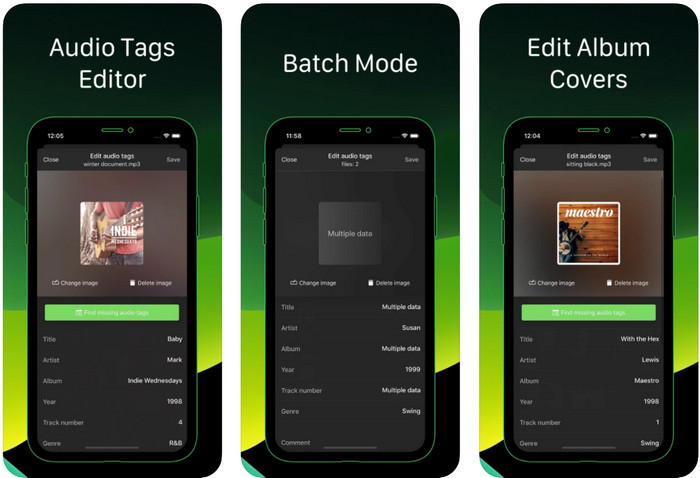
یاد بگیرید چگونه با کمک Ever Tag: Music Tag Editor 4+ روی آیفون، تگهای موسیقی را ویرایش کنید. این اپ در iOS از چندین فرمت صوتی پشتیبانی میکند، بنابراین افزودن متادیتا و همینطور ویرایش آن از همیشه آسانتر است. علاوه بر این، این اپ مجموعهای از تگهای متادیتای مختلف را در اختیار شما قرار میدهد تا با پرکردن جداگانه، از عنوان تا امتیازدهی، آنها را به فایل صوتی اضافه کنید. نقطهضعف این اپ آن است که نمیتواند مانند برخی ابزارهای اندرویدی، تگها را بهصورت خودکار و با جستوجوی خودکار پر کند. حتی اگر اپ اعلام کرده است که قابلیت پردازش دستهای برای ویرایش متادیتا دارد، در عمل چنین امکانی فراهم نیست. با این حال، اگر میخواهید این اپ را امتحان کنید، میتوانید همین حالا آن را از اپاستور دانلود کنید.
مولد تگ موسیقی
دستگاه پشتیبانیشده: iOS
امتیاز در پلیاستور: 4.5 ستاره
نظرات یا تعداد امتیازدهی: 55 نفر
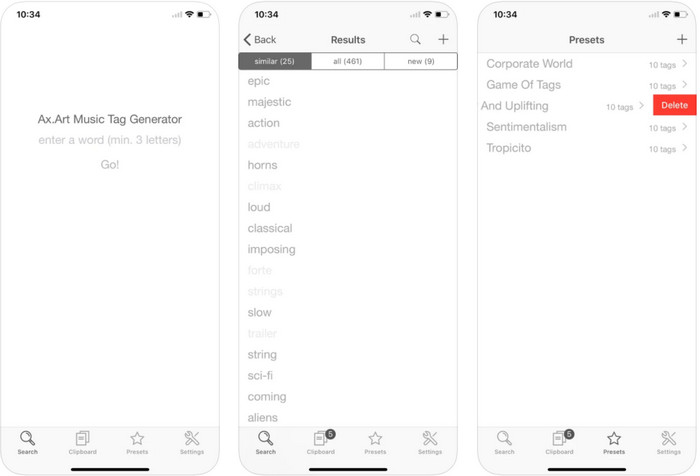
اگرچه محبوبیت Music Tag Generator به اندازه دیگر ویرایشگرها نیست، اما همچنان میتوانید با آن تگ موسیقی را ببینید و ویرایش کنید. این ابزار، اپ کاربردی کوچک شما برای یافتن و مرتبسازی ترکهای موسیقی بر اساس تگها است. علاوه بر مرتبکردن تگها، میتوانید با این اپ متادیتا را طبق نیاز خود تغییر دهید و آنها را سازماندهی کنید. با این که اپ میتواند در ویرایش به شما کمک کند، اما هنوز به خوبی دیگر ویرایشگرهای معرفیشده در این مقاله نیست. رابط کاربری سادهای دارد، اما قابلیتهای آن به اندازهای که انتظار میرود کامل و حرفهای نیست.
iTunes
دستگاه پشتیبانیشده: iOS
امتیاز در پلیاستور: 4.9 ستاره
نظرات یا تعداد امتیازدهی: 1.4k نفر
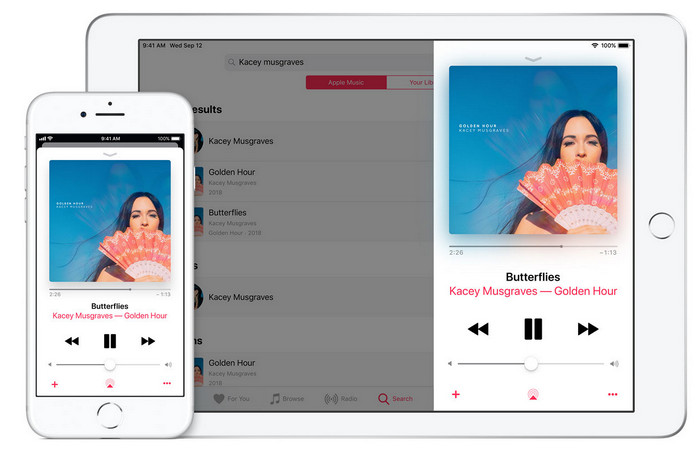
این برنامه دارای یک کتابخانه موسیقی داخلی است که می توانید آن را خریداری، دانلود و استفاده کنید. iTunes برنامه ویرایشگر متادیتای معمولی شما نیست که بتوانید در iOS خود از آن استفاده کنید زیرا این برنامه برای ذخیره موسیقی مانند آنچه Spotify می تواند ارائه دهد شناخته شده است. اگرچه موسیقیهایی که میتوانید در این برنامه پیدا کنید دارای متادیتا و برچسبها هستند، اما همچنان میتوانید برچسبها را مطابق با خواستههای خود تغییر دهید یا بهروزرسانی کنید. با این حال، شما نمی توانید به راحتی تگ ها را با این برنامه ویرایش یا به روز کنید، زیرا قبل از اینکه یاد بگیرید چگونه موسیقی را در iTunes برچسب گذاری کنید به یک الزام نیاز دارید.
اکثر برنامه های ذکر شده در اینجا دارای یک برچسب خودکار هستند که می تواند به شما کمک کند به طور خودکار برچسب ها یا ابرداده ها را به فایل صوتی خود اضافه کنید. با این حال، این ویژگی برخلاف افزودن دستی برچسبهای نامرتبط به فایل شما دارای نقصهایی است. اگر می خواهید از این اشتباهات جلوگیری کنید، بیایید با خواندن قسمت 2 به سراغ بهترین ویرایشگر تگ موسیقی در رایانه شخصی برویم.
بخش 3. سوالات متداول در مورد ویرایشگر برچسب موسیقی
تگ ID3 چیست؟
شما میتوانید این تگهای ID3 را اغلب روی موسیقی ببینید، زیرا دادههای مربوط به فایل رسانه، بهویژه صدا را در خود نگه میدارند. با افزودن تگ های ID3 به فایل صوتی خود، می توانید فایل را بر اساس پخش کننده رسانه ای که استفاده می کنید مرتب کنید.
آیا ضبط صدا در گوشی دارای برچسب است؟
بله، دارای تگ و ابرداده است. با این حال، برچسب ها مانند سایر فایل های رسانه ای جامع نیستند.
چرا فایل صوتی من پس از افزودن متادیتا خراب می شود؟
دلیل خراب بودن صدای شما مربوط به ابرداده هایی نیست که اضافه یا حذف می کنید، بلکه مربوط به ابزاری است که برای ویرایش برچسب های فایل خود استفاده کرده اید. بنابراین، اگر میخواهید از این شرایط اجتناب کنید، باید ابزار عالی را انتخاب کنید که به شما کمک میکند ابرداده را به راحتی اضافه یا حذف کنید. و به یاد داشته باشید، اگر فرآیند شروع شد، مطمئن شوید که فرآیند ویرایش فراداده را لغو نخواهید کرد.
نتیجه
اکنون باید انتخاب کنید که از کدام اپ برای ویرایش فراداده موسیقی خود استفاده کنید. حتماً اپی را بر اساس سیستمعامل دستگاهتان انتخاب کنید تا بتوانید آن را بهراحتی از پلیاستور یا اپاستور دانلود کنید. اما اگر احساس میکنید به ابزاری نیاز دارید که بهترین عملکرد را داشته باشد، باید از ابزار نهایی روی دسکتاپ استفاده کنید. FVC Video Converter Ultimate بهترین روش را برای افزودن تگ به موسیقی به شکلی آسان ارائه میدهد. اما پیش از استفاده از این ابزار، باید آن را دانلود کنید و دستورالعملهایی را که در بخش دوم ارائه کردهایم دنبال کنید. برای آگاهی بیشتر، آن را با دقت بخوانید.
-
 5 ساده ترین راه برای حذف متادیتا در هر فایل رسانه ای
 چگونه ابرداده را حذف کنیم؟ انجامش سخته؟ آیا نیاز به خرید یا استفاده از یک ابزار رایگان برای حذف برچسب ها دارم؟ همه این سوالات در این مقاله پاسخ دارند.
-
 5 استخراج کننده برتر فراداده موجود به صورت آنلاین و آفلاین [2022]
 شما میتوانید استخراجکنندههای متادیتای متعددی را در بازار پیدا کنید، اما امروز، ما تنها پنج استخراجکننده برچسب را با توجه به مخاطبان انتخاب میکنیم.
-
 5 ویرایشگر برتر فراداده ویدیو برای سال 2022 [بررسی بی طرفانه]
 آیا می خواهید ابرداده ویدیوی خود را مشاهده کنید؟ اگر چنین است، جزئیات زیر را بخوانید تا به طور کامل موضوع را درک کنید و بدانید کدام ابزار برای شما مناسب تر است.
