


 Video Converter Ultimate
 ضبط صفحه
 تعمیر ویدیو
3 پاک کننده واترمارک Shutterstock برای استفاده و حذف واترمارک در فیلم ها
آیا برای پروژهتان به ویدیوهای باکیفیت و دارای لایسنس Shutterstock نیاز دارید، اما روی آنها واترمارک Shutterstock وجود دارد؟ با کمک ابزار حذف واترمارک Shutterstock میتوانید بهراحتی واترمارک را از ویدیوی دانلودشده پاک کنید. چه در استفاده حرفهای و چه شخصی، معمولاً دوست نداریم ویدیوهایمان واترمارک داشته باشند، چون ایده اصلی ویدیو را خراب میکند. پس اگر میخواهید از شر واترمارک Shutterstock خلاص شوید، میتوانید توضیحات و آموزش کوتاهی را که در این مقاله آوردهایم ادامه دهید.

بخش 1. نحوه حذف واترمارک Shutterstock با حذف واترمارک نهایی در بازار [انتخاب ویرایشگر]
FVC Video Converter Ultimate میتواند بهدقت به شما کمک کرده و راهنمایتان کند که چگونه واترمارک Shutterstock را از ویدیوی ذخیرهشده حذف کنید. این یک راهحل همهجانبه است که میتوانید روی ویندوز و مک خود دانلود کنید تا ویدیویتان را تنظیم کنید؛ از جمله حذف واترمارک. با وجود اینکه این نرمافزار کاربردهای بسیار متنوعی دارد، توسعهدهنده برنامه رابط کاربری را ساده و کاربرپسند نگه داشته تا هر کسی بتواند بدون داشتن دانش گسترده از آن استفاده کند.
حتی با مهارتهای سطح پایین، میتوانید پس از استفاده از این ویرایشگر، یک خروجی برتر در پایان داشته باشید. هنوز با اطلاعاتی که اضافه کردیم متقاعد نشده اید؟ برای اثبات آن، نحوه حذف واترمارک Shutterstock را به صورت رایگان با این ویرایشگر ویدیو به شما آموزش می دهیم.
گام 1. برای حذف واترمارک از ویدیویی که دانلود کردهاید، ابتدا باید این ویرایشگر را با کلیک روی دکمه دانلود متناسب با سیستمعامل خود دریافت کنید. یک فرایند نصب کوتاه خواهید داشت و پس از آن میتوانید استفاده از نرمافزار را آغاز کنید.
دانلود رایگانبرای ویندوز 7 یا بالاتردانلود امن
دانلود رایگانبرای MacOS 10.7 یا بالاتردانلود امن
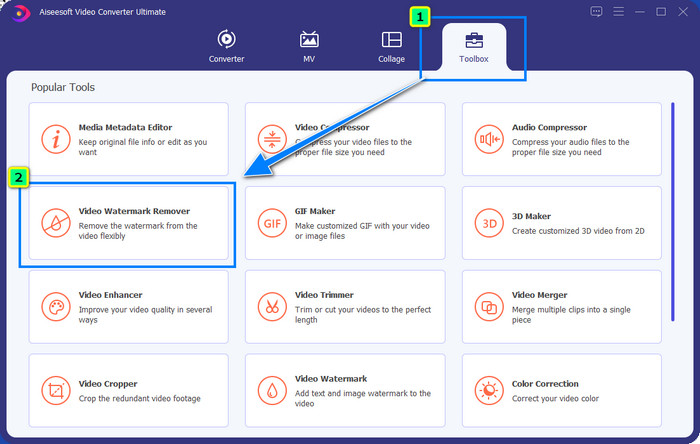
گام 2. در مرحله بعد باید از Video Watermark Remover استفاده کنید؛ این قابلیت را میتوانید در بخش Toolbox پیدا کنید. همانطور که میبینید، میتوانید از قابلیتها و ابزارهای ویرایشی مختلف برای تنظیم ویدیوی خود مطابق تصویر دلخواهتان استفاده کنید.
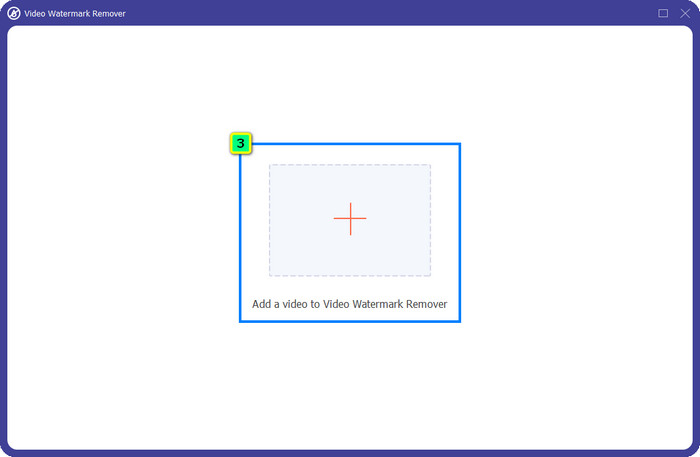
گام 3. روی آیکون بعلاوه کلیک کنید؛ یک مدیر فایل روی صفحه ظاهر میشود. فایل ویدیویی دارای واترمارک را انتخاب کرده و سپس روی Open کلیک کنید تا آن را آپلود کنید.
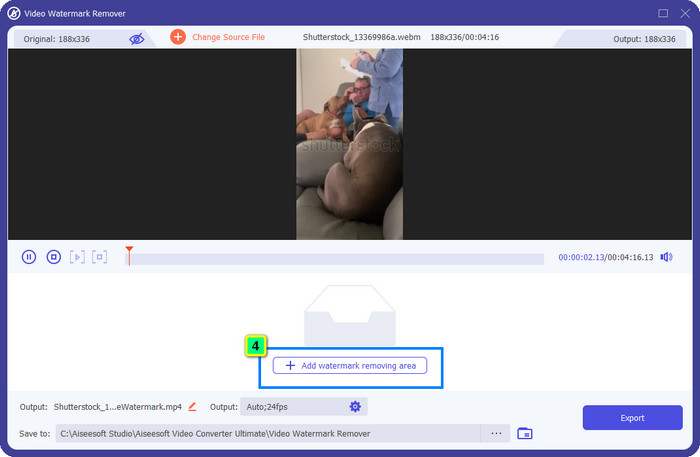
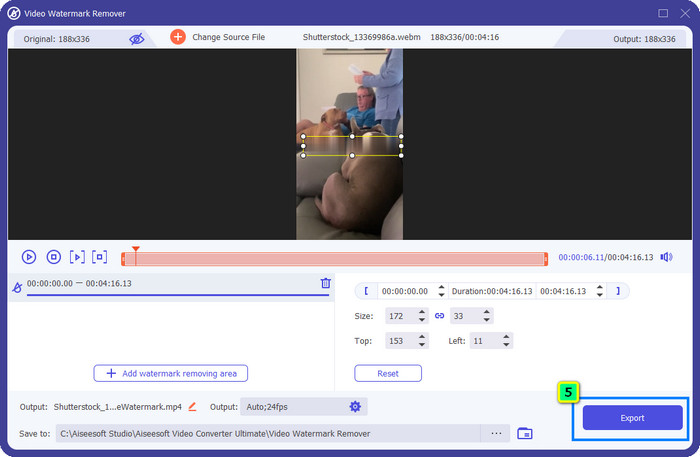
گام 4. برای پاک کردن واترمارک از ویدیویی که آپلود کردهاید، روی Add Watermark Removing Area فشار دهید؛ یک پنجره جدید باز خواهد شد.
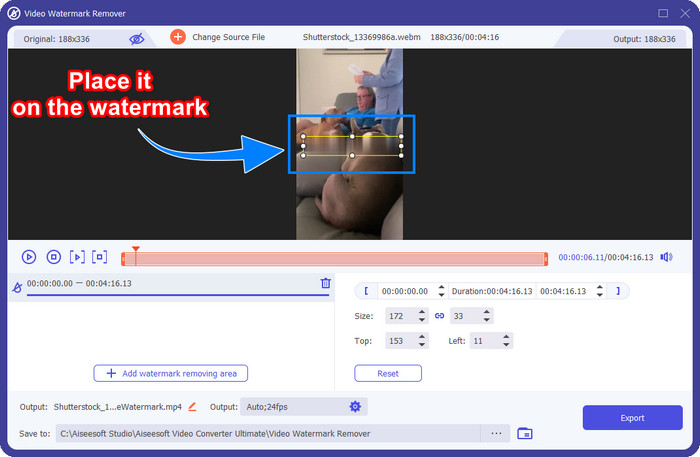
گام 5. در این بخش، یک ناحیه مربعی روی ویدیوی شما ظاهر میشود؛ آن را روی واترمارک قرار دهید. میتوانید آن را تغییر اندازه دهید، بکشید، کوچک یا بزرگ کنید تا کاملاً ناحیه واترمارکی را که میخواهید حذف کنید بپوشاند.
گام 6. در نهایت، روی دکمه Export کلیک کنید تا خروجی نهایی ویدیوی Shutterstock را روی دستگاه خود دانلود کنید. اکنون میتوانید بدون نگرانی از واترمارک، از آن لذت ببرید؛ چون حذف شده است.
قسمت 2. نحوه حذف واترمارک آنلاین Shutterstock به صورت رایگان
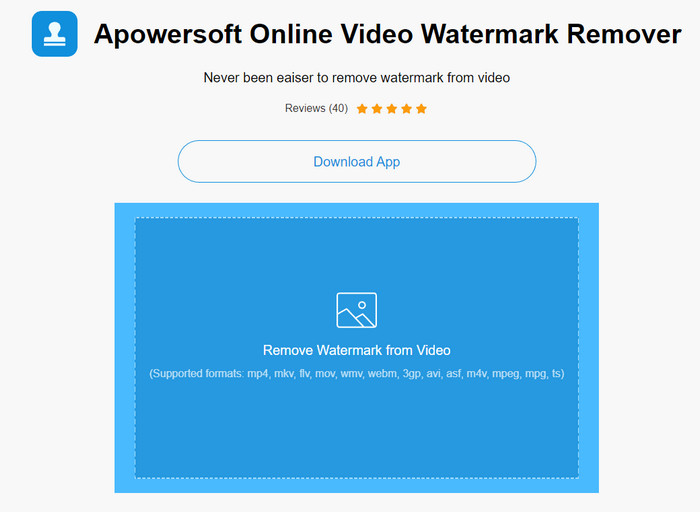
از اینکه ابزار حذف واترمارک را روی دسکتاپ خود دانلود کنید خوشتان نمیآید؟ در این صورت میتوانید از Apowersoft Online Watermark Remover استفاده کنید و ما اینجا هستیم تا به شما یاد بدهیم چگونه واترمارک Shutterstock را بهصورت آنلاین حذف کنید. این گزینهای عالی برای هر کسی است که نیاز دارد واترمارک را از ویدیویی که دارد یا از یک تصویر حذف کند. دلیل اینکه این نرمافزار را معرفی کردهایم این است که دسترسی به آن آسان است و با سیستمعاملهای مختلفی که در اختیار دارید سازگار است.
برخلاف ابزارهای آفلاین، برای استفاده از آنها به یک اتصال اینترنتی پایدار و قوی نیاز دارید. همانطور که قول داده ایم، در زیر آموزش استفاده از این واترمارک حذف کننده برای حذف واترمارکی که Shutterstock روی آن گذاشته است، آورده شده است.
گام 1. وبسایت رسمی Apowersoft Online Watermark Remover را با استفاده از موتور جستوجوی مورد علاقهتان باز کنید، سپس روی دکمه + در سمت راست کلیک کنید تا فایل ویدیو را آپلود کنید.
گام 2. جعبه انتخاب را روی واترمارک Shutterstock موجود در ویدیو قرار دهید.
گام 3. پس از آن روی Erase کلیک کنید تا واترمارک حذف شده و نتیجه را ببینید.
گام 4. روی Download File فشار دهید تا ویدیوی Shutterstock را بدون واترمارک دریافت کنید.
قسمت 3. نحوه حذف واترمارک Shutterstock با استفاده از فتوشاپ [Paid]
کاربران زیادی میپرسند چگونه با استفاده از فتوشاپ واترمارک Shutterstock را حذف کنند و ما اینجا هستیم تا کمکتان کنیم! Adobe Photoshop یک قابلیت حرفهای حذف واترمارک دارد که از کار با آن لذت خواهید برد. مانند نرمافزاری که در این مقاله معرفی شد، این ابزار هم کار را انجام میدهد؛ با این تفاوت که روش آن برای حذف واترمارک، فریمبهفریم است. یعنی باید برای هر فریم ویدیو زمان بگذارید و واترمارک را حذف کنید؛ هرچه ویدیو طولانیتر باشد، تعداد فریمها بیشتر است. اگر میخواهید بدانید این ابزار چگونه عمل میکند، مراحل آموزنده زیر را بخوانید.
گام 1. برنامه را روی دسکتاپ خود دانلود کنید، سپس روی File کلیک کنید. از زیرمنوی آن، Open را فشار دهید تا ویدیوی ذخیرهشده در کامپیوترتان را آپلود کنید.
گام 2. در سمت چپ، Magic Wand Tool را انتخاب کرده و روی واترمارکی که میخواهید حذف کنید کلیک کنید. این قابلیت بهطور خودکار واترمارک را در فریم ردیابی میکند.
گام 3. به منوی Edit بروید و پس از ردیابی واترمارک، روی Content-Aware Fill کلیک کنید.
گام 4. پس از باز کردن Content-Aware Fill، واترمارکی را که قبلاً انتخاب کردهاید بهطور خودکار حذف میکند، سپس روی OK فشار دهید.
مطالعه بیشتر:
روشهای آسان برای حذف واترمارک Shootproof
چگونه واترمارک Bandicam را بهراحتی حذف کنیم [۳ روش مؤثر]
بخش 4. سؤالات متداول در مورد نحوه حذف واترمارک Shutterstock
چگونه بدون فتوشاپ واترمارک Shutterstock را حذف کنیم؟
می توانید از FVC Video Converter Ultimate برای حذف Shutterphoto محدود شده به ویدیوی خود استفاده کنید. دارای یک پاک کن قدرتمند واترمارک است که دوست دارید آن را امتحان کنید. مراحلی را که در این مقاله اضافه کردهایم دنبال کنید تا این کار را به همان اندازه فتوشاپ انجام دهید.
آیا برش واترمارک Shutterstock روی ویدیو کار می کند؟
اگر میخواهید اندازه ویدیو را با تغییر ابعاد تغییر دهید، میتوانید ویدیو را با کمک چندین ویرایشگر ویدیو به صورت آنلاین و آفلاین برش دهید. از آنجایی که واترمارک Shutterstock در وسط قرار دارد، بهتر است از ویژگی های برش استفاده نکنید. تعداد زیادی از پاک کننده های واترمارک برای کمک به اینجا آمده اند. میتوانید آموزشی را که اضافه میکنیم بخوانید و کپی کنید تا بتوانید آن را به طور مؤثر پاک کنید بدون اینکه لکه روی آن باقی بماند.
آیا حذف واترمارک Shutterstock قانونی است؟
حذف واترمارک Shutterstock قانونی نیست، اما اگر میخواهید از آن برای غیرتجاری استفاده کنید، میتوانید این کار را با کمک یک حذف کننده واترمارک انجام دهید. اگر می خواهید از آن برای مقاصد تجاری استفاده کنید، بهتر است عکس مورد نظر خود را در Shutterstock خریداری کنید. اگرچه این کار برای شما هزینه دارد، اما حداقل به شما اجازه می دهد که حقوق قانونی استفاده از آن را داشته باشید.
نتیجه
اکنون میدانید چگونه با نرمافزارهایی که در این مقاله معرفی شدهاند، واترمارک Shutterstock را حذف کنید. پس کدام نرمافزار را ترجیح میدهید: نسخه پولی، ابزار آنلاین رایگان، یا نرمافزار نهایی (Ultimate)؟ با هر انتخابی، میتوانید به عکس یا ویدیوی Shutterstock بدون لوگوی محصول دست پیدا کنید. اما اگر از ما بپرسید چه چیزی را پیشنهاد میکنیم، بدون تردید FVC Video Converter Ultimate را انتخاب میکنیم، چون رضایتبخشترین نتیجه را در انجام این کار ارائه میدهد. با وجود اینکه یک ابزار قدرتمند برای حذف واترمارک است، کار با آن همچنان ساده است. پس اگر میخواهید این نرمافزار را امتحان کنید، میتوانید روی دکمه دانلود کلیک کرده و این ابزار را روی دسکتاپ خود داشته باشید.
-
 ابزارهای نهایی برای حذف واترمارک از ویدیوهای صادر شده Renderforest
 برای حذف واترمارک از Renderforest به حذف کننده واترمارک روی دستگاه خود نیاز دارید، تمام ابزارهایی که می توانید استفاده کنید در اینجا هستند.
-
 مراحل آسان در مورد نحوه حذف واترمارک لغزنده WOW [حل شد]
 WOW Slider برنامه ای برای ایجاد یک نمایش اسلاید فوق العاده است. با این حال، واترمارک روی خروجی خود تعبیه می کند. برای یادگیری نحوه حذف واترمارک WOW Slider، زیر را بخوانید.
-
 چگونه به صورت رایگان از شر واترمارک Power Director خلاص شویم [کامل]
 چگونه به صورت رایگان از شر واترمارک Power Director خلاص شویم؟ بهترین ابزار برای از بین بردن واترمارک اینجا هستند، پس با خواندن این مطلب، آنها را بیاموزید.
