


 Video Converter Ultimate
 ضبط صفحه
 تعمیر ویدیو
بهترین روش ها برای حذف لوگو VideoScribe از یک ویدیو
آیا میخواهید یاد بگیرید چگونه لوگوی VideoScribe را از ویدیوهای خود حذف کنید؟ گاهی اوقات با لوگویی روی ویدیوی خود روبهرو میشوید که نمیتوانید از آن اجتناب کنید، مخصوصاً وقتی صاحب ویدیو میخواهد از ویدیوهایش محافظت کرده و برندش را تبلیغ کند. همچنین هنگام استفاده از نسخه رایگان بعضی برنامهها با لوگو مواجه میشوید. بهترین نمونه، برنامه VideoScribe است. اگر از نسخه رایگان این برنامه استفاده کنید، روی ویدیوی شما لوگوی VideoScribe قرار میگیرد، مگر اینکه آن را خریداری کنید. اما پیش از آن، میتوانید از برنامههای رایگان دیگر برای حذف لوگو از ویدیوهایتان استفاده کنید. برای آشنایی با نحوه حذف لوگو بدون هیچگونه پرداختی، لازم است این مقاله را بخوانید.

قسمت 1: نحوه حذف لوگوی VideScribe از ویدیو آفلاین
اگر میخواهید لوگوی VideoScribe را بهصورت آفلاین از ویدیوهای خود حذف کنید، میتوانید از Video Converter Ultimate استفاده کنید. این برنامه میتواند بهآسانی و با سرعت، لوگوی VideoScribe را از ویدیوهای شما حذف کند. همچنین میتوانید از این نرمافزار برای ویرایش ویدیوها بدون افت کیفیت استفاده کنید. علاوه بر این، رابط کاربری سادهای دارد که خروجی باکیفیت بالا ارائه میدهد. Video Converter Ultimate هم در مک و هم در ویندوز در دسترس است. با وجود امکانات فراوان، همچنان برای مبتدیان مناسب است. این برنامه از بسیاری از فرمتهای فایل مانند FLV، MOV، MP4، MTS، DivX، XviD و موارد دیگر پشتیبانی میکند. افزون بر آن، این برنامه ابزارهای ویرایشی متعددی برای بهبود ویدیوها در اختیارتان میگذارد؛ مانند بهبود کیفیت، برش (trim)، کراپ، اصلاح رنگ، چرخاندن ویدیوها و موارد دیگر. Video Converter Ultimate همچنین دو روش برای حذف لوگوی VideoScribe از ویدیوهای شما ارائه میدهد.
استفاده از Video Watermark Remover
مرحله 1: روی دکمه دانلود زیر کلیک کنید تا Video Converter Ultimate را روی ویندوز یا مک خود دانلود کنید. سپس نرمافزار را روی دستگاه نصب کرده و اجرا کنید.
دانلود رایگانبرای ویندوز 7 یا بالاتردانلود امن
دانلود رایگانبرای MacOS 10.7 یا بالاتردانلود امن
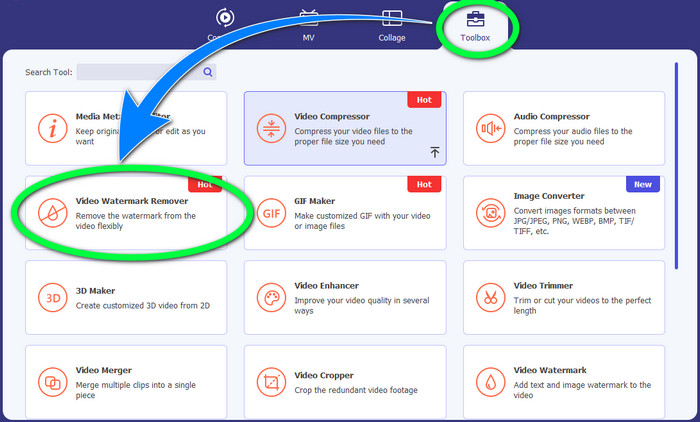
مرحله 2: بعد از آن به بخش Toolbox بروید و روی دکمه Video Watermark Remover کلیک کنید. یک رابط کاربری جدید روی صفحه شما ظاهر میشود.
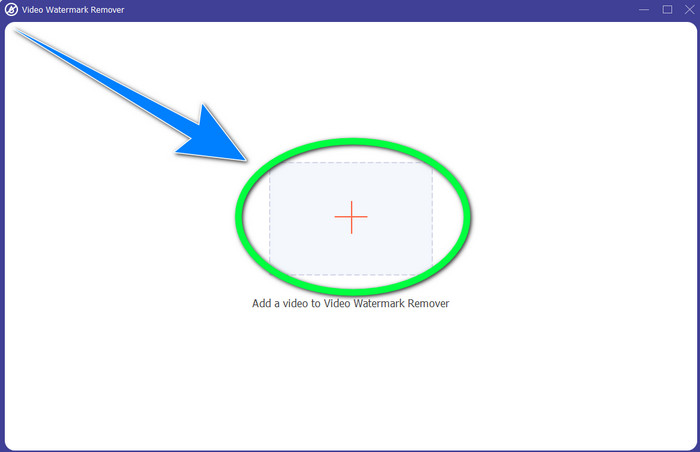
مرحله 3: روی دکمه + کلیک کنید و فایل ویدیویی حاوی لوگوی VideoScribe که میخواهید حذف کنید را وارد نمایید.
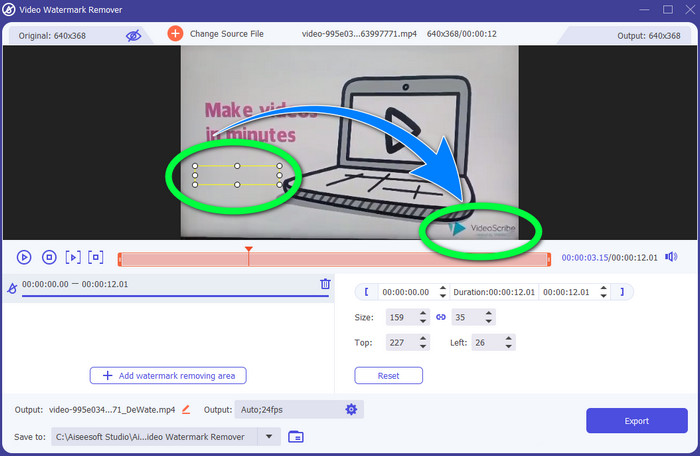
مرحله 4: پس از اتمام وارد کردن ویدیو، روی Add Watermark Removing Area کلیک کنید و جعبه انتخاب کوچک را روی لوگو قرار دهید. میتوانید اندازه جعبه را تنظیم کنید.
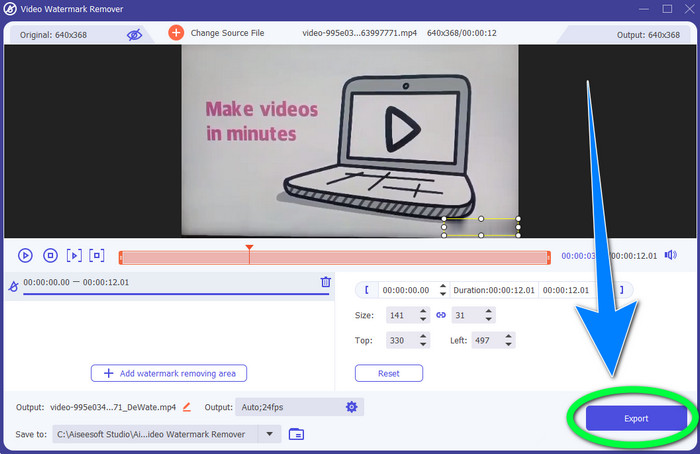
مرحله 5: در مرحله پایانی، میتوانید روی دکمه Export کلیک کنید تا ویدیو را بدون لوگو ذخیره نمایید.
با استفاده از عملکرد برش ویدئو
مرحله 1: ابزار برش (Crop) راه دیگری برای حذف لوگوی VideoScribe است. در قسمت Toolbox روی دکمه Video Cropper کلیک کنید.
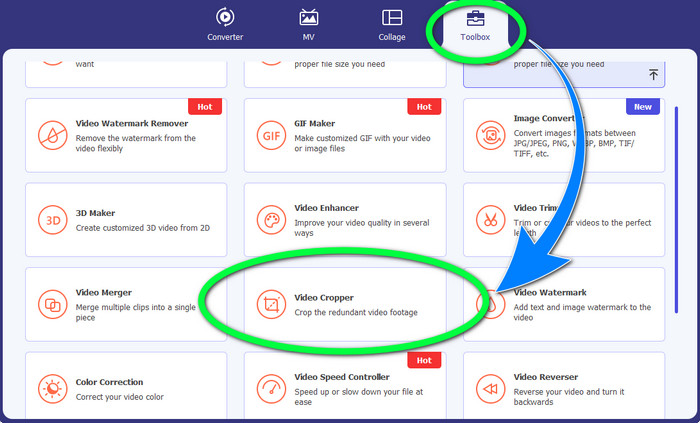
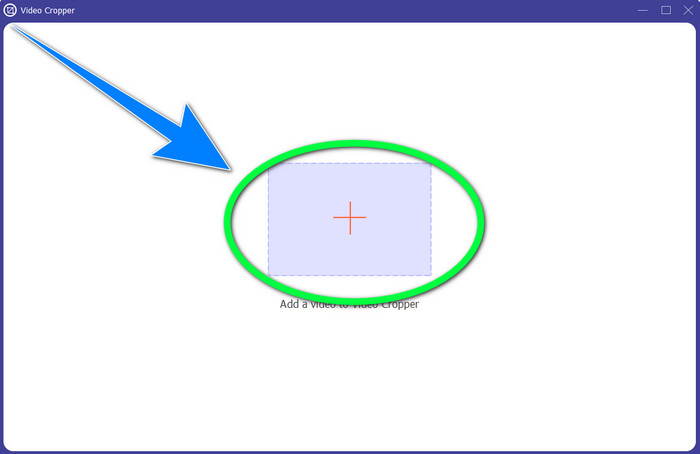
مرحله 2: رابط کاربری جدیدی روی صفحه شما ظاهر میشود. دکمه + را انتخاب کرده و ویدیوی دارای لوگوی VideoScribe را وارد کنید.
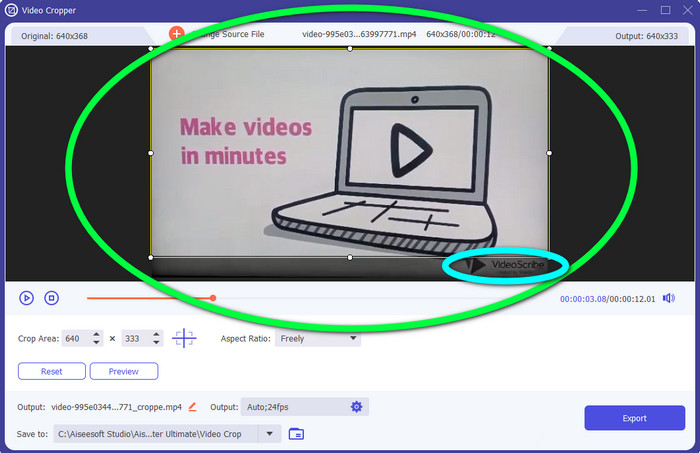
مرحله 3: ابزار برش این امکان را به شما میدهد که لبههای ویدیوی خود را کراپ کنید. اگر لوگو در لبه ویدیوی شما قرار دارد، میتوانید آن بخش را ببُرید تا لوگو حذف شود.
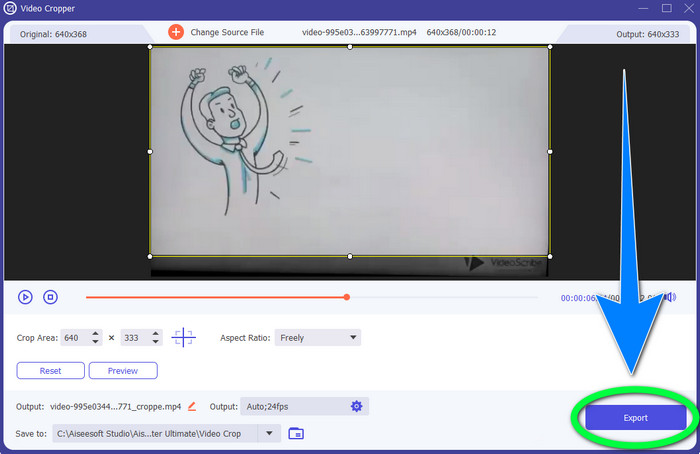
مرحله 4: در ادامه، اگر فکر میکنید که لوگوی VideoScribe را بهطور کامل حذف کردهاید، میتوانید دکمه Export را انتخاب کرده و ویدیوی نهایی را روی دستگاه خود ذخیره کنید.
قسمت 2: نحوه حذف لوگو VideoScribe از Video Online
استفاده از BeeCut-Online Watermark Remover
آیا میخواهید لوگوی VideoScribe را بهصورت آنلاین از ویدیوهای خود حذف کنید؟ BeeCut-Online Watermark Remover یکی از ابزارهای آنلاین عالی و کاربردی است که میتوانید از آن استفاده کنید. این ابزار آنلاین میتواند به شما کمک کند اشیای آزاردهنده را از ویدیوهایتان، مانند لوگو، واترمارک، متن، تاریخ و موارد دیگر، حذف کنید. بنابراین بهدلیل رابط کاربری ساده، میتوانید لوگوی VideoScribe را بدون دردسر از ویدیوهای خود پاک کنید. همچنین BeeCut-Online Watermark Remover از فرمتهای زیادی مانند FLV، MOV، MP4، WebM، ASF، AVI، 3GP، MPG و غیره پشتیبانی میکند. علاوه بر این، با این ابزار میتوانید عناصر مزاحم را از تصاویر خود نیز حذف نمایید. متأسفانه این برنامه وابسته به اینترنت است؛ یعنی اگر به اینترنت یا اتصال پایدار دسترسی نداشته باشید، نمیتوانید از آن استفاده کنید. در مورد فرآیند حذف نیز، گاهی اوقات زمانبر است که این موضوع به سرعت اینترنت شما (سریع یا کند بودن آن) بستگی دارد. مراحل استفاده را بهترتیب در ادامه برای شما آوردهایم.
مرحله 1: به وبسایت BeeCut-Online Watermark Remover بروید. روی دکمه Remove Watermark from Video کلیک کرده و ویدیوی حاوی لوگوی VideoScribe خود را ضمیمه کنید.
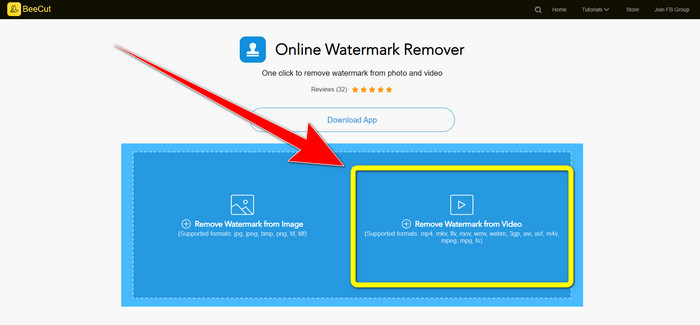
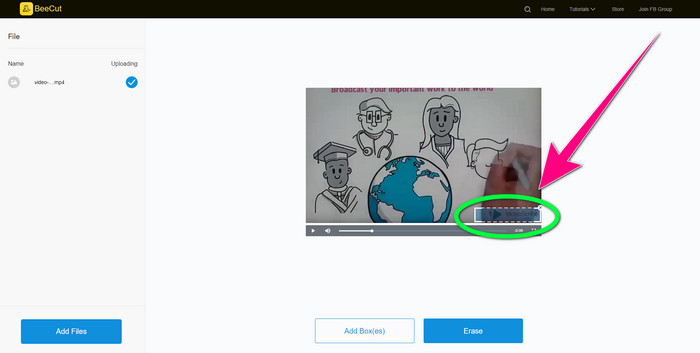
مرحله 2: پس از افزودن ویدیو، از جعبه کوچک روی ویدیو استفاده کرده و آن را بکشید تا لوگو را بپوشاند.
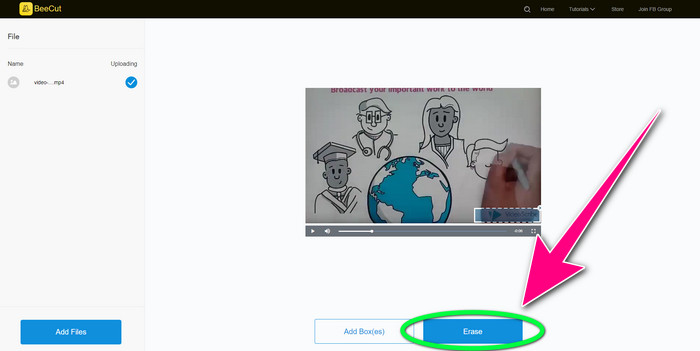
مرحله 3: وقتی با استفاده از جعبه کوچک، لوگو را پوشاندید، دکمه Erase را انتخاب کنید تا ویدیوی خود را بدون لوگوی VideoScribe ذخیره و دانلود کنید.
استفاده از Video Watermark Remover Online
Video Watermark Remover Online ابزار آنلاین دیگری است که میتوانید برای حذف لوگوی VideoScribe از ویدیوهای خود به کار ببرید. این ابزار رابط کاربری سادهای دارد و برای مبتدیان مناسب است. علاوه بر این، میتوانید لوگوها را از ویدیوهای خود حذف کنید بدون اینکه کیفیت آن کاهش یابد، که بسیار عالی است. با این حال، نسخه رایگان این ابزار آنلاین امکانات محدودی دارد. فقط میتوانید از ۵ ویدیو لوگو حذف کنید و امکان خروجی گرفتن در فرمتهای دیگر را ندارید. و از آنجا که یک برنامه آنلاین است، بدون اتصال اینترنت نمیتوانید از آن استفاده کنید. همچنین گاهی اوقات ابزار بهدرستی کار نمیکند. اگر میخواهید نحوه حذف لوگو از ویدیوهای خود را یاد بگیرید، مراحل ساده زیر را دنبال کنید.
مرحله 1: به وبسایت Video Watermark Remover Online بروید. روی دکمه Click or Drag Videos Here کلیک کنید تا ویدیوی حاوی لوگوی VideoScribe خود را وارد نمایید.

مرحله 2: روی دکمه Remove Watermark کلیک کرده و منتظر بمانید تا فرآیند حذف انجام شود. سپس میتوانید ویدیوی خود را ذخیره کنید.
قسمت 3: سوالات متداول در مورد حذف لوگو VideoScribe از ویدئو
آیا می توانم به ابزارهای آنلاین برای حذف لوگو از ویدیوهایم اعتماد کنم؟
بله، تو میتونی. ابزارهای آنلاین ایمن هستند و می توانند فایل ویدیوی شما را ایمن کنند. برخی از ابزارها می توانند به طور خودکار فایل های شما را پس از انجام فرآیند حذف کنند، بنابراین لازم نیست نگران باشید. با این حال، همه ابزارهای آنلاین یکسان نیستند، بنابراین هنوز باید به دنبال بررسی ها باشید تا بدانید آیا می توانید به یک ابزار خاص اعتماد کنید یا خیر.
چگونه می توان از شر لوگوهای یک ویدیو خلاص شد؟
اگر می خواهید از شر لوگو خلاص شوید، Video Converter Ultimate را در رایانه یا مک خود دانلود کنید. می توانید از ابزار حذف واترمارک ویدیویی یا ابزار برش دهنده ویدیو استفاده کنید. این دو راه می تواند به شما کمک کند از شر لوگوی ویدیوی خود خلاص شوید.
آیا می توانم آرم VideoScribe را بدون اشتراک حذف کنم؟
بله حتما! با استفاده از Video Converter Ultimate می توانید آرم VideoScribe را حذف کنید. برای حذف لوگو نیازی به خرید این برنامه ندارید زیرا رایگان است.
نتیجه
این مقاله اطلاعاتی درباره حذف لوگوی VideoScribe از ویدیو با استفاده از ابزارهای قابل دانلود و ابزارهای آنلاین در اختیار شما قرار داد. اما اگر میخواهید لوگو را سریع و بدون دردسر از ویدیوهای خود حذف کنید، میتوانید از Video Converter Ultimate استفاده کنید.
-
 3 تا از جدیدترین پاک کننده های واترمارک Shutterstock که تا به حال به آن نیاز دارید
 آیا واترمارک Shutterstock متصل به ویدیوی صادر شده را دوست ندارید؟ برای پاک کردن موثر آن می توانید از پاک کننده واترمارک Shutterstock استفاده کنید.
-
 نحوه حذف واترمارک Powtoon با استفاده از 4 روش موثر
 این مقاله را بخوانید تا نحوه حذف واترمارک Powtoon را با استفاده از بهترین ابزارهایی که در اینجا قرار داده ایم و یک آموزش یاد بگیرید.
-
 بررسی Apowersoft Watermark Remover – ویژگی ها، مزایا و معایب، و قیمت ها
 Apowersoft Watermark Remover یکی از بهترین حذف واترمارک است که به صورت آنلاین و آفلاین پشتیبانی می کند، برای اطلاعات بیشتر روی این کلیک کنید!
