


 Video Converter Ultimate
 ضبط صفحه
 تعمیر ویدیو
آموزش کامل نحوه حذف واترمارک Weibo که باید بدانید
Weibo یک پلت فرم رسانه اجتماعی شناخته شده است که برای اشتراکگذاری، انتشار و دریافت اطلاعاتی مانند توییتر استفاده میشود که اغلب میتوانید از آن در چین استفاده کنید. همچنین میتوانید تصاویر کوچک، عکسها و ویدیوها را در اینجا پست و دانلود کنید. با این حال، هنگامی که آن را صادر کنید، یک واترمارک وجود خواهد داشت. بسیاری از کاربران می خواهند آن را حذف کنند زیرا باعث اختلال در جلوه های بصری محتوا می شود.
با وجود هزاران ابزار حذف واترمارک، ابزارهای کمی واقعاً میتوانند واترمارک را بهطور مؤثر حذف کنند. بنابراین اگر از واترمارک روی محتوای بصریای که دانلود میکنید خوشتان نمیآید، این مقاله بهترین ابزارهایی را که میتوانید استفاده کنید، گردآوری کرده است. ما آنها را آزمایش کردهایم تا نشان دهیم در حذف واترمارک واقعاً کارآمد و کاربردی هستند. برای اینکه به شما آموزش دهیم چگونه واترمارک ویبو را حذف کنید، باید تا انتهای این مقاله با ما همراه باشید.

قسمت 1. نحوه حذف واترمارک از ویدیوی Weibo با استفاده از Ultimate Watermark Remover
واترمارک ویبو در بسیاری از ابزارها مشکلساز است زیرا اغلب روی تصویر یا ویدیو لکهای از واترمارک باقی میگذارند. اما اگر از FVC Video Converter Ultimate استفاده کنید، هیچ لکهای از واترمارک باقی نخواهد ماند. فرقی نمیکند اندازه واترمارک بزرگ باشد یا کوچک، این ابزار میتواند آن را بدون بر جا گذاشتن هیچ اثری بهطور کامل پاک کند. به این ترتیب میتوانید از تماشای ویدیوی خروجی در ویبو لذت ببرید. به بیان دیگر، حذف واترمارک با کمک این ابزار کاری بسیار ساده است.
علاوه بر این، میتوانید از این ابزار برای موارد دیگری مانند برش، ادغام، فشردهسازی، برش، ایجاد فایلهای GIF و موارد دیگر استفاده کنید. و اگر می خواهید یک واترمارک روی ویدیوی خود اضافه کنید تا کسی نتواند آن را از شما بدزدد، می توانید از این نرم افزار برای انجام این کار استفاده کنید. این نرم افزار همه در یک مورد نیاز روی دسکتاپ شما است. آیا می خواهید بدانید چگونه واترمارک را از ویدیوی Weibo حذف کنید؟ شما می توانید مراحل بعدی را دنبال کنید زیرا ما نحوه انجام آن را گام به گام توضیح می دهیم.
دانلود رایگانبرای ویندوز 7 یا بالاتردانلود امن
دانلود رایگانبرای MacOS 10.7 یا بالاتردانلود امن
': قبل از اینکه مراحل بعدی را دنبال کنید، مطمئن شوید که ویدیوی Weibo را که میخواهید واترمارک آن را حذف کنید صادر کردهاید تا بتوانید آن را به راحتی در پوشه پیدا کنید.
گام 1. ابتدا باید نرمافزار را روی رایانه خود دانلود کنید و نسخه متناسب با سیستمعاملتان را انتخاب کنید. پس از نصب نرمافزار، مراحل راهاندازی WinRAR که روی صفحهنمایش ظاهر میشود دنبال کنید، روی Start Now کلیک کنید تا برنامه اجرا شود و ادامه دهید.
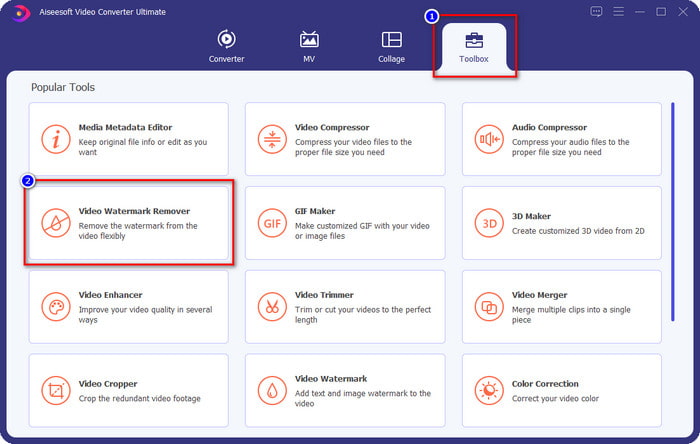
گام 2. به بخش Toolbox بروید و به دنبال گزینه Video Watermark Remover بگردید؛ روی آن کلیک کنید.
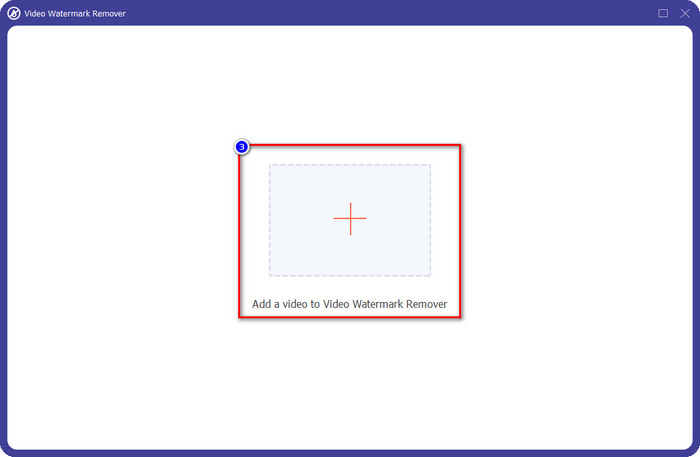
گام 3. روی دکمه + کلیک کنید، ویدئوی ویبویی را که دارای واترمارک است و قبلاً دانلود کردهاید در پوشه پیدا کنید، فایل را انتخاب کرده و روی Open بزنید تا آن را الآن بارگذاری کنید.
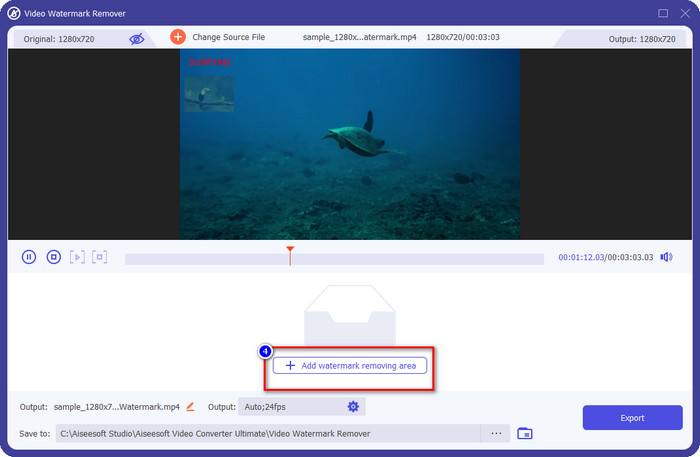
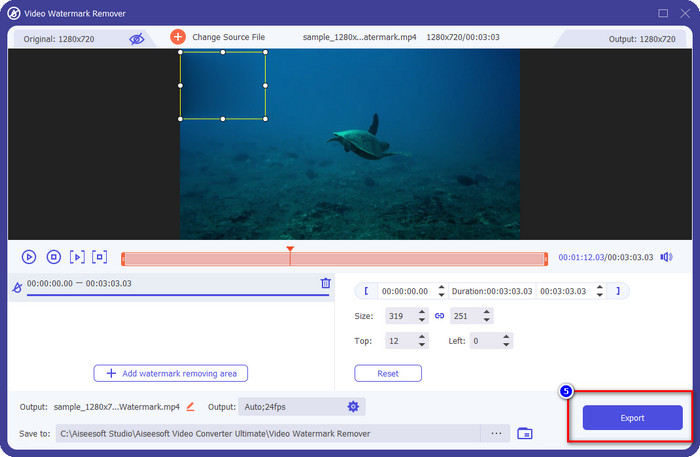
گام 4. در پنجره جدیدی که ظاهر میشود، برای ادامه فرایند حذف واترمارک روی Add Watermark Removing Area کلیک کنید.
گام 5. جعبه انتخاب را بکشید و نگه دارید تا روی واترمارک قرار گیرد؛ میتوانید با توجه به نیازتان آن را بزرگتر یا کوچکتر کنید و کامل روی واترمارک را بپوشانید، سپس ویدیو را خروجی بگیرید.
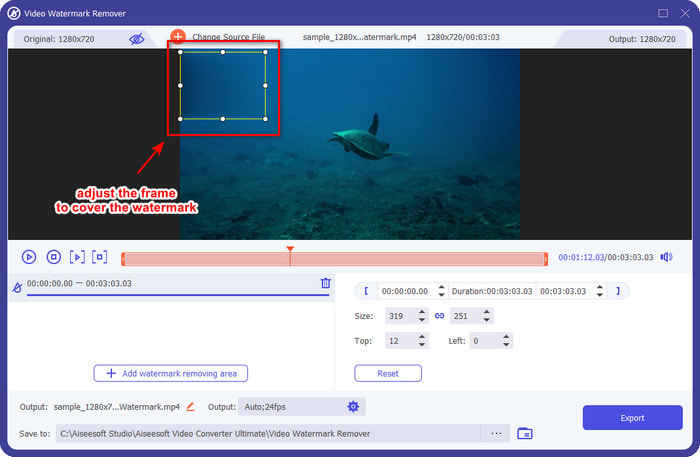
گام 6. پس از قرار دادن جعبه انتخاب روی واترمارک، برای حذف واترمارک از ویدیوی بارگذاریشده روی Export کلیک کنید. نیازی به انتظار طولانی نیست، چون از فرایند فوقالعاده سریع پشتیبانی میکند؛ چند ثانیه بعد ویدیوی ویبو را بدون واترمارک در اختیار خواهید داشت.
قسمت 2. نحوه حذف واترمارک از عکس Weibo با استفاده از نسخه رایگان در وب
چگونه میتوان عکسهای ویبو را بدون واترمارک ذخیره کرد؟ اگر تصویر را مستقیماً از ویبو خروجی بگیرید، نمیتوانید آن را بدون واترمارک ذخیره کنید. اما میتوانید از FVC Free Watermark Remover برای پاک کردن واترمارک روی تصاویر استفاده کنید. این ابزار، پاککنندهای کامل برای تصاویر دارای واترمارک است. از نظر کارایی، میتوان گفت این ابزار بهمراتب بهتر از بسیاری از حذفکنندههای واترمارک آنلاین دیگر است. بنابراین اگر میخواهید واترمارک روی تصویر را حذف کنید، این میتواند اولین انتخاب شما باشد. هرچند قادر است واترمارک روی تصویر را حذف کند، اما مانند نسخه نهایی (Ultimate) توانایی حذف واترمارک روی ویدیوها را ندارد.
با این وجود، استفاده از آن رایگان است و رابط وب آن تمیز است، بنابراین شما حتی تبلیغاتی که ممکن است شما را آزار دهد نخواهید دید. آیا می خواهید بدانید که چگونه از این ابزار وب استفاده کنید؟ سپس مراحل زیر را دنبال کنید تا خودتان آن را امتحان کنید.
توجه: مانند ویدیو، مطمئن شوید که تصویر Weibo را که میخواهید داشته باشید دانلود کنید و مطمئن شوید که آن را در پوشه قابل مشاهده و دسترسی آسان قرار دهید.
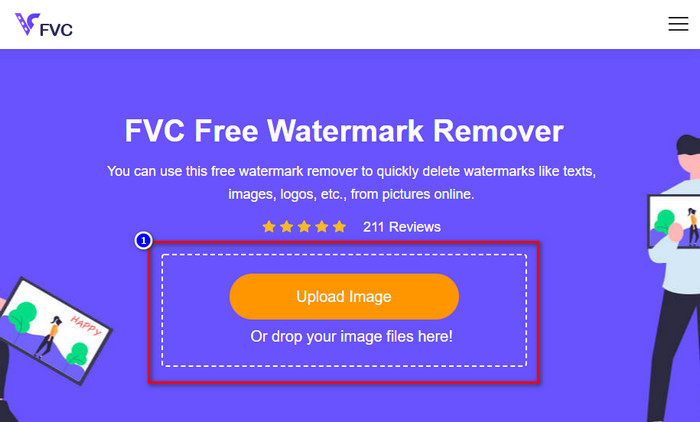
گام 1. برای دسترسی به ابزار حذف واترمارک تحت وب، روی این لینک کلیک کنید تا باز شود.
گام 2. در رابط وب، روی Upload Image کلیک کنید، سپس پوشهای روی صفحه نمایان میشود؛ تصویر را پیدا کرده و روی Open بزنید تا آن را بارگذاری کنید.
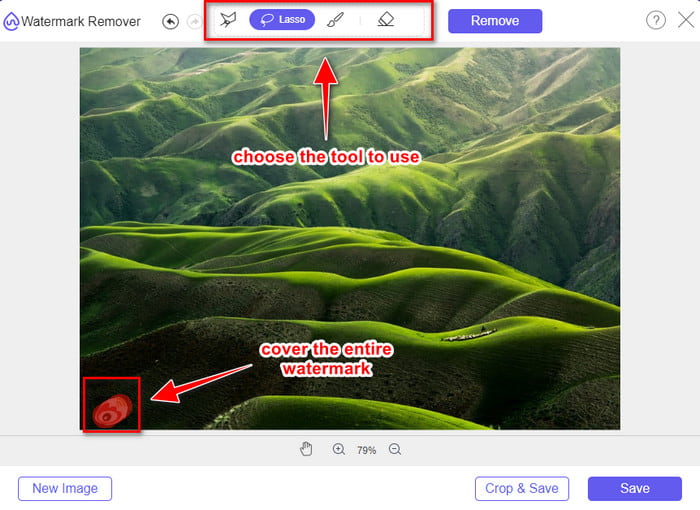
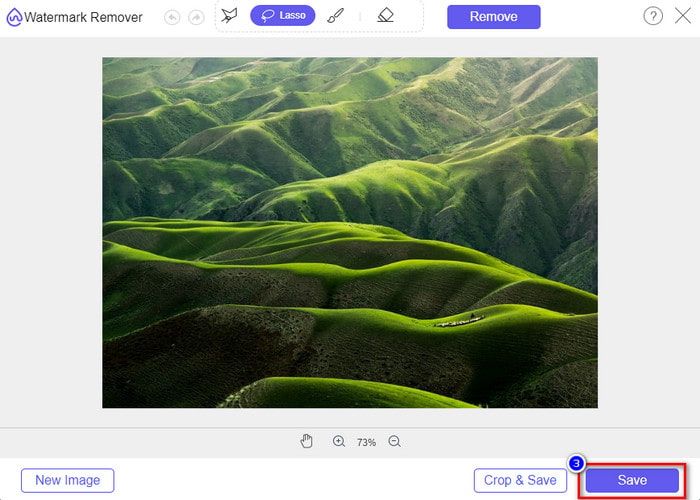
گام 3. اینجا میتوانید روی واترمارک خط بکشید تا آن را حذف کنید و مطمئن شوید تمام بخشهای واترمارک در محدوده ترسیمشده قرار دارد.
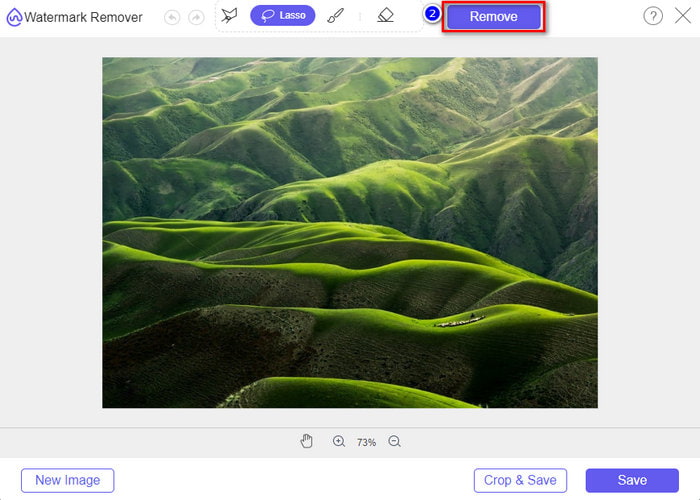
گام 4. روی Remove کلیک کنید تا واترمارکی که روی تصویرتان است پاک شود.
گام 5. پس از حذف واترمارک از تصویر ویبو، روی Save کلیک کنید تا تصویر ویبو را بدون واترمارک دانلود کنید.
مرتبط:
چگونه واترمارک تیکتاک را حذف کنیم
چگونه به ویدیو واترمارک اضافه کنیم
بخش 3. سوالات متداول در مورد نحوه حذف واترمارک Weibo
چرا واترمارک Weibo پس از صادرات تار شد؟
برخی از ابزارها واترمارک را محو میکنند تا در رسانههای تصویری که در Weibo صادر کردهاند، دیده نشود. اما همه ابزارها واترمارک ها را محو نمی کنند. برخی بدون هیچ اثری واترمارک روی رسانه های بصری را حذف می کنند. بنابراین، اگر میخواهید واترمارک را در Weibo بدون محو کردن آن حذف کنید، باید ابزاری را که در بالا ذکر کردیم برای کمک به حذف آن بشناسید.
آیا می توانم لوگوی Weibo را در فایل صادر شده بپوشانم؟
بله، تو میتونی. به این ترتیب، واترمارک Weibo را روی فایل مشاهده نخواهید کرد. با این حال، دستکاری در آن برخی از قسمتهای فایل را پوشش میدهد، بنابراین به جای کمک به شما، میتواند فایل را بدتر کند. بنابراین، برای پاک کردن واترمارک فایل به یک پاک کننده واترمارک نیاز است.
آیا همه فایل های صادر شده در Weibo دارای واترمارک هستند؟
صادرات هر نوع فایلی در این پلتفرم میکروبلاگینگ اثری از خود بر جای خواهد گذاشت. مهم نیست که چه چیزی باشد، واترمارک به فایل اضافه می شود. با این حال، میتوانید با ابزاری که قبلاً در این مقاله به آن اشاره کردیم، آن را حذف کنید.
نتیجه
شگفتانگیز است، نه؟ FVC ابزاری دارد که با آن میتوانید واترمارک ویبو را روی ویدیو و تصویر فوراً حذف کنید. حتی اگر تجربه حرفهای در این نوع ویرایش نداشته باشید، با ابزارهای یادشده ویرایش برای شما امکانپذیر است. بنابراین اگر میخواهید واترمارک روی تصویر را، چه از ویبو خروجی شده باشد چه نه، حذف کنید، FVC Free Watermark Remover تنها ابزاری است که نیاز خواهید داشت. اما برای ویدیوها و GIFها باید از نرمافزار حرفهای، درعینحال ساده و مقرونبهصرفهای مانند FVC Video Converter Ultimate استفاده کنید. منتظر چه هستید؟ واترمارک را از محتوای بصری خود حذف کنید تا از تماشای آن بدون هیچ اثری از نشان لذت ببرید.
-
 بهترین راه برای افزودن واترمارک به یک ویدیو در فتوشاپ در ویندوز و مک
 آیا می خواهید بدانید چگونه یک واترمارک به یک ویدیو در فتوشاپ اضافه کنید؟ در این صورت، این مقاله یکی دو موردی را که باید بدانید در اختیار شما قرار می دهد.
-
 3 بهترین راه حل برای حذف آسان واترمارک از ویدیوها
 آیا می خواهید واترمارک مزاحم روی ویدیو را حذف کنید؟ با این وبلاگ، می توانید ایده های مختلف در مورد حذف واترمارک روی یک ویدیو را بیاموزید.
-
 4 بهترین راه برای حذف واترمارک از GIF [آنلاین و آفلاین]
 آیا نیاز به حذف واترمارک از GIF دارید؟ با ابزار موجود در این مقاله، سبک های مختلف را با پاک کننده های مختلف واترمارک موجود در پلت فرم خود خواهید آموخت.
