


 Video Converter Ultimate
 ضبط صفحه
 تعمیر ویدیو
سریع ترین و ساده ترین راه برای کوتاه کردن ویدیو با بهترین ابزار
کوتاه کردن یا کوتاه کردن یک ویدیو مهم است زیرا فقط کلیپ های لازم را از ویدیوی شما برجسته می کند. کوتاه کردن یک ویدیو به معنای برداشتن ابتدای انتهای یک کلیپ ویدیویی است. این عنصر اساسی ویرایش ضروری است تا توجه مخاطب خود را از دست ندهید. بنابراین، اگر می خواهید ویدیوی طولانی خود را کوتاه یا کوتاه کنید، در این مقاله روش های کوتاه کردن یک ویدیو را یاد خواهید گرفت.

قسمت 1. 2 روش برای کوتاه کردن یک ویدیو در یک تریمر با استفاده از بهترین برنامه
FVC Video Converter Ultimate بهترین ابزار دسکتاپ برای برش دادن و کوتاه کردن ویدیو است. این ابزار رابط کاربری نرمافزاری直فهمی دارد و استفاده از آن رایگان است. این مبدل آفلاین به شما امکان میدهد بخشهایی را به فایل ویدیویی خود اضافه کنید. علاوه بر این، قابلیتی دارد که میتوانید با آن ویدیوی خود را بهسرعت به قسمتهای مختلف دلخواه تقسیم کنید. و اگر بهدنبال ابزاری هستید که بتواند چندین فرمت فایل را در یک فایل ادغام کند، این برنامه نیز این کار را برای شما انجام میدهد.
علاوه بر این، این ابزار امکانات پیشرفته زیادی مانند سازنده GIF، ادغامکننده ویدیو، حذف واترمارک ویدیو و غیره را ارائه میدهد. و چیزی که حتی بهتر است این است که از قالبهای متعدد فایل، از جمله MP4، WMV، FLV، AVI، MPG، WebM، MKV و بیش از 1000 فرمت دیگر پشتیبانی میکند. بنابراین، اگر میخواهید از این برنامه برای کوتاه کردن ویدیوی خود استفاده کنید، دو روش برای دنبال کردن در اختیار شما قرار دادهایم.
روش 1. از ویدئو تریمر FVC استفاده کنید
مرحله 1. ابتدا با کلیک روی دکمه Download زیر، FVC Video Converter Ultimate را دانلود کنید. فرایند نصب را دنبال کرده، سپس برنامه را اجرا کنید.
دانلود رایگانبرای ویندوز 7 یا بالاتردانلود امن
دانلود رایگانبرای MacOS 10.7 یا بالاتردانلود امن
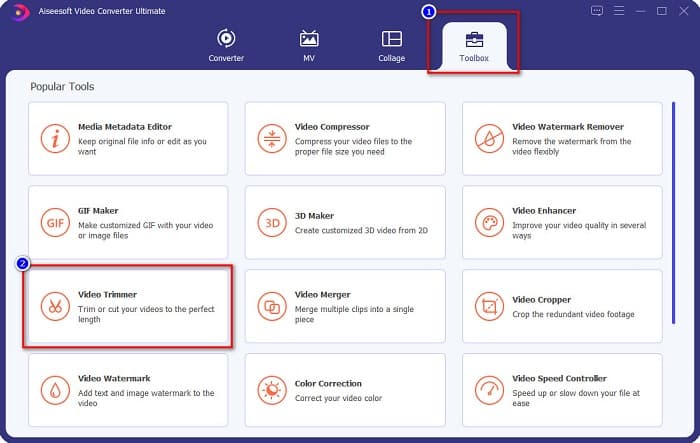
مرحله 2. سپس، پنل Toolbox را که در بالای رابط نرمافزار قرار دارد انتخاب کنید. بعد، در پنل Toolbox روی Video Trimmer کلیک کنید.
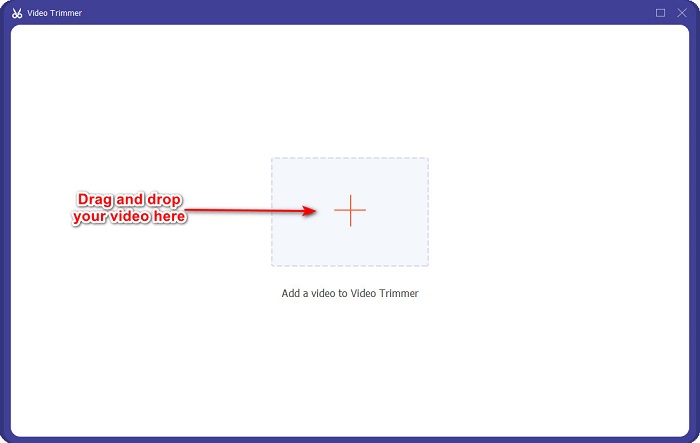
مرحله 3. سپس، در رابط بعدی روی دکمه علامت + کلیک کنید یا ویدیوی خود را بکشید و رها کنید و روی علامت + بیندازید.
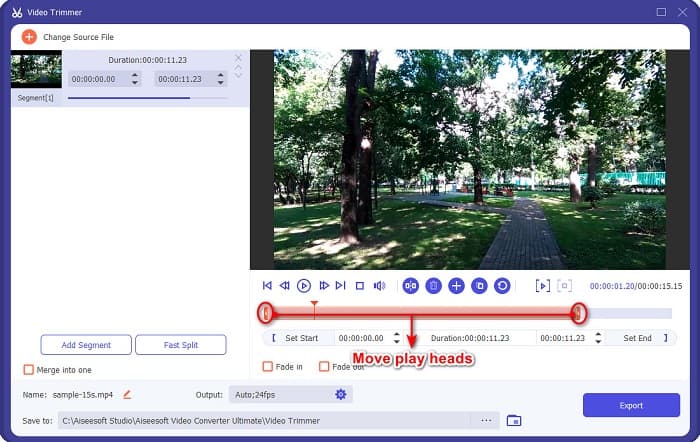
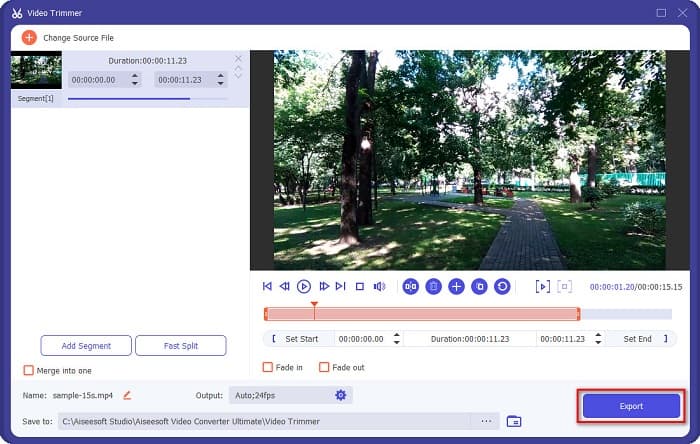
مرحله 4. سپس، دکمههای هد پخش را به طول دلخواه خود منتقل کنید. پیکان محل پیشنمایش ویدیوی شما را نشان میدهد و هدهای پخش طول ویدیوی شما را مشخص میکنند. میتوانید تغییرات موقت ویدیوی خود را در پیشنمایش ببینید.
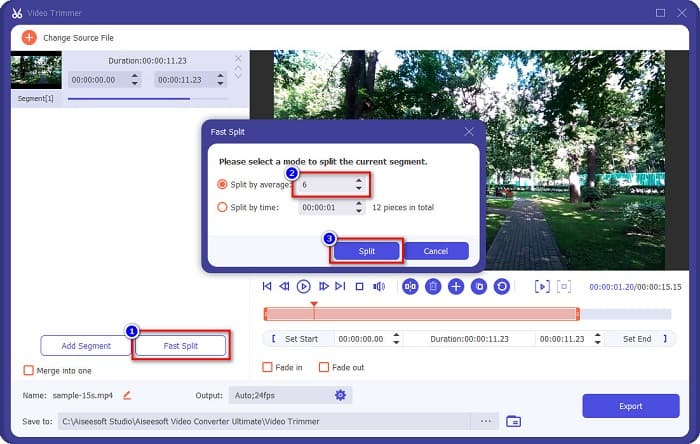
اختیاری. اگر میخواهید به روش سادهتری ویدیوی خود را به قسمتها تقسیم کنید:
1. روی دکمه Fast Split کلیک کنید.
2. تعداد بخشهایی را که میخواهید ویدیویتان به آن تقسیم شود انتخاب کرده، سپس روی Split فشار دهید.
3. اگر نمی خواهید ویدیوی خود را تقسیم کنید، به مرحله بعدی بروید.
مرحله 5. در نهایت روی دکمه Export کلیک کنید تا تغییرات روی ویدیوی شما اعمال شود. سپس خروجی بهطور خودکار در فایلهای رایانه شما ذخیره خواهد شد.
روش 2. از FVC's Video Speed Changer استفاده کنید
FVC Video Converter Ultimate همچنین دارای قابلیتی است که در آن می توانید سرعت ویدیوی خود را با سرعت های 0.125x، 0.25x، 0.5x، 0.75x، 1.25x، 1.5x، 2x، 4x و 8x تغییر دهید. و اگر می خواهید طول ویدیوی خود را کوتاه کنید، ویدیوی خود را با سرعت بالا تنظیم کنید. برای جزئیات بیشتر، راهنمای زیر را دنبال کنید.
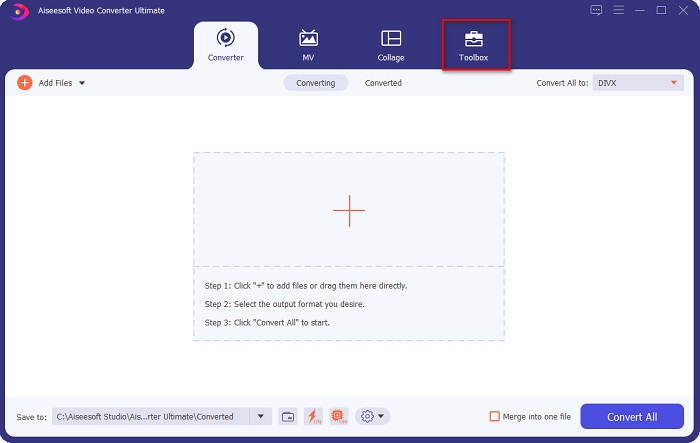
مرحله 1. FVC Video Converter Ultimate را باز کنید. و در رابط اصلی نرمافزار، روی گزینه Toolbox کلیک کنید.
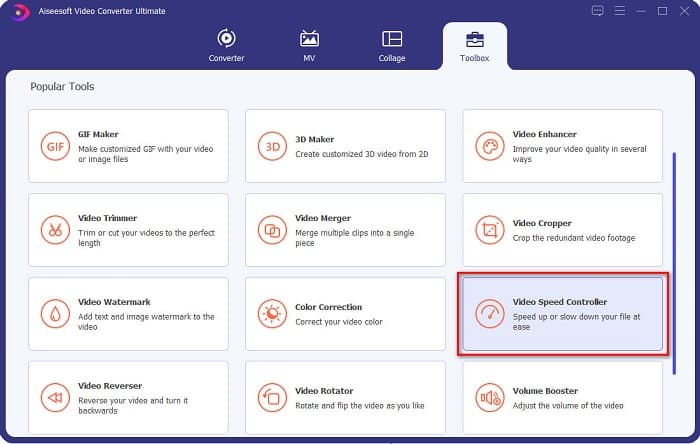
مرحله 2. سپس روی Video Speed Controller کلیک کرده و به مرحله بعد بروید.
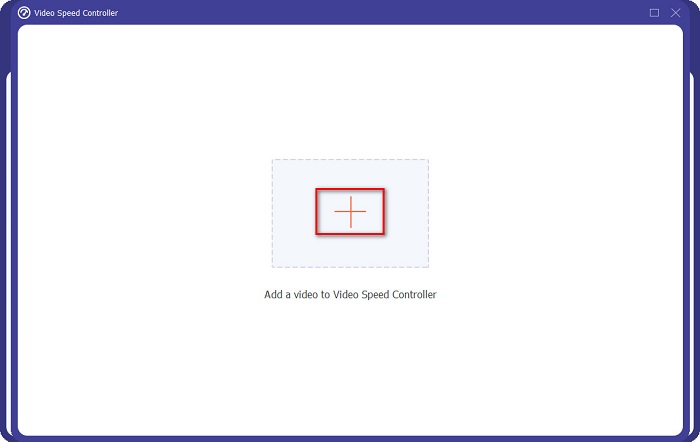
مرحله 3. در ادامه، برای بارگذاری ویدیویی که میخواهید کوتاه کنید، روی دکمه علامت + کلیک کنید. پوشههای رایانه شما ظاهر میشوند و در آنجا ویدیوی مورد نظر را انتخاب کرده و در رابط نرمافزار بارگذاری میکنید.
مرحله 4. برای کوتاهتر کردن ویدیوی خود، سرعتی بین 1.25x تا 8x انتخاب کنید.
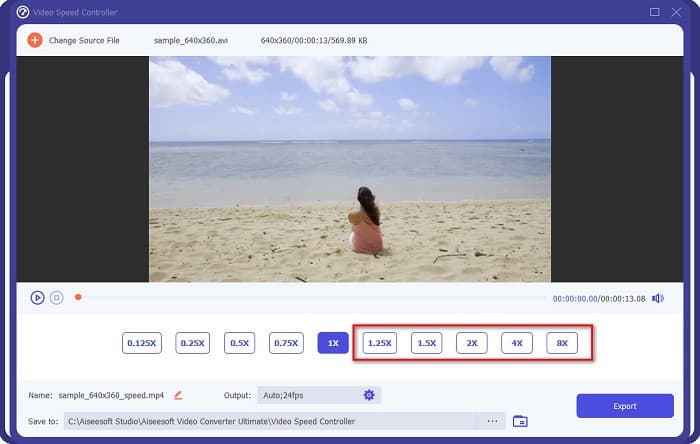
مرحله 5. در مرحله نهایی، روی دکمه Export کلیک کنید تا تغییرات ویدیوی شما ذخیره شود. سپس خروجی بهطور خودکار در فایلهای رایانه شما ذخیره خواهد شد.
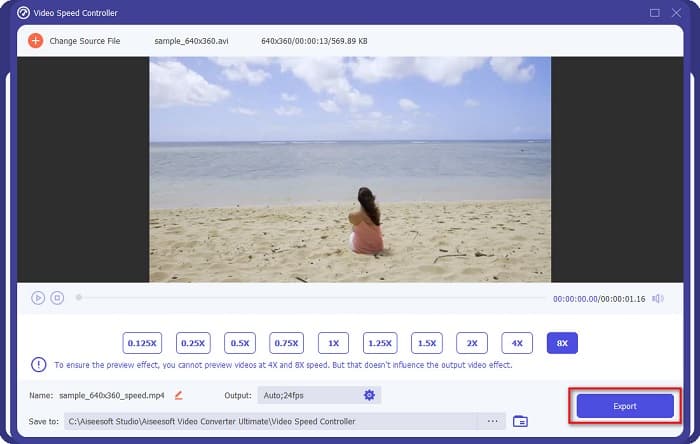
برای مدت کوتاه تر، سرعت 8 برابر را انتخاب کنید.
طرفداران
- از فرمت های فایل های متعددی از جمله MOV، MKV، AVI، MP4، WMV، WMA، MPEG و بیش از 1000 فرمت پشتیبانی می کند.
- دارای یک رابط نرم افزاری با کاربری آسان.
- این امکان را به شما می دهد که ویدیوی خود را تنها با چند کلیک به سرعت تقسیم کنید.
- قابل دانلود در تمام پلتفرم های چندرسانه ای مانند ویندوز، مک و لینوکس.
منفی ها
- ابتدا برنامه را قبل از دسترسی به سایر ویژگی های آن خریداری کنید.
قسمت 2. 2 تریمر آنلاین ویدیویی برای امتحان
اگر میخواهید ویدیوی خود را بدون دانلود چیزی برش دهید، دستگاههای اصلاح کننده ویدیویی آنلاین وجود دارند که میتوانید از آنها استفاده کنید. ما بهترین دستگاه های اصلاح کننده ویدیویی آنلاین را که بسیاری از افراد از آن استفاده می کنند در این قسمت فهرست کرده ایم.
اصلاح ویدئو
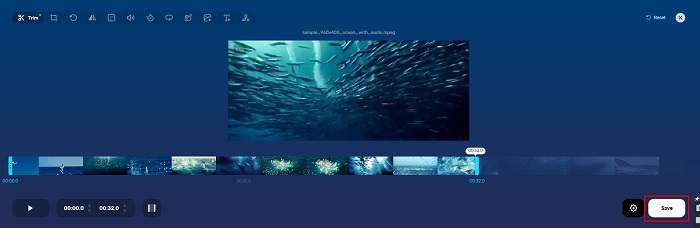
Trim Video یک ابزار آنلاین برای برش ویدیو است که بهدلیل رابط کاربری直فهم، استفاده از آن آسان است. این یک ابزار کاربردی است، زیرا مانند بسیاری از ابزارهای آنلاین دیگر به نصب نیاز ندارد. علاوه بر این، قابلیتی دارد که میتوانید ویدیوی خود را 90، 180 یا 270 درجه بچرخانید. همچنین، نیازی نیست نگران امنیت دادههای خود باشید، چون این ابزار از حریم خصوصی محافظت میکند. با این حال، از آنجا که یک برنامه مبتنی بر وب است، حاوی تبلیغاتی است که ممکن است حواس شما را پرت کند.
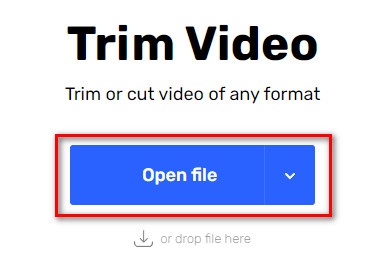
مرحله 1. در مرورگر خود بهدنبال online video trimmer بگردید. سپس، روی سایت Trim Video کلیک کنید. در رابط اصلی نرمافزار روی دکمه Open File کلیک کنید.
مرحله 2. سپس، دکمههای play head را روی طول دلخواه خود تنظیم کنید.
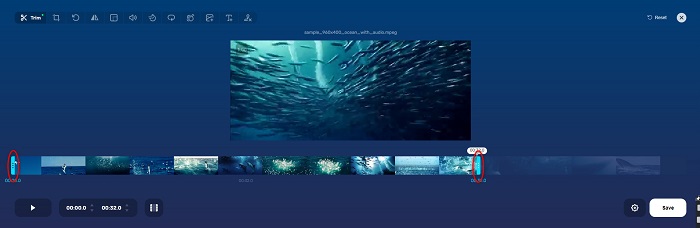
مرحله 3. برای تغییر طول ویدیوی خود روی دکمه Save کلیک کنید.
طرفداران
- دارای رابط کاربری گرافیکی آسان برای استفاده.
- دارای ویژگی هایی برای برش و چرخش ویدیو شما است.
- استفاده از آن بی خطر است.
منفی ها
- این شامل تبلیغات مزاحم است.
- روند بارگذاری و آپلود کندی دارد.
کلیپو
ابزار آنلاین دیگر برای برش ویدیو، Clideo است. این ابزار آنلاین رابط کاربری سادهای دارد که آن را به ابزاری کاربرپسند تبدیل میکند. همچنین از بیشتر فرمتهای استاندارد فایل مانند AVI، MP4، VOB، MPG، MOV و غیره پشتیبانی میکند. علاوه بر این، این ابزار سطح بالایی از امنیت را اعمال میکند؛ به این معنی که دادههای شما امن هستند و دیگران نمیتوانند آنها را مشاهده کنند. افزون بر آن، Clideo هیچ تبلیغاتی که موجب حواسپرتی شود، نمایش نمیدهد.
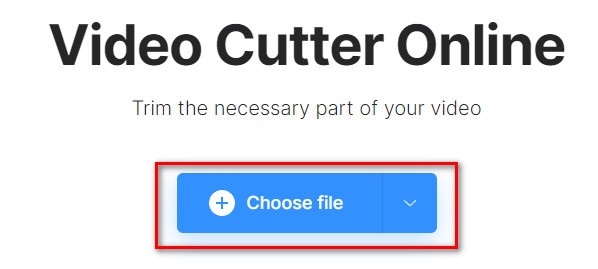
مرحله 1. در مرورگری که استفاده میکنید، عبارت Clideo video trimmer را جستجو کنید. و در اولین رابط نرمافزار، روی دکمه Choose File کلیک کنید. پوشههای رایانه شما ظاهر خواهند شد و در آنجا ویدیویی را که میخواهید کوتاه کنید انتخاب میکنید.
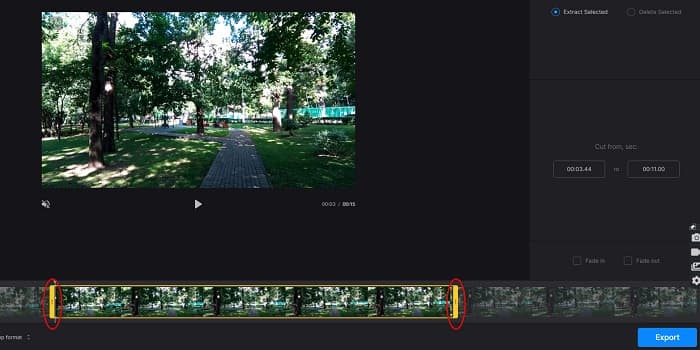
مرحله 2. دکمههای play head را به سمتی حرکت دهید تا ویدیوی شما به طول مورد نظر برسد.
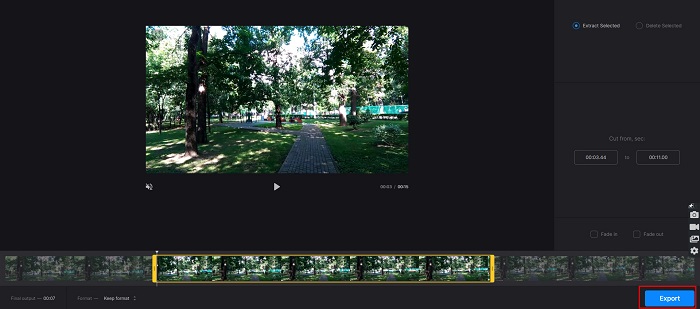
مرحله 3. برای مرحله نهایی، روی دکمه Export کلیک کنید تا طول ویدیوی شما تغییر کند.
طرفداران
- دارای یک رابط کاربری آسان است.
- استفاده از آن بی خطر است.
- این شامل هیچ تبلیغاتی نیست.
منفی ها
- هنگامی که اتصال اینترنت شما کند است ممکن است روند کندی را تجربه کنید.
بخش 3. سوالات متداول در مورد نحوه کوتاه کردن ویدیو
چگونه ویدیو را در آیفون کوتاه کنیم؟
ابتدا برنامه Photo را باز کنید و ویدیویی را که می خواهید برش دهید انتخاب کنید. سپس روی Edit ضربه بزنید. پس از آن، نوار لغزنده را به طول ویدیوی مورد نظر خود منتقل کنید و روی Done ضربه بزنید تا تغییرات ویدیوی شما ذخیره شود.
آیا کوتاه کردن ویدیو روی کیفیت تأثیر می گذارد؟
خیر. اکثر ابزارهای پیرایش بر کیفیت ویدیوی شما تأثیری ندارند. اما اگر به ابزاری اطمینان میدهید که هنگام کوتاه کردن ویدیوتان بر کیفیت تأثیر نمیگذارد، از FVC Video Converter Ultimate استفاده کنید.
آیا کوتاه کردن ویدیو روی اندازه فایل تأثیر می گذارد؟
آره. هرچه ویدیوی شما کوتاهتر باشد، حجم فایل کمتری دارد. در مقابل، اگر ویدیوی شما طولانی است، حجم فایل بسیار بالایی دارد.
نتیجه
همه آنچه درباره کوتاه کردن ویدیو با استفاده از ابزار برش (trimmer) و تغییر سرعت ویدیو لازم بود، همین بود. همه ابزارهای فهرستشده نتایج بسیار خوبی ارائه میدهند و بهترین عملکرد را برای شما تضمین میکنند. اما اگر بهدنبال بهترین ابزاری هستید که امکانات زیادی برای استفاده داشته باشد و در زمینه کوتاه کردن ویدیو بسیار محبوب است، FVC Video Converter Ultimate بهترین ابزار برای شماست.
-
 نحوه قطع و ادغام آهنگ های آنلاین - 4 بهترین راهی که باید بدانید
 هنگامی که می خواهید آهنگ ها را به صورت آنلاین قطع و ادغام کنید تا یک قطعه موسیقی ایجاد کنید ، می توانید با 4 بهترین ابزار آنلاین برای کلیپ کردن آهنگ ها و ترکیب فایل ها از مقاله ، اطلاعات بیشتری کسب کنید.
-
 با روش و اطلاعات ، بهترین دستگاه برش MP4 را کشف کنید
 آیا می خواهید یاد بگیرید که چگونه ویدیوهایی را مانند ولاگرهایی که تماشا می کنید برش دهید؟ سپس به خواندن این پست ادامه دهید تا بدانید از چه تریمرهای MP4 می توانید استفاده کنید.
-
 5 برش MP3 برای برش آسان هر صدا [به روز رسانی 2022]
 آیا برای برش صدا به کاتر MP3 نیاز دارید؟ در این صورت، این مقاله را بخوانید زیرا ما ابزارهایی را ارائه میدهیم که میتوانید به آنها وابسته باشید که برش آسان صدا را فراهم میکنند.
