


 Video Converter Ultimate
 ضبط صفحه
 تعمیر ویدیو
درک عمیق درباره 5 ویرایشگر ویدیوی حرکت آهسته موجود
آیا تماشای ورزشهای پرضرب و با سرعت بالا مثل مسابقات اتومبیلرانی، بوکس، بیسبال، والیبال و موارد دیگر را دوست دارید؟ همهی این ورزشها برای تحلیل حرکت، به دوربینهای بسیار پرسرعت نیاز دارند. اگر میخواهید هر حرکت هر ورزشکار را مو به مو تحلیل کنید، بهتر است با بهترین سازنده ویدیو اسلوموشن که میتوانید استفاده کنید آشنا شوید. همچنین با کمک ابزارهایی که در ادامه معرفی میشوند، دیگر نیازی به هیچ تجهیزات اضافی جز کامپیوتر، اینترنت یا تلفن همراه خود نخواهید داشت. هنگام ادامه مطالعه، ابزارها را با دقت بخوانید و انتخاب کنید کدامیک برای شما مناسبتر است.

قسمت 1. 3 بهترین فیلم ساز با حرکت آهسته برای رایانه های شخصی ویندوز، مک و آنلاین
1. Video Converter Ultimate
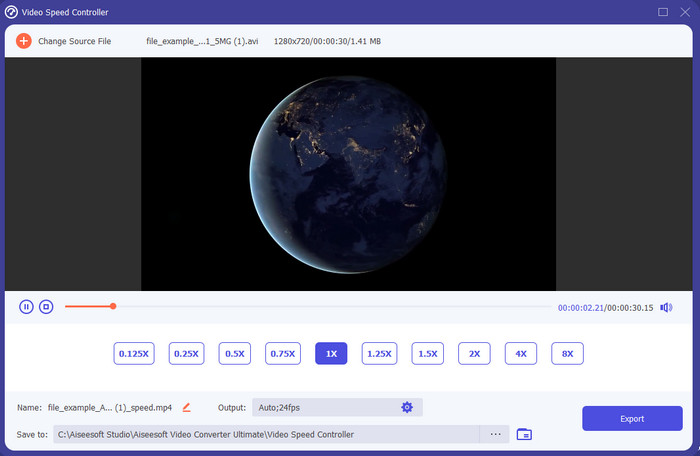
میخواهید بدانید کدامیک از ویرایشگرهای ویدیو اسلوموشن برای تبدیل پخش معمولی به حرکت آهسته بهتر است؟ پس Video Converter Ultimate را امتحان کنید، چون این ابزار نهتنها بهترین، بلکه واقعاً شگفتانگیز است. این ابزار از پیش تعداد زیادی قابلیت پیشرفته دارد که حتی اگر حرفهایِ تدوین ویدیو هم نباشید، از آنها خوشتان خواهد آمد. حتی اگر حرفهای هم باشید، این نرمافزار بدون توجه به سطح مهارت تدوین شما، انتخابی بسیار مناسب است. علاوه بر این، میتوانید خیلی سریع، افکت حرکت آهسته را روی ویدیوی خود اعمال کنید بدون اینکه لازم باشد دفترچه راهنما بخوانید یا ویدیوهای آموزشی تماشا کنید، چون دستورالعملهای این ابزار بسیار سادهتر از ابزارهای دیگری است که در ادامه میآیند. البته باید برای دسترسی، هزینه آن را پرداخت کنید، اما قیمت آن چندان بالا نیست. اگر میخواهید اطلاعات بیشتری درباره این ابزار بدانید، ویژگیهای کلیدی زیر را بخوانید.
ویژگی های کلیدی Video Converter Ultimate:
◆ اپلیکیشن پیشرفته سازنده ویدیو اسلوموشن با دستورالعملهای ساده.
◆ رابط ابزار کاربر پسند.
◆ سرعت ویدیو را به راحتی روی کنترلر سرعت ویدیو تنظیم کنید.
◆ از بیش از 200 فرمت ویدیویی و صوتی پشتیبانی می کند.
◆ می توان آن را در سیستم عامل های PC و Mac بارگیری کرد و به آن دسترسی داشت.
دانلود رایگانبرای ویندوز 7 یا بالاتردانلود امن
دانلود رایگانبرای MacOS 10.7 یا بالاتردانلود امن
2. واحد زمان پیوسته بوریس
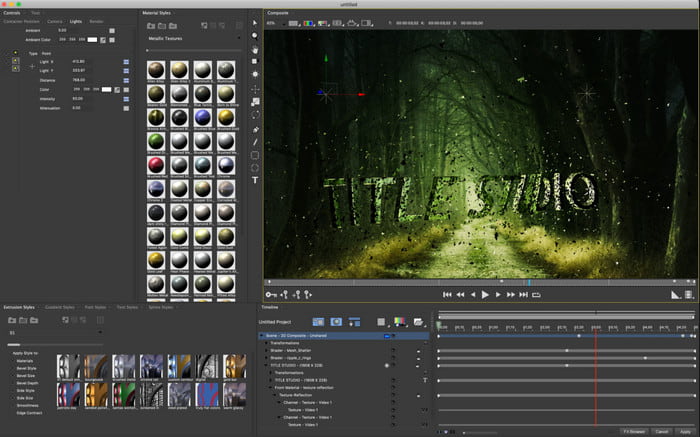
اگر بهدنبال یک اپلیکیشن قدرتمند برای ساخت ویدیو اسلوموشن هستید، Boris Continuum Time Unit بهترین انتخاب است. هیچ ابزار دیگری نمیتواند مثل این برنامه، خروجیای در حد حرفهای ارائه دهد. علاوه بر این، این ابزار دقیقترین و جزئیترین امکانات ویرایشی را در اختیار شما میگذارد که ارزش امتحان کردن دارند. با وجود اینکه این ابزار از بقیه قویتر است، اما واقعاً بسیار گرانقیمت است. همچنین اگر میخواهید از آن استفاده کنید، باید یک سیستم دسکتاپ قدرتمند و بهروز داشته باشید، چون روی کامپیوترهای قدیمی قابل استفاده نخواهد بود.
طرفداران
- بهترین ابزار برای انجام ویرایش های سنگین.
- با تمام پلتفرم ها سازگار است.
- رابط این ابزار بیشتر شبیه یک ابزار حرفه ای است.
منفی ها
- این نرم افزار گران ترین در این نوشتن است.
- نیاز به یک واحد سیستم درجه بالا.
- برای مبتدیانی که سابقه ویرایش ندارند، بهترین انتخاب نیست.
3. VEED.IO
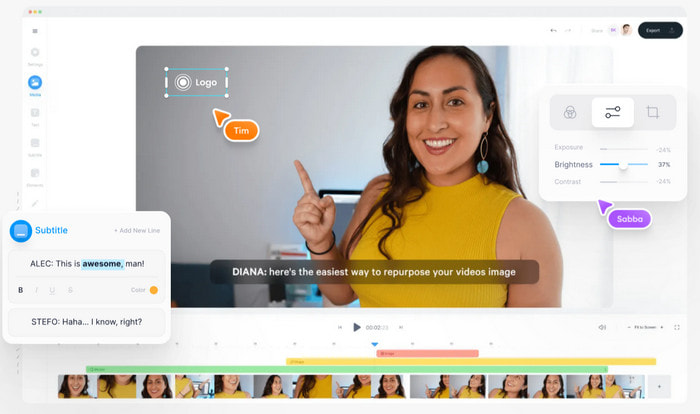
پس اگر نمیخواهید هیچ هزینهای بپردازید و به اینترنت هم دسترسی دارید، سعی کنید از VEED.IO استفاده کنید. این وبسایت، بهترین نرمافزار آنلاین برای ساخت ویدیو اسلوموشن است، چون ساده و دسترسپذیر است. رابط کاربری آن بسیار تمیز است و دستورالعملها هم کاملاً سرراست هستند، بنابراین کار با آن برای همه راحت است. با این حال، فقط میتوانید فایلهایی با حجم کمتر از ۵۰ مگابایت آپلود کنید و اگر بخواهید فایلهای حجیمتری اضافه کنید، لازم است حساب خود را ارتقا دهید. همچنین، اگر نسخه پولی را تهیه نکنید، باید انتظار داشته باشید که روی خروجی نهایی، واترمارک وجود داشته باشد.
طرفداران
- هر کسی که به اینترنت متصل است به راحتی قابل دسترسی است.
- بدون تبلیغات مزاحم در وب سایت
- به راحتی توسط مبتدیان در ویرایش برخورد می شود.
منفی ها
- ویژگی های ابزار در نسخه رایگان ابزار بسیار محدود است.
- وابسته به اینترنت بنابراین، اگر اینترنت شما کند است، منتظر آپلود، دانلود و ویرایش با سرعت پایین باشید. همچنین در صورت عدم اتصال به اینترنت نمی توانید به این ابزار دسترسی داشته باشید.
قسمت 2. 2 بهترین برنامه ویدیویی با حرکت آهسته در اندروید و iOS
1 SloPro
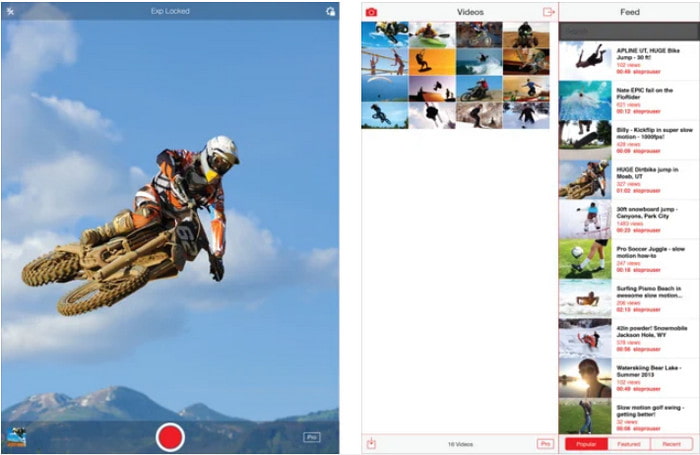
SloPro بهترین اپلیکیشن ویدیو اسلوموشن است که میتوانید بهصورت رایگان روی iOS دانلود کنید. این برنامه میتواند ویدیوها را تا ۵۰۰ تا ۱۰۰۰ فریم بر ثانیه به حرکت آهسته تبدیل کند. علاوه بر این، میتوانید ویدیو را از تند به آهسته یا برعکس تغییر دهید. با وجود اینکه گزینه بسیار خوبی است، اما هنوز هم ایراداتی دارد؛ مثلاً ویدیو خروجی در گالری خودِ برنامه ذخیره میشود، نه در Camera Roll. همچنین طبق نظر کاربرانی که آن را امتحان کردهاند، اگر بخواهید از حالت ۱۰۰۰ فریم بر ثانیه استفاده کنید، ویدیو دچار لگ و باگ میشود. با این همه، چون کاملاً رایگان است و کم کردن سرعت ویدیو در آن بسیار ساده است، همچنان گزینهای بسیار خوب محسوب میشود.
طرفداران
- بهترین پخش اسلوموشن که می توانید به صورت رایگان در iOS استفاده کنید.
- در حال حاضر یک امتیاز منصفانه و یک ستاره 3.3 دریافت کرده است.
- ساده و آسان برای استفاده.
منفی ها
- خروجی نهایی مستقیماً در گالری ذخیره نمی شود.
- همه ویدیوهای ذخیره شده در گالری SloPro تصادفی هستند و به درستی دسته بندی نشده اند.
- اگر از سرعت 1000 فریم بر ثانیه استفاده می کنید، انتظار خروجی ویدیویی باگ را داشته باشید.
2. Slow Motion Video Maker
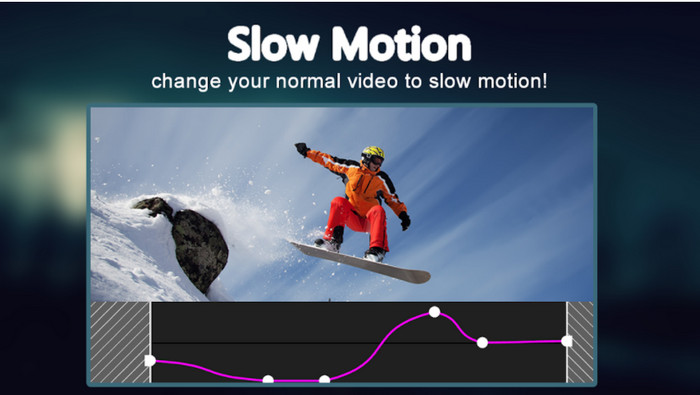
یکی از بهترین سازندههای ویدیو اسلوموشن که میتوانید بهطور رایگان روی گوشی اندروید خود دانلود کنید، Slow Motion Video Maker است. با کمک این اپلیکیشن، میتوانید بهسادگی ویدیوهای خود را بهصورت سریع (Fast Forward) یا حرکت آهسته پخش کنید. با این حال، برنامه پر از تبلیغات آزاردهندهای است که ناگهان ظاهر میشوند. همچنین میزان حرکت آهستهای که میتوانید اعمال کنید فقط تا ضریب ۰٫۵ است. اما در مجموع، برای کند کردن ویدیو در اندروید گزینه خوبی است، هرچند تبلیغات تجربه کار با برنامه را بهشدت تحت تأثیر قرار میدهد.
طرفداران
- این برنامه در فروشگاه Play رایگان است.
- استفاده از آن برای کاهش سرعت ویدیو بسیار عالی است.
- مدیریت برنامه آسان است.
منفی ها
- تبلیغات مزاحم زیادی دارد که از ناکجاآباد نشان داده می شوند.
- دانلود ویدیو ممکن است زمان زیادی ببرد زیرا سرعت پردازش ندارد.
بخش 3. سوالات متداول در مورد فیلم ساز حرکت آهسته
نقش FPS چیست؟
برای محاسبه سری های متوالی فریم هایی که در صفحه نمایش شما نمایش داده می شود استفاده می شود. این معمولاً در هر فیلم برداری مانند بازی های ویدیویی، دوربین ها، فیلم ها دیده می شود و حتی چشم ما می تواند 30 تا 60 فریم در ثانیه را ببیند.
بهترین نرخ FPS در حرکت آهسته چیست؟
فریم بر ثانیه ایده آلی که می توانید برای تماشای ویدئو در حالت پخش آهسته استفاده کنید، بین 120 یا 240 فریم بر ثانیه است. بنابراین، اگر می خواهید پخش اسلوموشن دقیق تری داشته باشید، FPS را بالاتر ببرید.
چگونه یک ویدیو را در حالت پخش سریع پخش کنیم؟
اگر میخواهید بدانید چطور یک ویدیو را با سرعت بالا پخش کنید، روی این لینک کلیک کنید. در آنجا با ۵ ابزار برتر برای تند کردن ویدیو آشنا خواهید شد.
نتیجه
در جمعبندی، تمام ابزارهایی که در اینجا معرفی شدند، بهترین سازندههای ویدیو اسلوموشن هستند که میتوانید در وب پیدا کنید. همچنین این مقاله به شما کمک کرده تا جستوجویتان سریعتر و سادهتر شود. با این حال، یک ابزار خاص وجود دارد که شاید بخواهید برای بهتر کردن ویدیوی خود، از آن استفاده کنید و آن Video Converter Ultimate است. همه قابلیتهای پیشرفتهای که در این برنامه در اختیار دارید، شگفتانگیز و در عین حال، ساده برای استفاده هستند. افزون بر این، اگر هنوز قانع نشدهاید، پیشنهاد میشود ابتدا برنامه را دانلود کنید و خودتان آن را امتحان کنید.
-
 بهترین برنامه Android برای پخش فایل های MOV در تلفن های همراه خود
 به دلیل اینکه ضبط MOV شما نمی تواند در اندروید شما پخش شود، مشکل دارید؟ بنابراین، در این مورد شما در جستجوی بهترین پخش کننده MOV برای اندروید هستید.
-
 5 پخش کننده قدرتمند AVI برای تماشا و پخش فایل های AVI [وب و دسکتاپ]
 بیاموزید که از چه پلیرهای AVI می توانید برای پخش و تماشای فایل های avi.avi استفاده کنید. به خواندن زیر ادامه دهید و انتخاب کنید کدام پخش کننده رسانه بهتر از دیگری است.
-
 روشهای م onثر در نحوه تهیه فایلهای MKV در Xbox One S 2021
 راه هایی را کشف کنید که می تواند به شما کمک کند با استفاده از برخی از بهترین مبدل ها، فایل های MKV را در Xbox One S خود پخش کنید.
