


 Video Converter Ultimate
 ضبط صفحه
 تعمیر ویدیو
یاد بگیرید واترمارک چیست | انواع و دلایلی که چرا در ویدیوها نیاز است
امروزه بارگذاری ویدیو برای همه در دسترس شده است؛ چه شاغل باشید، چه دانشجو، چه مسن و چه جوان، حتی بازنشر آن در دیگر پلتفرمهای شبکههای اجتماعی هم آسان است. هرچند انجام این کار رایگان است، بعضی افراد از ویدیوهای دیگران سوءاستفاده کردهاند تا پولی به دست آورند و عملاً مالکیت آن را به نام خود ثبت کنند. پس برای جلوگیری از دزدیده شدن کاری که انجام دادهاید، باید روی ویدیو واترمارک اضافه کنید. اما چرا لازم است این کار را انجام دهید؟ هدف از آن چیست؟ چطور واترمارک ویدیو را اضافه یا حذف کنیم؟ برای پاسخ به تمام پرسشهایی که در ذهن دارید، خواندن این مقاله را ادامه دهید تا پاسخ سؤال خود را درباره اینکه واترمارک روی ویدیو چیست پیدا کنید.

قسمت 1. واترمارک ویدیو چیست
مشخص است که واترمارک ها بخشی از اکثر محتوای دیجیتالی هستند، مانند ویدیوهایی که در وب آپلود می شوند. از ویدیوهای موجود در شبکه در برابر سرقت توسط هر کسی و استفاده برای منافع خود محافظت می کند. همچنین، هر کسی را قادر میسازد بداند مالک یا منبع ویدیوی مذکور کجا یا کدام است. اگرچه هر کسی به افزودن واترمارک برای محافظت یا تبلیغ دسترسی دارد، هنوز باید واترمارک خود را منحصر به فرد و قابل تشخیص برای هر کسی بسازید. اما واترمارک در ویرایش ویدیو چیست که باید از آن استفاده کنید؟ انواع واترمارک معمولاً در ویدیوها دیده می شود. شما باید به خواندن این مقاله ادامه دهید تا بدانید اینها چیست.
قسمت 2. انواع واترمارک های ویدئویی چیست؟
چهار نوع واترمارک ویدیویی وجود دارد که می توانید از آنها برای اضافه کردن به ویدیوی خود استفاده کنید. برای شناخت انواع آن، باید به خواندن جزئیات زیر ادامه دهید تا به شما کمک کند بدانید چه نوع واترمارکی را باید استفاده کنید.
4 نوع واترمارکینگ که می توانید روی ویدیوها اعمال کنید:
◆ واترمارک محسوس – همانطور که از نامش پیداست، قابل دیدن است؛ یعنی هر واترمارکی که با چشم غیرمسلح دیده شود، واترمارک قابلمشاهده محسوب میشود. همه بهسرعت آن را تشخیص میدهند، چون بهصورت بصری دیده میشود. معمولاً برای تبلیغ و ترویج یک برند استفاده میشود.
◆ واترمارک نامحسوس – برعکس واترمارک قابلمشاهده است. این نوع واترمارک برای کسانی ایدهآل است که میخواهند دزدی را که قصد سرقت ویدیو را دارد شناسایی کنند. چون اگر واترمارک نامرئی باشد، حتی شما هم نمیتوانید آن را با چشم غیرمسلح تشخیص دهید.
◆ واترمارک عمومی - با استفاده از یک الگوریتم مشخص، هر کسی میتواند واترمارک را مطابق سلیقه خود تغییر دهد. هرچند برای همه شفاف و در دسترس است، اما همچنان امنترین روش برای افزودن واترمارک به شمار نمیرود.
◆ واترمارک شکننده - حساسترین نوع طراحی برای واترمارک است. برای افرادی که نمیخواهند محتوایشان توسط افراد سودجو دستکاری شود، بسیار مناسب است. همچنین با هرگونه تغییر در دادههای ویدیو بهسرعت از بین میرود.
قسمت 3. چرا واترمارک به محتوای ویدیوی خود اضافه کنید؟
با استفاده از آن، کاربران و حتی شما به راحتی میتوانید مالک، وبسایت یا نرمافزاری را که در ویدیوی آپلود شده استفاده کردهاند، شناسایی کنید. همچنین، واترمارک را می توان برای برندسازی ظریف در وب، مانند اضافه کردن لوگو، نام برند، خط برچسب و موارد دیگر استفاده کرد. واترمارک ها در درجه اول برای شناسایی نام تجاری و حفاظت استفاده می شوند. هدف شما از افزودن واترمارک هر چه باشد، همه باید واترمارک اضافه کنند، به خصوص اگر بخواهیم آن را در وب آپلود کنیم.
اکثر واترمارک های استفاده شده در ویدیوها شفاف هستند زیرا حذف آنها سخت ترین است، به خصوص اگر در وسط قرار گیرد. حتی اگر واترمارک شفاف است، تماشای یک ویدیوی واترمارک آنقدرها هم که فکر میکنید ناخوشایند نیست. اگرچه می تواند کمک کند، اما هنوز در مورد واترمارک کردن، به خصوص در تجربه تماشای کاربران، معایبی وجود دارد. قسمت 4 را بخوانید تا بدانید بهترین نرم افزار واترمارک رایگانی که می توانید استفاده کنید چیست.
قسمت 4. نحوه افزودن و حذف واترمارک به ویدیوهای خود
میخواهید روی ویدیوی خود واترمارک اضافه یا آن را حذف کنید؟ خوشبختانه، نرمافزار FVC Video Converter Ultimate میتواند با افزودن و حذف واترمارک، این مشکل را برطرف کند. این نرمافزار در زمینه واترمارکگذاری روی ویدیو بدون نقص عمل میکند. از نظر حرفهایها بهترین انتخاب است، اما میتواند برای مبتدیها هم گزینهای عالی باشد؛ زیرا رابط کاربری سادهای دارد که به شما اجازه میدهد در چند دقیقه، افزودن و حذف واترمارک را یاد بگیرید.
همانطور که جزئیات اولیه مشخص می کند که واترمارک چیست و چگونه ساخته می شود. وقت آن است که با خواندن آموزش گام به گام زیر ویدیوی شما را اضافه و حذف کنیم. اما ابتدا باید نرم افزار را روی دسکتاپ خود با کلیک بر روی دکمه دانلود ارائه شده در زیر دانلود کنید. مراحل نصب و راه اندازی را دنبال کنید، سپس ابزار را اجرا کنید و اکنون می توانید مراحل را ادامه دهید.
دانلود رایگانبرای ویندوز 7 یا بالاتردانلود امن
دانلود رایگانبرای MacOS 10.7 یا بالاتردانلود امن
نحوه اضافه کردن واترمارک به ویدیو:
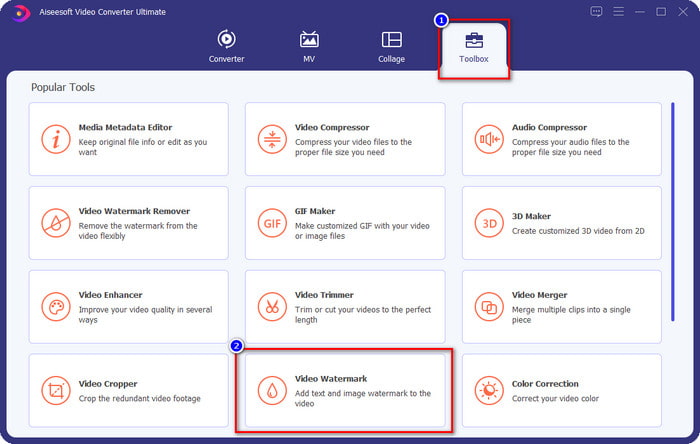
مرحله 1. بعد از باز کردن نرمافزار، به بخش Toolbox بروید و گزینه Video Watermark را پیدا کرده و روی آن کلیک کنید.
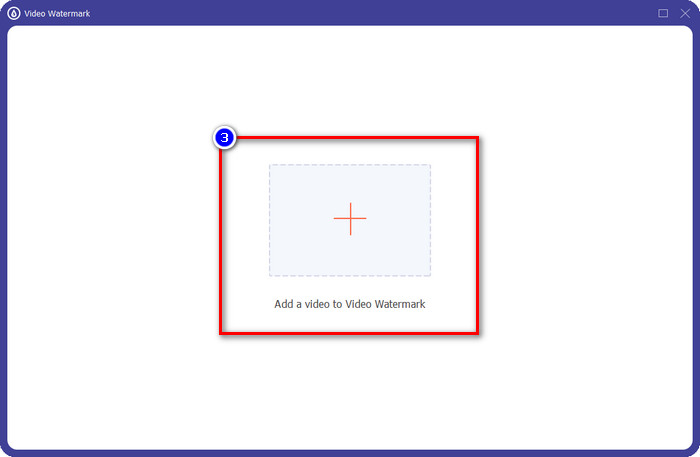
مرحله 2. دکمه + را فشار دهید تا ویدیویی را که میخواهید روی آن واترمارک اضافه کنید، بارگذاری کنید. در پوشهای که باز میشود، فایل ویدیو مدنظرتان را پیدا کرده و برای ادامه روی Open کلیک کنید.
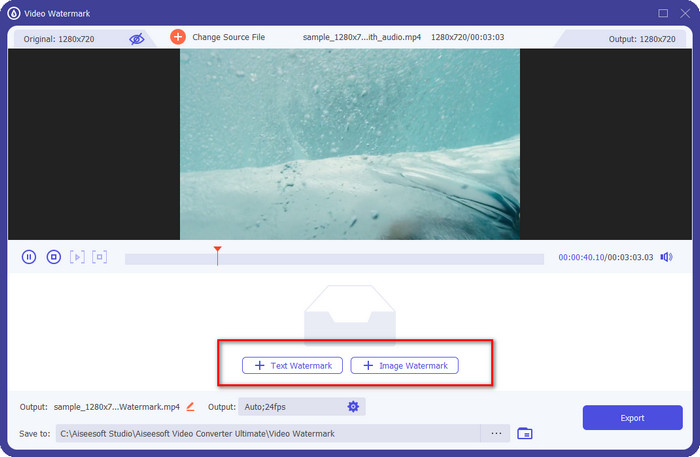
مرحله 3. دو گزینه در دسترس است: اگر میخواهید متن اضافه کنید، باید روی Text Watermark کلیک کنید، اما برای لوگو یا تصویر، باید گزینه Image Watermark را انتخاب کنید.
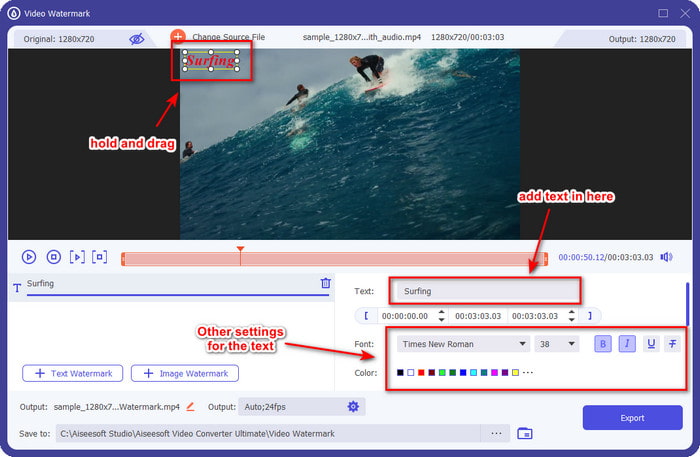
برای واترمارک متن:
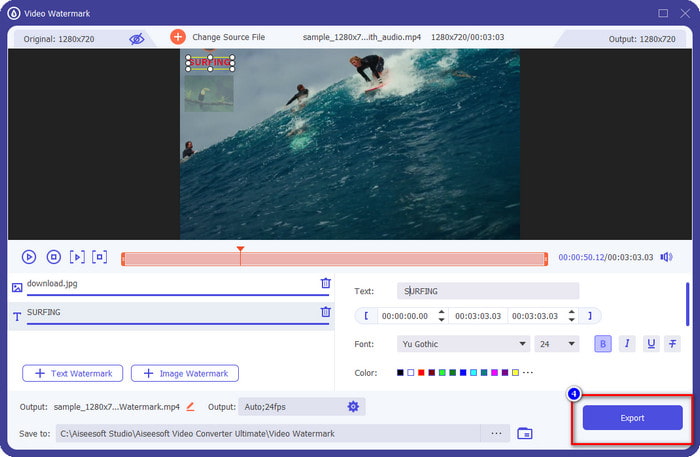
واترمارکی که می خواهید اضافه کنید را در این قسمت تایپ کنید و سپس می توانید رنگ فونت و سبک واترمارک متن را با توجه به نیاز خود تغییر دهید. متن روی ویدیو را بکشید تا آن را در هر جایی از ویدیو قرار دهید.
برای واترمارک تصویر:
روی Image Watermark کلیک کنید و فایل تصویریای را که میخواهید بهعنوان واترمارک استفاده کنید، برگزینید. مطمئن شوید تصویری که میخواهید از آن استفاده کنید از قبل روی درایو ذخیره شده باشد. در این بخش میتوانید سایر تنظیمات تصویر را تغییر دهید. تصویرِ واترمارک را روی کل ویدیو بکشید و رها کنید تا در جای مناسب قرار بگیرد.
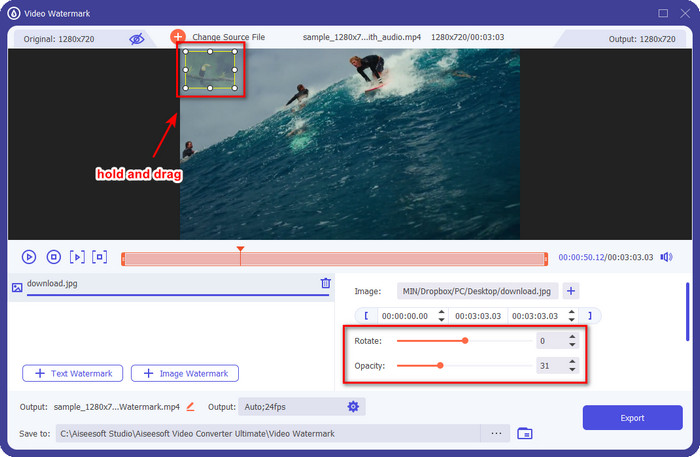
مرحله 4. برای ذخیره ویدیوی حاوی واترمارک، اکنون میتوانید روی دکمه Export کلیک کنید.
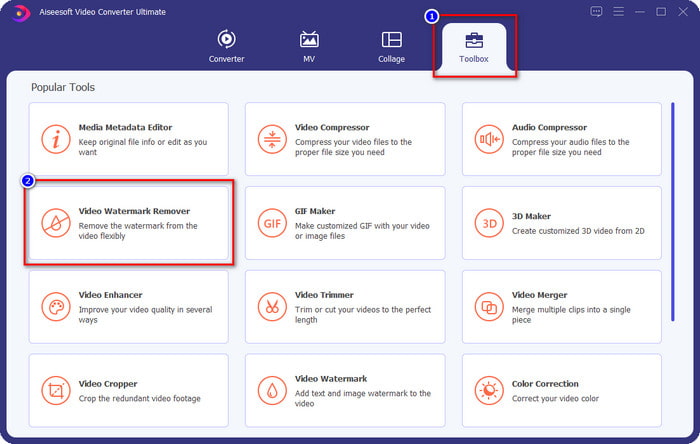
نحوه حذف واترمارک در یک ویدیو:
مرحله 1. در بخش Toolbox، گزینه Video Watermark Remover را پیدا کرده و باز کنید.
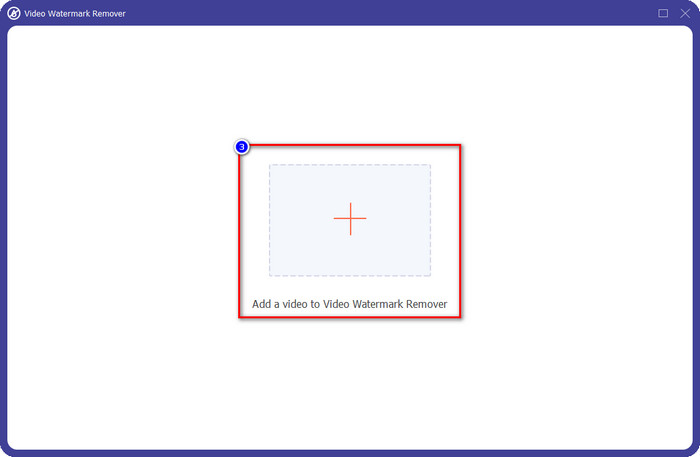
مرحله 2. روی آیکون + کلیک کنید تا ویدیوی دارای واترمارک را بارگذاری کنید و پس از انتخاب نهایی، روی Open بزنید.
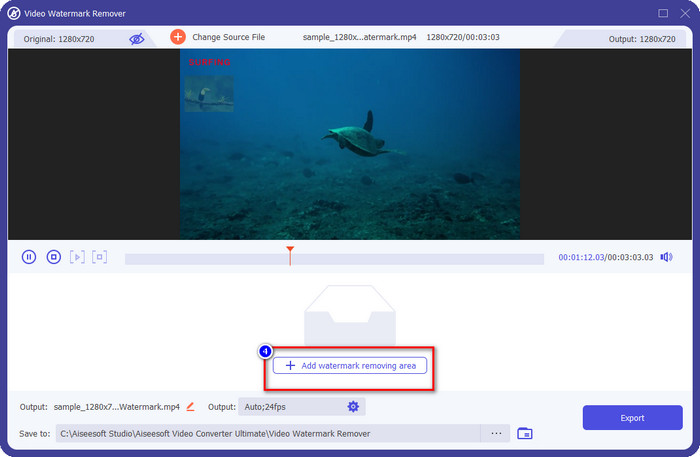
مرحله 3. روی Add Watermark Removing Area کلیک کنید تا ناحیه حذف واترمارک را برای پاک کردن واترمارکِ ویدیو اضافه کنید.
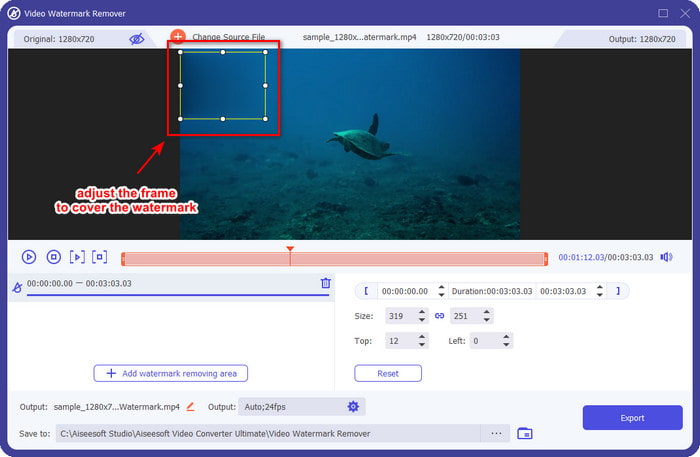
مرحله 4. قابِ حذف واترمارک را روی محل واترمارک قرار دهید تا آن را حذف کنید. همچنین میتوانید آزادانه اندازه و موقعیت آن را در ویدیو تغییر دهید.
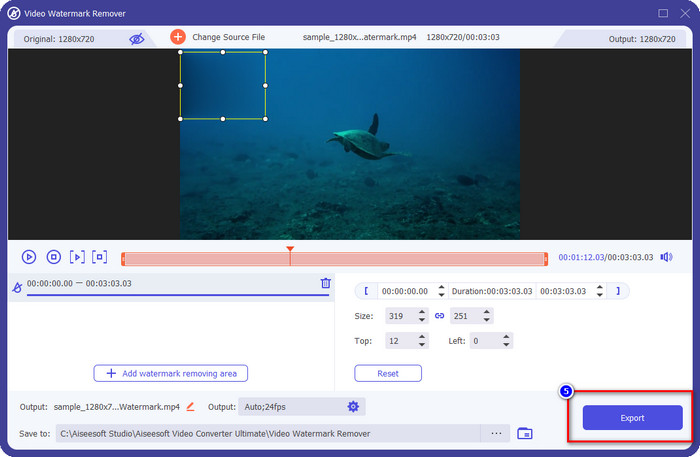
مرحله 5. حالا که واترمارک محو شده است، میتوانید روی Export کلیک کنید تا ویدیو را بدون واترمارک ذخیره کنید. به همین سادگی.
مرتبط:
چگونه به GIF واترمارک اضافه کنیم
چگونه واترمارک را از GIF حذف کنیم
بخش 5. سؤالات متداول در مورد واترمارک در ویدیو
آیا میتوانم همزمان واترمارک متنی و تصویری اضافه کنم؟
کاملا بله. می توانید متن و واترمارک تصویری را روی ویدیویی که با آن سروکار دارید اضافه کنید. برای انجام این کار، میتوانید مراحلی را که در بالا ارائه کردیم را برای افزودن واترمارک با استفاده از متن و تصویر دنبال کنید.
آیا واترمارک باعث افزایش حجم فایل ویدیو میشود؟
اگرچه اندازه فایل ویدیویی با واترمارک با فایل بدون واترمارک تفاوتی ندارد، اندازه فایل ویدیوی دارای واترمارک کمی با ویدیوی بدون واترمارک متفاوت است. با این حال، می توان گفت که اندازه فایل ویدیو به احتمال زیاد با یا بدون آن یکسان است.
کدام نوع واترمارک برای نیازهای من مناسبتر است؟
قبل از اینکه یک واترمارک به ویدیویی که با آن سر و کار دارید اضافه کنید، باید انواع مختلف واترمارک را بدانید. لطفاً اطلاعاتی را که در بالا اضافه کردهایم بخوانید، زیرا آنها را به صورت جداگانه مورد بحث قرار دادهایم تا مشخص کنیم کدامیک را باید به راحتی استفاده کنید.
نتیجه
در نهایت، اکنون میدانیم لوگوی واترمارک چیست و چطور آن را به ویدیوی خود اضافه کنیم. پس اگر به یک راهحل همهکاره برای کار با واترمارک، چه حذف و چه افزودن آن، نیاز دارید، FVC Video Converter Ultimate همان کمکی است که به آن احتیاج خواهید داشت. اگر میخواهید بدانید این ابزار چه قابلیتهای دیگری دارد، میتوانید همین حالا آن را روی رایانه خود دانلود کنید و خودتان امتحان کنید.
-
 بهترین راه برای افزودن واترمارک به یک ویدیو در فتوشاپ در ویندوز و مک
 آیا می خواهید بدانید چگونه یک واترمارک به یک ویدیو در فتوشاپ اضافه کنید؟ در این صورت، این مقاله یکی دو موردی را که باید بدانید در اختیار شما قرار می دهد.
-
 4 روش موثر برای حذف واترمارک Tiktok از ویدیوهای Tiktok
 آیا باید واترمارک Tiktok را از ویدیوهای Tiktok صادراتی خود حذف کنید؟ شما می توانید این کار را در اینجا با کمک ابزارهایی که ارائه می دهیم انجام دهید. شما به راحتی می توانید آن را انجام دهید.
-
 نحوه اضافه کردن واترمارک به ویدیو در iMovie در مک [All Embracing]
 آیا می خواهید اسرار افزودن واترمارک به ویدیو در iMovie را بدانید؟ چای را روی کسی نریزید و با خواندن این مقاله آن را یاد بگیرید.
