


 Video Converter Ultimate
 Näytön tallennin
 Videon korjaus
 Suojattu lataus
3 ilmaista tapaa muuntaa FLV WAV: ksi
Haluatko erottaa äänen ladatuista videoista, mutta et tiedä miten? Etsitkö helppoa tapaa muuntaa FLV WAViksi tai MP3:ksi?
Joissakin tapauksissa tarvitset vain yhden videon ääniraidan tai taustamusiikin. Joten sinun on muunnettava video ääneksi. Tässä viestissä puhutaan lähinnä FLV: n muuntamisesta WAV: ksi.

Tässä suositellaan sinulle 3 erinomaista FLV–WAV-muunninta, joilla voit muuntaa FLV-tiedostosi. Voit valita itsellesi sopivimman tavan muuttaa FLV-tiedostot WAV-ääniksi.
Osa 1. Muunna FLV WAV Online: ksi
Kun etsit internetistä tapaa muuntaa FLV WAViksi, näet hakutuloksissa monia ilmaisia verkkopohjaisia muuntimia. Jos et tiedä, mitä niistä käyttäisit, esittelemme sinulle lämpimästi suositun Free Online Video Converter -palvelun. Se on suunniteltu erityisesti muuntamaan FLV mihin tahansa yleisesti käytettyyn video- ja äänimuotoon, kuten MP4, MOV, AVI, MP3, AAC, M4A ja WAV.
Verrattuna muihin online-FLV-WAV-muuntimiin, se tukee useampia tulo- ja lähtöformaatteja ja tarjoaa nopeamman muunnosnopeuden. Lisäksi se ei vaadi tilin rekisteröintiä tai kirjautumista. Sen avulla voit muuntaa minkä tahansa FLV-tiedoston ilman tiedostokokorajoitusta.
Vaihe 1: Siirry selaimellasi tälle ilmaiselle FLV–WAV-verkkosivulle. Se on yhteensopiva useimpien selainten kanssa, kuten Safarin, IE:n, Chromen, Firefoxin ja Yahoon.
Vaihe 2: Napsauta Add Files to Convert ja sitten Download-painiketta asentaaksesi käynnistysohjelman FLV-muunnosta varten. Asennuksen jälkeen avautuu ponnahdusikkuna, jossa voit ladata FLV-tiedostosi.

Vaihe 3: Kun pääset varsinaiseen muunnosikkunaan, näet siinä listattuna joitakin suosittuja videoformaatteja, kuten MP4, MOV, AVI, FLV, MKV, VOB, MPG, WMV ja muita. Tässä vaiheessa sinun tulee napsauttaa Audio-kuvaketta, jotta äänimuodot tulevat näkyviin. Valitse WAV lähtömuodoksi.
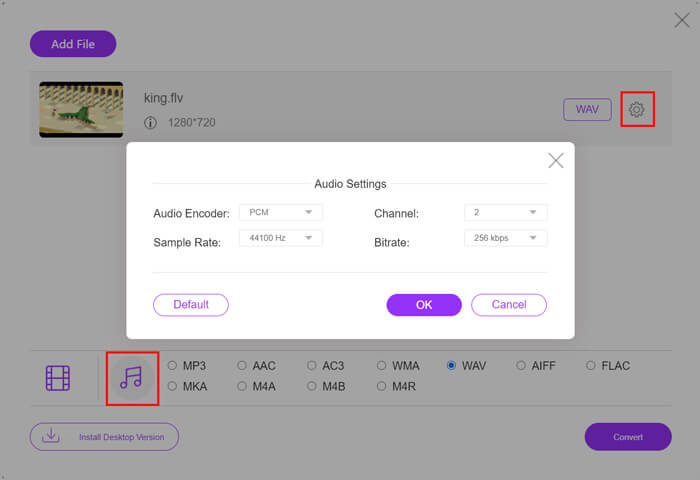
Vaihe 4: Ennen FLV–WAV-muunnosta voit napsauttaa Settings-kuvaketta lähtömuodon vieressä ja mukauttaa lisäasetuksia äänelle. Voit säätää esimerkiksi äänen enkooderia, kanavien määrää, näytteenottotaajuutta ja bittinopeutta. Sen jälkeen voit napsauttaa Convert-painiketta muuntaaksesi FLV-tiedostosi WAV-äänitiedostoksi.
Jos haluat muuntaa FLV:n ääneksi, kuten MP3, WMA, WAV jne., sinun tulee napsauttaa Audio-välilehteä ja merkitä se valituksi.
Osa 2. Ilmainen Muunna FLV WAV: ksi
Verkkopohjaisten FLV-muuntimien lisäksi on myös joitakin ilmaisia videomuuntimia, joiden avulla voit helposti muuntaa FLV:n WAViksi. Tätä varten voit käyttää Free FLV Converter -ohjelmaa.

Ilmainen FLV-WAV-muunnin
155321+ Lataukset- Muunna FLV WAV-, AAC-, MP3-, M4A-, MP4-, MOV-, AVI- ja muiksi.
- Tukee kaikkia usein käytettyjä video- ja äänimuotoja.
- Tukee uusimpia moniydinsuoritimia ja GPU-kiihdytyksiä.
- Muunna yksi tai useampi FLV-tiedosto ilman laadun heikkenemistä.
Ilmainen latausWindows 7 tai uudempiTurvallinen lataus
Ilmainen latausMacOS 10.7 tai uudempiTurvallinen lataus
Se sisältää kaikki tarvitsemasi muunnosominaisuudet. Seuraava opas näyttää, kuinka FLV voidaan muuttaa WAV: ksi sen avulla.
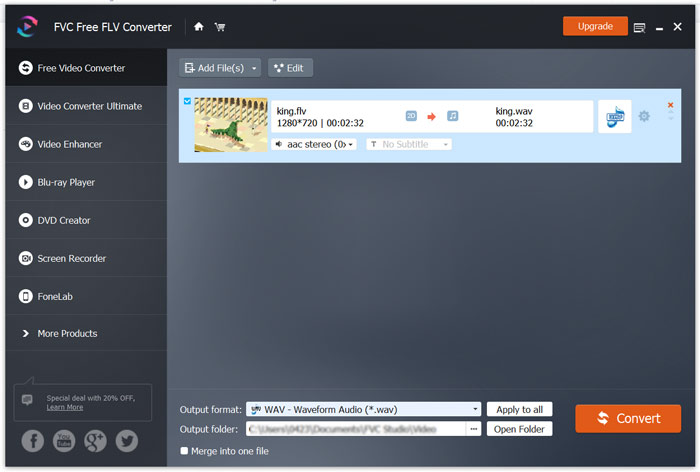
Vaihe 1: Lataa, asenna ja käynnistä tämä ilmainen FLV–WAV-muunnin tietokoneellasi. Napsauta Add Files tuodaksesi FLV-tiedostosi.

Vaihe 2: Napsauta Output format ja valitse WAV kohdemuodoksi. Valitse sitten sopiva kohdekansio tiedostolle.
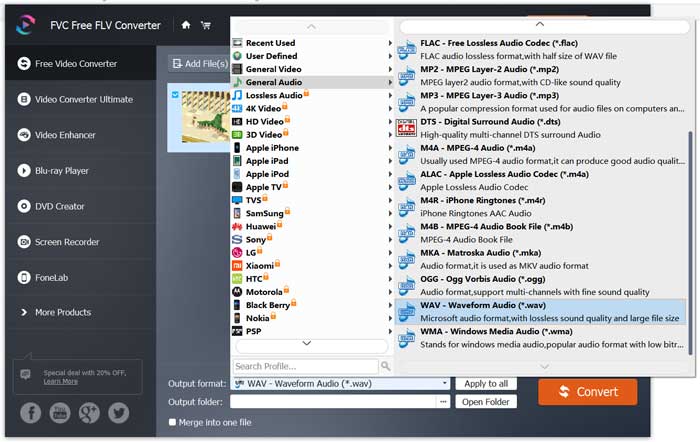
Vaihe 3: Napsauta Convert-painiketta käynnistääksesi FLV–WAV-muunnoksen.
Osa 3. Muunna FLV WAV: ksi VLC: llä
Jos tietokoneellesi on asennettu VLC Media Player, voit käyttää myös VLC:tä FLV–WAV-muunnokseen. VLC on tunnettu mediasoitin, joka tarjoaa lisäksi perustoiminnot tiedostojen muuntamiseen ja muokkaamiseen.
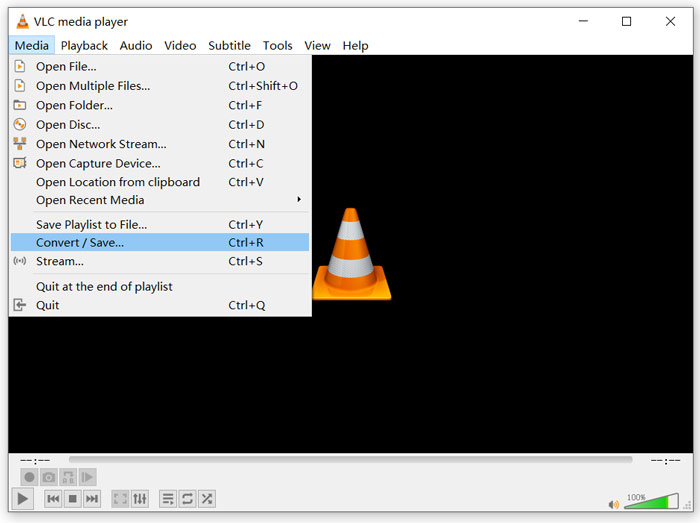
Vaihe 1: Avaa VLC Media Player tietokoneellasi. Voit asentaa sen maksutta VideoLAN-sivustolta. Napsauta Media ja valitse avattavasta valikosta Convert/Save-vaihtoehto.
Vaihe 2: Nyt siirryt Open Media -ikkunaan. Napsauta Add-painiketta lisätäksesi muunnettavan FLV-tiedoston. Napsauta sitten Convert/Save-painiketta avataksesi Convert-ikkunan.
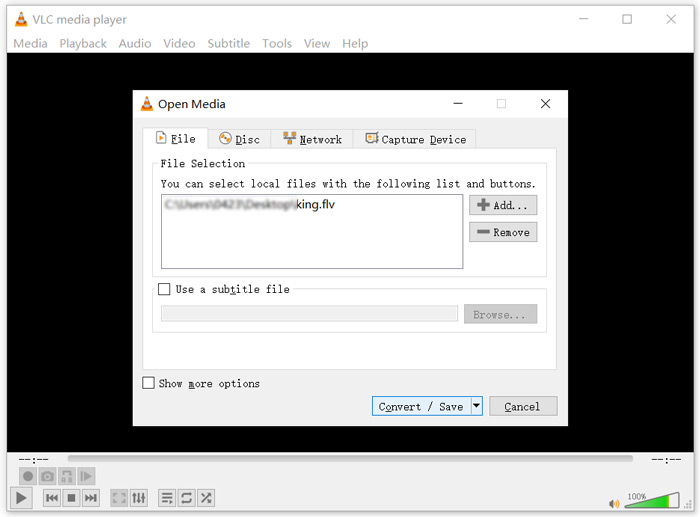
Vaihe 3: Valitse Display the output -vaihtoehto Convert-välilehden alta. Valitse sitten sopiva lähtömuoto Profile-pudotusvalikosta. Napsauta Browse-painiketta ja valitse sopiva kohdekansio. Tässä vaiheessa voit myös nimetä tulostiedoston uudelleen.
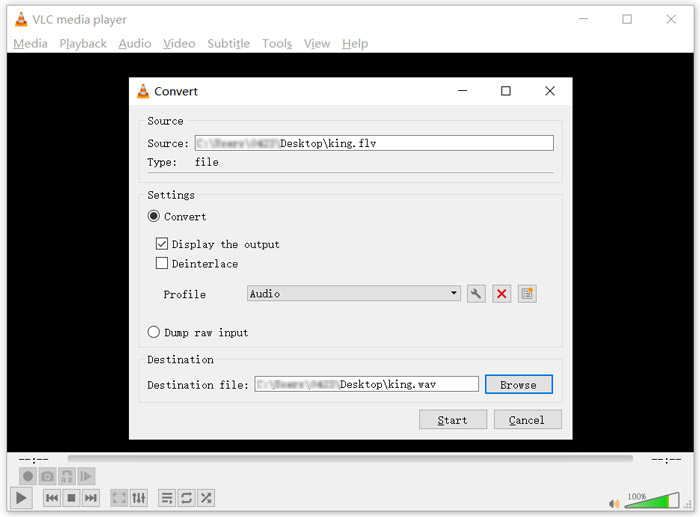
Vaihe 4: Napsauta Start-painiketta aloittaaksesi FLV–WAV-muunnoksen. Tämän jälkeen VLC toistaa muunnetun WAV-tiedoston automaattisesti. Näet Converting file -ilmoituksen muunnoksen aikana. Älä sulje VLC Media Playeria kokonaan ennen kuin muunnos on valmis.
Osa 4. UKK FLV: n muuntamisesta WAV: ksi
FLV vs WAV, Mikä on ero FLV: n ja WAV: n välillä?
FLV (Flash Video File) on Adobe Systemsin kehittämä Flash-yhteensopiva videotiedosto. Se sisältää lyhyen otsakkeen sekä vuorottelevia video-, ääni- ja metatietopaketteja. FLV on alun perin suunniteltu videoiden upottamiseen Adobe-sovelluksiin. Tyypillinen FLV-tiedosto sisältää 640x360-videovirran ja äänivirran, jonka näytteenottotaajuus on 44,1 kHz, 2 kanavaa ja AAC-koodekki.
Tiedosto, jonka tiedostopääte on WAV, on Waveform Audio File Format -äänitiedosto, joka on säiliö ja tallentaa dataa osioihin. Sen ovat alun perin kehittäneet Microsoft ja IBM, ja se tallentaa pakkaamatonta, häviötöntä ääntä, mikä johtaa erittäin suuriin tiedostokokoihin. Formaatti käyttää säiliörakennetta tallentaakseen äänidatan, raidat, näytteenottotaajuuden ja bittinopeuden.
Kuinka muuntaa FLV WAV-ohjelmistoksi?
Jos haluat muuntaa FLV WAV: ksi ilman muunninohjelmistoa, voit vaihtaa tiedostotunnisteen .flv tiedostoksi .wav.
Kuinka ladata FLV WAV: hen?
Markkinoilla on tarjolla suuri määrä näytön tallentimia, joiden avulla voit tallentaa videota äänitiedostoina paikalliselle tietokoneellesi.
Johtopäätös
Tämän artikkelin luettuasi opit 3 ilmaista tapaa erottaa WAV-ääni FLV-tiedostoista. Kun sinun tarvitsee muuntaa FLV WAViksi, voit valita itsellesi sopivimman FLV-muuntimen tähän tarkoitukseen.
-
 5 parasta ilmaista WAV-soitinta Androidille, iOS: lle ja tietokoneelle
 Kuinka toistaa WAV-tiedostoja Android-puhelimessa? Mikä pelaaja voi pelata WAVia? Tämä viesti jakaa 5 parasta ilmaista WAV-soitinta Androidille, iPhonelle, Macille ja PC: lle.
-
 10 parasta FLV-videosoitinta Windows 10/8/7: lle, Macille, iOS: lle ja Androidille, joita sinun on kokeiltava
 FLV-soittimen avulla voit helposti käyttää FLV-tiedostojasi Windows-, Mac-, Android- ja iOS-laitteilla. Katso parhaat FLV-tiedostosoittimet, jotka voit ladata juuri nyt.
-
 Kuinka muuntaa WAV MP3: ksi 5 parhaalla muuntimella
 Tämä sivu on pitkä luettelo ilmaisista WAV-MP3-muuntimista (iTunes, Audacity, VLC, Windows Media Player ja Free Audio Converter), joiden avulla WAV voidaan muuttaa MP3: ksi tietokoneella.
