


 Video Converter Ultimate
 Enregistreur d'écran
 Réparation vidéo
 Téléchargement sécurisé
Convertisseur WTV en MP4: Comment convertir WTV en MP4
WTV, en tant que successeur du format DVR-MS, est développé par Microsoft pour stocker le contenu TV enregistré par Windows Media Center. Encodé avec les standards MPEG-2 et MPEG-4 et MPEG-1 Layer II ou Dolby Digital AC-3, WTV est pris en charge par quelques logiciels comme FFMPEG, Windows Media Center, CyberLink PowerDVD 12, Nero 12, HandBrake, CCextractor, etc.

If you want to watch or share WTV files conveniently, you had better convert WTV to MP4, the most popular format for almost any device.
We’ve searched the Internet in a quest for WTV to MP4 converter and found the top 2 free WTV to MP4 converters to turn WTV to MP4.
Partie 1. Free Video Converter - Convertir WTV en MP4 en ligne
Well, it is very easy to convert WTV to MP4. The easiest way to change WTV to MP4 is to finish it online. Free Online Video Converter is the freeware to convert WTV to MP4 and other mainstream video and audio formats. This free online tool is compatible with Windows 10/8/7 and Mac OS X 10.7 or above, and you can easily transcode WTV to MP4 within steps.
Pour rationaliser le processus, vous pouvez suivre le guide:
1. Click Add Files to Convert button to upload WTV files from PC.
2. Select MP4 from the checkbox.
3. Click Convert to convert and download WTV files automatically.
Maintenant, nous sommes là pour vous expliquer comment convertir en détail WTV en MP4.
Step 1. Add WTV files
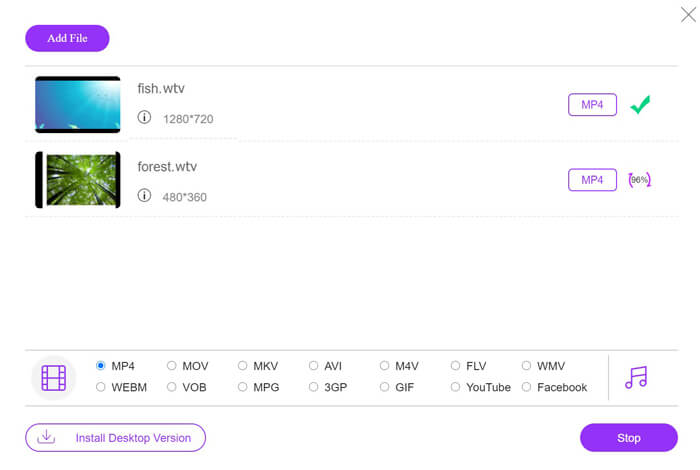
Open this free online WTV to MP4 converter via your browser. Click Add Files to Convert button, and a pop-up window prompts to tell you to download and install the launcher. Just download it and the open-source window will appear after the successful installation. Then you can select the WTV recordings on your computer for uploading. This freeware supports batch conversion and you can add more than one WTV files online.

Step 2. Select MP4
Tick the checkbox of MP4 on the bottom, where you can find various output options like MKV, AVI, M4V, FLV, VOB, GIF, YouTube, Facebook, MP3, AAC, WMA, WAV, FLAC, etc.
In addition, you can click the Settings icon next to the output MP4 pane to adjust the encoder, frame rate, resolution, bitrates, and other parameters.

Step 3. Convert WTV to MP4
After everything is done, click the Convert button and a window appears that requires you to select the destination to store the converted MP4 files. Choose the destination and return to this free online converter, click Convert again to start converting and downloading the MP4 files automatically. You can see the conversion progress percentage directly.
Partie 2. HandBrake - Convertissez WTV en MP4 sur PC / Mac
HandBrake est un autre moyen gratuit de convertir WTV en MP4. HandBrake est le quelques logiciels capables de lire les fichiers WTV. En outre, il peut également transcoder WTV en MP4 / MKV sur votre ordinateur Windows et Mac.
HandBrake est le logiciel de bureau open-source, vous devez donc d'abord télécharger ce convertisseur gratuit sur votre ordinateur.
Encore une fois, les étapes simples de conversion de WTV en MP4 dans HandBrake sont les suivantes:
1. Ajoutez les fichiers WTF ou le dossier entier dans HandBrake.
2. Profil MP4 personnalisé dans HandBrake.
2. Prévisualisez et convertissez WTV en MP4.
Voici le guide complet pour changer WTV en MP4 dans HandBrake.
Step 1. Add WTV files into HandBrake
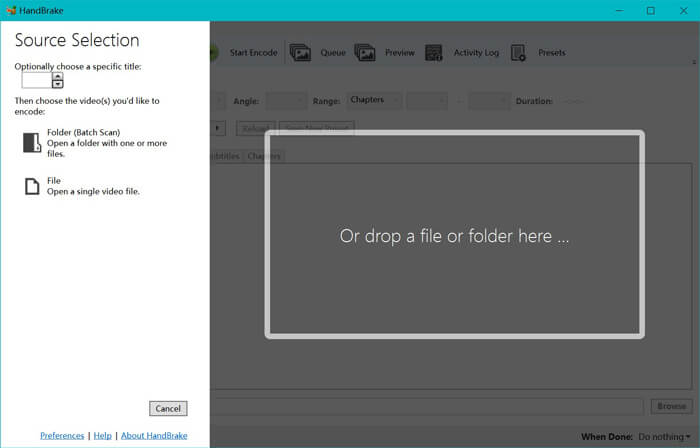
Once you have installed HandBrake on your computer, HandBrake will present the open-source dialog by default. Here you can click Folder or File to select the WTV files or folder into main window. Alternatively, you can also drag and drop the WTV files into this software.
Step 2. Select MP4 format
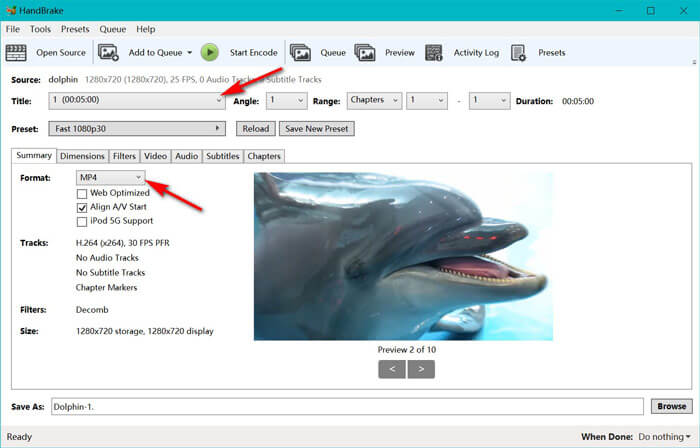
Once you have loaded the WTV files, you can select the exact WTF file from the Title drop-down option. Then select MP4 in the tab of Summary as the output for the selected WTV file. Besides, HandBrake allows you to adjust the dimensions, filters, video codec/quality, audio track, etc. Not only MP4, it can also convert other formats like AVI, MOV, M2TS, etc., to MKV.
Step 3. Preview and convert WTV to MP4
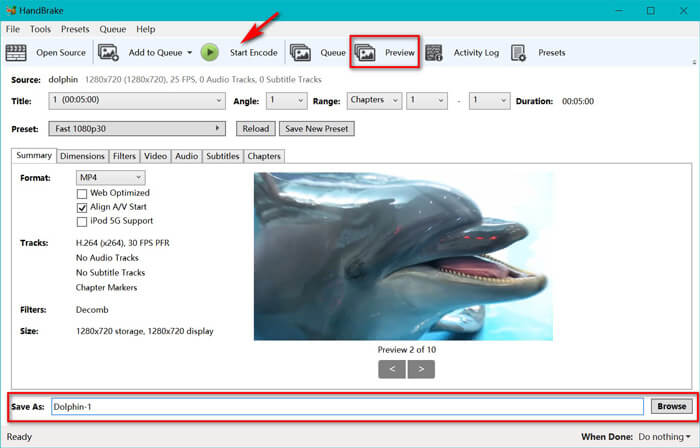
HandBrake’s Preview on the toolbar feature allows you to see what your new MP4 video will look before encoding it. After all your settings are just right, give the name of the converted MP4 files and select the location of your new videos by clicking the Browse button at the bottom. Finally, just click Start Encode button on the toolbar to convert WTV to MP4.
Partie 3. FAQ de WTV en MP4
Pourquoi HandBrake enregistre-t-il MP4 en tant que M4V?
Pour les fichiers MP4, HandBrake les fichiers MP4 automatiquement en utilisant l'extension M4V, lorsque vous choisissez l'audio AC3 et les sous-titres SRT ou que vous avez des marqueurs de chapitre pour personnaliser le fichier MP4. Mais vous pouvez changer l'extension .m4v en .mp4 directement.
Le lecteur VLC peut-il lire les fichiers WTV?
VLC ne peut pas lire directement les fichiers WTV. Vous devez installer le pack de codes K-Lite pour installer le pack de codes WTV, puis lire les fichiers WTV sur VLC.
Puis-je convertir des fichiers WTV protégés?
Oui, vous pouvez. Cependant, seul MCEBuddy prend en charge l'édition et la conversion des fichiers WTF commerciaux protégés. Vous devez utiliser ce logiciel pour copier et convertir les fichiers WTV protégés.
Conclusion
Pour utiliser facilement les fichiers WTV enregistrés par Windows Media Center, vous devez d'abord convertir WTV en MP4. Cet article partage 2 façons gratuites de convertir WTV en MP4 en ligne via Free Online Video Converter et HandBrake. Free Online Video Converter vous permet de convertir WTV en MP4 et d'autres formats populaires, tandis que HandBrake vous offre plus de contrôles d'édition avec des options de format de sortie limitées.
Quelle est votre voie préférée?
Ou peut-être avez-vous un meilleur convertisseur WTV en MP4?
Quoi qu'il en soit, j'aimerais avoir de vos nouvelles. Alors, allez-y et laissez un commentaire ci-dessous.
-
 Comment convertir MXF en MP4 via Free Converter
 Cet article est le guide détaillé pour convertir MXF en MP4 sur ordinateur. Vous pouvez obtenir 4 convertisseurs MXF en MP4 gratuits pour transcoder le caméscope MXF en MP4 en quelques étapes simples.
-
 Les 3 meilleures façons de convertir gratuitement MP4 en MOV
 Comment convertir MP4 en MOV sur Mac? Existe-t-il un moyen gratuit de convertir MP4 en MOV sans perte de qualité? Cet article présente 3 façons simples de vous aider à effectuer la conversion vidéo de MP4 en MOV sur Mac, PC Windows et en ligne.
-
 Comment convertir M2TS en WMV sur Windows / Mac / en ligne (totalement gratuit à utiliser)
 Voici 3 façons simples de convertir des vidéos M2TS en vidéos WMV. Vous pouvez changer le format vidéo de M2TS à WMV gratuitement sur Windows, Mac et en ligne rapidement. La conversion par lots est prise en charge.
