


 Video Converter Ultimate
 Enregistreur d'écran
 Réparation vidéo
Tutoriel simplifié sur la synchronisation audio et vidéo dans Adobe Premiere Pro
If you are a pro then you've already used the Adobe Premiere Pro as your video editor software that performs really well. A lot of Adobe users really love this software because it provides the best output you would love to insert on your video. But did you know that you can also use this tool to sync your audio with video? So, if you don't have an idea on how to do it then this is one of your lucky days. As we try it for yourself on how to sync it easily. So now, you will not need to read a manual because this write-up makes it simple for you to understand how to sync audio in Premiere easily and effectively with another alternative tool.

Partie 1. Comment synchroniser l'audio et la vidéo dans Adobe Premiere Pro
Before we start, let's have a brief introduction to the Adobe Premiere Pro. As we indicate above, this tool has already been used a lot by the professional editors who love to make amazing videos. However, this tool will take a lot of your time to learn because it provides a lot of advanced features that beginners will not understand. Although learning how to use it will surely take a lot of time, it is worth it to learn how to use it if you have free time. Moreover, the indicated steps below are simpler for you to understand to learn how to sync audio and video in Premiere if you follow the steps below.
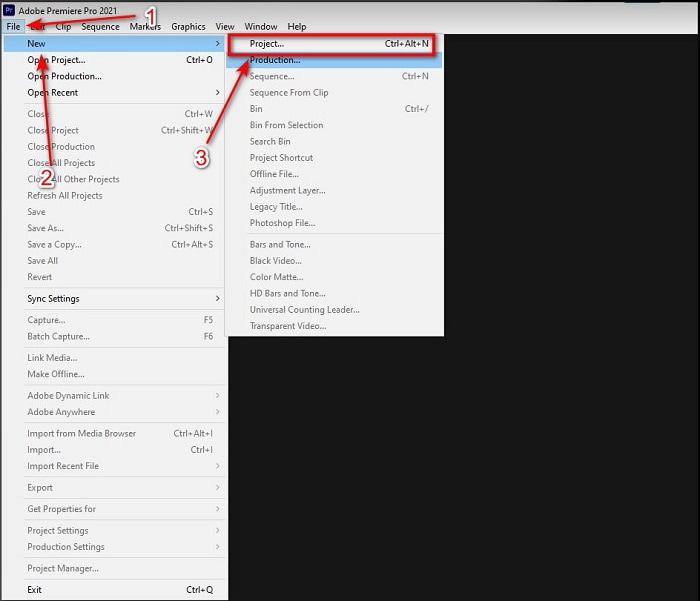
Step 1. First, you must buy the tool first and download it on your computer drive. Launch it after the downloading process has already been taken in place. Then click the File and under it is the New then click the Project to proceed then press OK on the new interface will be going to pop-up.
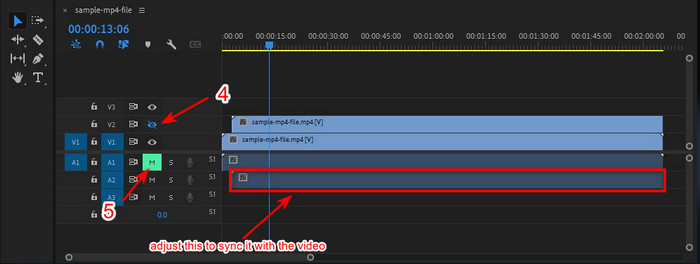
Step 2. And add the same video and audio to the Timeline twice. Then click the Toggle Track Output of the second video and mute the second by clicking the Mute Track. Adjust the audio track to make it sure that it will sync with the video.
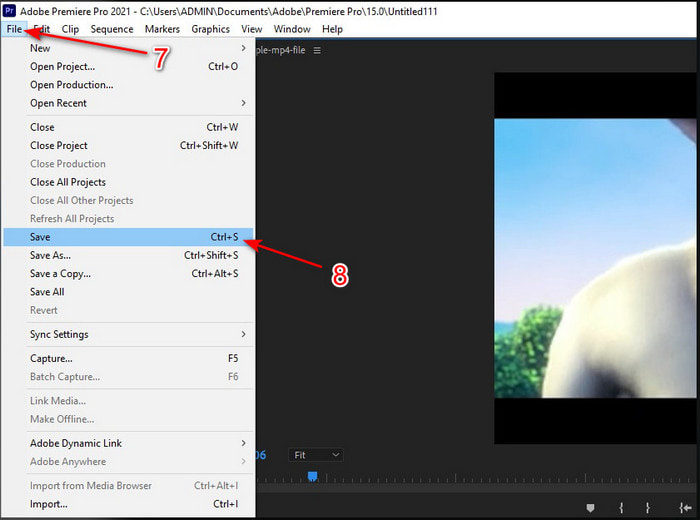
Step 3. Re-click the File above and locate the Save to finally export the media file into your computer drive.
Avantages
- Cet outil fournit une fonction d'édition avancée.
- Éditeur haut de gamme que vous pouvez télécharger.
- Meilleur choix pour avoir une sortie professionnelle.
Les inconvénients
- Pas le meilleur choix pour le débutant qui n'a pas d'idée sur le montage.
- Le logiciel est totalement cher par rapport aux autres éditeurs qui offrent presque la même fonctionnalité.
Partie 2. Méthode la plus simple pour synchroniser l'audio pour les débutants et les professionnels avec Video Converter Ultimate
Just like Adobe Premiere Pro this phenomenal converter also produces high-quality and advanced editing features that you would love to use. But this is way easier to use compared to the premiere pro. The Video Converter Ultimate is the best friend of the editors who loves to make a video, enhance, boost, create Gif and more. This software specialized almost all of the internet user's problems even in syncing. And because of how easy it is to use, more than a million users have already downloaded and fell in love with it. So, if you want to make your life easier instead of using premiere pro sync audio why don't you use this? Follow the step below.
Steps on How to Sync Audio and Video with the Video Converter Ultimate:
Step 1. Download the software on your computer and choose whether it is a PC or Mac. Install it later on, do the set-up and click the Start Now to proceed.
Téléchargement gratuit pour Windows 7 ou version ultérieure Téléchargement sécurisé
Téléchargement gratuit pour macOS 10.7 ou version ultérieure - Téléchargement sécurisé
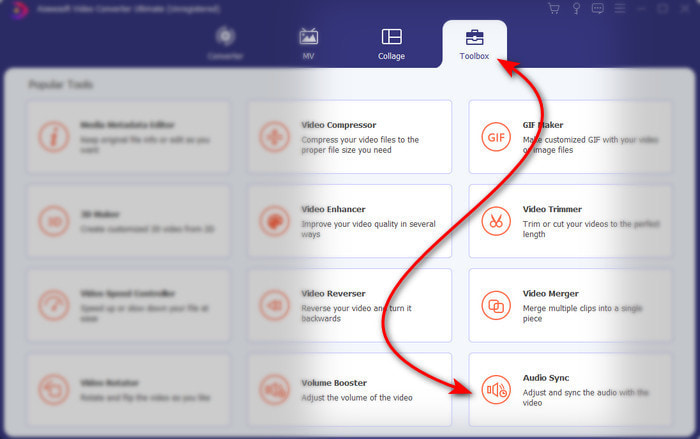
Step 2. Launch the tool after the first step and go next to the Toolbox section and press the Audio Sync in the lower part.
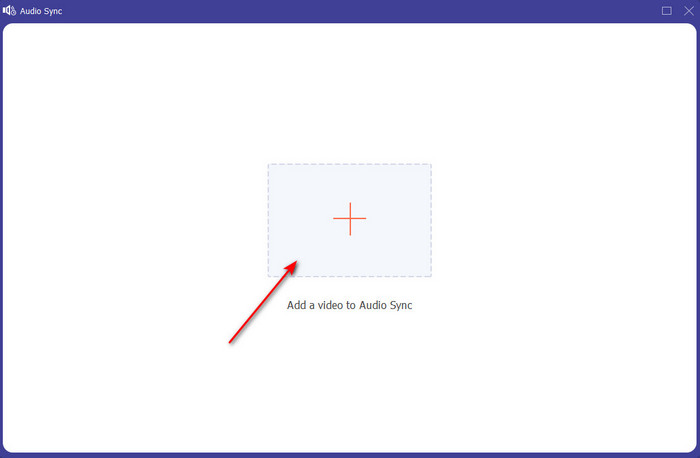
Step 3. Press the + button to insert the video and audio you want to be synced. After locating it on the folder click Open to proceed.
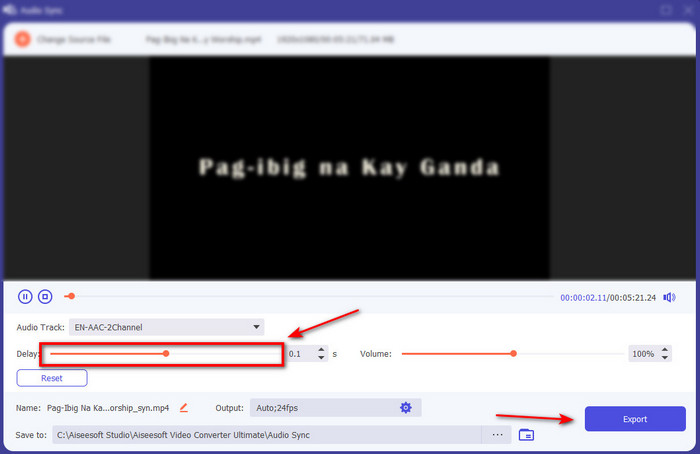
Step 4. To make the audio sync adjust the Delay slider to match it with the video. In addition, you can also boost the audio there as well by adjusting the volume slider. After it is done click Export to save the final output.
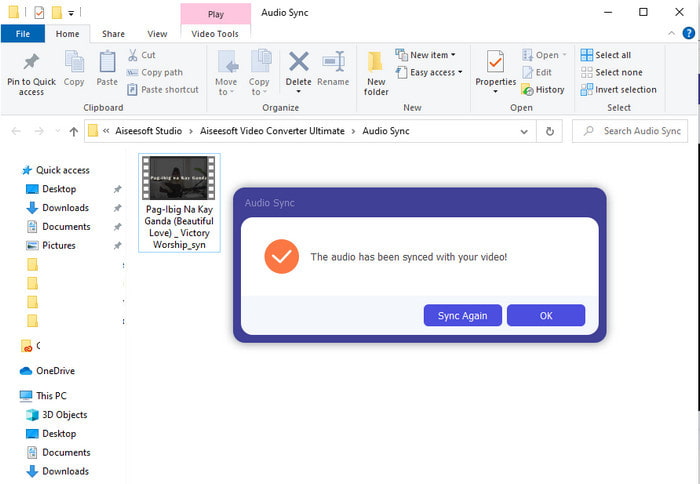
Step 5. After it is done, a folder will be going to show on your screen with synchronized audio and video you've made. Click the file to watch, play and enjoy the audio-video in sync.
Avantages
- Le meilleur choix pour rendre votre vidéo phénoménale.
- L'expérience globale lors de l'utilisation de cet outil est littéralement ultime et pourtant facile à utiliser.
- Il est disponible sur toutes les plateformes, que ce soit un PC ou un Mac.
Les inconvénients
- Tout comme Premiere Pro, cet outil est payant, mais il est beaucoup moins cher que Premiere Pro.
- Vous devez d'abord le télécharger sur votre lecteur avant de pouvoir y accéder.
Partie 3. FAQ sur la synchronisation audio et vidéo dans Premiere
Puis-je utiliser Premiere comme enregistreur d'écran ?
If you're trying to record a screen on the Premiere pro then you must surrender now because you can't do it here. However, we can tell you a secret screen recorder you can choose on. So, if you want to know what are the Top 5 Best Screencasts you can use on PC, Mac, online, iOS, and Android.
Adobe Premiere Pro est-il gratuit ?
En fait, c'est un oui, vous pouvez télécharger cet outil gratuitement mais vous ne pouvez accéder à cet outil que pendant 7 jours en période d'essai. Ainsi, si la période d'essai est terminée, vous devez vous abonner à nouveau à Adobe Premiere Pro pour profiter de la pleine capacité des fonctionnalités d'édition fournies par Premiere Pro.
Puis-je utiliser un autre site Web pour télécharger Premiere Pro ?
Non, car il est illégal de télécharger toutes les applications avec l'autre site Web. De plus, si vous utilisez un autre site Web pour télécharger Premiere Pro, il est possible qu'il contienne des logiciels espions, des virus ou même bien pire. Donc, si vous souhaitez garantir votre sécurité, téléchargez le logiciel uniquement sur les principaux sites Web officiels.
Puis-je acheter un accès à vie sur Adobe Premiere Pro ?
Bien que vous puissiez acheter un accès mensuel sur Adobe Premiere Pro, vous ne pouvez toujours pas acheter un accès à vie. Mais vous pouvez l'acheter avec un autre site Web, cependant, c'est illégal et il y aura une chance que le fichier que vous allez télécharger soit corrompu, contienne un virus ou soit une arnaque. Donc, si vous souhaitez utiliser et acheter Adobe Premiere Pro, nous suggérons à tout le monde de l'acheter sur son site Web principal.
Conclusion
Après 5 minutes de lecture de cet article, nous savons déjà utiliser Adobe Premiere pro pour synchroniser l'audio à la vidéo. Cependant, il existe un moyen plus simple de le synchroniser en utilisant Video Converter Ultimate. Comme cet outil permet de régler beaucoup plus rapidement la vidéo et l'audio non synchronisés tout en ayant la meilleure qualité. Alors maintenant, si vous avez beaucoup d'argent, optez pour Adobe Premiere Pro, mais si vous voulez économiser beaucoup tout en ayant la même fonction, votre choix doit être le Video Converter Ultimate.
-
 Comment ralentir une vidéo : astuces parfaites [Téléphone de bureau/mobile]
 Êtes-vous fatigué de chercher les meilleurs outils pour ralentir une vidéo en ligne ? Lisez cet article particulier pour vous éclairer avec les informations énumérées ci-dessous.
-
 Lecteur Windows Media | Apprenez à accélérer les vidéos [Prouvé]
 Vous souhaitez ralentir votre clip vidéo à l'aide de votre Windows Media Player, mais vous ne savez pas comment faire ? Cet article est idéal pour la lecture et peut éclairer votre point de vue sur la façon d'accélérer les vidéos à l'aide de Windows Media Player.
-
 Comment changer la vidéo au ralenti en vitesse normale [Etapes faciles]
 Vous voulez savoir comment restaurer une vidéo au ralenti que vous avez téléchargée sur Internet ou enregistrée accidentellement au ralenti ? Découvrez comment convertir une vidéo au ralenti en vitesse normale sur Mac, Windows, iOS et Android.
