


 Video Converter Ultimate
 Enregistreur d'écran
 Réparation vidéo
5 façons rapides et sans effort de transformer gratuitement MKV en FLV [en ligne et hors ligne]
Vous ne pouvez pas partager vos fichiers MKV sur Internet parce que leur taille est trop importante ? Pourquoi ne pas les convertir plutôt que de les compresser à l’extrême et risquer de perdre en qualité ? Ce problème est résolu si vous lisez les informations ci‑dessous avant de les envoyer. Inutile d’y passer une heure, alors sans plus attendre, découvrons les six convertisseurs que vous pouvez utiliser pour convertir MKV en FLV.

Partie 1. Meilleur convertisseur MKV en FLV haut de gamme à télécharger
FVC Video Converter Ultimate peut vous aider à transformer vos MKV en FLV facilement et efficacement, sans le moindre effort. Ce convertisseur exceptionnel est très différent des convertisseurs de cette liste ou de ceux que vous utilisez déjà ou non. C’est l’un des meilleurs encodeurs et décodeurs que vous puissiez télécharger sur votre PC ou Mac, et il fonctionne parfaitement hors ligne, même si vous n’avez pas une configuration de bureau haut de gamme.

Convertisseur vidéo FVC Ultimate
4 987 355+ téléchargements- Convertissez MKV en FLV, AVI, MP4, MOV ou en plus de 200 formats disponibles sur Windows et Mac.
- Rendez votre format MKV compatible avec tous les ordinateurs de bureau et appareils.
- Il peut effectuer une conversion par lots pour vos formats MKV ou d'autres formats.
- Convertisseur infaillible à utiliser par n'importe qui.
- Prend en charge la sortie haute définition et même une qualité vidéo jusqu'à 4k.
Téléchargement gratuit pour Windows 7 ou version ultérieure Téléchargement sécurisé
Téléchargement gratuit pour macOS 10.7 ou version ultérieure - Téléchargement sécurisé
Étapes pour convertir MKV en FLV avec FVC Video Converter Ultimate
Étape 1. Téléchargez l’application sur votre disque, puis suivez le processus d’installation.
Téléchargement gratuit pour Windows 7 ou version ultérieure Téléchargement sécurisé
Téléchargement gratuit pour macOS 10.7 ou version ultérieure - Téléchargement sécurisé
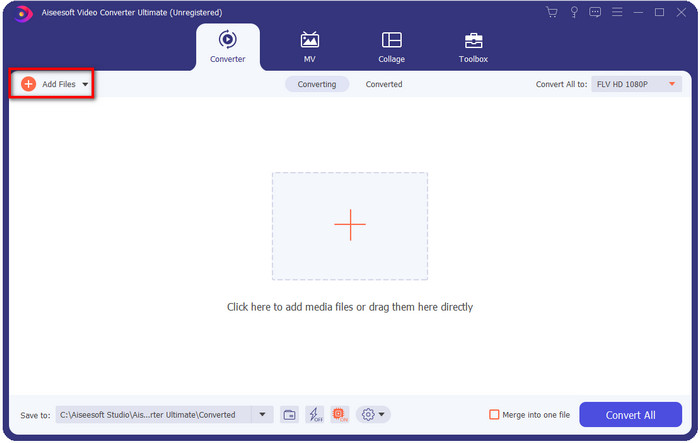
Étape 2. Après l’installation, ouvrez l’application pour ajouter les fichiers MKV ; vous pouvez glisser‑déposer le fichier dans l’interface ou cliquer sur le bouton Add Files.
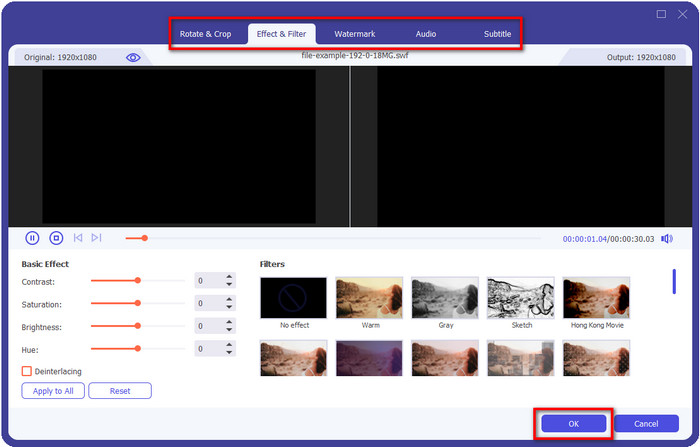
Si vous souhaitez éditer vos fichiers MKV avant de les convertir, vous pouvez cliquer sur le bouton en forme de baguette magique pour ajouter de la magie à votre résultat, comme ajouter des effets, recadrer, ajouter des sous‑titres, et plus encore. Pour enregistrer les modifications que vous avez apportées à votre vidéo, cliquez sur OK.
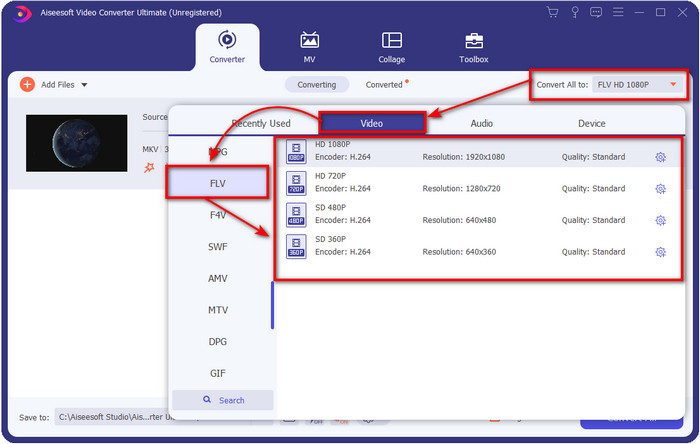
Étape 3. Cliquez sur le bouton drop-down et choisissez le format FLV dans la liste proposée.
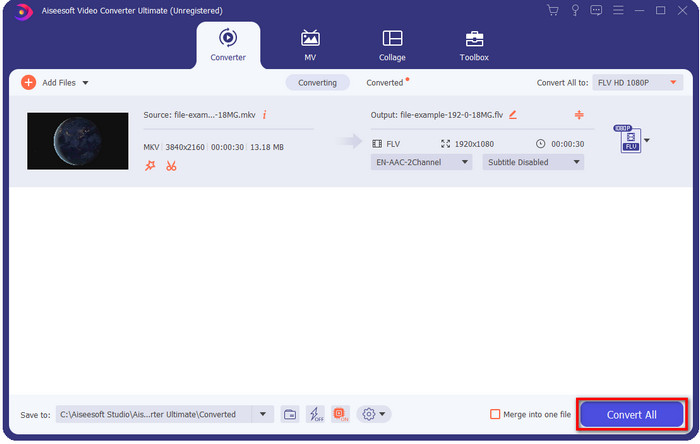
Étape 4. Cliquez sur le bouton Convert All pour commencer à convertir MKV en FLV gratuitement. Un dossier s’ouvrira après le processus avec le nouveau fichier FLV.
Partie 2. 4 Meilleur convertisseur MKV vers FLV basé sur le Web
1. Convertisseur vidéo gratuit FVC en ligne
FVC Free Video Converter Online propose un convertisseur MKV en FLV gratuit en ligne à la fois simple et impressionnant, disponible sur tous les navigateurs. Il prend également en charge un nombre moyen de formats parmi lesquels vous pouvez choisir et vers lesquels téléverser. Même si l’outil dépend d’Internet, la conversion et le téléversement de fichiers ici sont plus simples et plus rapides. Vous voulez savoir comment l’utiliser ? Alors suivez les étapes ci‑dessous.
Avantages
- Il est disponible pour être utilisé par n'importe qui avec Internet.
- Interface conviviale et facile à comprendre.
- Aucune limitation de taille de fichier.
- Paramètres avancés pour la vidéo et l'audio.
Les inconvénients
- Format moyen.
Étape 1. Pour ouvrir le convertisseur en ligne, cliquez sur ce lien.
Étape 2. Appuyez sur le bouton Add Files to Convert pour ajouter le fichier depuis le dossier de votre ordinateur, puis cliquez sur Open.
Téléchargez la version de bureau pour convertir des fichiers par lots.
Même si vous ne pouvez pas éditer les vidéos ici, vous pouvez modifier les paramètres vidéo et audio en cliquant sur le bouton en forme de rouage.
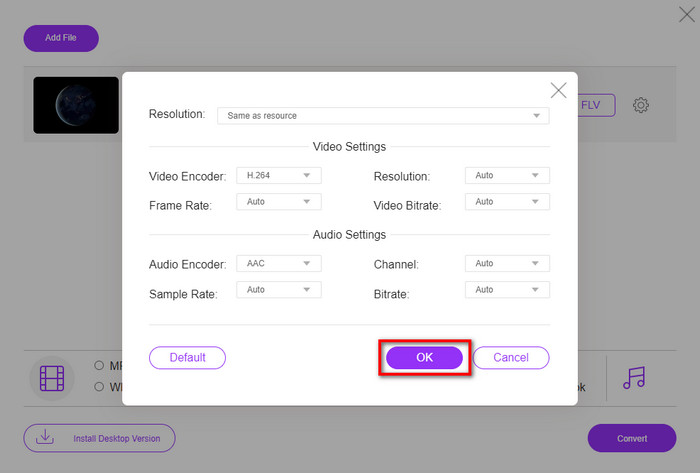
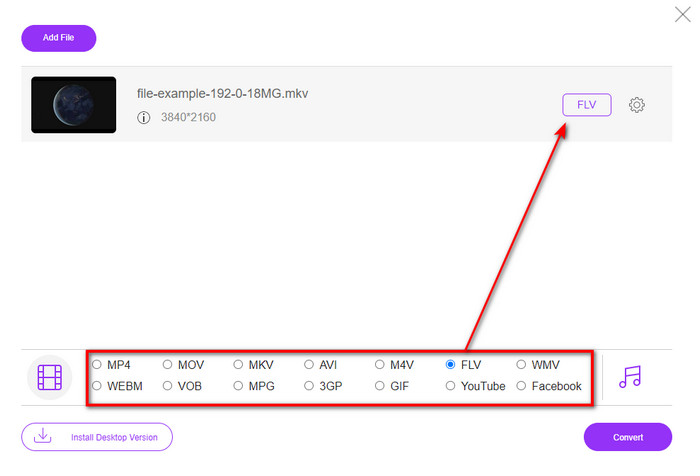
Étape 3. Sélectionnez le format FLV dans la liste proposée.
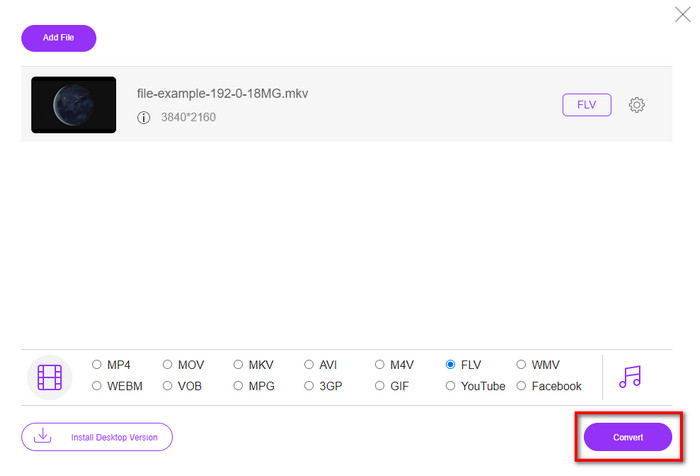
Étape 4. Cliquez sur Convert pour lancer le processus de conversion.
2. Mconvertisseur
L’un des convertisseurs MKV en FLV en ligne les plus sûrs que vous puissiez utiliser est Mconverter. En plus de convertir des formats vidéo et audio, vous pouvez aussi y convertir vos images, archives, documents et de nombreux autres formats multimédias. Même si ce convertisseur est gratuit, il existe une limite pour chaque fichier que vous pouvez y importer.
Avantages
- Convertissez des vidéos, de l'audio, des documents et plus encore en ligne.
- Il prend en charge plusieurs conversions.
- Facile à utiliser.
Les inconvénients
- La taille du fichier ne doit pas dépasser 200 Mo.
- Quelques publicités lors de la conversion du fichier.
Étape 1. Ouvrez Mconverter dans votre navigateur, faites glisser le fichier .mkv et déposez‑le dans la zone prévue.
Étape 2. Cliquez sur le format FLV, et le processus commencera automatiquement.
Étape 3. Une fois terminé, le fichier sera automatiquement téléchargé sur votre disque.
3. Freeconvert.com
Freeconvert.com vous aidera à convertir MKV en FLV en ligne gratuitement. Ce convertisseur web dispose d’une interface facile à comprendre que tout le monde peut utiliser. Cependant, ce convertisseur en ligne ne prend en charge qu’un nombre limité de formats parmi lesquels vous pouvez choisir, et il y a beaucoup de publicités sur l’interface du site.
Étape 1. Cherchez Freeconvert.com sur votre moteur de recherche.
Étape 2. Cliquez sur Choose File pour téléverser le fichier .mkv depuis le dossier de votre ordinateur, appuyez sur le bouton drop-down et choisissez le format FLV.
Étape 3. Cliquez sur Convert FLV pour lancer la conversion, puis pour le télécharger, cliquez sur Download FLV.
Avantages
- Un convertisseur en ligne gratuit que vous pouvez utiliser.
- Convertisseur web sécurisé et simple.
- Il prend en charge un fichier de 1 Go à convertir.
Les inconvénients
- Il prend en charge un format à petite échelle.
- Le processus de conversion et de téléchargement prendra beaucoup de temps.
4. Convertisseur vidéo en ligne Movavi
Movavi Online Video Converter fait partie des convertisseurs recommandés pour convertir MKV en FLV en ligne. Il s’agit de la version web gratuite de Movavi Video Converter, utilisée par de nombreux internautes en raison de l’efficacité de cet outil et de son apparence professionnelle.
Étape 1. Ouvrez votre navigateur préféré et recherchez le site web de Movavi.
Étape 2. Cliquez sur +Add Your Media pour ajouter le fichier que vous souhaitez convertir. Cliquez sur le bouton drop-down et appuyez sur Video ; trouvez le format FLV et cliquez dessus.
Étape 3. Appuyez sur Convert pour lancer le processus de conversion.
Avantages
- Interface Web sans publicité.
- Convertisseur simple que tout le monde peut utiliser.
- Il prend en charge un format moyen.
Les inconvénients
- Le processus de conversion de format prend plus de temps.
- Dépendant d'Internet comme les autres convertisseurs Web.
Partie 3. Tableau de comparaison
| Caractéristiques | Convertisseur vidéo FVC Ultimate | FVC Convertisseur Vidéo Gratuit en Ligne | Mconvertisseur | Freeconvert.com | Convertisseur vidéo en ligne Movavi |
| Conversion des capacités de format |  | | | | |
| Dépendant d'Internet |  | | | | |
| Conversion par lots | | | | | |
| Fonctionnalités d'édition avancées | | | | | |
| Plateformes disponibles | Outil basé sur le bureau | Outil Web | Outil Web | Outil Web | Outil Web |
MKV contre FLV
Le format de conteneur multimédia Matroska, sorti en 2002, est un format open source qui peut inclure un certain nombre de pistes vidéo, audio, image et sous-titres. Ainsi, vous pouvez l'utiliser pour stocker facilement de courts clips vidéo, des émissions de télévision et des films. Il est très populaire pour les fans d'anime.
Adobe Flash Player a utilisé FLV pour diffuser du contenu vidéo comme des films et des émissions de télévision. Aujourd'hui, Adobe ne développe plus le lecteur et recommande aux utilisateurs de le désinstaller pour des raisons de sécurité. Cependant, vous pouvez toujours utiliser le format FLV sur de nombreux programmes autres qu'Adobe/Macromedia.
Partie 4. FAQ sur la conversion MKV en FLV
Pourquoi les fichiers MKV sont-ils trop volumineux ?
Il y a deux raisons principales pour lesquelles les fichiers MKV sont trop volumineux. La première est que ce format peut contenir un nombre illimité de contenus et d’éléments vidéo, audio, de métadonnées dans un seul fichier. La seconde est que si votre vidéo est longue, attendez‑vous à ce que la taille du fichier augmente en conséquence. Cependant, vous pouvez compresser le fichier MKV à l’aide de ce compresseur MKV que vous pouvez utiliser. Mais si vous voulez une solution plus simple, vous devriez envisager de convertir les fichiers MKV en MP4, AVI, MOV, FLV, etc.
Est-ce que MKV est meilleur qu'AVI ?
Les formats MKV et AVI sont presque similaires, car ils peuvent contenir de la vidéo en haute définition et générer des fichiers volumineux. Toutefois, ces conteneurs ont des objectifs et des structures différents qui les rendent uniques. Par exemple, le format AVI est un format non compressé qui peut contenir de la vidéo brute, idéal pour la lecture. Il est également à la base du développement du fichier MKV. Bien que les fichiers MKV utilisent une compression, leur contenu et leurs éléments sont bien plus nombreux que ce que peut contenir un AVI. Donc, si vous voulez conserver la haute qualité de vos vidéos, optez pour le format MKV. Mais si vous privilégiez la compatibilité, choisissez plutôt l’AVI. Si vous souhaitez savoir comment convertir MKV en AVI, cliquez sur ce lien.
Handbrake gère-t-il la conversion de MKV en FLV ?
Handbrake peut gérer ce travail, mais ce convertisseur ne prend pas en charge les programmes macOS et Windows qui ne sont pas 10 ci-dessus.
Conclusion
Pour conclure, vous savez désormais comment convertir MKV en FLV en ligne et hors ligne. Les outils ci‑dessus n’ont pas été choisis au hasard, nous les avons sélectionnés en fonction des préférences des utilisateurs. Au fil de nos recherches et analyses, nous avons découvert que ces six outils offrent d’excellentes performances en tant que convertisseurs. Mais FVC Video Converter Ultimate dépasse encore ce que nous attendions d’un convertisseur. Vous voulez connaître les autres atouts de ce convertisseur remarquable ? Alors qu’attendez‑vous ? Vous devez le télécharger dès maintenant.
-
 MKV en MOV - Comment convertir MKV en MOV
 Comment convertir MKV en MOV sur Mac? IMovie peut-il lire MKV? Que signifie le format MOV? Cet article explique 2 façons simples de vous aider à convertir MKV en MOV avec des convertisseurs vidéo gratuits en ligne et professionnels.
-
 Comment convertir des vidéos MKV en GIF animés sans Photoshop/FFmpeg
 Après avoir téléchargé et regardé des films MKV sur votre ordinateur, vous voudrez peut-être partager des moments merveilleux avec des amis ou sur Internet sous forme de GIF. Dans cet article, vous pouvez découvrir les 2 manières les plus simples de convertir MKV en GIF.
-
 Conseils et astuces pour convertir des fichiers MKV en MP3 [2025]
 Vous avez du mal à choisir le bon convertisseur pour MKV en MP3 ? Continuez ensuite à lire cet article car nous avons présenté différentes solutions à un problème.

