


 Video Converter Ultimate
 Enregistreur d'écran
 Réparation vidéo
Guide simplifié Comment convertir DV en WMV sur Windows et PC
Les fichiers DV sont des formats bruts de diffusion standard couramment utilisés sur les caméscopes. Après son lancement en tant que format standard de caméscope, Sony et Panasonic ont introduit un format plus professionnel, différent du format DV. Bien que ce fichier DV soit excellent pour le montage, pour le lire sous Windows, vous devrez utiliser un logiciel pour visionner la vidéo. Nous vous présentons donc ci‑dessous deux convertisseurs que vous pouvez utiliser pour convertir un fichier DV en WMV et le regarder sans aucune difficulté.

Partie 1. Utilisez le convertisseur le plus incroyable pour convertir DV en WMV
FVC Video Converter Ultimate peut vous aider à convertir votre ancien format dans une nouvelle version. Cet outil prend en charge de nombreuses fonctions en plus de la simple conversion. Ainsi, si vous disposez de ce convertisseur, vous pouvez vous attendre à faire bien plus que de simples conversions. De plus, si vous avez besoin d’un processus de conversion immédiat, c’est le meilleur choix pour convertir un DV en WMV, AVI, MOV, MP4, MKV et plus de 200 autres formats multimédias. Vous souhaitez découvrir un nouveau type de convertisseur qui fournit un résultat professionnel sans aucun tracas ? Si oui, cette démonstration vous aidera à comprendre comment convertir votre fichier dans un nouveau format WMV.
Étapes pour convertir un DV en WMV avec FVC Video Converter Ultimate :
Étape 1. Téléchargez FVC Video Converter Ultimate sur le disque de votre ordinateur, cliquez sur le bouton de téléchargement, suivez les étapes d’installation, puis lancez l’outil.
Téléchargement gratuit pour Windows 7 ou version ultérieure Téléchargement sécurisé
Téléchargement gratuit pour macOS 10.7 ou version ultérieure - Téléchargement sécurisé
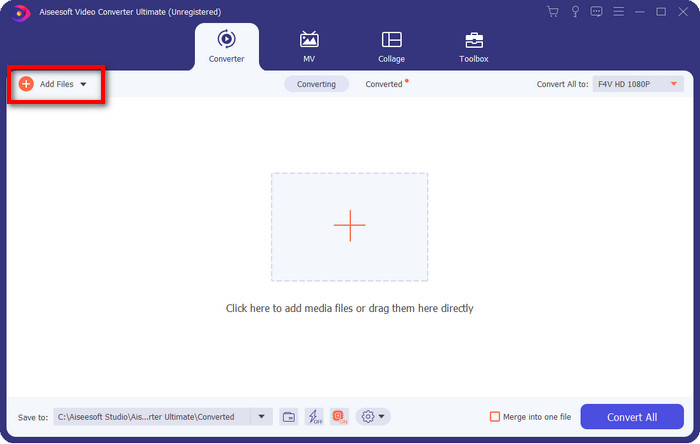
Étape 2. Après avoir tout configuré, importez le fichier dans le convertisseur en cliquant sur Add Files, recherchez le fichier DV enregistré sur votre ordinateur dans le dossier qui s’affiche, puis cliquez sur Open.
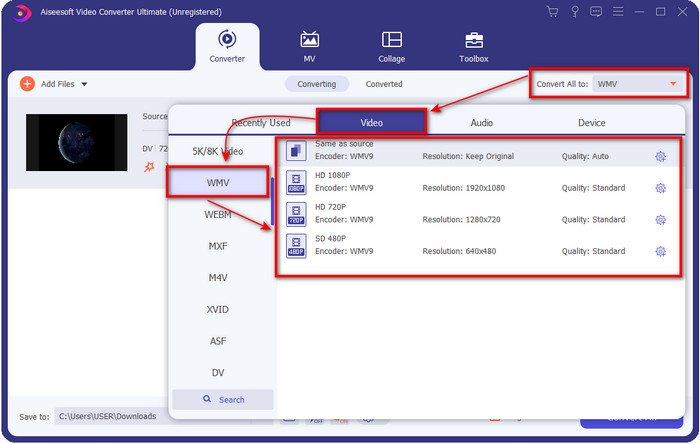
Étape 3. Modifiez le format en cliquant sur le bouton drop‑down dans la partie supérieure droite de l’interface utilisateur. Puis choisissez le format WMV dans la liste qui s’affiche, et vous pourrez maintenant sélectionner la qualité de la vidéo en sortie.
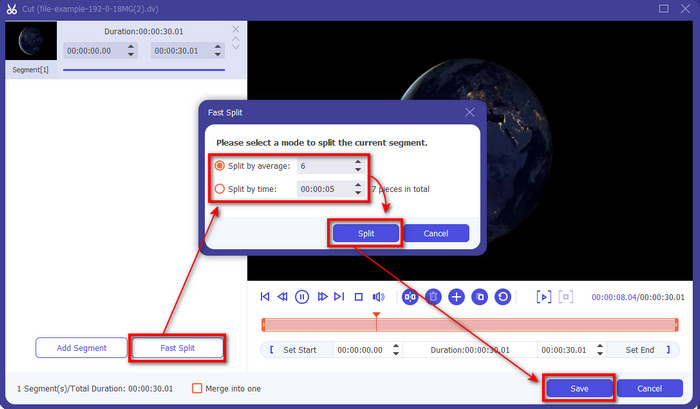
Vous voulez découper vos vidéos en plusieurs segments ? Dans ce cas, appuyez sur le bouton en forme de ciseaux, cliquez sur Fast Split pour définir le nombre de segments souhaités et la durée de chaque segment, puis appuyez sur Split pour continuer. Pour enregistrer le résultat du découpage que vous avez effectué, cliquez sur Save.
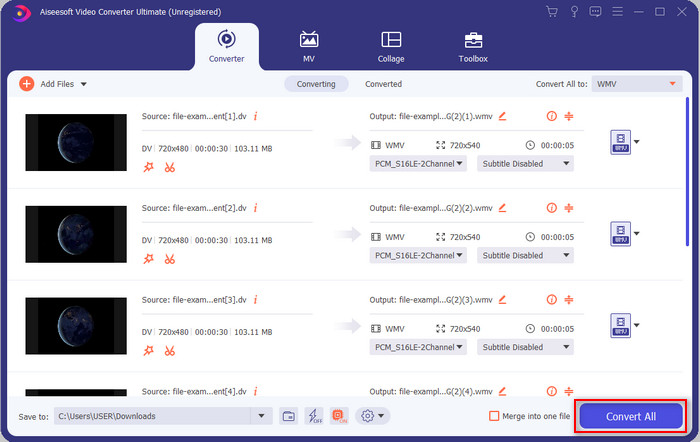
Étape 4. Cliquez sur Convert All pour lancer le processus de conversion du fichier DV. Une fois la procédure terminée, un nouveau dossier s’affichera avec le nouveau fichier WMV.
Partie 2. Utilisez le convertisseur en ligne pour convertir DV en WMV en ligne
Vous recherchez une solution en ligne pour convertir un DV en WMV et sans prise de tête ? Alors FVC a ce qu’il vous faut avec le FVC Free Video Converter Online. Ce convertisseur web vous aidera à convertir vos fichiers, mais vous devrez y accéder via votre navigateur au lieu de le télécharger. De plus, il est simple, gratuit et sûr, ce qui améliore encore votre expérience de conversion. Vous voulez savoir comment utiliser cet outil en ligne ? Suivez alors les étapes ci‑dessous pour apprendre à effectuer la conversion en ligne.
Étape 1. Vous pouvez cliquer sur ce lien pour ouvrir le convertisseur en ligne ; un nouvel onglet s’ouvrira.
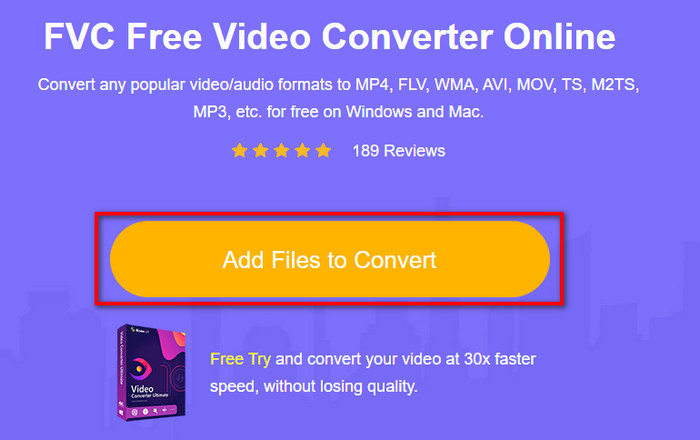
Étape 2. Cliquez sur Add Files to Convert sur le site ; un dossier s’affichera directement sur votre écran, sélectionnez le fichier DV, puis cliquez sur Open.
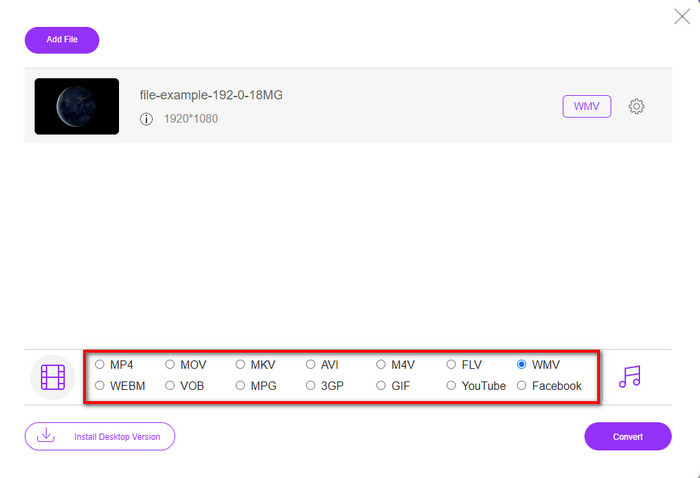
Étape 3. Une fois le fichier téléversé, choisissez le format dans le catalogue présenté en dessous ou cliquez sur WMV pour l’enregistrer au format WMV.
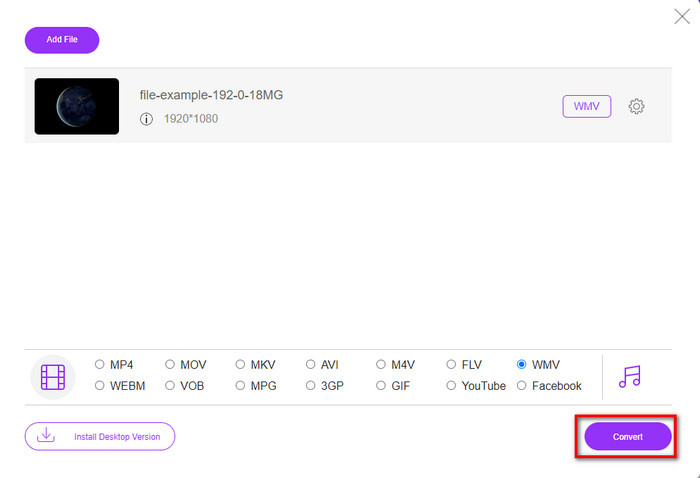
Étape 4. En cliquant sur Convert, le processus de conversion débutera. Une fois la conversion terminée, le fichier sera automatiquement téléchargé sur le disque de votre ordinateur.
Partie 3. Quelle est la différence entre DV et WMV
La différence entre DV et WMV est facile à comprendre à bien des égards. Donc, si vous voulez savoir de quoi il s'agit, vous devez lire les informations sur la liste ci-dessous.
Pour enregistrer de la vidéo sur un caméscope, le DV est le meilleur choix car il peut stocker ce type de contenu. En outre, ce format peut contenir des détails essentiels tels que les métadonnées, le sous-code, l'heure et l'encodage de la date. De plus, ce format utilise une compression intra-image dans chaque image, et à cause de cela, il est idéal pour une édition détaillée. Bien que le format soit excellent et stocké sur des cassettes DV, la compatibilité de ce format est médiocre et sa taille de fichier est énorme par rapport au WMV. D'autre part, WMV est le meilleur format à utiliser pour la lecture vidéo sous Windows. Et maintenant, il adapte le format de la version 9 pour les DVD HD et les disques Blu-ray, il est maintenant connu sous le nom de VC-1.
Partie 4. FAQ sur la conversion DV en WMV
Pourquoi ne puis-je pas utiliser le logiciel DV sur Mac ?
Le format DV n’est pas pris en charge sur Mac, en particulier dans iMovie et QuickTime Player. Mais vous pouvez convertir votre fichier DV au format MOV pour qu’il fonctionne sur votre macOS. Si vous ne savez pas comment convertir un DV en MOV, prenez 5 minutes ou moins pour lire cet article et découvrir la marche à suivre.
Les fichiers DV sont-ils toujours le meilleur format pour le montage ?
Les formats DV sont connus pour être l'un des meilleurs conteneurs en matière de montage. Parce que DV stocke des vidéos de haute qualité et stocke chaque image à des fins de montage plus accessibles. Mais aujourd'hui, la capacité de ce format a déjà été adoptée par la plupart des formats. Donc, si vous demandez si c'est toujours l'idéal, alors la réponse est non en raison de la mauvaise compatibilité de ce format.
Comment réduire la taille de mes fichiers DV ?
Comme vous le savez peut‑être déjà, les fichiers DV sont très volumineux, car ce format utilise un compresseur spécifique. Il est donc tout à fait normal de chercher un compresseur pour réduire la taille du fichier et gagner de l’espace sur votre disque. Vous avez des difficultés à choisir et à effectuer la compression de fichiers DV ? Si oui, cliquez sur ce lien.
Conclusion
Tous les convertisseurs présentés ci‑dessus vous aideront dans votre parcours de conversion de DV en WMV. Il est donc temps de conclure, car nous arrivons au terme de ce guide après avoir acquis suffisamment de connaissances sur la façon de convertir vos fichiers DV. À présent, il vous reste à choisir le convertisseur qui vous convient le mieux. Le choix vous appartient ; quel que soit le convertisseur que vous utilisez, ces outils FVC garantiront votre réussite. FVC Free Video Converter Online ou FVC Video Converter Ultimate, ces deux convertisseurs rendront votre processus de conversion simple et sans tracas.
-
 Meilleure stratégie pour convertir un fichier DV au format AVI avec des étapes détaillées
 Voulez-vous convertir votre fichier DV en AVI ? Alors lisez cet article pour connaître l'outil unique que vous pouvez utiliser pour convertir et un lecteur multimédia pour lire votre DV sur votre PC ou Mac.
-
 Convertisseurs DV en FLV utiles pour convertir DV en FLV [2022]
 Si vous recherchez les meilleurs outils faciles à utiliser pour convertir DV en FLV, voici le meilleur article à lire. Ayez un excellent aperçu en fouillant dans toutes les informations de cet article.
-
 Les 3 meilleures façons de convertir FLV en WMV sur Windows et Mac
 Vous cherchez le meilleur moyen de convertir FLV en WMV sans perte de qualité sur PC ou Mac ? Vous avez de la chance puisque nous partageons ici trois méthodes pour faire le travail facilement.
