


 Video Converter Ultimate
 Enregistreur d'écran
 Réparation vidéo
Comment réduire la résolution d'une vidéo sur Windows, Mac et téléphones mobiles
Videos on 1080 and 720 HD have the best resolution you would love to use, especially watching. Although these resolutions are best, sooner or later, you will need to convert the video resolution into less to save some space on your drive. But the question is how to convert the video resolution to lower it? This article will identify the leading video resolution converter to lower the video resolution on Windows, Mac, Online, Android, & iPhone.

Partie 1. Pourquoi avez-vous besoin de réduire la résolution vidéo
En guise de préparation avant de réduire la résolution vidéo, déterminons d'abord la raison pour laquelle nous devons changer pour réduire la résolution d'une vidéo. Les informations que nous fournissons ci-dessous sont le cas le plus courant dont vous aurez besoin pour réduire la résolution.
Raison 1. Non pris en charge sur les appareils mobiles
Certains appareils mobiles ne prennent pas en charge une résolution vidéo plus élevée car votre mobile ne la reconnaît pas. Parfois, nous pensions que la vidéo ne s'ouvrait pas à cause de la compatibilité du format, mais c'est une autre raison derrière cela. Si vous souhaitez lire la vidéo, vous devez garder à l'esprit la résolution de la vidéo que vous avez enregistrée sur votre téléphone.
Raison 2. Prenez le temps de charger le fichier sur un lecteur multimédia
Chaque lecteur multimédia peut lire votre vidéo dans la résolution la plus élevée possible, mais tous ne peuvent pas charger immédiatement la vidéo en haute qualité. Bien que regarder une vidéo en haute résolution soit plus agréable que d'en regarder une plus basse. Apprendre à réduire la résolution d'une vidéo est indispensable si vous souhaitez regarder la vidéo instantanément avec peu ou moins de charge sur le lecteur multimédia.
Raison 3. Une vidéo de haute qualité occupe beaucoup d'espace
Cette raison n'est pas nouvelle pour nous ; une vidéo de haute qualité est plus susceptible d'avoir une taille de fichier énorme. En raison de la sortie de haute qualité, vous devez vous attendre à ce que la taille du fichier soit importante. Par exemple, 720 et 1080 sont parmi les meilleures qualités, mais la taille de fichier de 720 vidéos est bien inférieure à celle de 1080 vidéos. En revanche, la résolution de 1080 est bien supérieure à 720.
Maintenant que nous avons une idée de la raison pour laquelle nous devons réduire la résolution vidéo, les informations suivantes vous apprendront les différents ensembles d'outils que vous pouvez utiliser pour réduire la résolution de votre vidéo. Gardez le bal pour avoir une idée complète à ce sujet.
Partie 2. Le moyen le plus simple de réduire la résolution vidéo sur le bureau
If you need a user-friendly video converter that can help you quickly change the video resolution, then Video Converter Ultimate will offer this to you. This tool supports 200+ formats with different presets you can choose from. Want to know what impressed us about this converter? With this tool, you can create presets that can go up to 4k or as low as 360 resolution. Moreover, you don't need to be a professional video editor to learn how to convert video to a lower resolution; by following the steps below, you can convert resolution successfully.
Step 1. Kindly click the appropriate button to get the version you are currently using, whether Windows or Mac. Open the download file to install the software follow the installation process to install it properly. After installation, open the Video Converter Ultimate and proceed to the next step.
Téléchargement gratuit pour Windows 7 ou version ultérieure Téléchargement sécurisé
Téléchargement gratuit pour macOS 10.7 ou version ultérieure - Téléchargement sécurisé
Step 2. Upload the video with the highest resolution by dragging and dropping it on the tool's interface. But you can click the + button to open the folder, locate the file and click Open to upload the video.
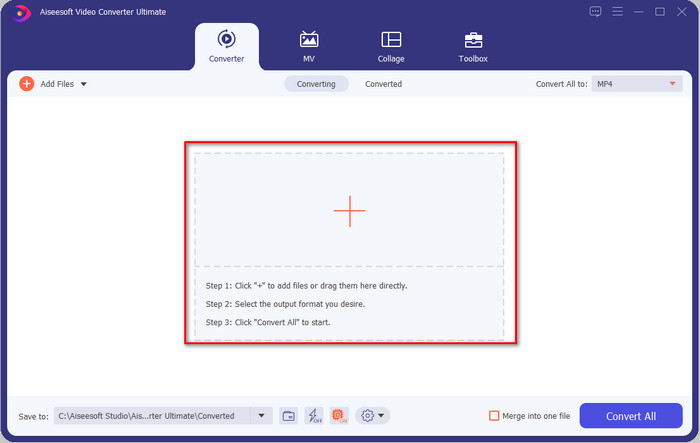
Step 3. Click Convert All to, and a setlist of the premade format will show. You can select different formats such as MP4, MOV, AVI, MKV, and 200+ more with different resolutions, click the format you want, and proceed.
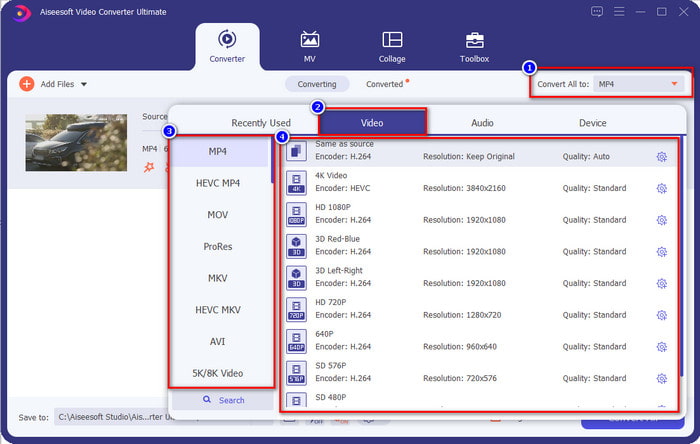
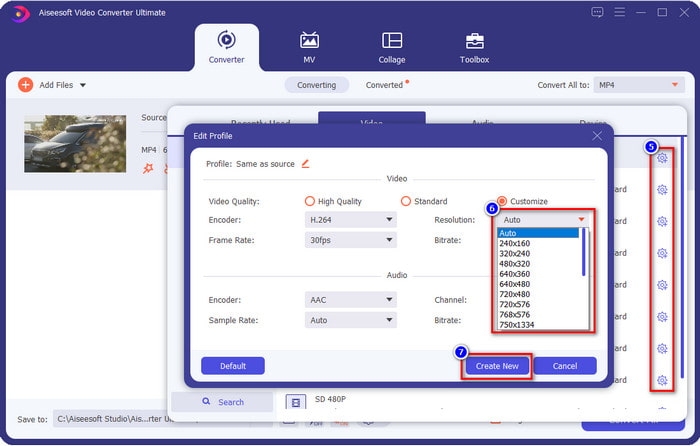
What if the resolution you want to achieve is not on the pre-made list? No need to worry; you can create your resolution. After clicking the Convert All to, choose the format you want and click the gear with a plus icon. Click the drop-down button, select the resolution you want, click Create New, and click the preset you've made.
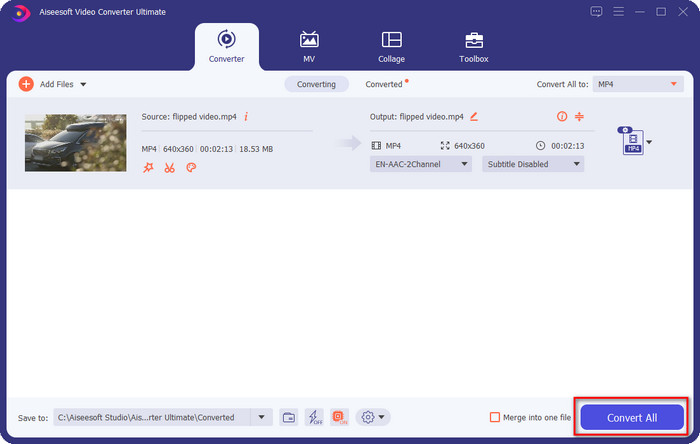
Step 4. To start lowering your video resolution, hit the Convert All button. With the ultra-fast conversion, the download will take less than a minute. And voila, the resolution of your video is now lowered, all thanks to the ultimate tool.
Partie 3. Méthode gratuite pour convertir une résolution vidéo en résolution inférieure sur le Web
If you are looking for a way to convert HD video to lower resolution online, then you can use the FVC Free Video Converter Online as a solution. This web tool supports numerous formats you can upload and export into. Unlike the ultimate tool, you won't need to download this tool to convert the high-resolution video into a lower one. However, the tool doesn't have an ultra-fast converting process, and the supported format is not as many as the ultimate tool. So, if you want to try and use this web tool, you can follow the steps below.
Step 1. To go to the main webpage of FVC Free Video Converter Online, click this link.
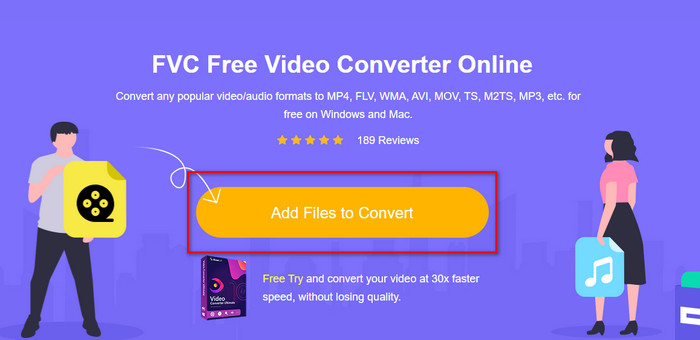
Step 2. Press Add Files to Convert to upload the video you want to lower the resolution. Additionally, if this is your first time using the tool, you must download the launcher. After that, click the Add Files to Convert again to upload the file.
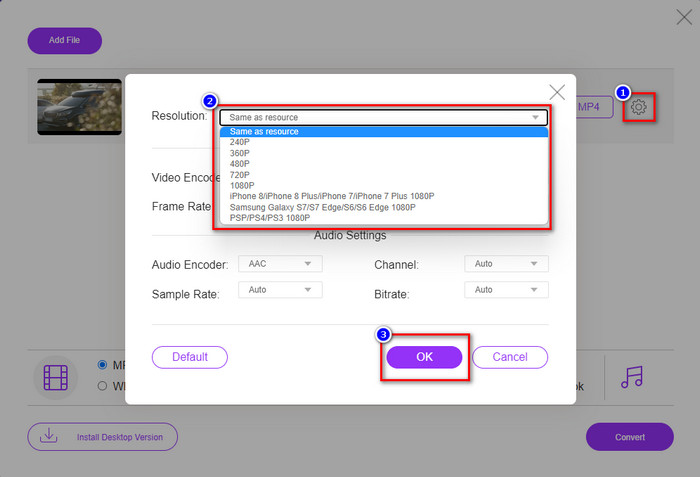
Step 3. Click the gear icon on the right side of the window that will show. Choose the resolution you want by clicking the drop-down button and pressing OK to save.
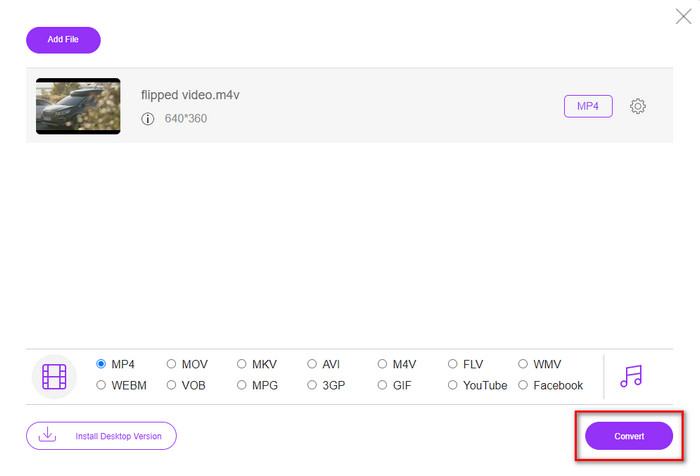
Step 4. To export the lower-quality video, click Convert and wait to download it on your drive.
Partie 4. 2 meilleures applications pour réduire la résolution vidéo sur iPhone et Android
Usine de format vidéo (pour les utilisateurs d'Android uniquement)
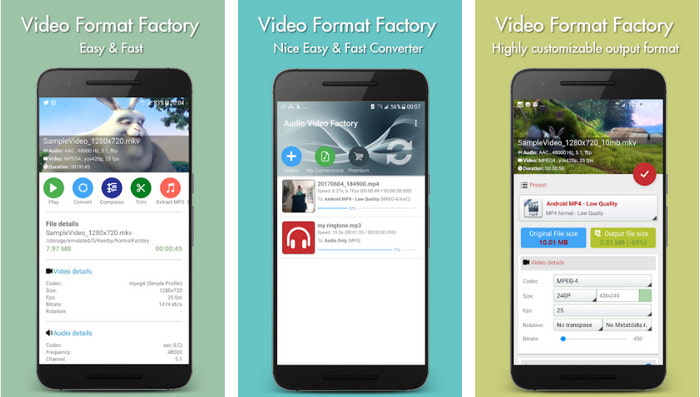
Si vous avez besoin d'apprendre à réduire la résolution vidéo sur Android, Audio Video Factory peut vous aider. Avec cette application, vous pouvez facilement convertir gratuitement la résolution vidéo de votre vidéo. Cependant, certaines publicités apparaîtront pendant la conversion et vous ne pourrez pas utiliser tout le potentiel de l'outil si vous ne l'achetez pas. Donc, pour vous apprendre à l'utiliser, suivez les étapes.
Step 1. Download the app on Playstore, then open it.
Step 2. Click Add to upload the video, choose where your video is, and click the video. After that, click Convert; click the Size and choose the resolution you want.
Step 3. Scroll up and click Convert Now to begin the process.
Appareil photo à très basse résolution (pour les utilisateurs iOS uniquement)
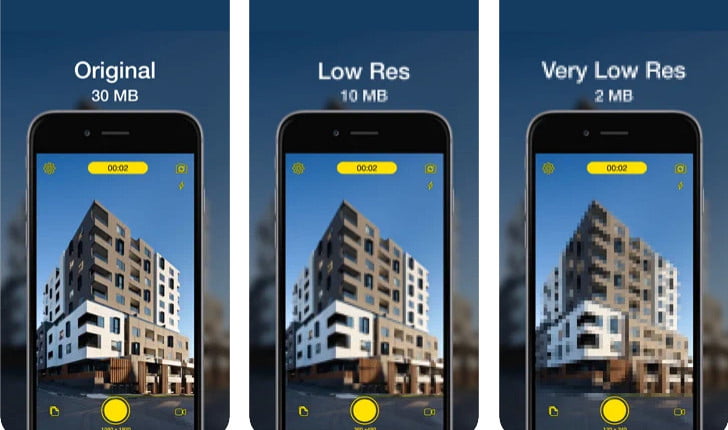
If you are an iOS user, you can still learn how to reduce the resolution of the video on the iPhone by using the Lower- Very Low Res Camera. Unlike the tools in this list, you can shoot a video with a lower resolution if you download this app on the App Store. However, the tools have some limitations, and it has pop-up ads while using the app.
Step 1. Download the app on the App Store, then click it to open.
Step 2. Click the file's icon and select the video you want to convert; after clicking the video, press Resize.
Step 3. Select the Recording Quality, and the process of converting it will begin.
Partie 5. FAQ sur la réduction de la résolution vidéo
VLC prend-il en charge la résolution 4k ?
Yes, VLC 3.0 supports playing videos that are on 4k resolution. But did you know there are many things VLC can do? If you want to explore VLC more, click this link and learn about VLC and its other perfect alternatives to use.
Quels sont les autres outils que je peux utiliser pour convertir la résolution vidéo ?
This review will learn the 8 of the best video resolution converters you can use on different platforms. By clicking this link, you will have more detailed information and different varieties of converter choices.
Quelle est la résolution vidéo la plus élevée que je puisse avoir ?
La résolution vidéo 8k est la résolution vidéo la plus élevée que vous puissiez utiliser à la télévision. Cette résolution est 4 fois plus nette que la 4k et 16 fois meilleure que la 1080.
Conclusion
Finally, we now have a clearer idea on how to lower the video resolution in your platform; whether you are using a Windows, Mac, Online, Android, or iPhone, you can use the converters in this list. But if you want a tool that can change your resolution without reducing the quality, we recommend using the FVC Video Converter Ultimate. As we present above, there are many reasons you should use this tool, and if you still do not believe us, you can download the tool and try if it works, as we explain in this post.
-
 Guide ultime Comment changer la résolution vidéo disponible sur plusieurs plates-formes
 Besoin de changer la résolution vidéo de la vidéo ? Si tel est le cas, découvrez les différentes façons de modifier facilement la résolution vidéo de la vidéo que vous regardez.
-
 Top 8 des convertisseurs de résolution vidéo à utiliser dans les multiplateformes [Mise à jour 2022]
 Vous n'avez aucune idée du meilleur convertisseur de résolution vidéo sur votre appareil ? Si tel est le cas, vous pouvez lire entièrement cet article pour en savoir plus sur les convertisseurs vidéo disponibles.
-
 Meilleur lecteur vidéo HD 1080p pour Windows/Mac/iOS/Android en 2021
 Si vous recherchez un lecteur vidéo pour regarder des vidéos haute définition 1080p sur votre ordinateur, consultez notre sélection des meilleurs lecteurs vidéo HD 1080p pour Mac, PC Windows, iOS et Android.
