


 Video Converter Ultimate
 Enregistreur d'écran
 Réparation vidéo
Comment convertir facilement un fichier WebM en WMV
WebM est un format de fichier multimédia pris en charge par la plupart des navigateurs web comme Google Chrome, Mozilla Firefox, Microsoft Edge, Opera, et bien d’autres. Il est utilisé dans les vidéos HTML5 et les audios HTML5 à des fins de diffusion en continu (streaming). Cependant, les fichiers WebM ne sont pas pris en charge nativement par les appareils Mac et iOS sans recourir à d’autres outils. Par conséquent, si vous voulez ouvrir des fichiers WebM sur n’importe quel appareil, nous vous recommandons de les convertir en fichiers WMV, un format largement pris en charge par presque tous les appareils et lecteurs. Dans cet article, nous avons répertorié les meilleurs convertisseurs WebM vers WMV pour que vous puissiez les essayer.

Partie 1. Les 3 meilleurs outils pour convertir WebM en fichier WMV sans perte
Convertisseur vidéo FVC Ultimate
FVC Video Converter Ultimate est extrêmement populaire sur le web lorsqu’il s’agit de convertisseurs de fichiers. Ce convertisseur vous permet de transformer facilement votre fichier WebM en fichier WMV. Il dispose également de fonctions avancées vous permettant de monter, d’améliorer et même de compresser votre fichier sans en détériorer la qualité. En outre, cet outil prend en charge un large éventail de conversions dont vous pouvez avoir besoin, y compris vers le format WMV. Ainsi, si vous souhaitez convertir efficacement un fichier WebM en WMV, cette application est faite pour vous.
Avantages
- Vous permet de modifier, d'améliorer et de compresser votre fichier.
- Peut convertir divers formats de fichiers, notamment WebM, WMV, MP4, M4V, MOV, AVI, etc.
- Interface facile à utiliser.
Les inconvénients
- Vous devez d'abord télécharger l'application avant de pouvoir l'utiliser.
FVC Convertisseur Vidéo Gratuit
FVC Free Video Converter est un convertisseur en ligne gratuit qui vous permet de convertir divers formats de fichiers, dont WebM vers WMV, MP4, FLV, MOV, et bien d’autres. Ce convertisseur est également facile à utiliser grâce à son interface simple. De plus, il n’a pas besoin d’être installé, car il fonctionne directement en ligne. Cependant, comme il s’agit d’un convertisseur en ligne, vous pouvez rencontrer une conversion plus lente, puisqu’il dépend de la qualité de votre connexion Internet. Néanmoins, de nombreux utilisateurs l’ont adopté et l’approuvent comme l’un des meilleurs convertisseurs en ligne pour convertir gratuitement votre WebM en WMV.
Avantages
- Ne pas contenir d'annonces dérangeantes.
- Vous permet de convertir de nombreux formats de fichiers, notamment WebM, WMV, MP4, FLV, WMA, etc.
- Vous n'avez pas besoin de télécharger l'application.
Les inconvénients
- Il peut être lent à convertir.
- N'a que des fonctionnalités limitées à utiliser.
SavetheVideo.com
SavetheVideo.com est un convertisseur en ligne gratuit qui prend en charge les principaux formats vidéo. Avec ce convertisseur, vous pouvez convertir les vidéos provenant de célèbres applications de réseaux sociaux comme Facebook, Twitter, Instagram, TikTok, et bien d’autres. Malgré cela, vous pouvez rencontrer des difficultés de conversion, notamment lorsque le fichier n’est pas pris en charge.
Avantages
- Il peut convertir des vidéos jusqu'à plus de 420 formats sur n'importe quel appareil.
- Vous pouvez convertir à partir d'appareils Android et iPhone.
Les inconvénients
- Il a une interface difficile à suivre.
- Vous pouvez rencontrer une conversion lente.
Partie 2. Comment convertir WebM en WMV à l'aide de FVC Video Converter Ultimate
Cette partie de l’article va vous montrer comment convertir des fichiers WebM au format WMV en utilisant FVC Video Converter Ultimate. Nous considérons en effet que ce convertisseur est le meilleur parmi ceux qui font actuellement tendance sur le marché. Parmi les autres convertisseurs WebM vers WMV disponibles aujourd’hui, ce convertisseur en ligne gratuit offre des performances prometteuses, surtout grâce à ses excellentes fonctionnalités.

Convertisseur vidéo FVC Ultimate
Plus de 5 689 200 téléchargements- Il prend en charge la conversion de WebM en WMV, MP4, MOV, MKV ou en plus de 200 formats en quelques clics.
- Il offre une conversion par lots pour convertir plusieurs fichiers WebM en même temps.
- La conversion ultra-rapide vous permet d'avoir un processus de conversion ultra-rapide en quelques secondes.
- Il possède des fonctionnalités d'édition où vous pouvez faire pivoter, couper, fusionner, etc.
Téléchargement gratuit pour Windows 7 ou version ultérieure Téléchargement sécurisé
Téléchargement gratuit pour macOS 10.7 ou version ultérieure - Téléchargement sécurisé
Étapes pour convertir un fichier WebM en WMV avec FVC Video Converter Ultimate :
Étape 1. Pour télécharger ce convertisseur, cliquez sur le bouton Télécharger ci‑dessous. Suivez le processus d’installation, puis ouvrez l’application.
Téléchargement gratuit pour Windows 7 ou version ultérieure Téléchargement sécurisé
Téléchargement gratuit pour macOS 10.7 ou version ultérieure - Téléchargement sécurisé
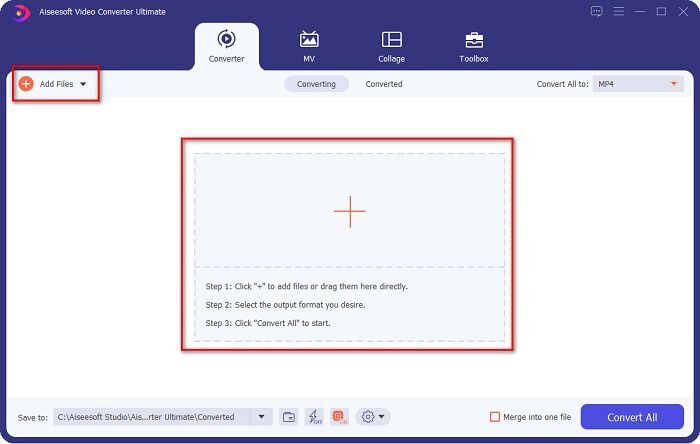
Étape 2. Après avoir ouvert l’application, cliquez sur le bouton Ajouter des fichiers ou sur le bouton + pour importer votre fichier WebM dans l’interface principale de l’outil. Une fenêtre de votre ordinateur s’ouvrira alors pour vous permettre de localiser votre fichier WebM. Appuyez ensuite sur le bouton Ouvrir pour importer votre fichier. De plus, vous pouvez ajouter plusieurs fichiers WebM, car cet outil prend en charge la conversion par lots.
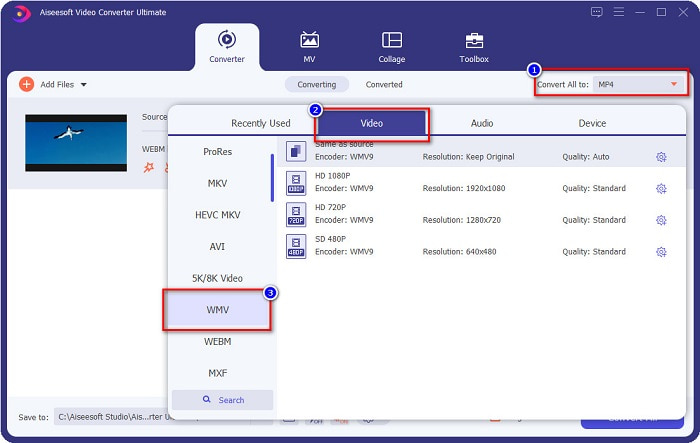
Étape 3. Dans le coin supérieur droit du logiciel, vous verrez le bouton Convertir tout en. Cliquez dessus, puis sélectionnez le format WMV dans la liste afin de changer le format du fichier de WebM en WMV.
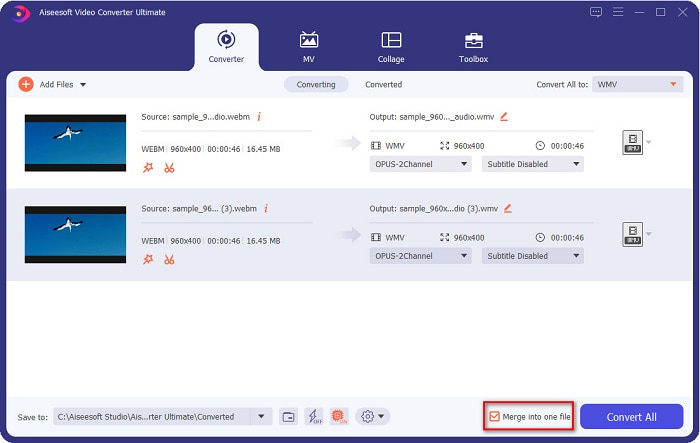
Optionnel. Vous souhaitez savoir comment fusionner plusieurs fichiers WebM en un seul ? Cet outil ultime possède une fonctionnalité puissante qui permet de les regrouper dans un fichier unique. Pour ce faire, cochez la case située dans le coin inférieur droit de votre logiciel. Ainsi, lorsque vous convertirez vos fichiers, ils seront automatiquement fusionnés en un seul. Mais si vous ne souhaitez pas fusionner vos fichiers, vous pouvez ignorer cette étape et passer à la suivante.
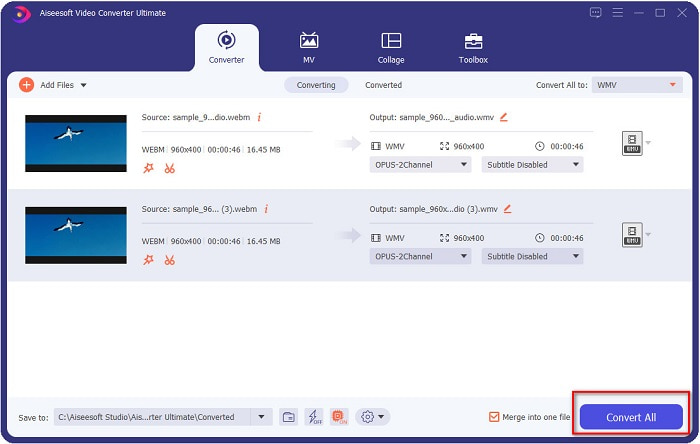
Étape 4. Une fois le format de fichier souhaité sélectionné, cliquez sur le bouton Tout convertir pour commencer à convertir votre fichier WebM en WMV. Et voilà ! Votre fichier WebM est maintenant converti en fichier WMV !
Vous pouvez facilement convertir votre fichier WebM en fichier WMV en suivant ces étapes simples.
Partie 3. Connaissances approfondies sur WebM et WMV
Pour plus de compréhension de ces deux fichiers, nous allons les aborder dans cette partie de l'article.
Le fichier WebM est un format vidéo largement pris en charge par les navigateurs web. Les sites HTML5 utilisent ce format pour la diffusion vidéo en streaming. De plus, ce type de fichier contient des flux vidéo compressés avec les codecs VP8 ou VP9. D’un autre côté, WMV ou Windows Media Video est développé par Microsoft pour Windows ; il est donc généralement lu sur les systèmes Windows. De nombreux encodeurs prennent également en charge ce type de fichier. En outre, ce format utilise un algorithme de compression qui permet de réduire la taille de vos fichiers sans en altérer la qualité.
Partie 4. FAQ sur la conversion de WebM en WMV
Le convertisseur vidéo ultime peut-il convertir les fichiers WebM au format de fichier MP4 ?
Bien sûr. Avec FVC Video Converter Ultimate, vous pouvez convertir votre fichier WebM en MP4. Vous pouvez cliquer sur ce lien et lire attentivement pour obtenir plus d’informations sur la façon de convertir votre fichier WebM au format MP4.
QuickTime prend-il en charge les fichiers WebM ?
QuickTime ne prend pas en charge les fichiers WebM. Comme QuickTime ne contient pas autant de codecs que d’autres lecteurs multimédias, vous pouvez convertir votre fichier WebM en des formats comme MOV, qui sont pris en charge par les codecs de QuickTime. Pour avoir plus d’informations sur la façon de convertir un fichier WebM en MOV, cliquez sur ce lien.
Internet Explorer prend-il en charge les fichiers WebM ?
Oui. Internet Explorer prend en charge les fichiers WebM. Même ainsi, Internet Explorer est déjà supprimé.
Conclusion
Pour résumer, les convertisseurs WebM vers WMV présentés ci‑dessus vous aideront à convertir facilement vos fichiers WebM en fichiers WMV. De plus, les outils proposés offrent différentes fonctionnalités qui vous permettent d’aller plus loin dans vos conversions. Mais nous pensons que FVC Video Converter Ultimate est le meilleur outil pour répondre à vos besoins. Vous n’arrivez toujours pas à choisir quel convertisseur utiliser ? Téléchargez‑le dès maintenant et essayez‑le !
-
 3 manières de convertir WebM en MP3 sans perte de qualité sonore
 Vous rencontrez un problème car les fichiers WebM ne peuvent pas être utilisés pour lire l'audio que vous enregistrez ? Alors lisez cet article car nous fournissons une aide efficace en convertissant WebM en MP3.
-
 3 superbes logiciels utilisés pour convertir un fichier WebM au format AVI
 Vous ne savez pas comment convertir WebM en AVI ? Alors commençons à lire cet article. Comme nous spécifions tous les détails sur WebM et les trois convertisseurs que vous pouvez utiliser pour convertir.
-
 Meilleur convertisseur WebM en FLV gratuit sur le Web et le bureau
 Avez-vous le même problème pour lire des fichiers WebM sur vos smartphones ? Passez ensuite 5 minutes à lire cet article pour savoir comment convertir WebM en FLV.
