


 Video Converter Ultimate
 Enregistreur d'écran
 Réparation vidéo
Comment supprimer les métadonnées des fichiers via Windows, Mac, en ligne et les téléphones
Every media file has metadata connected about the file, whether a video, image, audio, etc. Suppose you post a media file online; through that post, someone has information about coordinates about your location, time, date, manufacturer, device model, and many more, known as EXIF data. Isn't it scary to think someone can get information through your post with the metadata? Thankfully, this article will teach you how to remove metadata on any media file on Windows, Mac, Online, and even your phones before posting it online.

Partie 1. Meilleures façons de supprimer les métadonnées de tous les fichiers sous Windows
Les moyens que nous présenterons dans cet article sont le suppresseur de données intégré que vous pouvez utiliser sur Windows et l'outil tiers que vous pouvez utiliser pour effacer facilement les métadonnées. Donc, pour avoir plus d'idées sur la façon d'effacer les métadonnées de votre fichier, vous pouvez lire les détails ci-dessous et suivre les étapes pour le faire avec succès.
Utiliser les propriétés sous Windows
Sous Windows, vous pouvez facilement supprimer les métadonnées des vidéos si vous le souhaitez. En suivant les étapes ci-dessous, vous pouvez supprimer les informations relatives à votre dossier avant de les mettre en ligne.
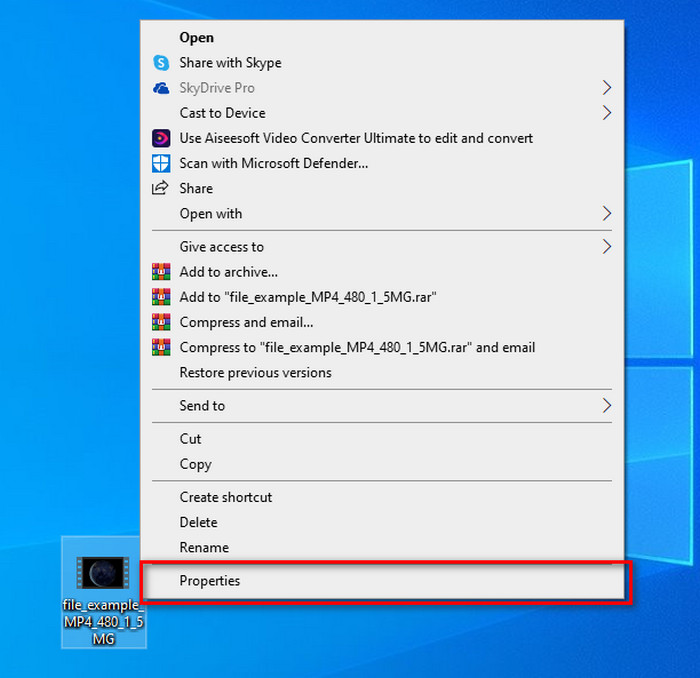
Step 1. Locate the file on your desktop and tap the right click on your mouse; under it, you will see Properties, then click it.
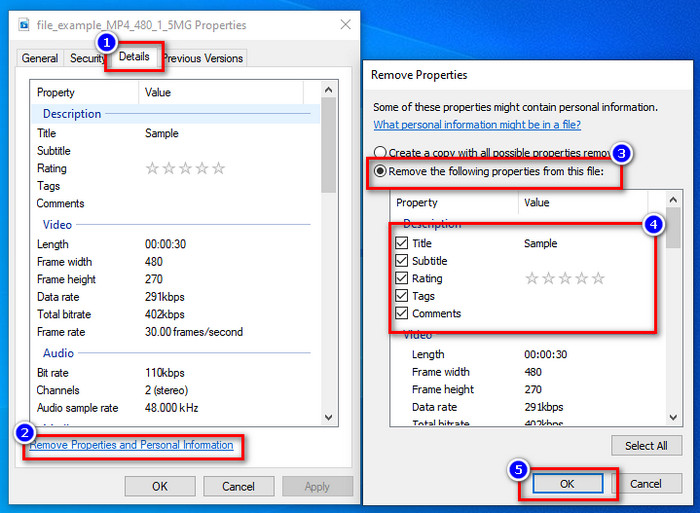
Step 2. Go to Details, and then under it, click the Remove Properties and Personal Information.
Step 3. Please tick the box of metadata you don't want to include on your media file before posting it. If you've done this, press OK; it will create a copy of the file without its metadata.
Utilisez le meilleur outil de suppression de métadonnées sur Windows et macOS
Suppose you want the best metadata removal tool, then FVC Video Converter Ultimate is the tool that you're looking for. It is the expert's tool to remove the metadata on your media file before the users post the file online. Although it is an expert choice tool, anyone can easily use it without exerting too much effort to remove the data on your file. Furthermore, this is a third-party option for you if the techniques we taught you can't remove the metadata on your file entirely. The corresponding steps will help you wipe the data you want to delete on your file and follow it accordingly.
Step 1. Before removing the metadata, you must first download the tool by clicking the below download button. Click the corresponding operating system you are using, whether Windows or Mac, then install it promptly. After that, open the tool by hitting the Start Now.
Téléchargement gratuit pour Windows 7 ou version ultérieure Téléchargement sécurisé
Téléchargement gratuit pour macOS 10.7 ou version ultérieure - Téléchargement sécurisé
Pour un processus fluide, vous devez vous familiariser avec l'interface utilisateur des outils avant de passer à l'étape suivante.
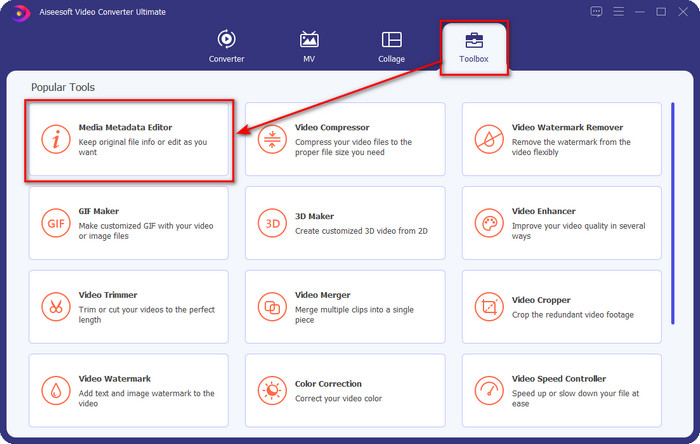
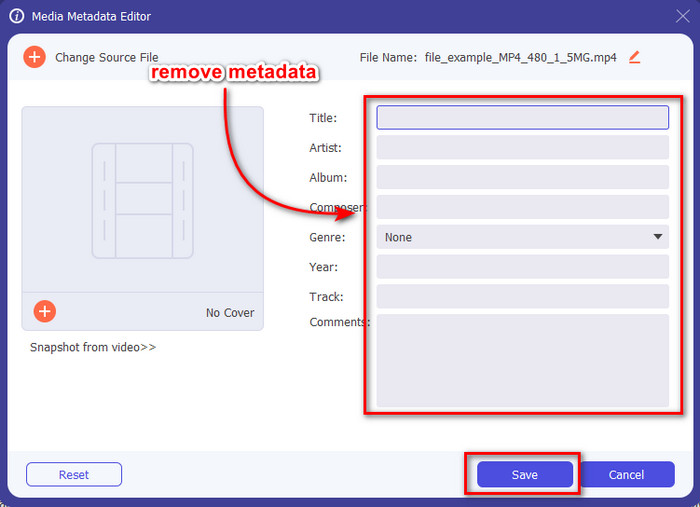
Step 2. Now that you've opened the Toolbox section, hit the Media Metadata Editor under it.
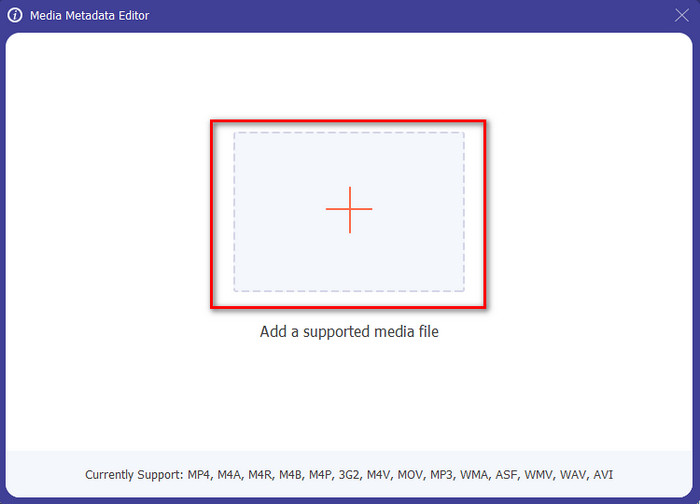
Step 3. A new window will show on your screen; by tapping the + button, you can add the media file you want to remove the metadata, then tap Open to upload it.
Step 4. Click the text box of each metadata you want to remove, then click the Delete Key on your keyboard. To save the file, you can click Save, and it will not make a copy with no metadata. Easy isn't it? It saves space on your desktop because it didn't create a copy of the file you remove metadata.
Partie 2. Meilleur moyen d'effacer les métadonnées des fichiers sur Mac
Sur Mac, vous pouvez facilement supprimer les informations sur votre photo ; cependant, vous ne pouvez supprimer que les données de localisation. Donc, si vous voulez apprendre à supprimer les métadonnées d'un fichier sur Mac plus que l'emplacement, vous devez utiliser l'outil que nous présentons ci-dessus.
Step 1. Go to the Preview and open the file.
Step 2. Click Tools, then Show Inspector and click i to see the location data.
Step 3. On the GPS tab, click Remove Location info, and it will automatically remove information about your media file.
Partie 3. Comment supprimer les métadonnées sur les appareils Android et iOS
Utiliser Exiftool - afficher, modifier les métadonnées de la photo et de la vidéo (Android)

Exiftool – view, edit metadata of photo and video can help you remove video metadata on Android by downloading the tool. With this tool, you can add, remove, and update the EXIF data of the video and photos for free. So, if you want to use this app, follow the steps below.
Step 1. Download the app on the Playstore and click Install.
Step 2. Open the app and select the file you want to remove its metadata.
Step 3. Press the option and click Wipe Quicktime Group to remove the metadata automatically.
Utiliser Photo & Video Metadata Remover (iOS)
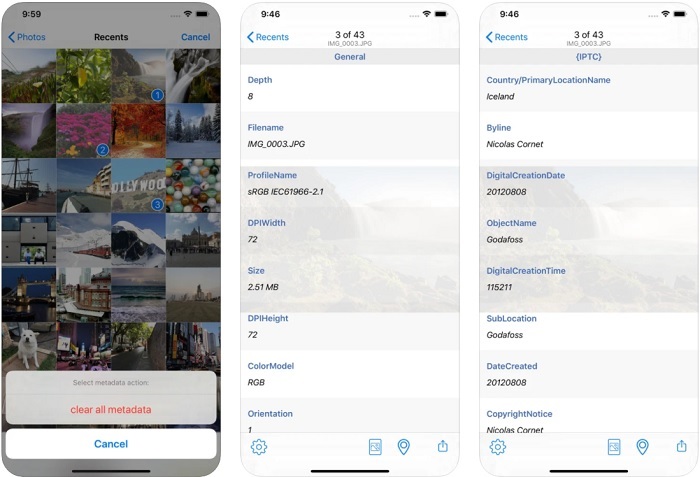
Si vous êtes un utilisateur iOS, vous pouvez utiliser Photo & Video Metadata Remover et apprendre à effacer les métadonnées sur vos appareils iOS. Cette application prend en charge tous les formats multimédias natifs sur les appareils Apple et fait exactement son travail de suppression de métadonnées. Si vous avez un appareil iOS, vous pouvez copier les étapes ci-dessous.
Step 1. To download the app, you must go to the App Store, search it, then install it.
Step 2. Open the tool and allow the app to access your Photos, select the video or photo you want to remove the metadata.
Step 3. Tap the gear icon, then click clear all metadata, and it will create a copy of the file without metadata on it.
Partie 4. Comment supprimer gratuitement des métadonnées à l'aide d'un outil Web
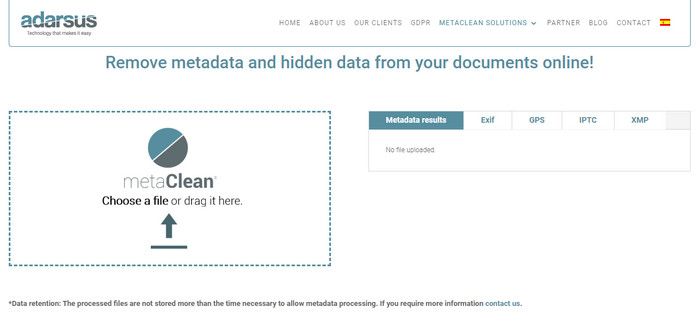
Adarsus – Remove Metadata can help you remove metadata online, and it is for free. Unlike the other converters above, you will not need to download the tool on your desktop to use because it is a web tool; to access it, you will need an internet connection. If you want to experience removing metadata for free, follow the steps below.
Step 1. Open your web browser, and search the tool.
Step 2. On the tool's website, click the upload button and choose the file to remove the metadata.
Step 3. Click Get my File Clean, and it will create a copy without metadata.
Partie 5. Tableau de comparaison sur le Metadata Remover sur Windows, Mac, Online, Android et iOS
| traits | Convertisseur vidéo FVC Ultimate | Propriétés sous Windows | Aperçu sur Mac | Exiftool - afficher, modifier les métadonnées de la photo et de la vidéo (Android) | Suppresseur de métadonnées photo et vidéo | Adarsus – Supprimer les métadonnées |
| Utilisation sûre |  | | | | | |
| Convivial | | | | | | |
| Effacer toutes les métadonnées | | |  | | | |
| Modifier les métadonnées | | | | | | |
| Dupliquer le fichier | | | | | | |
| Limites | Il n'est pas disponible sur les appareils mobiles et en ligne | Parfois, les données ne sont pas entièrement supprimées. | Il ne supprime pas les autres métadonnées autres que l'emplacement. | Pas aussi efficace que l'outil ultime. | La plupart du temps, il échoue lors de la suppression des métadonnées | La taille du fichier est limitée à 5 Mo. |
Partie 6. FAQ sur la suppression des métadonnées
La suppression des métadonnées diminue-t-elle la taille du fichier ?
Oui, ce sera parce que les métadonnées ajoutent de la taille au fichier multimédia avec ses informations. Vous pouvez économiser moins d'espace en le retirant, et il sera plus petit qu'avant. Cependant, les informations qui se trouvent sur votre dossier sont supprimées.
Après avoir supprimé les métadonnées, la qualité l'affectera-t-elle ?
Non, ce ne sera pas le cas; la qualité ne sera pas affectée même si vous modifiez ou supprimez les métadonnées de votre fichier multimédia. Alors, ne vous inquiétez pas car vous aurez toujours la même qualité même sans ou avec des métadonnées dessus.
Tous les formats de fichiers ont-ils des métadonnées ?
Most media formats have different metadata structures, but not all media formats have metadata. In some cases, formats can't contain metadata because of their build, design, and many more factors.
Conclusion
We have now learned how to remove metadata on the file to protect your privacy as easy as that. With the tool presented in this article, it became possible to remove it before posting on the web. Although we offer five tools to erase the metadata, there is no doubt of the capabilities of FVC Video Converter Ultimate because the tool can entirely remove the entire data or certain parts as quickly as 1-2-3. If you doubt our review, you can check out the tool by downloading it on your computer drive and test it out if it is the real deal!
-
 4 façons de convertir WMV en MKV sur Mac, Windows et en ligne sans perte
 Vous voulez convertir WMV en MKV sur Mac et Windows ? Cet article présente les meilleures façons de convertir WMV en MKV rapidement.
-
 4 des meilleurs visualiseurs de métadonnées en ligne et hors ligne [Mise à jour 2022]
 Puis-je vérifier les métadonnées de mon fichier ? Oui, vous pouvez, à l'aide de cet article, nous vous présenterons les différents visualiseurs de métadonnées que vous pouvez utiliser.
-
 Les meilleurs convertisseurs WebM en MKV que vous devez utiliser pour convertir rapidement
 Cherchez-vous des moyens de convertir des fichiers WebM en fichiers MKV ? Cet article présente les meilleurs convertisseurs WebM en MKV à essayer.
