


 Video Converter Ultimate
 Enregistreur d'écran
 Réparation vidéo
 Téléchargement sécurisé
Directive sur la façon de modifier les métadonnées WebM pour Windows et Mac
La nécessité d’inclure une balise pour ajouter des informations supplémentaires sur le contenu d’un fichier WebM est l’une des raisons pour lesquelles nous devons modifier les métadonnées de ce format. Il est parfois nécessaire de les corriger immédiatement afin de les rendre visibles pour les utilisateurs, le système et l’application. L’un des objectifs est de déterminer précisément quel contenu contient le fichier. Ainsi, avant de transférer les données en ligne, il est essentiel de savoir comment modifier les métadonnées d’un WebM. Informez‑vous et apprenez à le faire en lisant l’article ci‑dessous.

Partie 1. Le moyen le plus rapide de modifier les métadonnées WebM sur Windows et Mac [Version simplifiée]
FVC Video Converter Ultimate propose une édition des métadonnées simple et sans prise de tête pour faciliter la tâche à ses utilisateurs et clients qui l’adoptent. Avec cet éditeur de métadonnées, vous pouvez rapidement ajuster ou supprimer les balises de vos fichiers WebM, MOV, TS, RMVB et de plus de 1000 autres formats pris en charge par cet outil, comme un véritable professionnel. Ce logiciel est à la hauteur de son nom et des attentes des utilisateurs. Donc, si vous voulez un programme parfait pour les débutants comme pour les experts, vous devez choisir cet outil. Contrairement à d’autres logiciels, vous pouvez mettre à jour les métadonnées de votre WebM avec des informations exactes en les ajoutant manuellement.
Vouloir plus? Cet outil excelle dans l'édition des métadonnées et d'autres domaines de résolution des problèmes vidéo et audio. Comme couper, rogner, éditer, créer des GIF, accélérer les vidéos et faire plus avec l'outil en moins d'une minute. Et pour vous prouver que le logiciel est ultime en termes de nom et de performances. La démonstration écrite ci-dessous vous apprendra comment modifier les métadonnées WebM sans trop d'efforts sur ce problème.
Étapes pour modifier les balises WebM avec FVC Video Converter Ultimate :
Étape 1. Pour disposer de ce logiciel ultime, cliquez sur le bouton de téléchargement ci‑dessous et choisissez le système d’exploitation que vous utilisez actuellement. Suivez le processus d’installation après avoir cliqué sur le fichier téléchargé, puis ouvrez l’outil en cliquant sur Démarrer maintenant.
Téléchargement gratuit pour Windows 7 ou version ultérieure Téléchargement sécurisé
Téléchargement gratuit pour macOS 10.7 ou version ultérieure - Téléchargement sécurisé
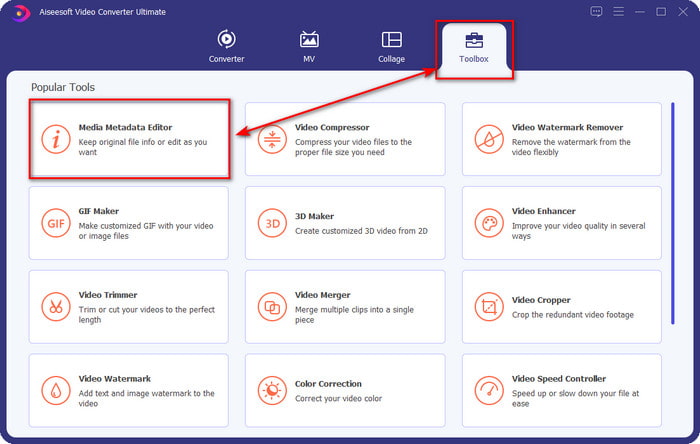
Étape 2. Ouvrez la section Boîte à outils et trouvez le Media Metadata Editor dans la liste d’outils qui s’affichera en dessous.
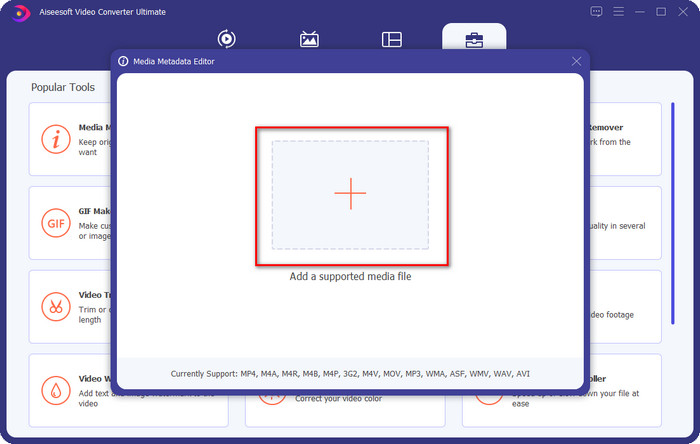
Étape 3. Ajoutez le fichier WebM en cliquant sur le bouton +, recherchez‑le dans votre gestionnaire de fichiers, puis cliquez sur Ouvrir pour continuer.
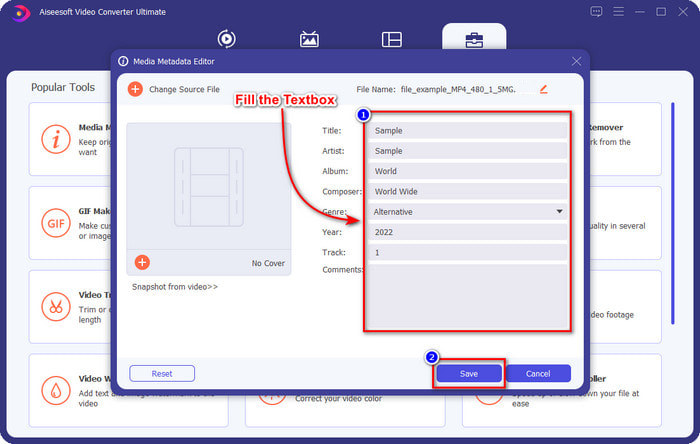
Étape 4. Saisissez toutes les informations que vous souhaitez ajouter comme balises à votre WebM dans chaque zone de texte. Une fois que vous avez fini d’ajouter toutes les informations sous forme de balises, cliquez sur Enregistrer. Simple, n’est‑ce pas ? Voilà comment ajouter des métadonnées à votre WebM grâce à la solution ultime disponible sur Windows et Mac.
Partie 2. Comment modifier les métadonnées WEBM à l'aide d'un logiciel de ligne de commande sur le bureau
FFmpeg
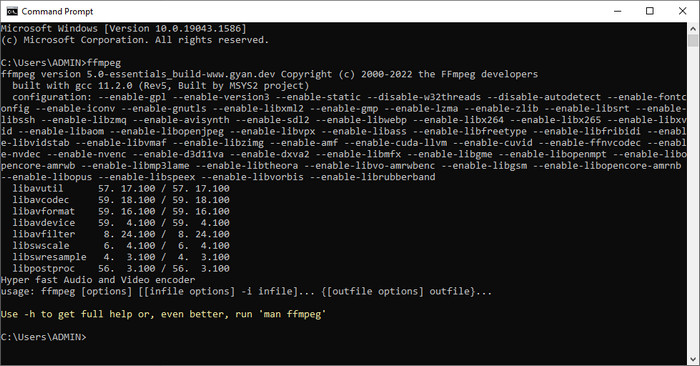
FFmpeg est une solution connue pour tout problème lié aux médias, comme la correction de métadonnées. Contrairement au premier outil, vous devrez utiliser un code spécifique comme commande pour effectuer une tâche donnée, par exemple lui ordonner de modifier manuellement les métadonnées du fichier en question. Même si ce logiciel open source utilise des aspects techniques que certains utilisateurs ne comprennent pas, les capacités de cet éditeur restent impressionnantes. Continuez à lire pour savoir comment modifier les métadonnées WebM à l’aide de l’un des logiciels en ligne de commande présentés dans la liste.
Étapes pour modifier les balises WebM avec Ffmpeg :
Étape 1. Téléchargez et installez le logiciel sur votre ordinateur. Trouvez l’emplacement du fichier WebM et copiez le nom du fichier.
Étape 2. Cliquez sur le bouton Windows, tapez Invite de commandes dans la barre de recherche, puis cliquez dessus pour l’ouvrir. Ensuite, copiez ce code ffmpeg -i fileexample.webm -metadata title='samplemetadata' -c copy fileexample.webm et collez‑le dans l’invite.
Remarque : Le fichier exemple.webm est le nom du fichier webm que nous utilisons pour cette tâche. Ajoutez le nom de fichier de celui-ci en fonction du nom exact de votre fichier.
Étape 3. Appuyez sur Entrée pour lancer le processus et laissez le logiciel écraser le fichier d’origine.
Outil EXIF
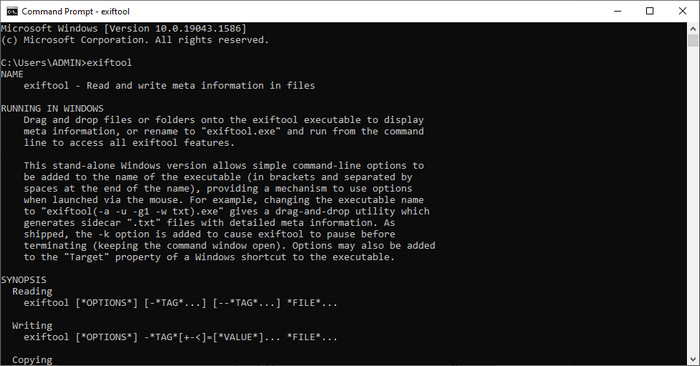
Tout comme FFmpeg, EXIF Tool est un logiciel gratuit en ligne de commande que vous pouvez télécharger sur pratiquement tous les systèmes d’exploitation de bureau. Avec ce programme, vous pouvez lire, modifier et créer des métadonnées sur vos fichiers existants, ce que d’autres fichiers multimédias ne permettent pas entièrement. Le logiciel peut modifier les balises des fichiers vidéo, audio, image et PDF pour les rendre parfaitement exactes. Plus tôt, nous avons dit qu’il est similaire à FFmpeg, et c’est vrai, mais leurs codes sont différents. Donc, si vous voulez utiliser cet outil, vous devrez apprendre un autre ensemble de commandes sans lien avec celles de FFmpeg. Est‑ce difficile ? Heureusement, nous avons ajouté des étapes faciles à comprendre pour modifier les métadonnées WebM à l’aide de cet outil.
Étapes pour modifier les balises WebM avec EXIF Tool :
Étape 1. Téléchargez le logiciel depuis son site officiel, puis installez‑le pour passer à l’étape suivante.
Étape 2. Ouvrez le gestionnaire de fichiers, sélectionnez le fichier et copiez son nom. Ensuite, ouvrez le CMD et tapez ce code exiftool –common fileexample.webm pour voir les informations de base de votre fichier WebM.
Remarque : CMD est identique à l'invite de commande ; vous pouvez les localiser sur les fenêtres et taper CDM.
Étape 3. Ajoutez ce code dans l’invite pour modifier le fichier : exiftool -filename='metadtasample' fileexample.mkv puis appuyez sur Entrée pour lancer le processus d’ajout des métadonnées.
Partie 3. FAQ sur l'éditeur de métadonnées WebM
Pourquoi le format WebM est-il populaire sur les sites Web HTML 5 ?
Le format WebM est l'un des formats de redevances alternatifs à la croissance la plus rapide contenant des éléments vidéo et audio HTML 5. Ce format utilise deux codecs différents, VP8 et VP9, que le projet WebM a développés.
Puis-je fusionner les fichiers WebM ?
Vous pouvez fusionner une séquence de fichiers WebM avant de leur ajouter des métadonnées. Donc, si vous voulez savoir comment fusionner facilement plusieurs fichiers WebM, cliquez sur ce lien pour en savoir plus.
Ce qui est mieux? WebM ou MP4 ?
Les deux formats sont excellents pour stocker des fichiers vidéo, chacun à sa manière, mais leurs objectifs diffèrent. Bien que WebM soit l’un des meilleurs formats pour le partage en ligne, il existe encore des problèmes de compatibilité avec certains appareils. Si vous rencontrez le même problème avec un fichier WebM, nous vous suggérons de convertir le format en MP4. Pour avoir l’outil à portée de main, vous pouvez lire le contenu de cet article en cliquant sur ce lien.
Conclusion
Maintenant que nous disposons de toutes les informations nécessaires et que nous avons appris à modifier les métadonnées WebM, il est temps de choisir la méthode la plus adaptée. Si vous souhaitez essayer un outil en ligne de commande, alors FFmpeg et EXIF Tool sont les meilleures solutions pour corriger les métadonnées de votre fichier WebM. En suivant les tutoriels que nous fournissons à leur sujet, vous pouvez accomplir rapidement cette tâche. Mais si vous préférez une méthode plus simple pour modifier les métadonnées de votre WebM, alors FVC Video Converter Ultimate est l’outil incontournable. Si vous hésitez encore, nous vous suggérons de télécharger le logiciel sur votre ordinateur et de l’essayer dès maintenant !
-
 Top 4 des changeurs de date de fichier pour Windows PC et Mac [Mise à jour 2022]
 Vous avez un problème avec la modification des balises d'heure et de date sur votre fichier ? Si vous voulez savoir comment le faire, vous pouvez continuer à lire cet article pour le savoir.
-
 Trucs et astuces simples pour ajouter facilement des balises à un fichier
 Vous voulez ajouter facilement des balises sur des fichiers ? Ensuite, cet article vous fournit la meilleure et la plus simple façon de vous fier rapidement à cette tâche.
-
 Top 3 des éditeurs de métadonnées FLAC sur Mac et Windows [Mise à jour 2022]
 Voulez-vous modifier les métadonnées FLAC ? Dans ce cas, vous devez lire cet article car nous fournissons des connaissances suffisantes sur le dernier éditeur de métadonnées FLAC à utiliser.
