


 Video Converter Ultimate
 Enregistreur d'écran
 Réparation vidéo
 Téléchargement sécurisé
Ligne directrice pour supprimer le filigrane VSDC sur les vidéos facilement et efficacement
Vous ne pouvez pas vous tromper en choisissant VSDC Video Editor pour un montage vidéo basique sur Windows. Ce logiciel de montage non linéaire peut répondre aux besoins que vous recherchez chez un éditeur vidéo. Il offre un ensemble de fonctionnalités de montage que vous pouvez utiliser pour produire un excellent résultat final. Avec la montée en popularité de cet outil, de nombreux utilisateurs se posent des questions à son sujet, et l’une des plus fréquentes actuellement est : la version gratuite de VSDC Video Editor ajoute‑t‑elle un filigrane ? Avez‑vous les mêmes interrogations que les autres internautes ? Pour répondre aux questions que beaucoup se posent, nous allons vous apporter la réponse dont vous avez besoin ; poursuivez votre lecture pour en savoir plus.

Partie 1. Est-ce que VSDC Free Video Editor a un filigrane
Même si vous utilisez la version gratuite de VSDC pour éditer les vidéos ou les films que vous avez, aucun filigrane VSDC n'est inclus une fois que vous les avez exportés. Ainsi, vous pouvez profiter gratuitement de la vidéo que vous éditez ici sans le filigrane. Pour utiliser les autres fonctionnalités de montage vidéo dont il dispose, vous feriez mieux d'acheter l'outil pour les déverrouiller. Bien qu'il s'agisse d'un éditeur gratuit, l'outil ne peut pas supprimer le filigrane que vous avez ajouté à la vidéo. C'est un problème pour certains, et d'autres utilisent sa fonction de fractionnement et de coupe pour supprimer le filigrane, même si c'est bien s'il est sur les côtés. Mais si le filigrane est au milieu, voudriez-vous utiliser un découpeur vidéo ? Bien sûr que non! Les outils ci-dessous peuvent vous aider à supprimer facilement le filigrane VSDC qui se trouve dans votre vidéo.
Partie 2. Comment supprimer le filigrane d'une vidéo sur VSDC avec les 2 méthodes disponibles
FVC Video Converter Ultimate - Suppresseur de filigrane ultime sur Windows et Mac
FVC Video Converter Ultimate est le logiciel le plus avancé, basé sur l’IA, que vous puissiez utiliser pour supprimer le filigrane de VSDC. Cet outil vous permet de modifier manuellement les paramètres de suppression de filigrane qu’il propose, ce que de nombreux autres logiciels ne permettent pas. Il supprime précisément le filigrane des vidéos sans laisser de trace de la zone de suppression d’où le filigrane provenait.
De plus, cet outil possède également des fonctionnalités et des fonctions robustes que vous ne pouvez pas trouver sur les autres logiciels. Même si cet outil prend en charge la technologie AI, vous n'avez pas à vous soucier des spécifications de votre ordinateur car l'outil fonctionne sur Windows et macOS bas de gamme. En termes de performances, il est supérieur, utilise des spécifications faibles sur les ordinateurs, fonctionne à la fois sur Windows et Mac, et a des performances élevées en matière d'importation et d'exportation. Il ne reste plus rien à rechercher autre que le didacticiel étape par étape sur la façon de supprimer le filigrane de la vidéo dans VSDC avec l'aide ci-dessous.
Étape 1. Téléchargez dès maintenant le logiciel sur votre ordinateur de bureau en cliquant sur le bouton de téléchargement ci‑dessous. Ensuite, suivez le processus d’installation et de configuration requis, puis cliquez sur « Start Now » pour ouvrir l’outil sur votre ordinateur.
Téléchargement gratuit pour Windows 7 ou version ultérieure Téléchargement sécurisé
Téléchargement gratuit pour macOS 10.7 ou version ultérieure - Téléchargement sécurisé
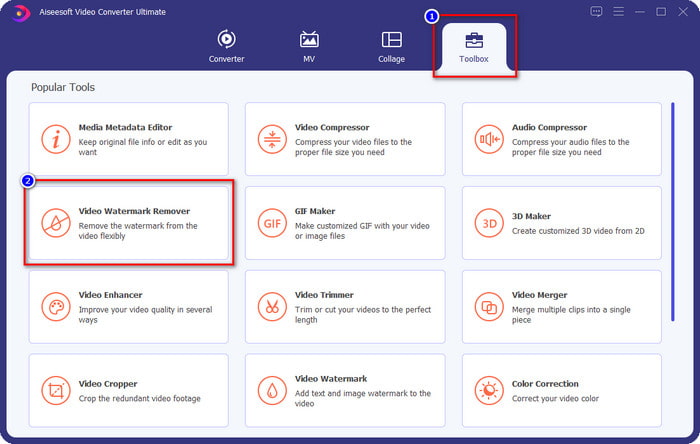
Étape 2. Après avoir lancé le logiciel, allez dans la section Toolbox, puis sélectionnez Video Watermark Remover pour utiliser l’outil de suppression de filigrane avancé de ce logiciel.
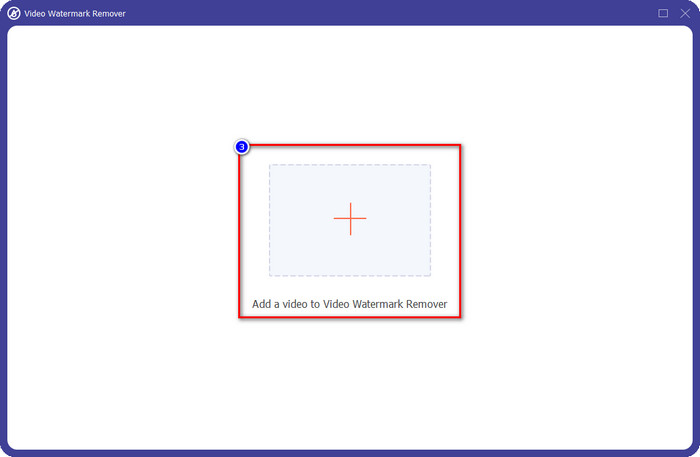
Étape 3. Dans la fenêtre qui s’affiche sur votre écran, cliquez sur l’icône + pour importer la vidéo contenant un filigrane.
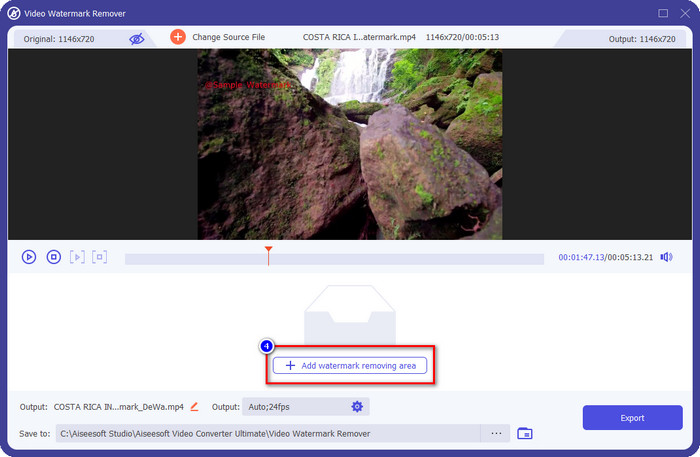
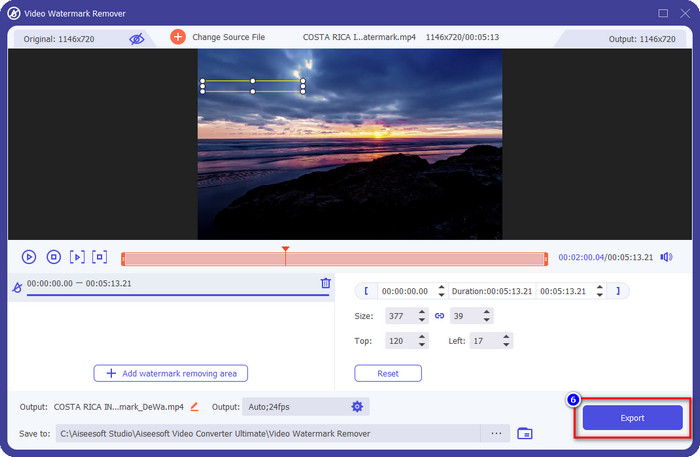
Étape 4. Pour utiliser le module de suppression de filigrane, cliquez sur Add Watermark Removing Area.
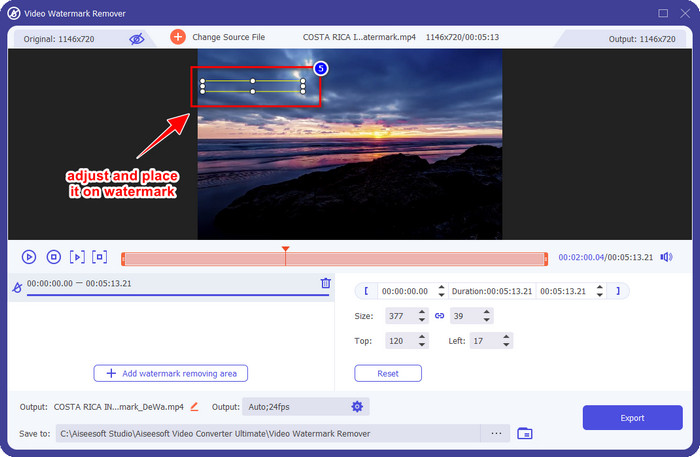
Étape 5. Placez le cadre de sélection sur la zone où se trouve le filigrane et assurez‑vous de bien tout couvrir afin qu’au moment d’exporter la vidéo, vous ne voyiez plus le filigrane et puissiez profiter pleinement du visionnage.
Étape 6. Maintenant que le filigrane est couvert, cliquez sur le bouton Export pour enregistrer la vidéo sans filigrane.
Kapwing

L’une des meilleures façons de supprimer le filigrane de la version gratuite de VSDC Video Editor est d’utiliser Kapwing.com. Cet éditeur de filigranes vous permet d’éliminer rapidement le filigrane déjà présent sur la vidéo pour la rendre plus attrayante. Même si vous n’êtes pas un pro pour réaliser cette tâche, il n’y a pas lieu de s’inquiéter si vous choisissez cet outil, car son interface est intuitive et complète. L’apprentissage de son utilisation en est d’autant plus rapide. Cet outil est un excellent choix, mais il présente aussi certains inconvénients ; par exemple, la version gratuite ne permet pas d’exporter des vidéos de plus de 60 minutes, est limitée, et vous devez vous connecter pour supprimer le filigrane Kapwing lors de l’exportation.
Étape 1. Ouvrez l’outil en ligne, puis importez le fichier en le glissant‑déposant ici.
Étape 2. Après avoir importé le fichier, allez dans la section « éléments » et cliquez sur la forme que vous souhaitez parmi celles proposées.
Étape 3. Maintenez et placez la forme sur le filigrane. Gardez à l’esprit que cette méthode ne fonctionne pas bien si la vidéo comporte plusieurs couleurs ; elle fonctionne uniquement si la zone de la vidéo utilise une palette de couleurs unie.
Étape 4. Cliquez sur Export Video, puis sur Export MP4 pour enregistrer le résultat final.
En rapport:
Comment supprimer les filigranes Photobucket
Comment supprimer un filigrane sur un GIF
Partie 3. FAQ sur VSDC Free Video Editor a-t-il un filigrane
Puis‑je exporter une vidéo 4K avec VSDC ?
Oui, cet outil peut exporter des vidéos en résolution 4k si vous le souhaitez. Cependant, le processus prend plus de temps que les autres résolutions vidéo, comme 1080 et 720. Bien que le rendu prenne autant de temps, l'outil peut toujours produire une qualité vidéo ultra haute définition comme le 4k si nécessaire.
Comment supprimer le filigrane dans VSDC ?
Téléchargez l'outil, puis lancez-le pour continuer, cliquez sur Ajouter un objet, et en dessous, cliquez sur Vidéo. Ouvrez le filtre vidéo ; alors les options s'afficheront ; cliquez sur Filtres ; cliquez sur DeLogo. Avec le DeLogo, vous pouvez maintenant masquer le filigrane de la vidéo sur VSDC. Il ne fonctionne qu'avec une seule version récemment mise à jour de l'outil ; si vous ne le trouvez pas, vous devez mettre à jour ce que vous utilisez en téléchargeant la version la plus récente.
VSDC est‑il le meilleur éditeur vidéo à utiliser ?
Ce n'est pas le meilleur, mais nous pouvons le considérer comme un outil incontournable car il fournit des fonctionnalités d'édition de base dont vous pourriez avoir besoin pour créer une vidéo impressionnante. Bien qu'il soit difficile d'apprendre à l'utiliser, les autres utilisateurs ont tendance à passer du temps à apprendre ce logiciel plutôt qu'à faire le montage. Même s'il ne figure pas dans le top 10 des meilleurs éditeurs vidéo, il est toujours considéré comme un excellent outil pour son objectif d'édition.
Conclusion
Pour supprimer le filigrane de VSDC, vous aurez besoin d’un outil de suppression de filigrane fiable, comme les deux logiciels mentionnés dans cet article. Avec les étapes fournies pour chacun d’eux, vous pouvez choisir celui qui, selon vous, répondra le mieux à vos besoins et sera le plus utile pour supprimer le filigrane de votre vidéo. Mais si vous souhaitez un logiciel polyvalent qui permette à la fois de supprimer et d’ajouter des filigranes, d’éditer des vidéos, de les convertir et bien plus encore, vous devez choisir FVC Video Converter Ultimate. Pourquoi ? Parce que c’est tout simplement le meilleur logiciel tout‑en‑un dont vous aurez besoin sur votre ordinateur. La lecture de cet article vous a‑t‑elle été utile ? Si oui, vous pouvez nous attribuer cinq étoiles ci‑dessous si vous êtes satisfait de cet article.
-
 Guide sur ce qu'est un filigrane sur une photo [Mise à jour 2022]
 Qu'est-ce qu'un filigrane sur une photo ? Doit-on en ajouter un ? Comment pouvons-nous l'enlever ? Toutes les choses dont vous aurez besoin sont ici, alors continuez à lire ce blog.
-
 Comment supprimer facilement le filigrane de Wondershare DVD Creator
 Cet article contient des informations sur la façon de supprimer le filigrane de Wondershare DVD Creator. Pour obtenir toutes les informations dont vous avez besoin, il est indispensable de lire ceci.
-
 Supprimer facilement le filigrane du PDF en quelques étapes simples
 Supprimez le filigrane du PDF en suivant ces étapes simples. Apprenez à supprimer facilement les filigranes de votre fichier PDF à l'aide de ces outils incroyables.
