


 Video Converter Ultimate
 Enregistreur d'écran
 Réparation vidéo
 Téléchargement sécurisé
Top 5 des meilleurs dissolvants de filigrane Arnold Maya qui valent la peine d'être essayés
Arnold est un moteur de rendu d'Autodesk. Le moteur de rendu est utilisé pour les graphiques, la vidéo et même l'audio. De plus, Arnold est une application de rendu avancée que vous pouvez utiliser avec les effets visuels et le rendu d'animation. En outre, il produit des sorties de haute qualité, ce qui le rend populaire auprès des éditeurs professionnels. De plus, il possède de nombreuses fonctionnalités d'édition avancées que vous pouvez utiliser pour rendre une animation.
Arnold exige que ses utilisateurs paient pour l’application ; c’est pourquoi un filigrane est apposé sur leurs images. Ainsi, de nombreuses personnes recherchent des outils de suppression de filigrane capables d’enlever le filigrane Arnold sur leurs photos. Lisez cet article pour découvrir les cinq meilleurs suppresseurs de filigrane Arnold Maya.

Partie 1. Top 5 des meilleurs dissolvants de filigrane Arnold
Bien que vous puissiez télécharger de nombreux outils pour supprimer le filigrane Arnold de votre image, tous ne produisent pas une sortie propre, nous avons donc recherché les décapants de filigrane les plus utilisés et choisi le meilleur d'entre eux. Cette partie vous présente les cinq meilleurs dissolvants de filigrane Arnold.
Movavi
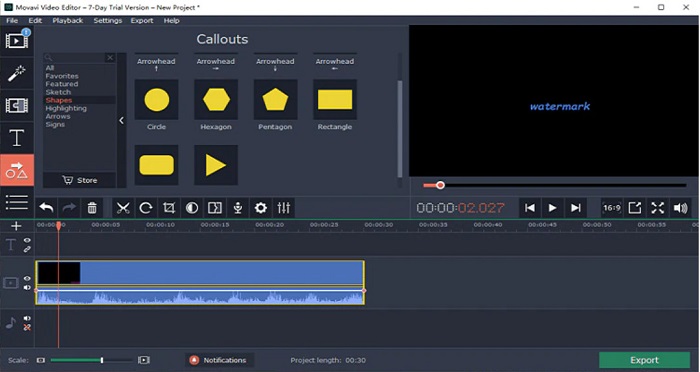
Movavi est un logiciel de montage vidéo de référence qui peut vous aider à supprimer le filigrane Arnold de votre image. Il propose également une option pour ajouter des filigranes à votre image ou à votre vidéo. De plus, il contient de nombreuses fonctions d’édition que vous pouvez utiliser pour améliorer votre image. Toutefois, vous devez utiliser l’outil de correction des couleurs pour atténuer le filigrane sur votre vidéo. C’est aussi un outil convivial grâce à son interface utilisateur simple.
Avantages
- Il a un processus d'exportation rapide.
- Disponible en téléchargement sur toutes les plateformes multimédias, y compris Windows et Mac.
Les inconvénients
- Achetez d'abord la version complète avant de pouvoir utiliser la fonction de suppression de filigrane.
- Il a des problèmes de politique de remboursement.
Filigrane Remover.io
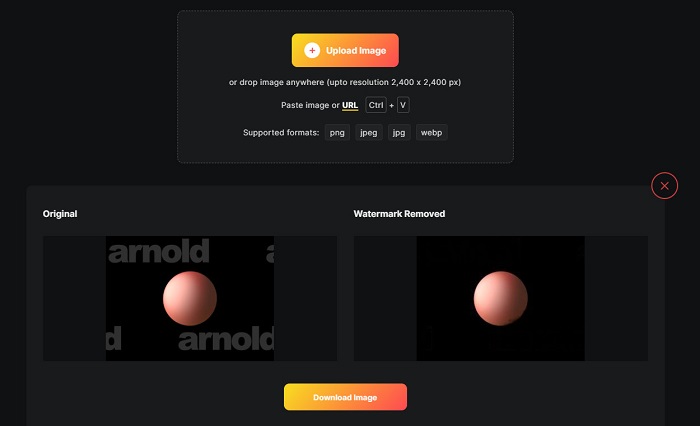
Si vous souhaitez obtenir un rendu Maya Arnold sans filigrane, alors Watermark Remover.io peut vous aider. De nombreux débutants préfèrent également utiliser cet outil, car il dispose d’une interface logicielle facile à utiliser. En outre, Watermark Remover.io est un outil en ligne accessible depuis tous les navigateurs web, comme Google, Firefox et Safari. Il fonctionne également sur Mac, Windows, iPhone et appareils Android.
De plus, ce dissolvant de filigrane vous permet de supprimer tous les objets indésirables sur vos photos, comme les logos, les textes ou les images. L'inconvénient de cette application en ligne est que vous pouvez rencontrer un processus de téléchargement lent car il s'agit d'une application Web.
Avantages
- C'est gratuit et facile à utiliser.
- Il prend en charge les formats d'image les plus courants, tels que PNG, JPEG, JPG et WEBP.
- Il a une interface de traitement rapide.
- Il a une fonction de prédiction de zone.
Les inconvénients
- C'est un outil dépendant d'Internet.
Suppresseur de filigrane HitPaw
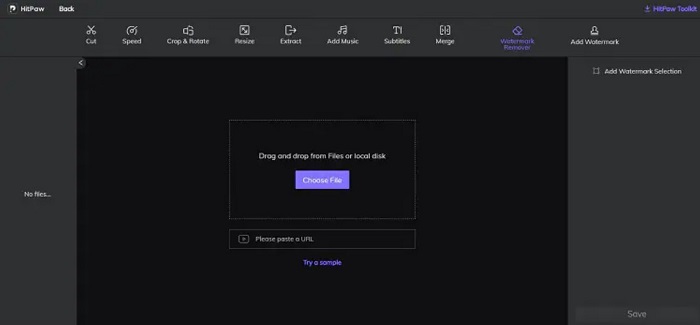
HitPaw est un autre outil de suppression de filigrane qui vous permet de retirer facilement le filigrane Arnold de votre image. Il vous permet d’effacer de manière professionnelle tout filigrane présent sur votre image. De plus, il possède une interface simple et facile à utiliser, de sorte que vous n’aurez aucune difficulté à vous servir de cet outil en ligne. Si vous avez une vidéo Arnold, cet outil supprime efficacement ce filigrane. Ce qui est impressionnant, c’est qu’il existe en version en ligne et hors ligne. Cependant, sa version hors ligne possède une interface logicielle difficile à prendre en main, ce qui complique son utilisation pour les débutants. Néanmoins, de nombreux utilisateurs continuent de s’en servir pour supprimer les filigranes.
Avantages
- Il a des versions en ligne et hors ligne.
- Sa version en ligne est accessible sur tous les navigateurs Web, comme Google et Safari.
- Il ne laisse aucune marque de flou sur la zone du filigrane.
Les inconvénients
- Vous devez vous inscrire avant de pouvoir éditer vos vidéos ou vos photos.
peindre
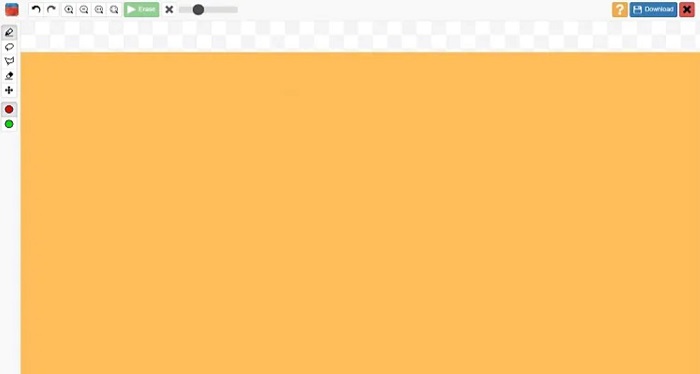
Inpaint est l’un des outils de suppression de filigrane les plus populaires que vous pouvez télécharger sur Windows et Mac. Cet outil hors ligne prend en charge de nombreux formats vidéo et image, comme MP4, MKV, AVI, PNG, JPG, etc. De nombreux utilisateurs apprécient cet outil parce qu’il supprime les éléments indésirables de vos images ou vidéos. En outre, il dispose d’autres fonctions d’édition que vous pouvez utiliser pour améliorer vos images ou vidéos.
Avantages
- Téléchargeable sur presque toutes les plateformes multimédias, y compris Windows et Mac.
- Il exporte une production professionnelle.
Les inconvénients
- Il a une interface logicielle difficile à utiliser.
- Parfois, il ne peut pas supprimer les éléments compliqués de vos vidéos ou images.
Partie 2. Comment supprimer le filigrane Arnold en un clic
Nous avons l'outil recommandé si vous voulez un moyen plus simple de supprimer le filigrane Arnold sur votre image. Lisez cette partie ci-dessous pour en savoir plus sur cet outil et comment supprimer les filigranes à l'aide de cet outil.
FVC Video Converter Ultimate est un outil complet que vous pouvez utiliser pour supprimer tout objet indésirable de votre image. Il prend en charge de nombreux formats vidéo, comme MP4, MKV, AVI, MOV, M4V et plus de 1000 autres. Grâce à son interface facile à utiliser, de nombreux débutants s’en servent pour supprimer les filigranes vidéo. De plus, il comporte de nombreuses fonctions avancées d’édition que vous pouvez utiliser, comme la suppression de filigrane vidéo, la correction des couleurs, le découpage vidéo, et bien plus encore. Donc, si vous souhaitez utiliser ce logiciel pour supprimer le filigrane Arnold, suivez le guide simple ci-dessous.
Comment supprimer le filigrane Arnold à l'aide de FVC Video Converter Ultimate :
Étape 1. Téléchargez FVC Video Converter Ultimate sur votre appareil en cliquant sur le bouton Télécharger ci‑dessous.
Téléchargement gratuit pour Windows 7 ou version ultérieure Téléchargement sécurisé
Téléchargement gratuit pour macOS 10.7 ou version ultérieure - Téléchargement sécurisé
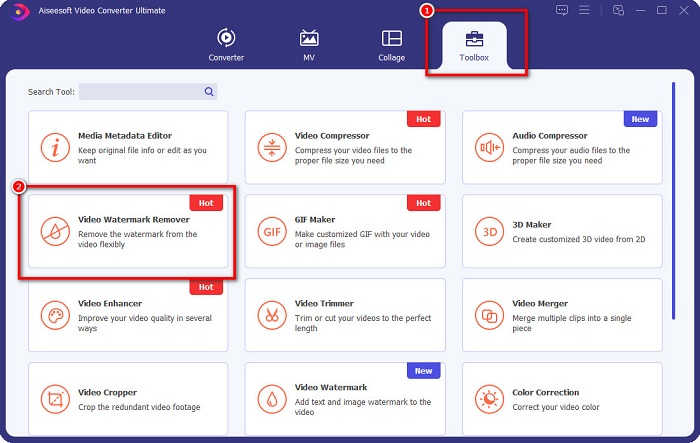
Étape 2. Allez dans l’onglet Boîte à outils sur l’interface principale du logiciel et sélectionnez Suppression de filigrane vidéo.
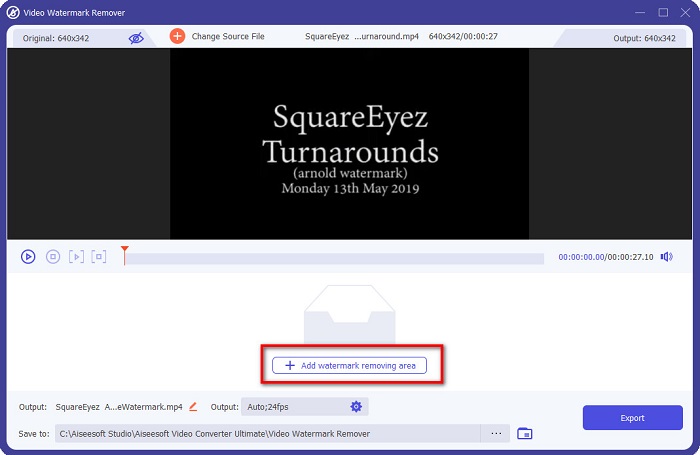
Étape 3. Ensuite, cliquez sur le bouton avec le signe + pour importer la vidéo Arnold que vous souhaitez rendre exempte de filigrane.
Étape 4. Vous verrez alors l’aperçu de votre vidéo. Cliquez sur le bouton Ajouter une zone de suppression de filigrane pour ajouter une zone de suppression.
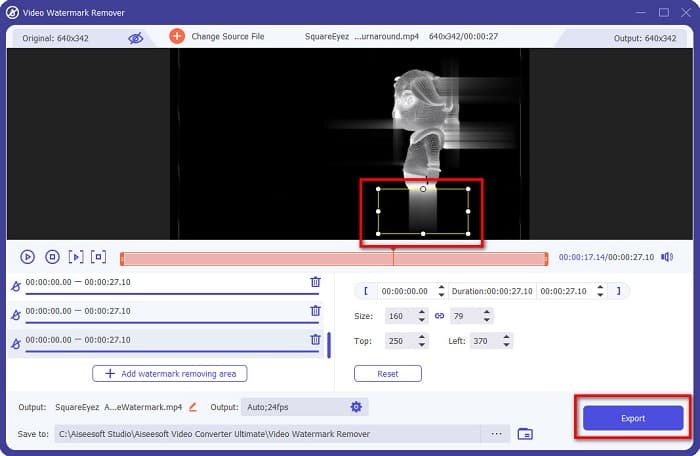
Étape 5. Placez la zone de suppression de filigrane sur la zone du filigrane dans votre vidéo. S’il y a deux filigranes ou plus sur votre vidéo, cliquez de nouveau sur Ajouter une zone de suppression de filigrane. Puis cliquez sur le bouton Exporter une fois que vous avez couvert tous les filigranes de votre vidéo. De plus, vous pouvez utiliser cet outil pour supprimer les filigranes Dxtory.
Partie 3. Comment supprimer le filigrane Arnold à l'aide de l'outil de séquence de rendu
Les filigranes Arnold n’apparaissent que sur le rendu final sans licence lors de l’utilisation de Maya. Donc, pour supprimer le filigrane, vous devez lancer un rendu en séquence. Après avoir créé une animation, vous devez ajuster les paramètres de rendu. Ces paramètres comprennent le format d’image, les extensions d’image fixe ou d’animation, les images de début et de fin, les préréglages, et plus encore. Après avoir ajusté les paramètres de rendu, cliquez sur Render > Batch Render. Une fois cela fait, toutes les images auront un filigrane.
Pour supprimer le filigrane Arnold, vous devez lancer le rendu de votre animation. Allez dans les Paramètres de rendu et assurez‑vous de sélectionner la caméra que vous souhaitez utiliser pour le rendu. Cliquez ensuite sur Render Sequence. Après cela, ouvrez les images et vous verrez qu’aucun filigrane n’y est intégré. Vous pouvez maintenant utiliser ces images pour créer une animation.
Partie 4. FAQ sur les dissolvants de filigrane Arnold
Pouvez-vous effectuer un rendu par lots avec Arnold ?
Oui. Vous pouvez utiliser le rendu par lots Maya pour rendre une image de séquence. Vous pouvez le faire en accédant à Maya en cliquant sur Render > Batch Render sur la ligne de commande.
Arnold est-il inclus dans Maya ?
Dans une installation par défaut, Arnold pour Maya est inclus via le mtoa. mll plug-in. Dans ce plug-in, Arnold est le moteur de rendu préféré dans Maya.
Combien coûte Arnold ?
L'abonnement annuel est de 380$, tandis que l'abonnement mensuel est de 50$ par mois.
Conclusion
Tous les suppresseurs de filigrane Arnold Maya ci‑dessus donnent des résultats prometteurs en matière de suppression de filigranes. Mais si vous souhaitez utiliser un logiciel riche en fonctionnalités, capable de supprimer les filigranes sans affecter la qualité, téléchargez dès maintenant FVC Video Converter Ultimate.
-
 123rf Watermark Removers - Examen approfondi des outils ultimes
 Si vous voulez savoir quels sont les meilleurs décapants de filigrane 123rf, lisez attentivement cet article. Cet article fournit une revue approfondie des outils.
-
 Comment supprimer le filigrane DeviantArt sur Windows et Mac
 Vous voulez savoir comment supprimer le filigrane DeviantArt sur vos images ? En utilisant les meilleurs dissolvants de filigrane DeviantArt, vous pouvez facilement supprimer ces filigranes embêtants.
-
 Comment supprimer le filigrane Pond5 à l'aide des outils ultimes
 Apprenez à supprimer le filigrane Pond5 en suivant les étapes simples ci-dessous. Vous pouvez facilement supprimer le filigrane Pond5 sur votre image à l'aide de ces outils impressionnants.
