


 Video Converter Ultimate
 Enregistreur d'écran
 Réparation vidéo
 Téléchargement sécurisé
Instruction simple sur la façon de convertir OGV en MKV
Voulez-vous savoir comment convertir un fichier OGV en MKV et l’ouvrir avec un autre lecteur multimédia ? Alors vous avez de la chance, car cet article va vous présenter d’excellents logiciels avec des étapes simples pour convertir différents types de fichiers. De plus, pas d’inquiétude : ces outils valent vraiment le coup d’être utilisés et ils ne vous décevront pas. Il est donc préférable de passer directement au sujet principal, car nous ne voulons pas vous faire attendre plus longtemps. Découvrons ces méthodes et lisez cet article dès maintenant.

Partie 1 : Informations sur les formats OGV et MKV
Avant de convertir le fichier OGV au format MKV, donnons d'abord leurs précieuses informations.
Qu'est-ce qu'OGV ?
Ogg Vorbis (OGV) est un format de conteneur multimédia et un codec gratuits, open source et non brevetés. Il appartient à la famille de formats et de codecs Ogg, que la fondation à but non lucratif Xiph.Org a créée pour prendre en charge les codecs brevetés. OGV peut diffuser du texte (sous-titres) et des métadonnées en multiplex temporel (TDM). De plus, pour la compression avec et sans perte, il prend en charge le streaming.
Qu'est-ce que MKV ?
MKV est un conteneur open source qui peut contenir du matériel multimédia compressé à l'aide de divers codecs. Il présente de nombreux avantages par rapport au conteneur AVI traditionnel, notamment la possibilité d'inclure des pistes audio et des sous-titres dans de nombreuses langues qui peuvent être commutées sans interrompre la lecture et la recherche et le rembobinage rapides des fichiers. De plus, le format est simple à modifier, ce qui facilite l'extraction des données audio et vidéo.
Partie 2 : Comment convertir OGV en MKV sans perte
Si vous êtes ici pour apprendre à convertir OGV en MKV sans perte de qualité, vous êtes au bon endroit. Le meilleur convertisseur téléchargeable que vous puissiez trouver est Video Converter Ultimate. C’est l’un des convertisseurs les plus fiables pour vos ordinateurs Windows et Mac. De plus, cet outil prend en charge plus de 100 formats, tels que FLV, MP4, M4V, MOV, SWF, AVI, MTS, et bien d’autres. Il ne se limite pas non plus à la conversion vidéo. Vous pouvez aussi y convertir des images, puisqu’il prend en charge JPG, PNG, GIF, WEBP, etc. Le meilleur, c’est que vous pouvez convertir des fichiers jusqu’à 30 fois plus vite, contrairement à d’autres outils qui n’offrent qu’une vitesse normale de conversion. En outre, la conversion par lot est possible avec cet outil, ce qui signifie que vous pouvez ajouter plusieurs fichiers vidéo et les convertir en une seule opération.
De plus, il y a plus de choses que vous pouvez faire sur votre fichier OGV. Si vous souhaitez redimensionner votre vidéo parce que la taille du fichier est trop grande, vous pouvez utiliser cette application car elle offre une fonction de compresseur vidéo dans laquelle vous pouvez modifier la taille de votre vidéo. Il existe d'autres fonctionnalités dont vous pouvez profiter pour améliorer votre fichier OGV avant ou après sa conversion au format MKV.
Fonctionnalités
◆ Convertissez les formats vidéo, tels que MP4, M4V, AVI, FLV et plus de 1000.
◆ Fournissez divers thèmes pour créer une vidéo musicale.
◆ La création d'un collage est disponible.
◆ Capable de combiner audio et vidéo.
◆ Offre diverses fonctionnalités pour améliorer les vidéos, telles que l'amélioration vidéo, la suppression de filigrane, le contrôleur de vitesse vidéo, etc.
◆ Il permet de changer la vitesse d'une vidéo.
Avantages
- A une interface compréhensible, ce qui est parfait pour les débutants.
- Le processus de conversion est 30 fois plus rapide.
- Il offre une conversion par lots.
- Convertissez des fichiers sans perte de qualité.
Les inconvénients
- Vous devez obtenir la version pro pour découvrir des fonctionnalités extraordinaires.
Pour convertir le format de fichier OGV en MKV à l'aide de Video Converter Ultimate, suivez les guides détaillés ci-dessous.
Étape 1 : Téléchargez Video Converter Ultimate sur votre Mac ou votre PC Windows. Lancez l’application après l’installation.
Téléchargement gratuit pour Windows 7 ou version ultérieure Téléchargement sécurisé
Téléchargement gratuit pour macOS 10.7 ou version ultérieure - Téléchargement sécurisé
Étape 2 : Après avoir lancé l’application, sélectionnez l’onglet Convertisseur. Il y a deux options pour ajouter le fichier OGV. Vous pouvez cliquer sur le bouton Ajouter des fichiers ou sur le signe Plus.
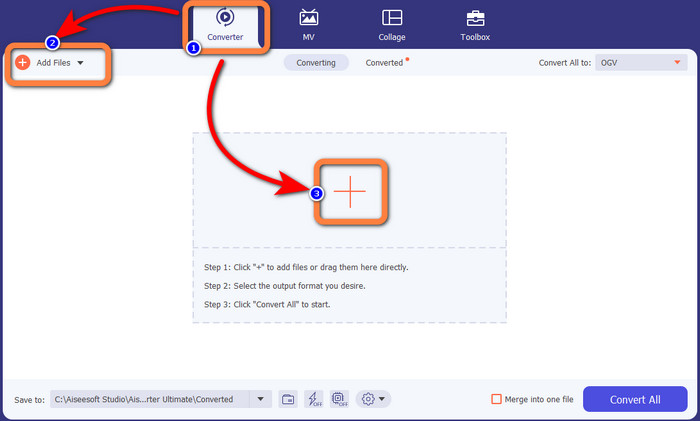
Étape 3 : Accédez aux options de format en cliquant sur l’icône de liste déroulante à côté de Tout convertir en, puis sélectionnez le format de fichier MKV pour l’étape suivante.

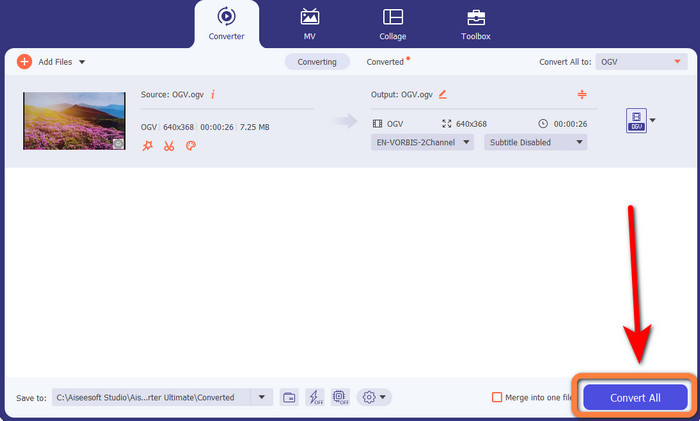
Étape 4 : La dernière étape consiste à convertir votre fichier en cliquant sur le bouton Tout convertir. Ensuite, vous pouvez enregistrer votre vidéo au format MKV.
Partie 3 : Solutions en ligne faciles pour convertir OGV en MKV
Utiliser Converthelper
Si Video Converter Ultimate vous a impressionné, il est rassurant de savoir que vous serez également satisfait en utilisant Converthelper. Cet outil en ligne vous permet de convertir OGV en MKV facilement et efficacement. Il prend également en charge divers formats, comme WMA, FLV, AVI, MP4, 3GP, et d’autres. Ses méthodes de conversion sont simples, de sorte qu’un débutant ne rencontrera pratiquement aucune difficulté à utiliser cette application en ligne. De plus, ce convertisseur vidéo gratuit peut aussi convertir vos vidéos sans perte de qualité. Ainsi, vous vous assurez que votre vidéo conserve le même rendu en termes de qualité. Toutefois, il arrive que Converthelper ne fonctionne pas de manière optimale, en particulier lorsque votre connexion Internet est lente. De plus, le processus de conversion est plutôt lent, ce qui fait perdre du temps aux utilisateurs. Essayez de convertir votre fichier OGV en MKV avec ce logiciel.
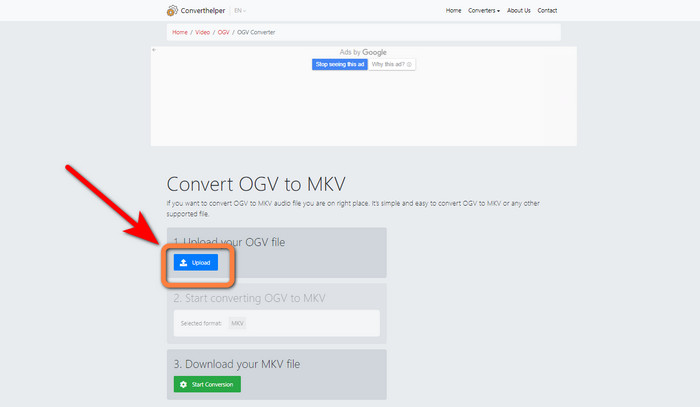
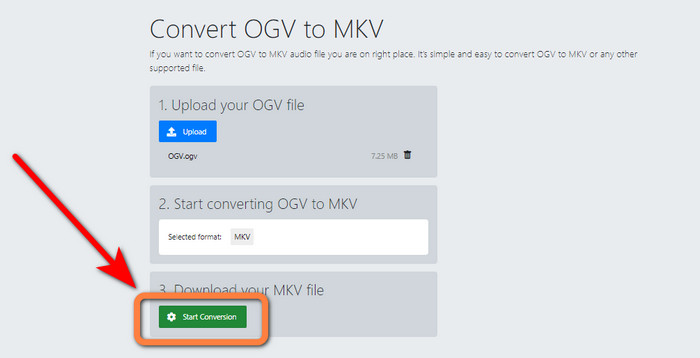
Étape 1 : Rendez-vous sur le site web de Converthelper. Puis cliquez sur le bouton Téléverser et importez le fichier au format OGV.
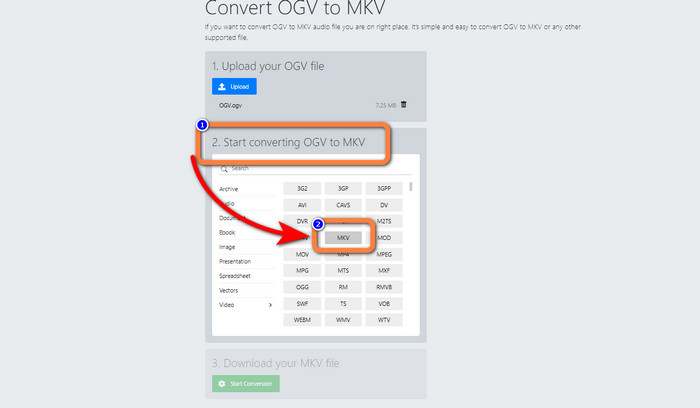
Étape 2 : Passez à l’étape 2. Sélectionnez le format de fichier MKV parmi les options de format.
Étape 3 : Pour la dernière étape, cliquez sur le bouton Lancer la conversion et attendez la fin du processus. Cet outil vous permet également de convertir OGV en FLV.
Utilisation de FreeConvert
FreeConvert vous permet de convertir OGV en MKV instantanément. Vous pouvez aussi utiliser cet outil pour convertir d’autres formats de fichiers, tels que MP4, WMV, AVI, WEBM, 3GP, MOV, etc. Ses étapes de conversion sont simples, ce qui est parfait pour les débutants. En plus de la conversion, FreeConvert peut aussi compresser des vidéos, des images, de l’audio, des documents, et plus encore. En outre, vous pouvez monter votre vidéo grâce à ses outils d’édition, comme un rogneur vidéo et un découpeur vidéo. Malheureusement, pour ce qui est de la conversion, il ne peut traiter que des fichiers d’une taille maximale de 1 Go. Vous ne pouvez donc convertir que des fichiers de taille limitée. Vous devez acheter un abonnement si vous souhaitez augmenter la taille maximale autorisée. De plus, c’est une application en ligne, il est donc indispensable de disposer d’une connexion Internet. Suivez les étapes ci-dessous pour convertir OGV en MKV.
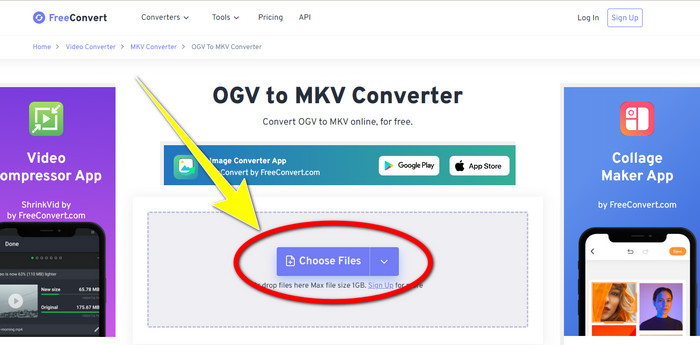
Étape 1 : Allez sur le site de FreeConvert. Cliquez sur le bouton Choisir un fichier pour ajouter le fichier OGV.
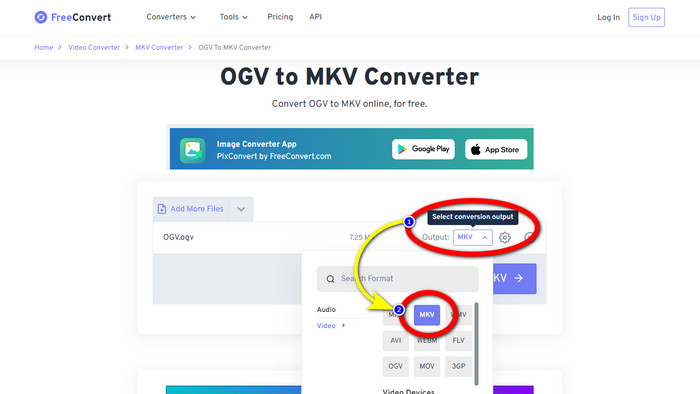
Étape 2 : Passez ensuite au bouton Sortie. Cliquez dessus pour afficher les options de format et sélectionnez le format de fichier MKV.
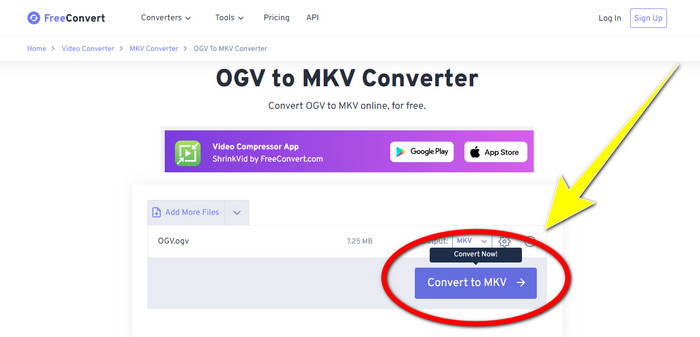
Étape 3 : Après avoir sélectionné le format de fichier MKV, cliquez sur le bouton Convertir en MKV. Le processus de conversion commencera alors et votre vidéo finale sera enregistrée.
Partie 4 : FAQ sur la conversion d'OGV en MKV
1. Puis-je utiliser FFmpeg pour convertir OGV en MKV ?
Bien sûr que oui. Téléchargez FFmpeg. C’est un outil en ligne de commande qui peut convertir divers fichiers vidéo, y compris OGV, MKV, MOV, MP4, AVI, et bien d’autres.
2. MKV est-il un format courant ?
La majorité des appareils actuels sont compatibles avec le format. De nombreuses pistes audio et de sous-titres peuvent être stockées dans un seul fichier en utilisant le format MKV ou Matroska Video. C'est incroyablement populaire pour garder des films. Une taille de fichier assez petite et une vidéo de haute qualité.
3. L'OGV est-il un OGG ?
Non. OGG est un format open source utilisé par le conteneur OGV. L'un des principaux objectifs du développement d'OGG était d'être exempt de restrictions de brevets logiciels. Un flux vidéo avec ou sans audio qui a été compressé à l'aide de la méthode Opus, Vorbis, Theora ou Speex est stocké à l'aide de l'extension de fichier OGV.
Conclusion
Utiliser des outils en ligne pour convertir OGV en MKV est efficace, mais on ne peut pas ignorer le fait que des publicités agaçantes apparaissent sans cesse pendant la conversion. Donc, si vous voulez convertir des fichiers sans être dérangé par les pubs, vous pouvez utiliser Video Converter Ultimate.
-
 Top 4 des meilleures solutions pour convertir MXF en MKV [Résolu]
 Apprenez à connaître ces quatre excellentes méthodes pour convertir facilement MXF en MKV en ligne et hors ligne. Les applications incluses dans cet article peuvent vous aider à convertir des fichiers sans tracas.
-
 4 façons de convertir MPG en MKV à l'aide de convertisseurs en ligne/hors ligne
 Vous recherchez un convertisseur facile à utiliser capable de convertir des fichiers MPG en MKV ? Cet article répertorie les moyens les meilleurs et les plus simples de convertir rapidement des fichiers MPG en fichiers MKV
-
 Les moyens les plus simples de convertir MOV en MKV gratuitement sur Mac
 Voulez-vous convertir MOV en MKV gratuitement sur Mac ? Lisez cet article pour connaître les moyens les plus simples et les plus simples de convertir votre fichier MOV en MKV.
