


 Video Converter Ultimate
 Enregistreur d'écran
 Réparation vidéo
 Téléchargement sécurisé
Supprimer le filigrane de JPG en ligne : 3 méthodes ultimes
De nos jours, enregistrer des photos est le meilleur moyen de conserver les souvenirs de nos proches. Cependant, il arrive que vos photos comportent des filigranes. Heureusement, nous allons vous fournir d’excellentes informations sur la façon de supprimer les filigranes d’un fichier JPG en ligne à l’aide de plusieurs applications. Le fichier JPG est l’un des formats d’image les plus populaires utilisés par les appareils photo numériques, il est donc probable que certaines de vos photos soient enregistrées au format JPG. Si vous faites partie de ceux qui souhaitent éliminer les éléments indésirables de leur image, en particulier sur un fichier JPG, vous devez lire la suite de cet article.

Partie 1 : Un filigrane de JPG peut-il être supprimé ?
À l'ère moderne, la suppression d'objets gênants, tels que les filigranes, les logos et le texte du format de fichier JPG, est simple si vous savez quoi faire et quels outils vous utiliserez. Non seulement sur un fichier JPG mais aussi dans d'autres formats de fichiers image. Tout ce que vous avez à faire est de rechercher en ligne des outils de suppression de filigrane légitimes.
Partie 2 : Comment supprimer un filigrane de JPG en ligne
Supprimer le filigrane de JPG à l'aide du dissolvant de filigrane gratuit FVC
Savoir comment supprimer un filigrane d’un fichier JPG est très utile, car la plupart des gens ne veulent pas voir d’éléments gênants sur leurs photos. Si vous recherchez les meilleures méthodes gratuites pour supprimer les filigranes d’un JPG, vous pouvez utiliser le FVC Free Watermark Remover. Cette application propose un téléversement et un processus de suppression rapides, de sorte que les utilisateurs n’ont pas à attendre longtemps pour retirer les filigranes de leurs photos. Elle prend en charge différents formats de fichiers, comme JPG/JPEG, PNG, BMP et bien d’autres. De plus, il existe deux façons de supprimer un filigrane de votre JPG : l’outil de recadrage et l’outil de suppression de filigrane. Par ailleurs, après avoir supprimé les filigranes avec succès, votre image peut être enregistrée dans le même format que l’original. En outre, grâce à des guides détaillés, des boutons simples et une interface claire, cet outil en ligne est parfait pour les utilisateurs non professionnels. L’utilisation de cet outil ne nécessite pas de compte, contrairement à d’autres logiciels. Vous n’avez pas non plus besoin d’installer l’application, car vous pouvez l’utiliser directement dans votre navigateur. Enfin, vous êtes la seule personne à pouvoir voir votre fichier, vous pouvez donc être sûr que votre fichier est sécurisé et protégé.
Fonctionnalités
◆ Il peut recadrer l'image avant ou après la suppression des filigranes.
◆ Il propose trois outils de suppression, Lasso, Pinceau et Polygonal, pour supprimer les objets gênants.
Avantages
- Il a des guides détaillés et une interface simple, ce qui est bon pour les débutants.
- Le logiciel en ligne est gratuit, il n'est donc pas nécessaire d'acheter un abonnement.
- Fournit un processus de suppression rapide.
- Enregistrez l'image avec la même qualité.
- Le fichier est sûr et sécurisé.
- Pas besoin de télécharger l'application car elle peut être utilisée directement dans le navigateur.
Les inconvénients
- Pour faire fonctionner l'application, vous avez besoin d'une connexion Internet.
Supprimons les filigranes de JPG à l'aide de FVC Free Watermark Remover. Suivez les étapes simples ci-dessous. Nous utiliserons les outils de suppression de filigrane. Assurez-vous que la zone du filigrane a été placée au milieu de la photo.
Utiliser l’outil Polygone
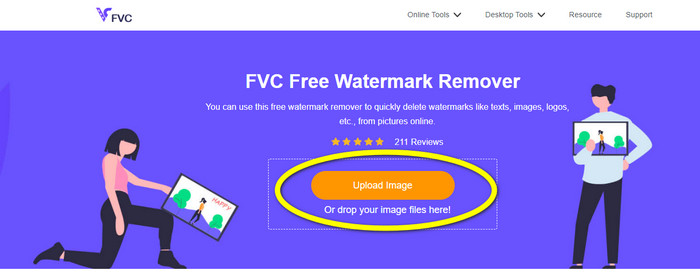
Étape 1 : La première chose à faire est de visiter le site FVC Free Watermark Remover. Appuyez sur le bouton Upload Image ou faites glisser votre fichier JPG pour le téléverser dans cet outil.
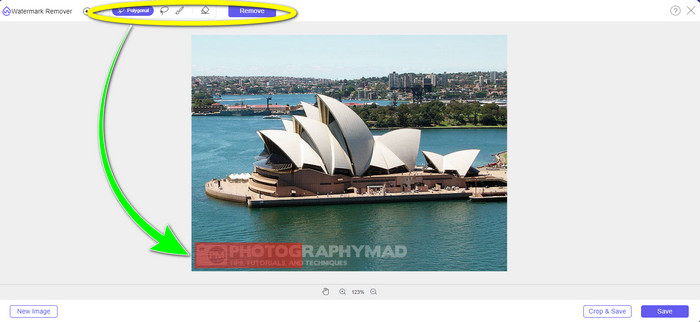
Étape 2 : Mettez les filigranes en surbrillance après avoir téléversé la photo. Vous pouvez utiliser des outils comme Lasso, Polygone et Pinceau pour les surligner.
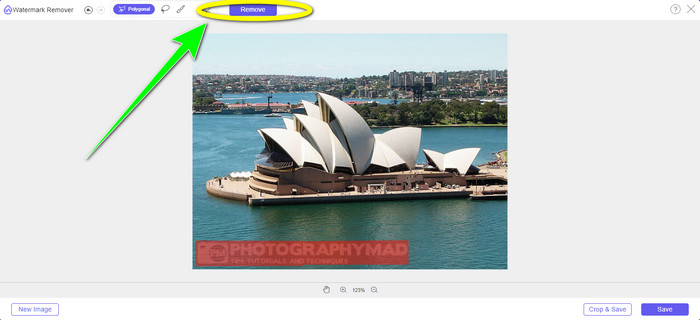
Étape 3 : Après avoir mis en surbrillance tous les filigranes de votre fichier JPG, vous pouvez déjà les supprimer en cliquant sur le bouton Remove. Patientez pendant le processus de suppression, puis passez à l’étape suivante.
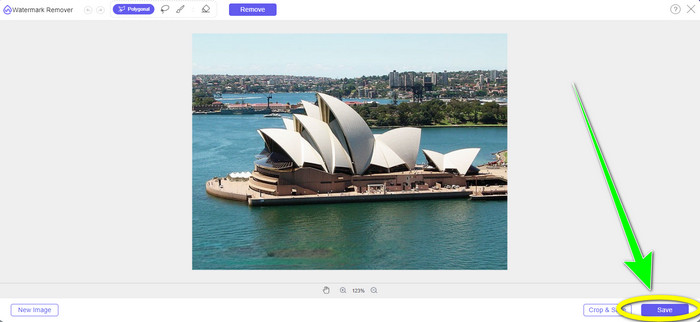
Étape 4 : Lorsque vous êtes satisfait du résultat final, cliquez sur le bouton Save pour enregistrer votre fichier JPG sans filigrane.
Utiliser l’outil Pinceau
Étape 1 : Téléversez le fichier image JPG contenant le filigrane que vous souhaitez supprimer.
Étape 2 : Parmi les outils de suppression de filigrane, sélectionnez l’outil Pinceau pour mettre en surbrillance le filigrane sur votre photo. Vous pouvez également cliquer sur les icônes + et - dans la partie inférieure de l’interface pour zoomer sur votre photo. À l’aide de la barre de défilement située sous l’outil Pinceau, vous pouvez aussi modifier la taille du pinceau.
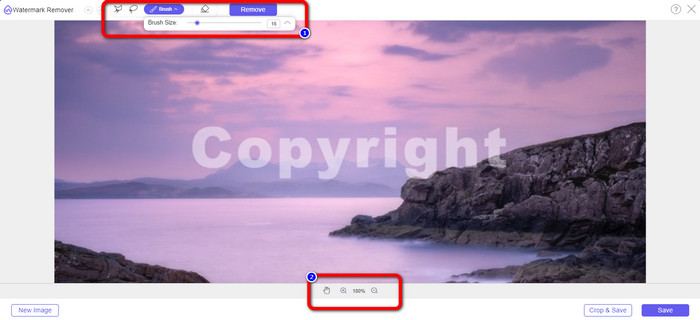
Étape 3 : Après avoir sélectionné l’outil Brush, mettez en surbrillance tous les filigranes sur votre photo.
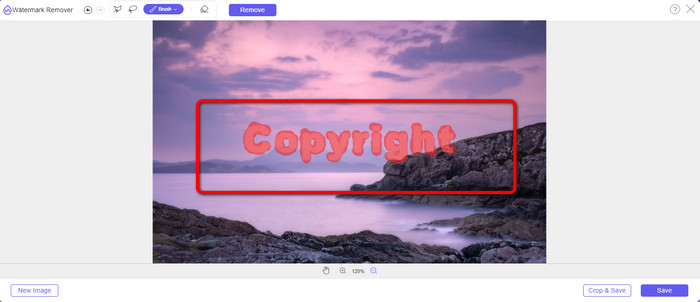
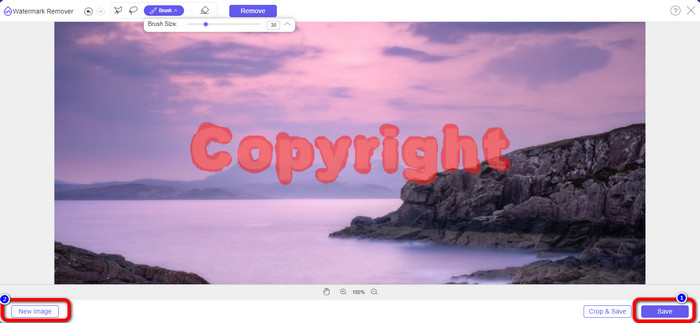
Étape 4 : Lorsque vous avez terminé de surligner les filigranes, vous pouvez les supprimer en cliquant sur le bouton Save, et la photo sera enregistrée automatiquement. Ouvrez le fichier et constatez que votre photo ne comporte plus de filigrane. Si vous souhaitez supprimer le filigrane d’une autre photo, cliquez sur le bouton New Image dans la partie inférieure gauche de l’interface.
Utiliser l’outil Lasso
Étape 1 : Téléversez le fichier image JPG contenant un filigrane.
Étape 2 : Choisissez Lasso comme outil de suppression de filigrane.
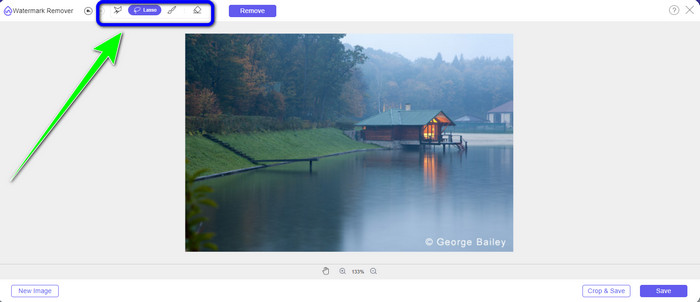
Étape 3 : Cliquez sur l’icône + sous la photo pour voir clairement le filigrane. Ensuite, à l’aide de l’outil Lasso, mettez les filigranes en surbrillance. Le procédé est similaire à l’utilisation d’un crayon tout en maintenant le bouton gauche de la souris enfoncé. Vous pouvez également cliquer sur le bouton Eraser dans la partie supérieure de l’interface pour resélectionner la zone mise en surbrillance.
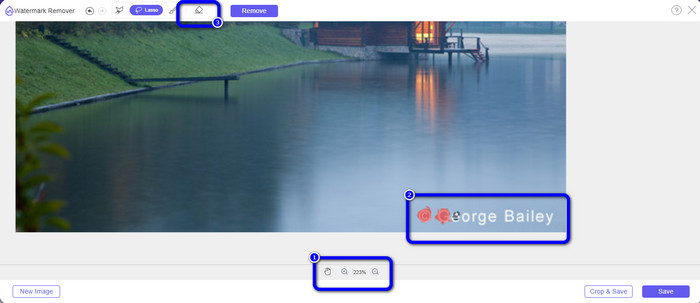
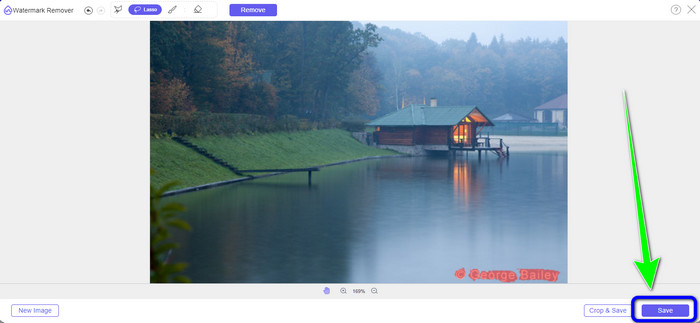
Étape 4 : Lorsque vous avez fini de surligner le filigrane avec l’outil Lasso, cliquez sur le bouton Save pour enregistrer la photo. Puis affichez le fichier image JPG sans le filigrane.
Utiliser l’outil de recadrage
Lorsque vous utilisez l'outil de recadrage, assurez-vous que la zone du filigrane de votre jpg se trouve dans le bord ou le coin.
Étape 1 : Téléversez le fichier image JPG.
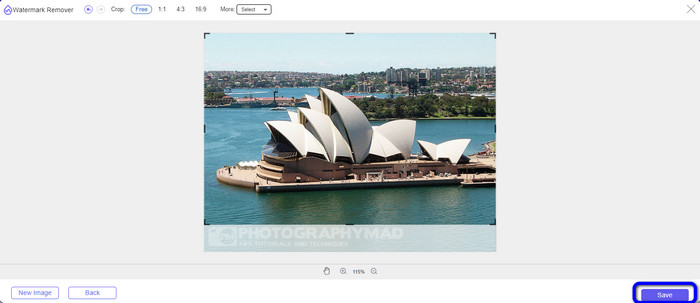
Étape 2 : Sélectionnez le bouton Crop & Save pour passer à l’étape de recadrage.
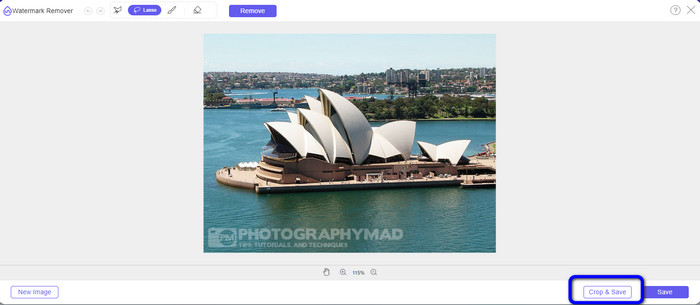
Étape 3 : À cette étape, vous pouvez déjà recadrer votre photo. Vous pouvez également utiliser la partie supérieure de l’interface pour recadrer votre image.
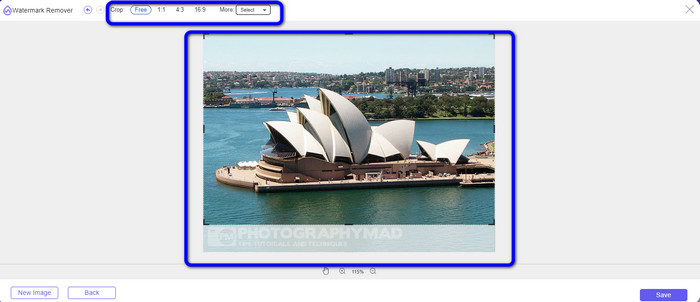
Étape 4 : Après avoir recadré votre photo, cliquez sur le bouton Save pour l’enregistrer.
En relation avec :
Comment supprimer des personnes sur une photo : un processus simple et rapide
Méthodes faciles pour supprimer le logo iSkysoft d’une vidéo
Partie 3 : FAQ sur la suppression du filigrane du JPG
Que se passe-t-il si vous supprimez un filigrane d'une photo ?
Après avoir supprimé un filigrane d'une photo, l'image modifiée sera supprimée dès que possible. C'est à cause de la modification intense de la photo originale.
Y a-t-il un filigrane difficile à supprimer ?
Oui il y a. Un filigrane d'image complète, tel que celui utilisé par les entreprises de photographie de stock pour protéger les photographies, est la seule exception à cette règle. Il est impossible de les éradiquer complètement. Si vous le faites, vous verrez la mauvaise qualité de la photo après avoir supprimé le filigrane de l'image complète.
Puis-je supprimer les filigranes du JPG sans perdre en qualité ?
Oui, c’est possible. Utilisez le FVC Free Watermark Remover. Ce logiciel en ligne vous permet de supprimer tous les éléments indésirables des fichiers image JPG sans perte de qualité.
Conclusion
Cet article vous présente la meilleure stratégie à suivre pour supprimer les filigranes d’un JPG en ligne. Vous avez également découvert d’excellents outils de suppression de filigrane, tels que Lasso, Polygone, Pinceau et l’outil de recadrage. Vous pouvez trouver ces outils dans une application en ligne fiable : le FVC Free Watermark Remover.
-
 Le moyen le plus rapide de supprimer le logo d'une vidéo dans Adobe Premiere Pro
 Essayez ces méthodes simples et rapides pour supprimer les logos d'une vidéo dans Adobe Premiere Pro. Cet article vous proposera les meilleures façons d'essayer d'utiliser votre appareil.
-
 Comment supprimer le logo d'une vidéo à l'aide de Windows Movie Maker
 Si vous souhaitez en savoir plus sur la suppression des logos des vidéos à l'aide de Windows Movie Maker et d'autres méthodes alternatives, lisez cet article. Nous avons des moyens simples pour vous.
-
 Comment supprimer le logo VideoScribe d'une vidéo sans effort
 Vous n'avez plus à vous soucier de supprimer le logo VideoScribe de vos vidéos. Cet article vous donnera des méthodes sans problème. Lisez cet article pour en savoir plus.
