


 Video Converter Ultimate
 Enregistreur d'écran
 Réparation vidéo
2 façons gratuites de compresser des fichiers WMV en ligne
Pour partager ou téléverser votre fichier WMV sur YouTube, Facebook, Google Video ou d’autres plateformes, vous devez compresser le WMV et réduire la taille du fichier. Savez‑vous comment compresser des fichiers WMV ?

Vous voulez certainement compresser un fichier WMV tout en conservant sa qualité d’image et de son d’origine. En tenant compte de ce besoin, cet article souhaite partager 2 méthodes simples pour compresser gratuitement des fichiers MKV en ligne.
Partie 1. Comment compresser gratuitement un fichier WMV en ligne
Il existe de nombreux outils de compression et de montage vidéo sur le marché qui peuvent vous aider à compresser facilement des fichiers MKV. Nous vous recommandons vivement l’outil simple d’utilisation Free Video Compressor pour réduire la taille de vos fichiers MKV.
Ce compresseur WMV en ligne gratuit est capable de compresser des vidéos dans tous les formats courants comme WMV, AVI, MP4, FLV, MKV, MOV et bien d’autres. Outre les vidéos classiques, il vous permet également de compresser des vidéos 4K UHD ainsi que des vidéos HD 1080p et 720p. Il est doté d’une fonction de compression par lots qui vous permet de compresser deux fichiers MKV ou plus en même temps. Vous pouvez suivre le guide ci‑dessous pour compresser gratuitement des MKV en ligne.
Étape 1. Rendez‑vous sur le site officiel de ce compresseur de fichiers WMV en ligne gratuit dans votre navigateur. Il est compatible avec tous les navigateurs populaires, notamment Chrome, Safari, IE, Firefox et autres.

Étape 2. Cliquez sur le bouton Ajouter des fichiers à compresser pour installer un petit lanceur destiné à la compression des fichiers WMV. Après cela, vous pouvez sélectionner et téléverser le fichier WMV que vous souhaitez compresser dans la fenêtre pop‑up.

Étape 3. Vous pouvez librement ajuster la résolution, la fréquence d’images et le débit binaire de votre vidéo WMV. Parallèlement, vous êtes autorisé à choisir un autre format de sortie pour le fichier compressé. Vous pouvez ensuite simplement cliquer sur le bouton Compresser pour commencer à compresser gratuitement le WMV en ligne.

Comparé à d'autres outils de compression MKV en ligne, ce compresseur vidéo gratuit peut vous offrir une vitesse de compression MKV plus rapide. Plus important encore, cela n'ajoutera aucun filigrane à votre vidéo de sortie.
Partie 2. Comment compresser des fichiers WMV en ligne avec Clideo
Outre le Free Video Compressor ci‑dessus, vous pouvez également vous appuyer sur le populaire Clideo pour réduire la taille de vos fichiers MKV. Il prend en charge de nombreux formats vidéo, dont WMV, MP4, MOV, VOB, AVI et bien d’autres. Il est doté d’une interface épurée qui vous garantit une expérience de compression vidéo pratique.
Étape 1. Ouvrez votre navigateur et rendez‑vous sur le site officiel de Clideo. Une fois sur la page, choisissez l’option Compresser.
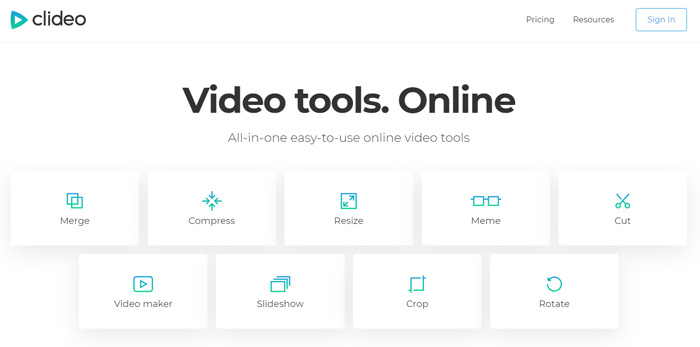
Étape 2. Lorsque vous accédez à la page Compresser la vidéo, vous pouvez cliquer sur le bouton Choisir un fichier pour téléverser votre vidéo WMV. En plus du disque dur local, il vous permet également d’ajouter des fichiers MKV via Dropbox, Google Drive ou une URL. Le processus de téléversement peut prendre assez longtemps.
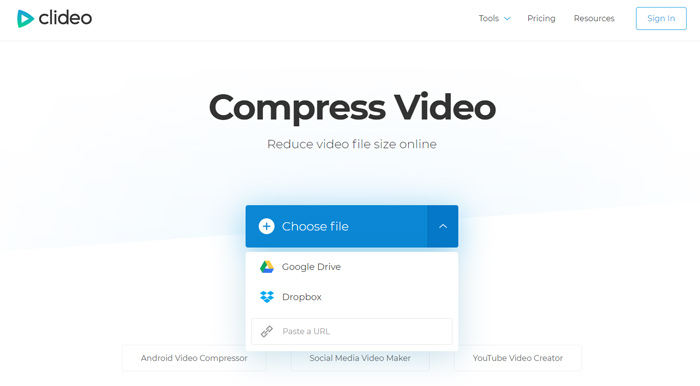
Étape 3. Ce compresseur WMV en ligne gratuit compressera automatiquement le fichier WMV pour vous. Vous pouvez prévisualiser directement le résultat de la compression. Vous devez vous connecter pour accéder à davantage de fonctions d’édition. Ensuite, vous pouvez cliquer sur le bouton Télécharger pour enregistrer le fichier WMV compressé sur votre ordinateur.
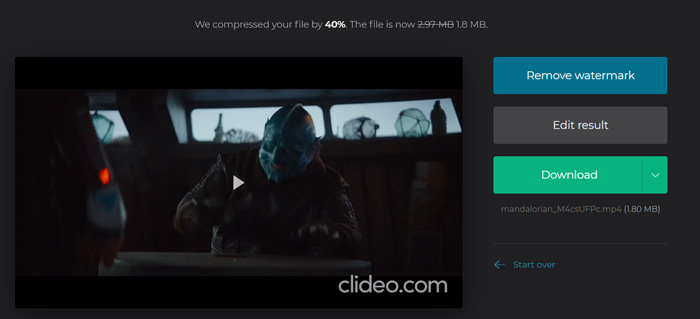
Clideo insérera un filigrane dans votre fichier WMV compressé. Vous devez vous connecter avec un compte Facebook ou Google pour supprimer le filigrane.
Partie 3. FAQ sur la compression de fichier WMV
Question 1. Que signifie le format WMV?
Windows Media Video (WMV) est une série de codecs vidéo et de formats de codage vidéo correspondants développés par Microsoft. Il s'agit d'une extension vidéo pour le format de conteneur ASF, Advanced Systems Format. WMV est principalement utilisé pour stocker des vidéos sous Windows.
Question 2. Comment convertir gratuitement WMV en MP4 en ligne?
Pour convertir gratuitement un fichier WMV en MP4, vous pouvez utiliser le logiciel de conversion vidéo populaire Free Online Video Converter. Il vous permet d’effectuer la conversion de WMV en MP4 sans perte de qualité.
Question 3. Est-ce que WMV est meilleur que MP4?
Par rapport au MP4, le plus grand avantage de WMV est sa petite taille de fichier. En général, un fichier WMV est plus petit que le fichier MP4 similaire. Pour cette raison, un fichier WMV coûtera moins de ressources sur votre machine et pourra être mieux partagé sur le réseau, la messagerie électronique ou les plateformes de médias sociaux. Mais vous ne pouvez pas simplement dire que WMV est meilleur que MP4. Le format MP4 peut être pris en charge par plus d'appareils, de lecteurs multimédias et d'éditeurs.
Question 4. Le WMV est-il toujours utilisé?
Comme mentionné ci-dessus, le format WMV est conçu par Microsoft et largement utilisé sous Windows. Il faut une petite taille de fichier avec une meilleure compression que MP4. Donc jusqu'à présent, WMV est toujours populaire pour le streaming vidéo en ligne.
-
 3 façons de compresser et de convertir de gros fichiers vidéo pour WhatsApp
 À partir de cet article, vous pouvez obtenir 3 moyens simples de compresser des vidéos en ligne pour WhatsApp. Pourquoi vous ne pouvez pas envoyer de vidéos sur WhatsApp? Que pouvez-vous faire pour corriger la limite de taille de la vidéo WhatsApp? Lisez et vérifiez.
-
 Tutoriel pour compresser un GIF et réduire sa taille de fichier avec une haute qualité
 Voici 2 façons simples de compresser des GIF sur votre ordinateur ou votre téléphone portable. Vous pouvez utiliser FVC Free Online Video Compressor et Photoshop pour réduire la taille du fichier GIF sous différents aspects.
-
 Les 6 meilleures façons de combiner des fichiers MP4 sur Windows / Mac / en ligne
 Vous souhaitez fusionner vos fichiers MP4 bruts pour votre projet? Cet article rassemble les 6 meilleures façons de vous aider à combiner facilement des vidéos MP4 sur Windows, Mac et en ligne.
