


 Video Converter Ultimate
 Enregistreur d'écran
 Réparation vidéo
 Téléchargement sécurisé
Un guide pas à pas sur la façon de corriger les images floues
Do you have any hazy pictures? It's not always possible to get a clear picture. The slightest camera movement might result in a blur that detracts from a sharp image. Sometimes, this movement can be seen in the photograph's subject. For example, a twitch from a human subject or wind that blows at a tree's leaves. In either case, it's helpful to have the option to enhance an image to see the greater version of your photo. In that case, this guidepost will give you the best solution on how to fix blurry pictures on your devices. We will provide you with the most trusted and tested ways. So, read this article to learn everything you can’t afford to miss.

Partie 1 : Meilleur moyen de corriger les images floues en ligne
You can use many web-based tools to fix blurry images. But the problem is that some of them are difficult to use. In that case, if you are looking for a tool with an easy procedure, use FVC Free Image Upscaler. The AI Super Resolution technology offers this potent image upscaler. It has received training from learning millions of times. This image upscaler detects blurred areas and improves them by applying some changes. It can restore missing pixels, colors, textures, and other elements. Additionally, it is simple to recognize and restore the portrait. Moreover, in terms of difficulty, this image upscaler is fine. Everyone can use this tool because it has an intuitive interface. It becomes more understandable to them. Also, it has a simple step for enhancing blurry images. You can also unblur images for free, which is convenient for all users. Also, are you concerned about your photographs' insufficient size? You can use this image upscaler online. You can enlarge the photographs by 2, 4, or 8 times with this online image upscaler and improve the image quality. Choose the one you desire, then enlarge your image to the precise pixel size. You can use the enhanced and enlarged photographs in various contexts after processing. This web-based tool doesn’t need you to create an account. It allows you to use this application. Follow the instructions below to learn how to fix a blurry picture on your browser.
Step 1: Go to your computer browser and visit the official website of FVC Free Image Upscaler. Then, click the Upload Photo button on the main page to upload the blurry image. Another way to add a photo is to drop the image file inside the box.

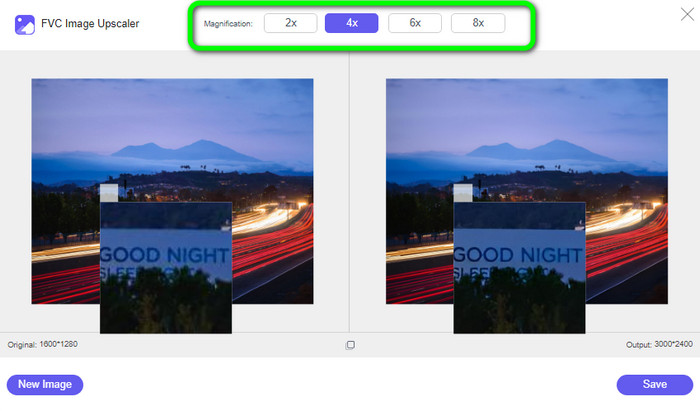
Step 2: After uploading the photo, you can eliminate the blur by upscaling it. Choose from the magnification options to upscale blurry images. You can magnify your photo to 2×, 4×, 6×, and 8x. You can see the magnification times option on the upper part of the tool interface.
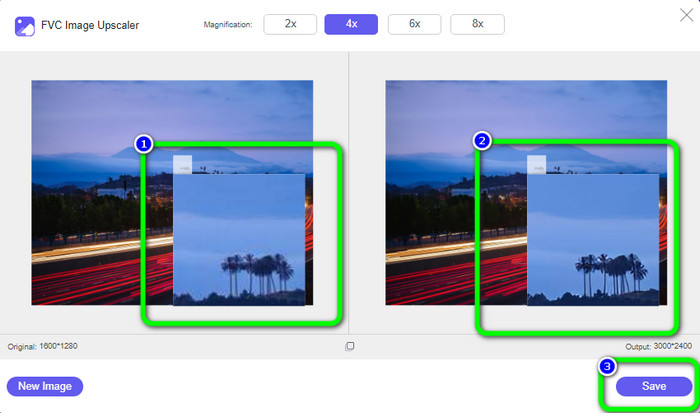
Step 3: As you can observe, the result is magnificent. The photo on the right side is enhanced, eliminating the blurry area. Click the Save button to save your photo automatically.
Partie 2 : Comment réparer les images floues sur l'ordinateur
You'll be glad you learned how to edit fuzzy photos. No matter if you're an editor, an Instagram user, or someone who hoards photos in their gallery. You will only recover a photo if it is so blurred that it is difficult to pick out the features. AI might not be able to help either. A typical photo editing tool should work if an image only requires minor retouching. In this part, you will learn a good way on how to make pictures less blurry using Movavi Picverse. This software is reliable in enhancing photos, especially making your blurry images wonderful. It uses AI to edit your images, making the process fast and smooth. Also, this application is available on both Windows and Mac computers. So, it becomes convenient for users. Also, you can get great results after editing photos that will make users satisfied. But, even though it has excellent performance, using the free version has some limits. You can't experience its full features, so purchasing a subscription plan is needed. Also, utilizing this software is challenging, especially for beginners. It requires some experience to use this program. If you are a beginner, you can't enhance your blurry images.
Step 1: Download the software on your Mac or Windows. After launching it, go to File > Open to add the blurry image.
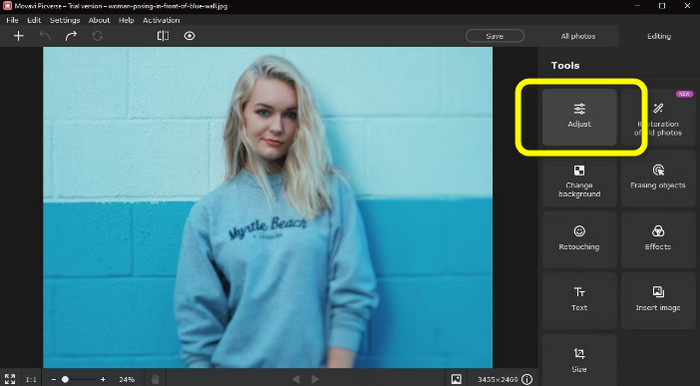
Step 2: Find the Adjust tab in the Tools panel on the right. If you choose Automatically, Picverse's AI system will try its best to correct any issues in the image. You might not, however, get the outcome you were hoping for.
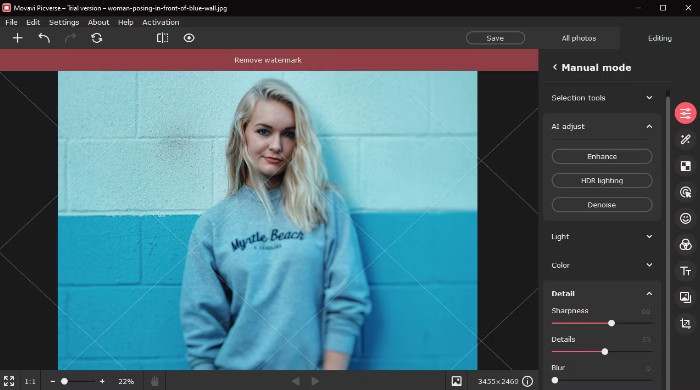
Step 3: If you choose Manually, several movable tools will be available in Manual mode. To access the Detail tab, scroll down. Here, the tools we need are sharpness and detail.
Step 4: Increase the Sharpness slider value. Don't turn it up too much, or your picture may blur. Increase the Details slider now. This device sharpens everything in the picture like a tiny magic wand. Then save your photo by clicking the File > Save button.
Partie 3 : Comment réparer les photos floues à l'aide d'Androids et d'iPhone
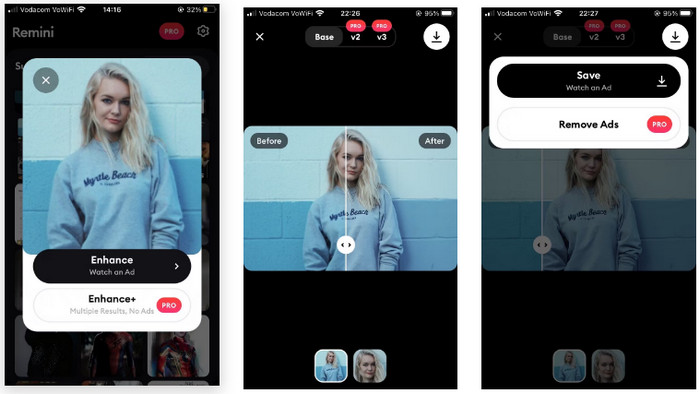
If you desire to know how to fix blurry pictures on Android and iPhone, use Remini. This app is powerful. Its powerful AI technology can improve almost anything, unlike some AI-improving tools. It improves the composition and the core subject. Besides, you can use the application easily because it has an intuitive interface. It has basic procedures to enhance blurry images, making it convenient for all users. Skilled or beginners can use this application. Moreover, Remini has more features than you imagine. Besides fixing blurry images, you can also add filters to your photo, change colors, and more. However, it can only offer a 7-day free trial, and then you need to purchase a subscription, which is costly. Also, ads constantly appear every time you edit photos, which is annoying and disturbing. Purchasing a subscription plan is one way to remove unnecessary ads.
Step 1: You can choose a photo from the Suggested section when opening the app. If not, select Other Photos to locate your photo in your photo album.
Step 2: There will be a pop-up. Tap the bottom Enhance Plus tab to purchase the Pro edition. However, if you're ready to watch a 30-second ad, you may complete these tasks for nothing if you choose the top Enhance tab.
Step 3: Once the advertisement has finished, tap the tiny X Reward granted tab in the top corner. Remini was working its magic behind the scenes as the advertisement was playing. You'll be taken to a window where your findings are shown.
Step 4: View the before and after by dragging the slider with the tiny arrows. To view the results up close, touch on the second preview icon at the bottom of the screen. Tap the tiny arrow button in the top right and choose Save to store your shot. You will regrettably need to watch another 30-second advertisement, but it's worthwhile.
Relative à:
Image Denoising: Causes of Image Noise & How to Fix It Immediately
5 Image Resolution Enhancers You Must Use This 2023 [Latest Picks]
Partie 4 : FAQ sur la correction d'une photo floue
1. Pourquoi les photos deviennent floues ?
Plus de lumière pénètre dans l'appareil photo avec une vitesse d'obturation lente. Cela rend la vitesse d'obturation lente idéale pour les situations de faible luminosité ou de nuit. Entre 1/500 et 1/60, les vitesses d'obturation sont les plus utilisées. Cependant, les taux d'obturation inférieurs à 1/60 ne sont pas recommandés si vous souhaitez prendre des photos nettes en tenant l'appareil photo avec vos mains car il est difficile de maintenir la stabilité. De plus, l'une des principales causes de vos photos floues peut être la façon dont vous tenez l'appareil photo. Entraînez-vous à devenir le photographe officiel pour le plus de stabilité.
2. Une mauvaise qualité d'objectif peut-elle provoquer des images floues ?
Même avec des compétences photographiques exceptionnelles, certains zooms et objectifs fixes bon marché ne donnent que parfois des photos haute résolution. Pour cette raison, vous devez apprendre à nettoyer les photos floues.
3. Quelle est la méthode la plus simple pour corriger les photos floues ?
You can use FVC Free Image Upscaler. It has an easier process than other converters. And you can experience its great features without purchasing a subscription plan.
Conclusion
All users don’t like blurry images. In that case, this article provided you with the most remarkable ways you can try to learn how to fix blurry pictures online, offline, and on Android and iPhone. But, if you want an easy-to-use way, use FVC Free Image Upscaler.
-
 Faites de la photo HD avec les meilleures façons que vous pouvez trouver sur le marché
 Vous vous posez la question ou souhaitez faire de la photo HD ? Vous pouvez suivre le tutoriel que nous ajoutons ci-dessous avec différentes solutions que vous pouvez utiliser.
-
 Façons officielles de mettre à l'échelle l'image en 4k avec un didacticiel pratique
 Pour mettre à l'échelle l'image en 4k, vous aurez besoin d'un logiciel sur votre appareil. Si vous n'en avez pas, vous devrez sélectionner l'outil que nous incluons ici.
-
 Comment affiner l'image en ligne et hors ligne avec 4 façons simples
 Il existe de nombreuses méthodes que vous pouvez utiliser si vous souhaitez affiner une image. Nous discuterons ci-dessous des moyens les meilleurs et les plus simples d'améliorer la netteté des images en ligne et hors ligne.
