


 Video Converter Ultimate
 Enregistreur d'écran
 Réparation vidéo
 Téléchargement sécurisé
Convertir TGA en PNG : Découvrez les 3 meilleurs convertisseurs TGA en PNG exceptionnels
Truevision Inc. a créé le format TGA pour le montage et l’animation. Cependant, ce format de fichier n’est pas devenu aussi populaire que d’autres formats (comme PNG et JPG). Certains utilisateurs ne parviennent même pas à ouvrir ce fichier avec d’autres plateformes ou programmes. Ainsi, certains ne savent pas quoi faire ni comment utiliser et ouvrir ce fichier image. Dans ce cas, voulez-vous savoir comment transcoder votre fichier TGA au format PNG ? Heureusement, ce guide vous apporte la meilleure solution. Nous allons vous proposer d’excellentes méthodes pour convertir un TGA en PNG à l’aide de convertisseurs d’images. Donc, si vous êtes impatient de découvrir ces solutions efficaces, lisez cet article du début à la fin.

Partie 1.Comment convertir TGA en PNG sur FVC Free Image Converter
Étant donné que le format de fichier TGA n’est pas populaire, il est difficile de l’ouvrir dans d’autres programmes. Mais si vous voulez utiliser l’image, le mieux est de la transcoder dans un autre format d’image. Si vous cherchez comment le transcoder, utilisez FVC Free Image Converter. Grâce à ce convertisseur d’images en ligne, vous pouvez transformer votre fichier TGA en un autre format standard comme PNG. De plus, vous pouvez convertir plusieurs fichiers TGA en PNG en une seule opération. En effet, le convertisseur d’images propose un processus de conversion par lots. Ainsi, vous pouvez convertir davantage de fichiers en un temps réduit. En outre, il prend en charge divers formats de fichiers en entrée, notamment BMP, JPG, PNG, BMP, TIFF, SVG, et bien d’autres. Vous pouvez donc téléverser n’importe quelle image sur cet outil en ligne. De plus, après le téléversement des images, l’outil les convertit automatiquement dans le format de sortie souhaité.
Mais attendez, il y a plus. FVC Free Image Converter ne nécessite pas d'installation. Cela signifie que vous pouvez commencer à convertir des images directement vers les navigateurs. Vous pouvez accéder à l'outil sur tous les navigateurs, ce qui le rend plus pratique pour les utilisateurs. De plus, vous n'obtiendrez aucun objet indésirable de vos images après le téléchargement. L'outil ne mettra pas de filigranes, de logos, d'autocollants, etc. Cela garantira également votre vie privée. L'outil supprimera automatiquement vos photos après avoir enregistré les images converties. Utilisez les instructions simples de ce convertisseur en ligne ci-dessous pour convertir TGA en PNG.
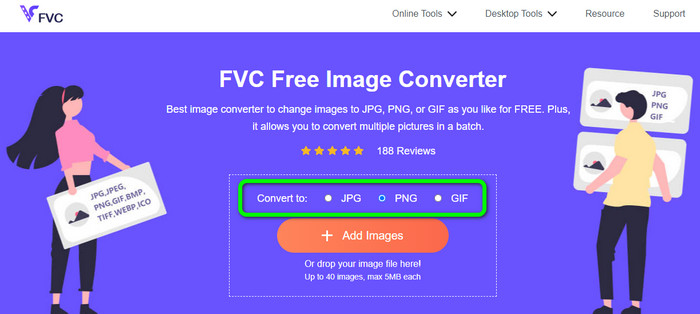
Étape 1. Ouvrez n’importe quel navigateur sur votre ordinateur et rendez-vous sur le site officiel de FVC Free Image Converter. Ensuite, sélectionnez le format de fichier PNG dans l’option Convert to au centre de l’interface.
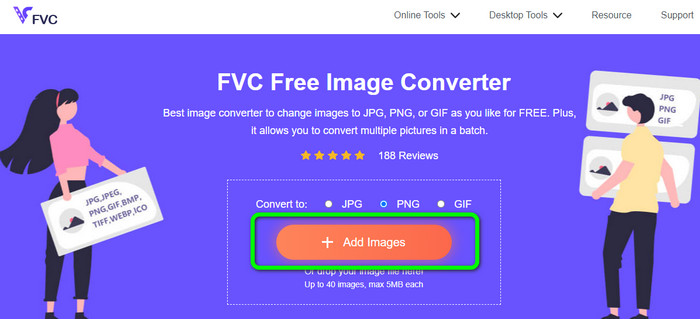
Étape 2. Après avoir sélectionné le format de sortie souhaité, cliquez sur le bouton Add Images. Lorsque le dossier de votre ordinateur s’affiche, choisissez le fichier TGA que vous voulez convertir et ouvrez-le. Notez que vous pouvez insérer plus d’un fichier image. Vous pouvez également faire glisser et déposer le fichier directement dans la zone prévue.
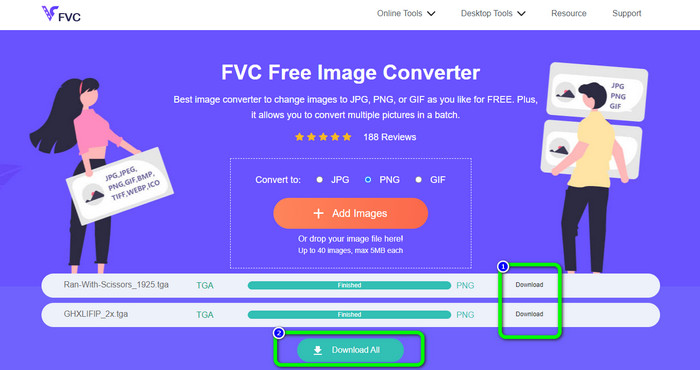
Étape 3. Une fois le téléversement terminé, vous verrez que l’outil convertit automatiquement les images. Après le processus de conversion, cliquez sur le bouton Download pour enregistrer les images une par une. Si vous voulez les télécharger en un seul clic, appuyez sur le bouton Download All.
Partie 2. Comment convertir TGA en PNG sur Zamzar
Zamzar est un autre convertisseur TGA vers PNG en ligne que vous pouvez utiliser. Tous les utilisateurs, en particulier les débutants, trouveront ce convertisseur web très accessible, grâce à son interface simple d’utilisation. Avec cet outil, vous pouvez téléverser des photos aux formats CR2, ARW, PNG, 3FR, JPG, GIF, ERF, TIFF, et d’autres formats d’entrée. Vous pouvez aussi convertir votre fichier image dans de nombreux formats, comme BMP, EPS, PDF, PNG, JPG et WBMP, afin de faciliter la tâche à tous les utilisateurs. Vous pouvez soit attendre l’apparition des liens de téléchargement sur la page, soit ouvrir le fichier converti via un e‑mail. La possibilité de téléverser des photos jusqu’à 50 Mo est très appréciable. Vous pouvez téléverser le fichier depuis votre ordinateur, Dropbox, Google Drive, ou un autre site web en entrant son URL. Zamzar est disponible sur presque tous les navigateurs, comme Google, Firefox, Edge, et bien d’autres. Cet outil peut également vous aider à convertir un fichier SVG en PNG.
Cependant, il présente certains inconvénients. Le processus de conversion est très long. Le processus prend beaucoup de temps dans cette situation. De plus, chaque session est limitée à deux conversions de photos. Suivez les étapes ci-dessous pour convertir TGA en PNG en utilisant Zamzar.
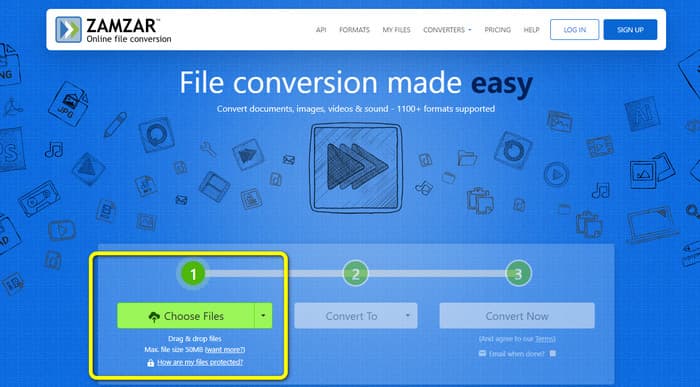
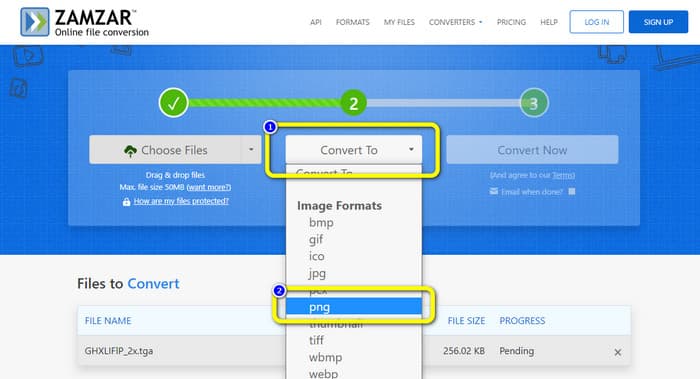
Étape 1. Allez sur votre navigateur et accédez au site principal de Zamzar. Cliquez sur le bouton Choose Files sur la page web pour téléverser le fichier image TGA. Une autre façon de téléverser l’image consiste à déposer directement le fichier dans l’outil.
Étape 2. Après avoir téléversé le fichier image TGA, allez dans les options Convert to. Lorsque les options de format apparaissent, sélectionnez le format PNG comme format de sortie.
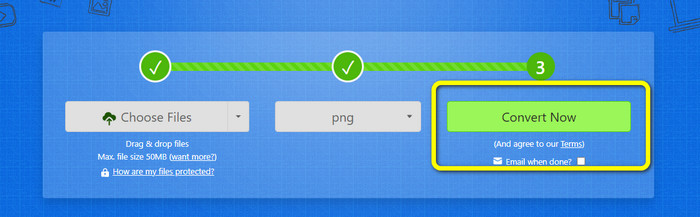
Étape 3. Cliquez ensuite sur le bouton Convert Now pour lancer le processus de conversion. Enfin, appuyez sur le bouton Download pour enregistrer votre image convertie sur votre ordinateur une fois la conversion terminée.
Partie 3. Comment convertir TGA en PNG à l'aide de Convertio
Si vous recherchez un autre convertisseur TGA vers PNG efficace, utilisez Convertio. Ce convertisseur d’images en ligne peut convertir votre fichier TGA en PNG. Les débutants le trouveront facile à comprendre grâce à sa présentation simple. Vous pouvez convertir des images facilement avec Convertio. En outre, il prend en charge de nombreux formats d’images, notamment PNG, GIF, BMP et SVG. Ce convertisseur d’images prend également en charge la conversion par lots. Vous pouvez convertir immédiatement plusieurs images à la fois avec cet excellent outil. Vous pouvez aussi convertir des fichiers vidéo, audio et des documents, en plus des images. Ainsi, vous n’avez pas besoin de chercher un autre outil en ligne. Vous pouvez également utiliser cet outil pour convertir un fichier WebP en PNG.
Cependant, la version gratuite a une limite de téléchargement de 100 Mo. Pour ajouter la plus grande taille de fichier, vous devez acheter un plan d'adhésion. Sur la version gratuite, vous ne pouvez convertir que deux fichiers à la fois en utilisant une méthode de conversion par lots. Un forfait coûteux est également une option si vous souhaitez accéder à tous les services. Vous pouvez utiliser les étapes simples ci-dessous pour convertir le fichier TGA au format PNG à l'aide de Convertio.
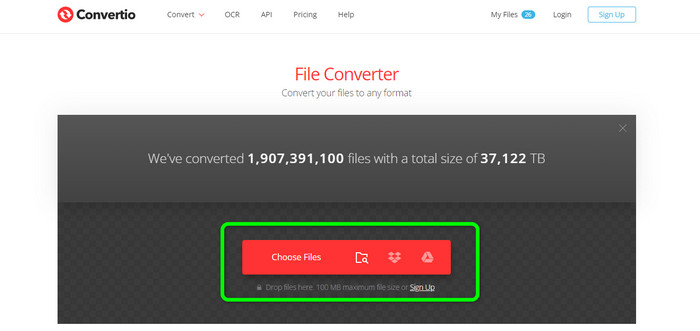
Étape 1. Depuis votre navigateur, recherchez et ouvrez le site officiel de Convertio. Une fois sur la page, cliquez sur le bouton Choose Files. Puis, ouvrez le fichier image TGA depuis le dossier de votre ordinateur. Vous pouvez téléverser jusqu’à deux images en utilisant la version gratuite.
Étape 2. Une fois le téléversement des images TGA terminé, allez dans les options de format. Après avoir cliqué, choisissez le format de sortie souhaité, c’est‑à‑dire PNG.
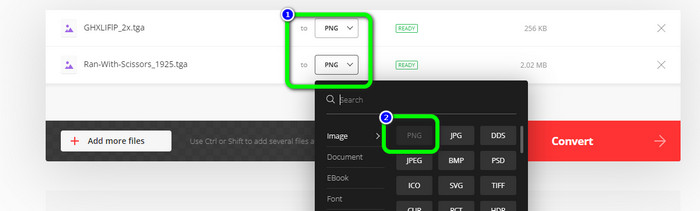
Étape 3. Après avoir modifié le format de sortie dans les options de format, cliquez sur le bouton Convert. Patientez pendant le processus de conversion, qui ne prend que quelques secondes.
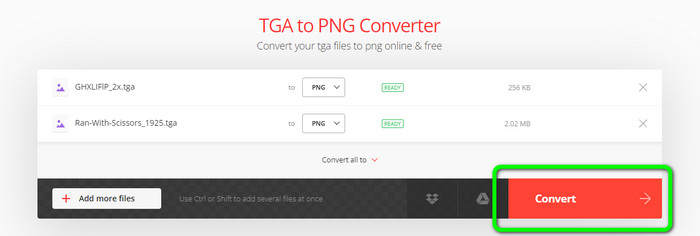
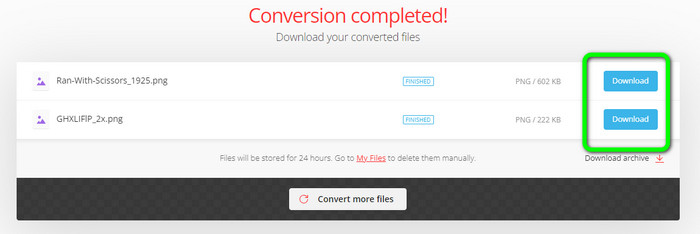
Étape 4. Enfin, pour enregistrer vos images converties, cliquez sur le bouton Download. Après cela, vous pouvez ouvrir vos images converties dans votre dossier Download.
Partie 4. FAQ sur la conversion de TGA en PNG
1. Qu'est-ce qu'un fichier TGA ?
Un fichier image Truevision Graphics Adapter porte l'extension de fichier TGA. L'acronyme TARGA signifie Truevision Advanced Raster Graphics Adapter. Le format Targa Graphic permet le stockage d'images compressées et non compressées. Il peut être choisi pour les icônes, les dessins au trait et d'autres graphiques simples. On pense que les fichiers image utilisés dans les jeux vidéo sont liés à ce format.
2. Pourquoi les images TGA sont-elles si grandes ?
Les images TGA consistent généralement en de gros fichiers en raison de l'utilisation de bits pour la représentation des pixels. La taille des fichiers dans ce format dépend de la profondeur de couleur.
3. Comment visualiser les photos TGA ?
Vous pouvez afficher des images TGA sur Adobe Photoshop, GIMP et TGA Viewer.
Conclusion
Comme le format de fichier TGA est peu répandu, certains programmes ne le prennent pas en charge. La meilleure solution pour l’ouvrir est donc de le transcoder dans un format très courant, comme PNG. Ainsi, l’article vous a proposé les meilleures méthodes pour convertir un fichier TGA en PNG. Cependant, certains outils en ligne exigent un abonnement pour profiter pleinement de leurs fonctionnalités avancées. Dans ce cas, utilisez FVC Free Image Converter. Ce convertisseur d’images en ligne vous permet de profiter gratuitement de toutes ses fonctionnalités.
-
 Méthodes faciles à comprendre pour convertir PSD en PNG ou JPG
 Cet article vous donnera des étapes gérables pour convertir PSD en JPG ou PNG. Il existe différents convertisseurs que vous pouvez utiliser pour convertir vos fichiers. Lire la suite pour le savoir.
-
 Principales méthodes sur la façon de convertir EPS en PNG et JPG
 Les méthodes les plus notables pour convertir EPS en PNG et JPG sont ici. Lisons ce guide pour obtenir les moyens à l'aide de convertisseurs d'image.
-
 Méthodes les plus simples pour convertir BMP aux formats JPG et PNG
 Apprenez les meilleures méthodes pour convertir BMP en JPG ou PNG en utilisant d'excellents convertisseurs. Vous découvrirez également la différence entre les formats de fichiers BMP, JPG et PNG.
