


 Video Converter Ultimate
 Enregistreur d'écran
 Réparation vidéo
 Téléchargement sécurisé
Convertir YouTube en sonnerie : la conversion simplifiée
Êtes-vous fatigué d’être dérangé par des sonneries fades et répétitives sur votre appareil mobile ? Et si vous commenciez à utiliser cette tonalité tendance, accrocheuse et rythmée entendue sur YouTube ? Vous ne savez pas comment faire ? Nous avons ce qu’il vous faut : la solution consiste à les convertir, et votre chance ne fait que commencer, car nous avons réuni des logiciels et des outils en ligne spécialement conçus pour convertir YouTube en sonneries. Commencez dès aujourd’hui à convertir des vidéos YouTube et transformez votre sonnerie quotidienne de quelque chose d’ennuyeux en quelque chose d’agréable.

Partie 1. Convertir un lien YouTube en sonnerie MP3
Vous vous demandez comment faire d'une vidéo YouTube votre sonnerie ? Eh bien, pour cette partie, nous allons vous montrer comment convertir une vidéo YouTube en sonnerie MP3 en copiant et collant le lien et en utilisant un outil de conversion basé sur le Web comme Y2Mate. Le processus se déroule en trois étapes environ, garantissant une conversion simple pour vous faire gagner du temps et définir votre sonnerie nouvellement convertie.
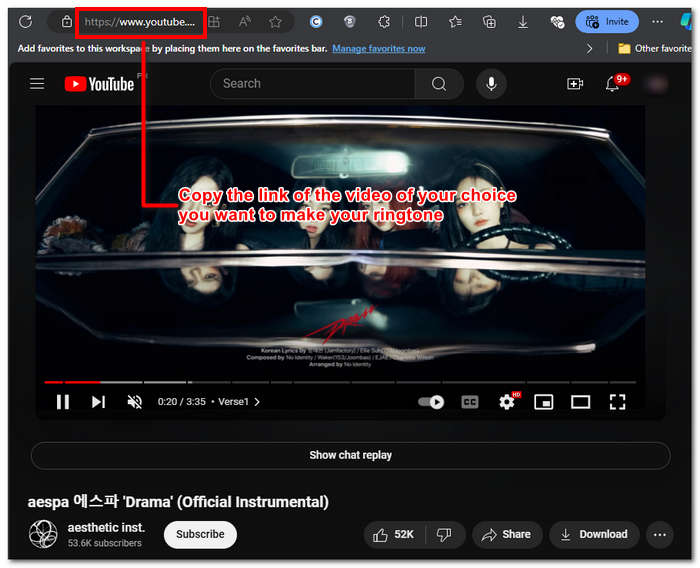
Étape 1. Copiez le lien de la vidéo YouTube que vous souhaitez convertir en sonnerie. Vous pouvez le faire depuis un navigateur sur votre ordinateur ou depuis l’application YouTube sur mobile.
Étape 2. Rendez-vous sur Y2Mate.com et collez simplement le lien de votre vidéo YouTube dans le champ prévu à cet effet.
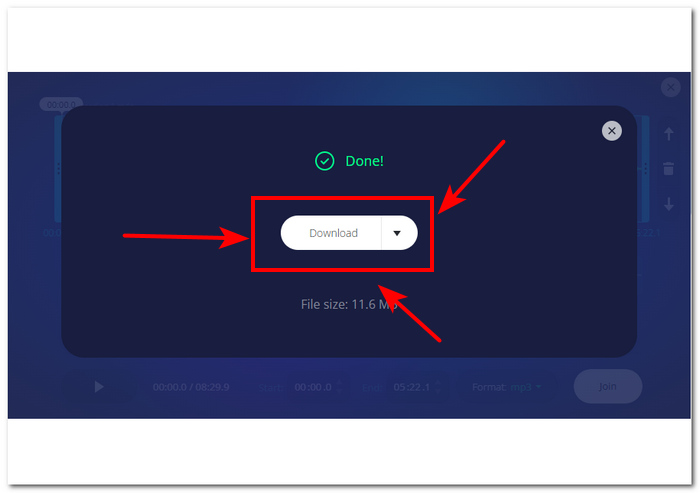
Étape 3. Cliquez ensuite sur le bouton Audio, puis sur le bouton Télécharger pour convertir le fichier et l’enregistrer sur votre appareil.
Cette étape fonctionne également sur les téléphones mobiles, car vous pouvez utiliser le navigateur de votre téléphone mobile.
Partie 2. Personnaliser une vidéo YouTube en sonnerie MP3 pour Android/iPhone
Si vous souhaitez télécharger une vidéo YouTube, la transformer en sonnerie et la personnaliser pour un rendu plus personnel, un outil logiciel est la solution idéale. FVC-picked Video Converter Ultimate est un outil tout-en-un qui permet de convertir, améliorer, compresser et même monter des vidéos et des fichiers audio, avec la prise en charge de plus de 1000 formats. Il intègre par ailleurs une technologie de traitement à haute vitesse pour garantir une conversion rapide sans perte de qualité.
La tâche consiste à personnaliser un fichier vidéo YouTube avant de le convertir en sonnerie M4R ou MP3. Ainsi, le logiciel peut vous aider à raccourcir la durée, à ajouter des effets de fondu et à supprimer les parties que vous jugez inutiles, réalisant ainsi une personnalisation complète qui correspond parfaitement à vos préférences en matière de sonnerie.
Avant de personnaliser votre sonnerie, vous devez avoir téléchargé votre vidéo YouTube. Si vous n'avez pas téléchargé la vidéo sur votre appareil, vous pouvez utiliser Y2Mate pour le faire.
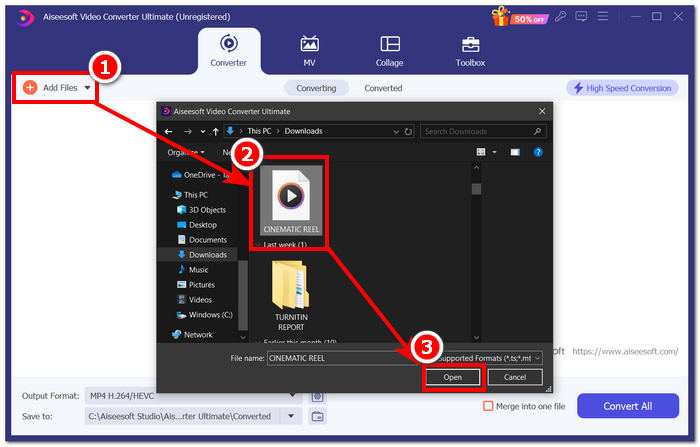
Étape 1. Depuis votre ordinateur, téléchargez et installez FVC-picked Video Converter Ultimate sur votre appareil. Ouvrez le programme et importez la vidéo YouTube téléchargée en cliquant sur le lien Ajouter des fichiers dans la partie supérieure gauche de l’interface.
Téléchargement gratuit pour Windows 7 ou version ultérieure Téléchargement sécurisé
Téléchargement gratuit pour macOS 10.7 ou version ultérieure - Téléchargement sécurisé
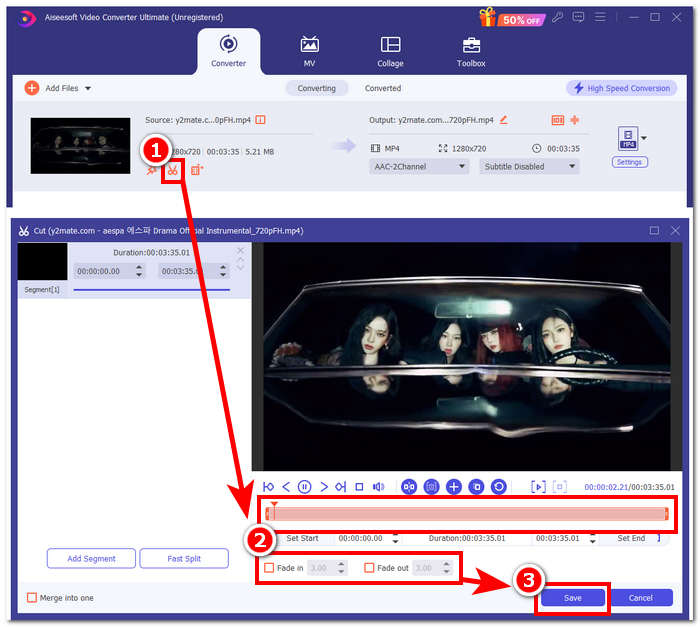
Étape 2. Une fois la vidéo ajoutée au programme, cliquez sur l’icône en forme de ciseau près de la vidéo pour commencer à personnaliser votre sonnerie. Lorsqu’une nouvelle fenêtre apparaît à l’écran, vous pouvez ajouter des effets de fondu à votre sonnerie et la raccourcir en faisant glisser la barre de curseur de gauche à droite. Une fois la personnalisation terminée, cliquez simplement sur le bouton Enregistrer.
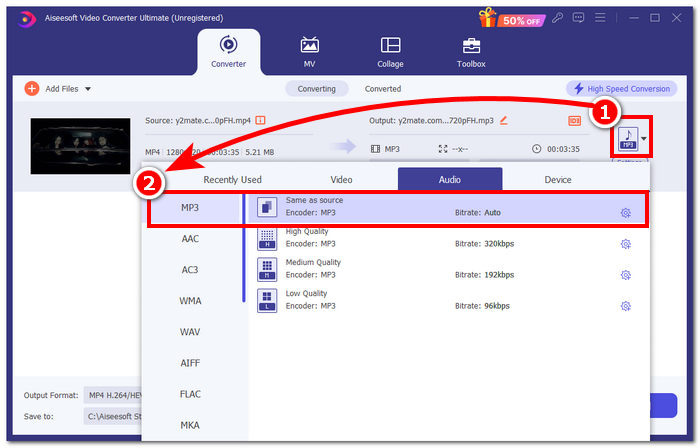
Étape 3. Après avoir personnalisé votre sonnerie, modifiez son format de fichier : passez du MP4, qui est un format vidéo, à un véritable format MP3 pour qu’elle apparaisse comme un fichier audio sur votre appareil.
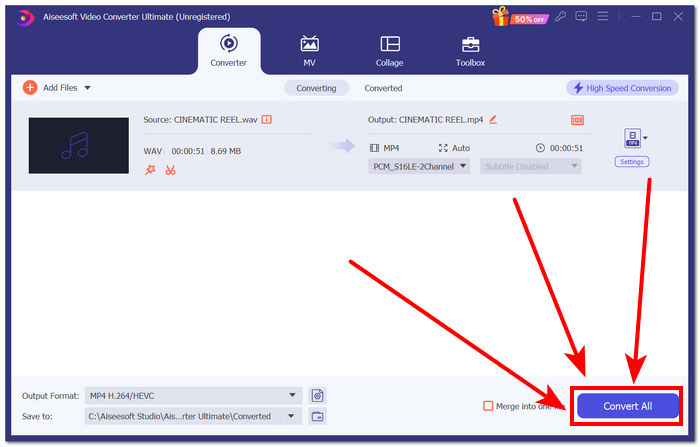
Étape 4. Cliquez sur le bouton Tout convertir pour lancer le processus de conversion et enregistrer automatiquement la sonnerie sur votre appareil. Une fois la conversion terminée, votre sonnerie se trouvera dans votre dossier de téléchargements.
Partie 3. Définir la vidéo YouTube comme sonnerie MP3
iPhone
Après avoir créé des sonneries pour iPhone, définir une sonnerie sur un iPhone est un processus nettement plus lourd que sur Android. Les iPhone ne disposent pas d’une prise en charge intégrée permettant de simplifier l’installation d’une nouvelle sonnerie provenant d’une autre source. Cela ne nous empêche toutefois pas de trouver des solutions pour expliquer comment transformer une vidéo YouTube en sonnerie MP3 sur iPhone.
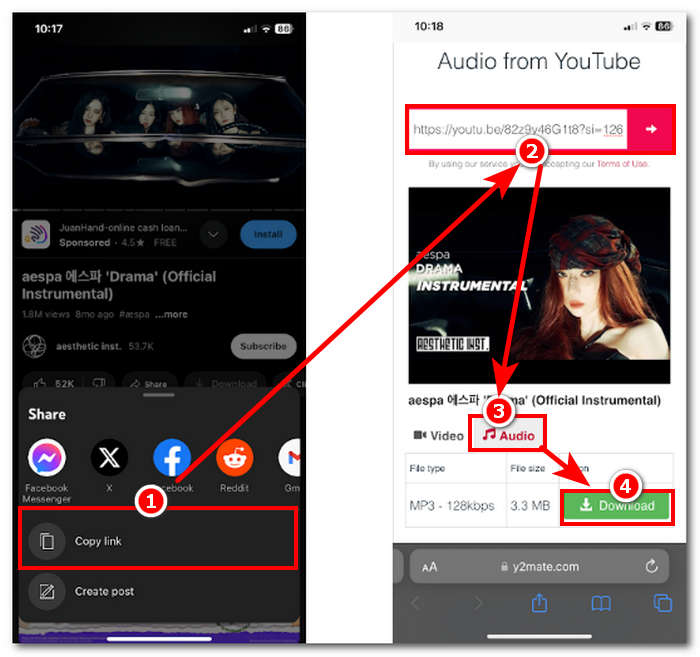
Étape 1. Copiez le lien de la vidéo dans l’application YouTube de votre iPhone.
Étape 2. Collez l’URL dans l’outil de conversion de votre choix dans Safari. N’oubliez pas de choisir d’abord l’option Audio afin que votre vidéo soit convertie en MP3 avant d’appuyer sur le bouton Télécharger.
Remarque : Assurez-vous d’installer les applications GarageBand et RingtoneMaker avant de passer à l’étape suivante.
Étape 3. Ouvrez l’application RingtoneMaker et importez-y la sonnerie YouTube téléchargée. Une fois celle-ci chargée, touchez le bouton Make Ringtone puis sélectionnez l’application GarageBand pour continuer.
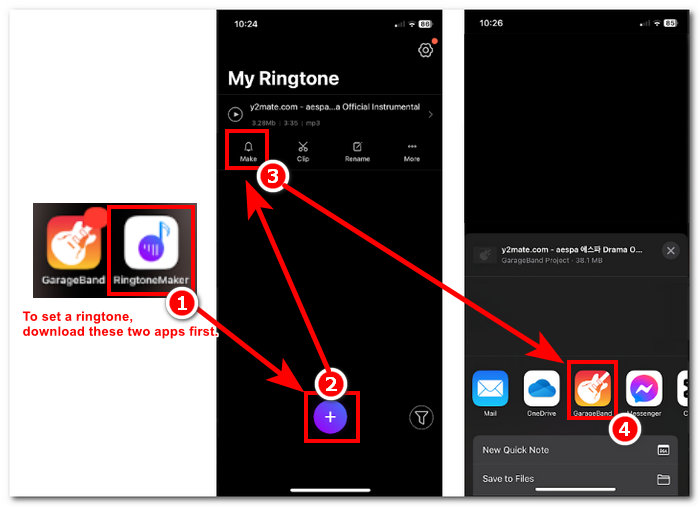
Étape 4. Une fois redirigé vers l’application GarageBand, touchez la sonnerie que vous avez importée, puis suivez le chemin de navigation suivant : Partager > Sonnerie > Exporter.
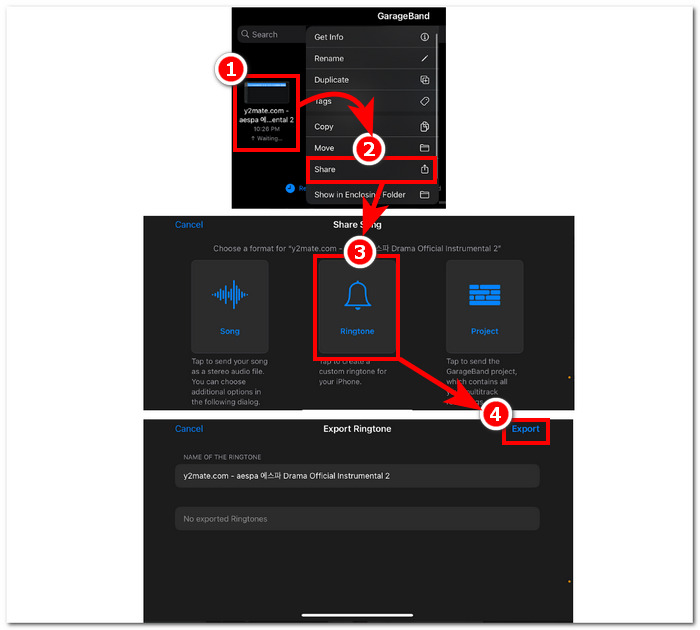
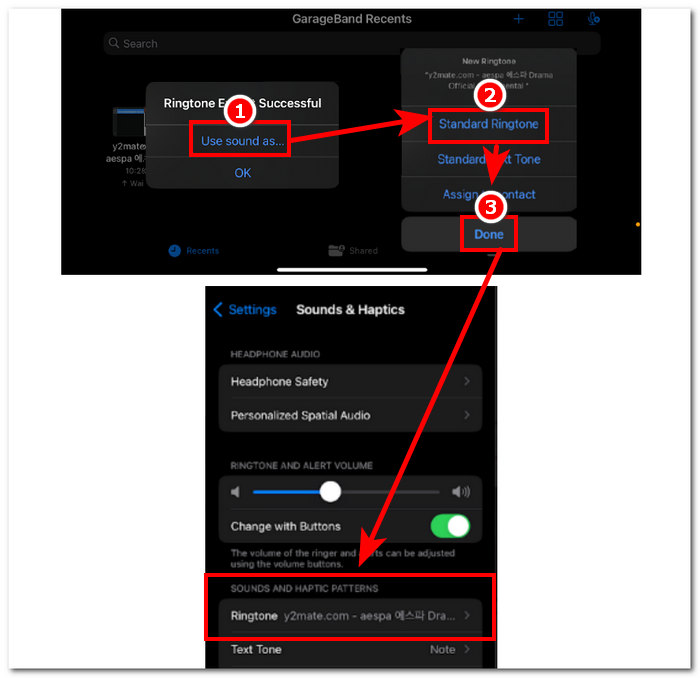
Étape 5. Une fois l’exportation terminée, choisissez d’utiliser le son comme sonnerie standard et appuyez sur le bouton Terminé. Pour vérifier si vous avez correctement défini votre nouvelle sonnerie, allez dans Réglages > Sons et vibrations. Le nom de votre fichier doit apparaître dans la section Sonnerie.
Android
Convertir une vidéo YouTube en sonnerie MP3 sur Android est aussi simple que de la configurer. Grâce à ses fonctionnalités intégrées, Android permet à ses utilisateurs de définir une sonnerie, ce qui rend le processus beaucoup plus simple et plus pratique. Ainsi, les utilisateurs doivent toujours télécharger et convertir la vidéo YouTube à l'aide de l'outil en ligne Y2mate.
Étape 1. À l’aide de l’application YouTube, copiez le lien de la vidéo que vous souhaitez transformer en sonnerie.
Étape 2. Depuis votre navigateur, collez le lien dans l’outil de conversion de votre choix. Avant de cliquer sur le bouton Télécharger, n’oubliez pas de sélectionner d’abord la section Audio pour que votre vidéo soit convertie en MP3.
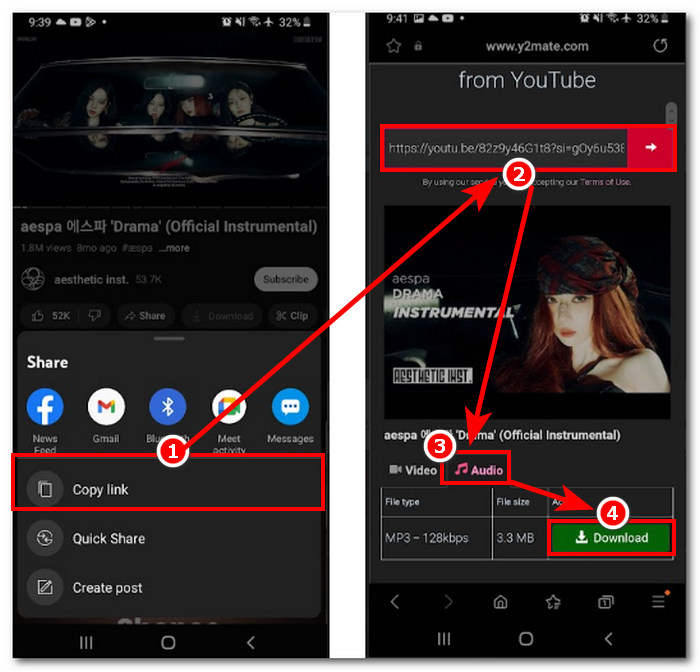
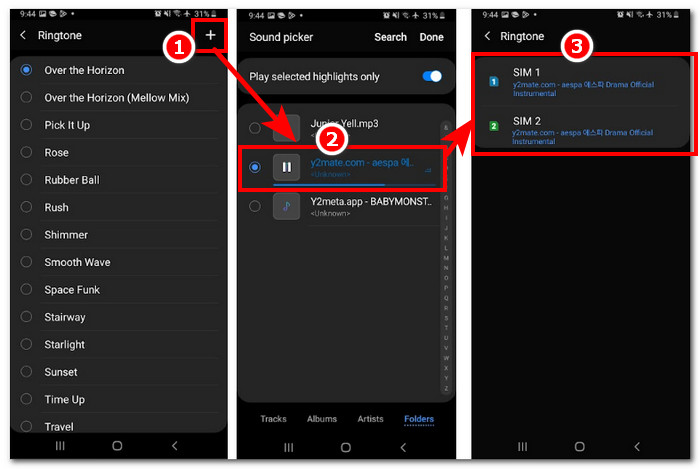
Étape 3. Accédez aux paramètres de sonnerie de votre téléphone pour définir votre nouvel audio converti comme sonnerie. Il vous suffit de suivre ce chemin : Réglages > Sons et vibrations > Sonnerie.
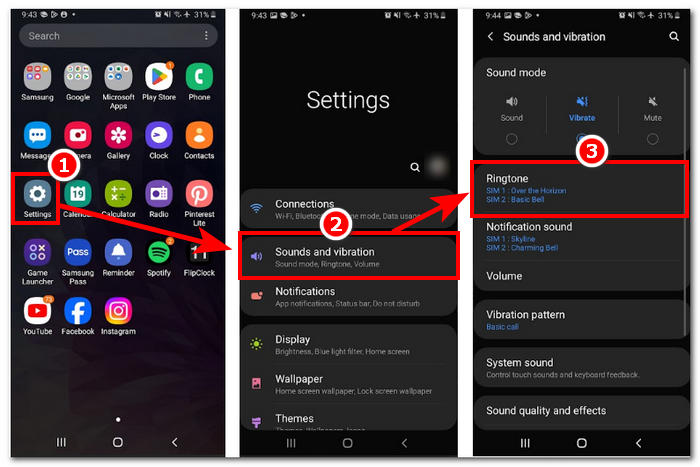
Étape 4. Une fois dans les paramètres de sonnerie, ajoutez votre nouvelle sonnerie en cliquant sur le bouton + situé dans le coin supérieur droit de l’écran. Et voilà, vous avez défini avec succès une nouvelle sonnerie provenant d’une vidéo YouTube.
Partie 4. FAQ sur la conversion de sonneries YouTube en MP3
Quel outil d’IA convertit YouTube en MP3 ?
De nombreux outils d'IA de premier ordre peuvent convertir efficacement des vidéos YouTube en MP3. Parmi les choix les plus populaires, on trouve YTMP3.cc et ClipGrab.
Qu'est-ce que l'application de conversion YouTube en MP3 ?
Une application YouTube to MP3 est un outil qui peut être téléchargé sur l'appareil mobile d'un utilisateur. Ces applications de conversion sont TubeMAte, VideMate et Snaptube.
Comment enregistrer l'audio des courts métrages YouTube ?
YouTube interdit le téléchargement illégal de fichiers audio, et donc de contenus sur la plateforme. Pour sauvegarder illégalement des fichiers audio à partir de vidéos YouTube, les utilisateurs ont recours à des outils de conversion en ligne et à l'enregistrement de l'écran de leur téléphone.
Conclusion
La conversion de YouTube en fichier MP3 pour une sonnerie peut être un processus assez long, surtout pour un débutant ou une personne peu à l’aise avec la technologie. Suivre attentivement les étapes ci-dessus peut donc aider les utilisateurs à créer facilement leur propre sonnerie. Nous proposons différentes options pour convertir une vidéo YouTube et en faire une sonnerie, en utilisant l’outil en ligne Y2Mate pour les appareils Android et iPhone, ainsi qu’un outil logiciel, FVC-picked Video Converter Ultimate, pour bénéficier de fonctions de personnalisation.
-
 MOV VS MP4 - Lequel choisissez-vous?
 MOV VS MP4, lequel est le meilleur? Cet article fait la différence entre MP4 et MOV, afin que vous puissiez obtenir le meilleur choix à utiliser pour vos fichiers vidéo.
-
 FLAC vs MP3 : quel format de fichier audio règne en maître
 Cet article comparera les principales différences entre FLAC et MP3. Cela inclut leur qualité sonore, leur taille de fichier, leur compatibilité, etc.
-
 Comment convertir MP3 en M4A pour une qualité sonore améliorée
 Améliorez la qualité de vos fichiers musicaux en convertissant MP3 en M4A grâce à nos conseils et astuces d'experts. Notre guide propose des instructions étape par étape et des logiciels recommandés.
