


 Video Converter Ultimate
 Enregistreur d'écran
 Réparation vidéo
 Téléchargement sécurisé
Convertisseur FLV en WMA - Comment extraire gratuitement l'audio WMA d'une vidéo FLV
Lorsque vous avez téléchargé des fichiers vidéo Flash à partir du site Web YouTube, vous pouvez convertir le FLV en audio sans perte WMA. WMA (Windows Media Audio) est une série de codecs audio et de formats de codage audio correspondants développés par Microsoft. L'audio WMA prend en charge l'audio multicanal et haute résolution. À partir de cet article, vous apprendrez 2 méthodes pour convertir les vidéos FLV en audio WMA sur Windows et Mac.

Partie 1. Meilleur moyen d'extraire gratuitement l'audio WMA de FLV
FVC Free FLV Converter est un convertisseur FLV vers WMA gratuit, simple et rapide, qui prend en charge la conversion par lot de fichiers FLV en WMA sur Windows et Mac. Par ailleurs, vous pouvez convertir vos vidéos FLV vers d’autres formats vidéo et audio comme HD MP4, AVI, WMV, MKV, 3GP, MP3, AAC, AC3, etc. Grâce à la fonction d’édition intégrée, vous pouvez modifier gratuitement les métadonnées des fichiers WMA.

FVC Convertisseur FLV Gratuit
145000+ Téléchargements- Convertissez FLV en WMA sous Windows 10/8/7/Vista/XP et Mac OS X.
- Compressez, fusionnez, ajoutez des thèmes et modifiez les métadonnées du fichier WMA.
- Ajoutez des thèmes spéciaux à vos fichiers FLV, tels que vacances, famille, anniversaire.
- Conversion par lots de FLV en WMA, MP3, AAC, FLAC, M4R, OGG, WAV.
Téléchargement gratuitPour Windows 7 ou version ultérieureTéléchargement sécurisé
Téléchargement gratuitPour macOS 10.7 ou version ultérieureTéléchargement sécurisé
Étape 1. Ajouter un fichier FLV
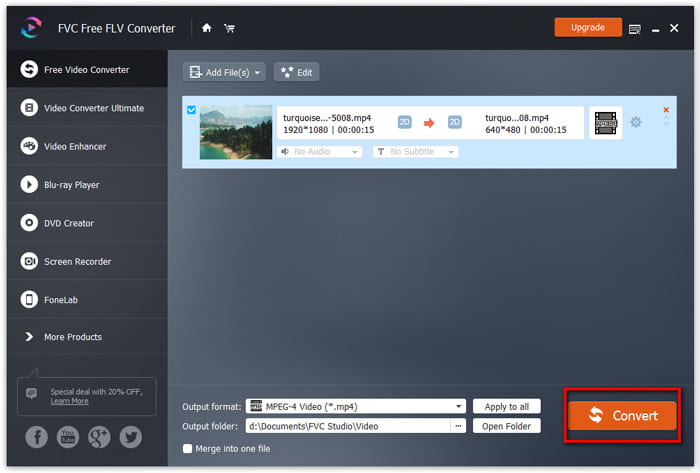
Après avoir téléchargé gratuitement FVC Free FLV Converter, vous pouvez installer et lancer le programme sur votre ordinateur. Cliquez sur le bouton Add File(s) pour importer le fichier vidéo Flash. Vous pouvez également faire glisser et déposer plusieurs fichiers FLV dans le programme en une seule fois.

Étape 2. Modifier le fichier FLV
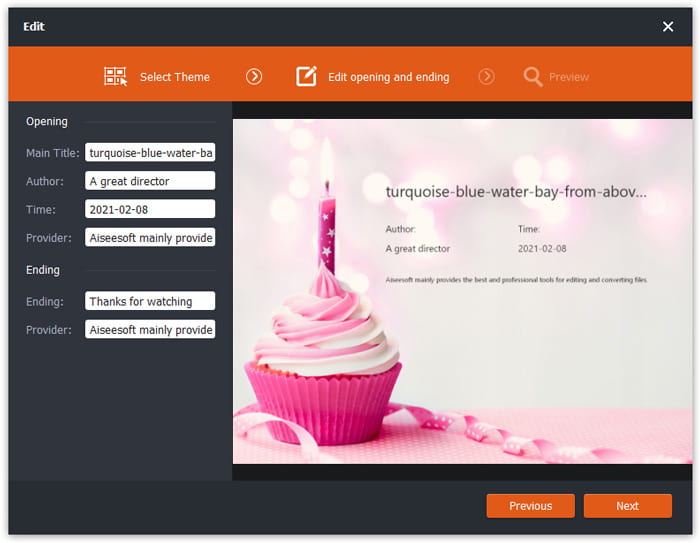
Cliquez sur le bouton Edit pour commencer à modifier votre fichier FLV. Vous pouvez choisir un certain thème, éditer les informations de données comme le titre, l’auteur, l’heure d’ouverture et de fin.
Étape 3. Définir WMA comme sortie
Ensuite, allez dans la zone Output format et tapez WMA dans la barre de recherche. Ici, vous pouvez sélectionner WMA - Windows Media Audio (*.wma) comme format de sortie.

Étape 4. Convertir FLV en WMA
Allez dans la zone Output folder et choisissez le dossier de destination dans lequel le fichier WMA sera enregistré. Vous pouvez cliquer sur le bouton Convert pour commencer à convertir gratuitement le FLV en fichier audio WMA.
Partie 2. Comment convertir FLV en WMA en ligne gratuitement
Si vous en avez assez de télécharger des logiciels, vous pouvez essayer FVC Free Audio Converter. Il s’agit d’un puissant convertisseur FLV vers WMA en ligne qui permet de convertir n’importe quel fichier vidéo/audio populaire en WMA, MP3, AAC, FLAC, WAV, etc. Vous pouvez apprendre en détail comment convertir FLV en WMA avec FVC Free Audio Converter.
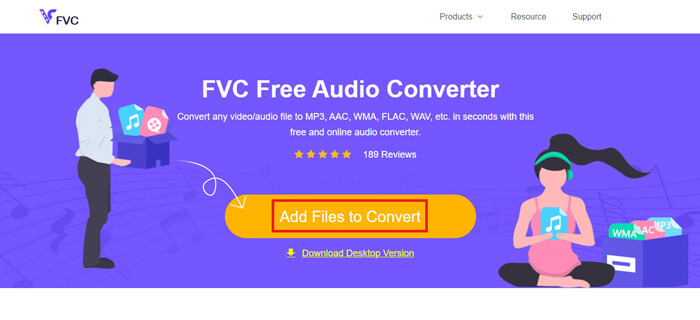
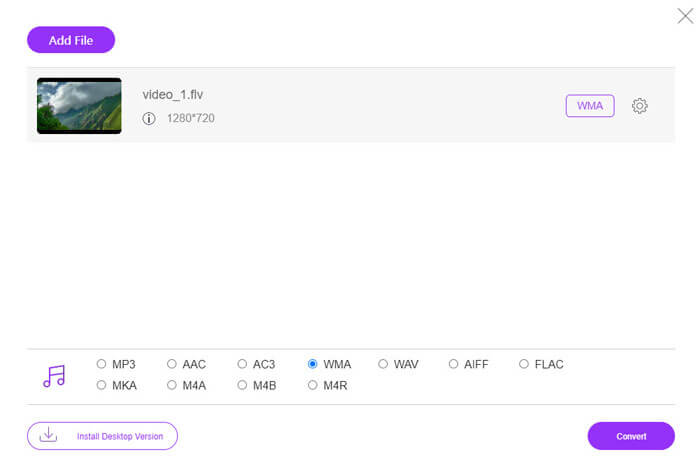
Étape 1. Visitez le site officiel de FVC Free Audio Converter (https://www.free-videoconverter.net/free-audio-converter/). Cliquez sur le bouton Add Files to Convert pour télécharger et installer le lanceur. Vous pouvez téléverser les fichiers FLV depuis votre ordinateur local.
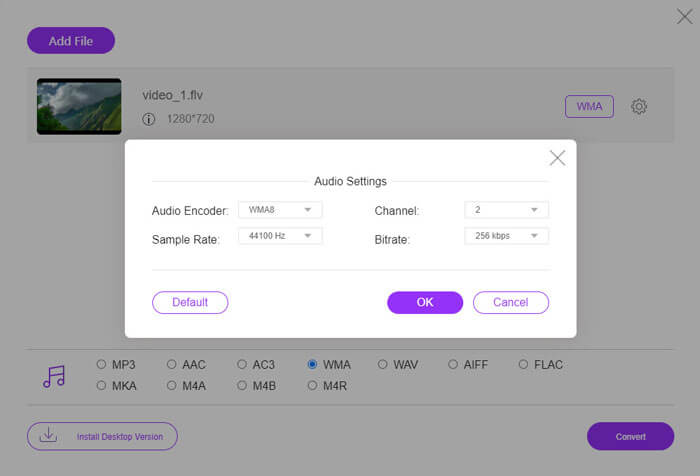
Étape 2. Cochez WMA en bas et définissez-le comme format de sortie. Si vous souhaitez ajuster davantage de paramètres, vous pouvez cliquer sur l’icône en forme de roue dentée pour régler l’encodeur audio, le canal, la fréquence d’échantillonnage et le débit binaire. Cliquez sur le bouton OK pour enregistrer les modifications.
Étape 3. Enfin, vous pouvez cliquer sur le bouton Convert pour commencer à convertir gratuitement votre fichier FLV en WMA en ligne.
Partie 3. FAQ sur la conversion de FLV en WMA
Qu'est-ce qu'un fichier FLV et comment puis-je le lire?
FLV est le format de fichier vidéo flash développé par Adobe. Il peut stocker de la vidéo, de l'audio, du texte, des indices et plus encore. Windows Media Player et QuickTime ne prennent pas en charge FLV, vous devez donc utiliser un lecteur multimédia tiers pour ouvrir FLV, comme VLC.
A quoi sert le format WMA ?
WMA est un format audio avec perte créé par Microsoft pour concurrencer le MP3. WMA est principalement utilisé pour diffuser de la musique en ligne. Un fichier WMA avec l'extension .wma est le Windows Media Audio. Il peut être parfaitement pris en charge par Windows Media Player.
Existe-t-il un lecteur de musique WMA ?
Oui. Il existe plusieurs lecteurs de musique WMA parmi lesquels vous pouvez choisir, comme FVC Free Video Player, KMPlayer, Elmedia Video Player, Macgo Free Mac Media Player, VOX Music Player, VLC Media Player, GOM Media Player, foobar2000, AIMP, Samsung Music, etc.
Conclusion
Dans cet article, nous avons principalement parlé de 2 façons gratuites de convertir une vidéo FLV en WMA sur Windows 10 PC et Mac. J'espère que toutes ces solutions vous aideront à résoudre votre problème. La prochaine fois que vous téléchargerez des vidéos flash à partir du site Web, vous pourrez essayer FVC Free FLV Converter pour convertir la vidéo FLV en WMA, MP3, AAC, MP4, AVI, VOB, etc.
-
 FLV en WAV - Convertissez FLV en WAV en ligne gratuitement et sur Mac / PC
 Comment convertir un fichier FLV? VLC peut-il convertir YouTube FLV en WAV? Cet article explique 3 façons gratuites de convertir FLV en WAV sans perte de qualité.
-
 2 façons simples de convertir des fichiers MOV en FLV sur Windows/Mac
 Comment convertir MOV en FLV gratuitement ? Voici les meilleurs convertisseurs vidéo sur ordinateur et en ligne pour convertir votre fichier MOV en FLV en quelques secondes sans payer un centime.
-
 Comment convertir WMA en MP3 sur Mac / Windows / en ligne
 Est-il possible de convertir WMA en MP3 avec Windows Media Player? Comment convertir WMA en MP3 gratuitement? Cet article partage 4 méthodes simples pour vous aider à effectuer la conversion audio de WMA en MP3 sur Mac, PC Windows et en ligne.
