


 Video Converter Ultimate
 Enregistreur d'écran
 Réparation vidéo
 Téléchargement sécurisé
Apprenez-en plus sur le meilleur enregistreur vocal M4A avec des tutoriels
M4A is a filename extension for audio-only to save a specific format also known as MPEG-4 Audio. This is a great choice for the user online who loves to download a lot of music over the internet and such. Instead of spending a lot of internet data downloading and wasting your time waiting, you may enjoy the downloaded audio format with the same audio output that the mp3 can give you. Although many questions bother you right now. By reading this write-up below will help you to clear your mind and to know what are the best M4A voice recorders for audio recording that supports M4A format with provided steps.

Partie 1. Meilleur enregistreur M4A en ligne pour Windows et Mac
FVC Enregistreur Audio Gratuit
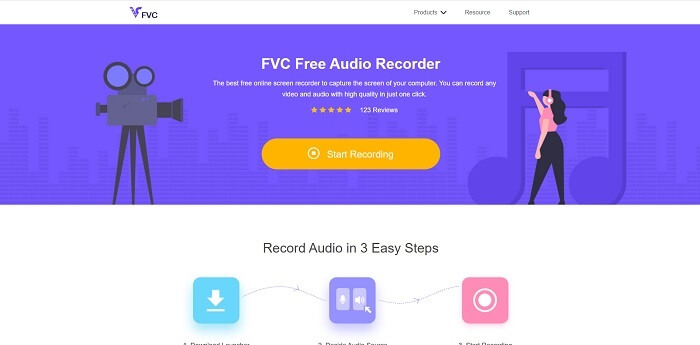
A no-payment tool available over the internet is the FVC Free Audio Recorder. This best online audio recorder tool helps the user to record anywhere with an internet connection. It allows you to record without any cut-back or limitation on different operating systems. You may as well record the audio sound system, microphone to input your voice, or as well both of them at the same time. To explore more about the tools, here are provided steps on how to use the tool.
Step 1. Open this link to proceed to the main website of the tool.
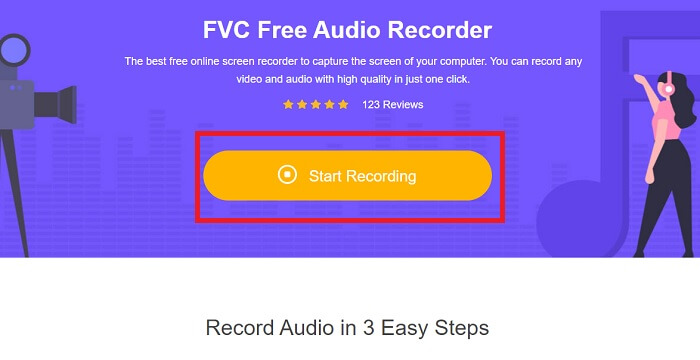
Step 2. launch the tool by clicking Start Recording.
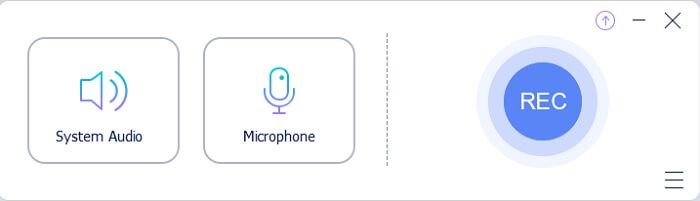
Step 3. And a toolbar like this will show into your screen display.
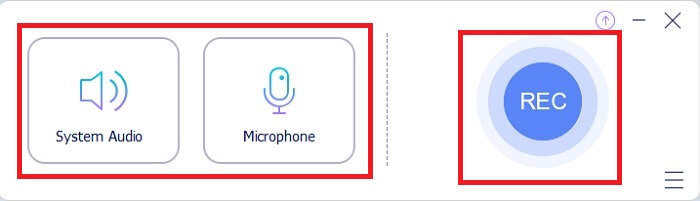
Step 4. Open the Speaker and Microphone to add the audio input. Click the round button to start the recording.
Step 5. If the recording is done, click the Square button to stop. The recording will be automatically saved to your pc.
Partie 2. Les 7 autres alternatives M4A Recorder pour Windows et Mac
1. Enregistreur d'écran FVC
Si vous voulez en faire plus pendant l'enregistrement, cet outil est fait pour vous. FVC Screen Recorder, un outil multifonctionnel qui permet à l'utilisateur de capturer de l'audio, de la vidéo, du jeu et bien d'autres à son meilleur. Si nous voulons parler d'une bien meilleure version prenant en charge M4A, celle-ci est pour vous. Cet outil payant n'est pas seulement destiné à l'enregistrement d'écran, il utilise également un enregistreur audio capable de produire un format de fichier M4A. Non seulement cela, il prend en charge différentes plates-formes auxquelles vous pouvez penser. Donc, pas de soucis si vous changez de plateforme, vous pouvez toujours l'utiliser. Il est choisi par plusieurs utilisateurs sur le Web comme leur enregistreur d'écran idéal. Pour en savoir plus sur l'utilisation de cet outil, nous devons maintenant passer aux étapes pour vous guider dans votre parcours d'enregistrement audio.
Step 1. Choose what platform you are currently using to download the tool. After downloading it, look at the bottom left side of your web to install it. Adjust the Preference according to your demand and click Finish to start the tool.
Téléchargement gratuitPour Windows 7 ou version ultérieureTéléchargement sécurisé
Téléchargement gratuitPour macOS 10.7 ou version ultérieureTéléchargement sécurisé
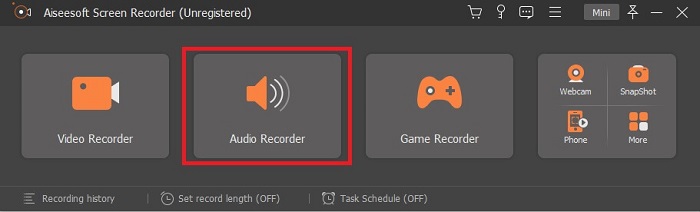
Step 2. A toolbar like this will show on your screen. Click the Audio Recorder to proceed.
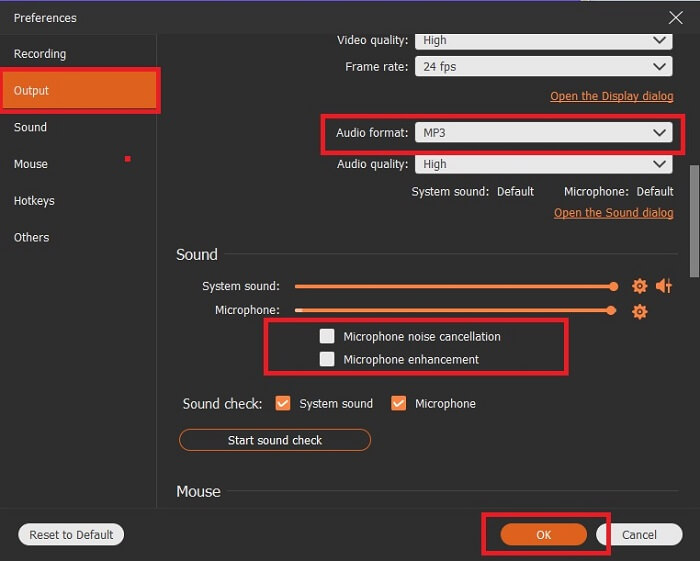
Step 3. In the toolbar you will see a Cog icon in there, then click it. Adjust the Output and Sound Settings of the recording. Click OK to proceed to the next step.
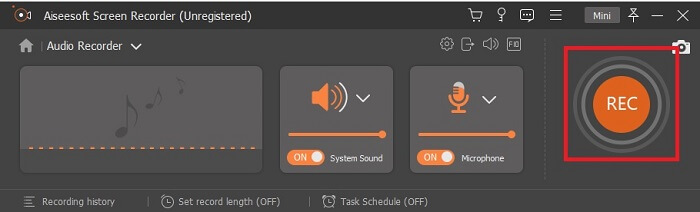
Step 4. Turn On the Speaker to add the audio sound and click the Microphone to add your voice. If this step is finished, click the disk-shaped button to start.Step 4. Turn On the Speaker to add the audio sound and click the Microphone to add your voice. If this step is finished, click the disk-shaped button to start.
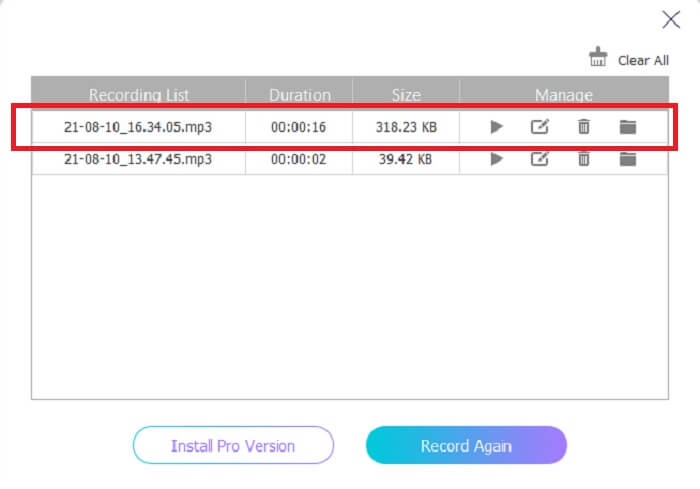
Step 5. If the recording is finished, click the square button to stop, click the Save button, and Next to producing the recordings. Then a list of your recordings will show in the display from the latest and the oldest, click the first recording and enjoy the output format you produce.
2. Audace
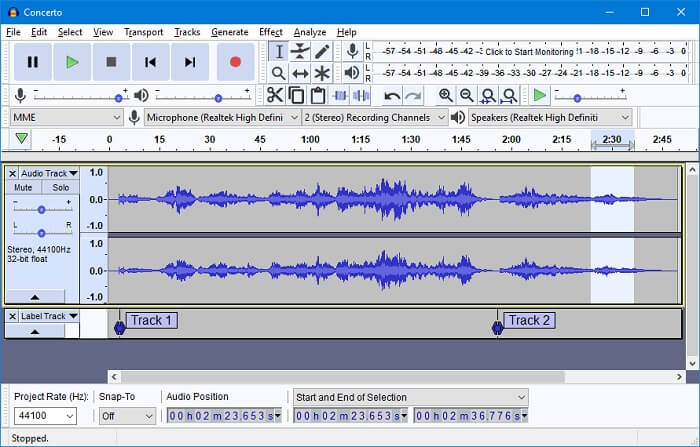
L'un des enregistreurs audio que vous pouvez utiliser est l'Audacity. Un outil téléchargeable open source gratuit qui permet à l'utilisateur de faire un enregistrement audio. Certains utilisateurs le choisissent comme enregistreur audio en raison de sa disponibilité et de son travail. Mais cela peut être facilement placé dans le top 10 des meilleurs enregistreurs audio. Le programme a un choix limité pour les capacités de mixage.
Avantages
- Gratuit et open source.
- N'a pas besoin d'une grande quantité de RAM pour le faire fonctionner.
- Fournit une édition de base.
Les inconvénients
- Fournit une édition de base.
- L'interface utilisateur n'est pas accrocheuse pour les utilisateurs.
3. Wavosaure
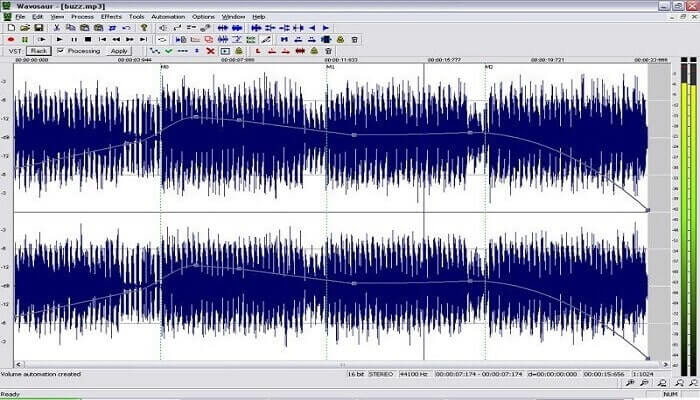
If Audacity is not your go-to choice as your M4A audio recorder you may as well use the Wavosaur. It can edit, mix, and many more. Also, it can be used for making complicated music arrangements. The user interface is a bit old but it is still efficient as an audio recorder.
Avantages
- A maintenant une fonction de refaire.
- Editeur de son gratuit.
- Montage audio non destructif.
Les inconvénients
- Il a un .exe qui peut endommager votre ordinateur.
- Non disponible sur toutes les plateformes autres que Windows.
4. Boo audio
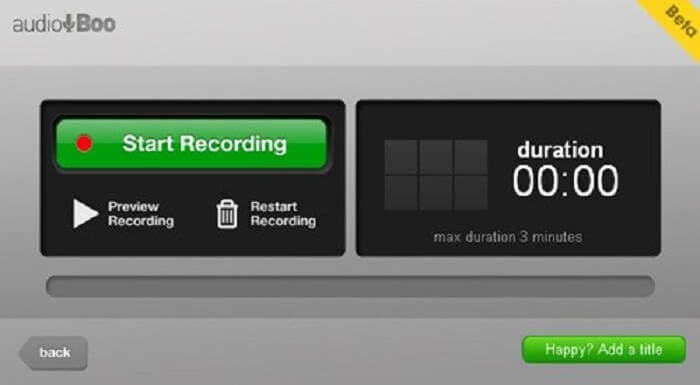
Une plate-forme mobile et basée sur le Web qui permet à l'utilisateur d'enregistrer pendant environ 3 minutes. Si vous essayez d'enregistrer un court extrait sonore, il est indispensable d'utiliser l'outil. Le nouveau nom d'Audio Boo est Audio Boo 2, donc si vous voulez télécharger l'outil, vous devez désinstaller l'ancienne version de pour en installer la nouvelle version.
Avantages
- Aucune publicité dans l'outil.
- Il peut produire les principaux formats audio.
- La qualité du son est correcte.
Les inconvénients
- Enregistrement limité.
- L'outil est introuvable car il change de nom en Livre audio 2.
5. Wavepad
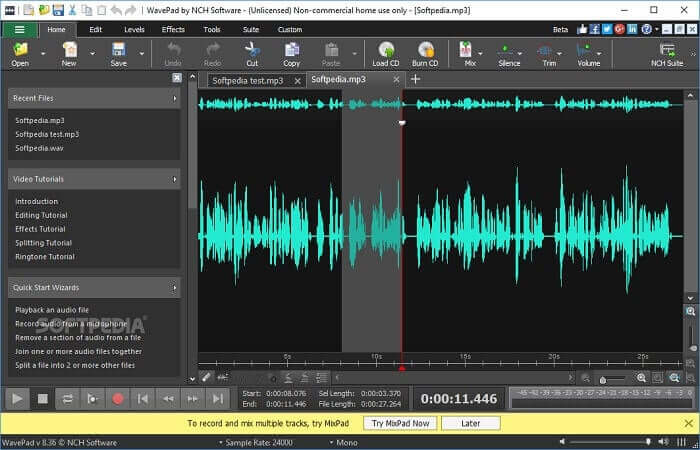
Un outil qui permet à l'utilisateur d'ajouter des effets spéciaux à votre enregistrement. Wavepad est devenu populaire en raison du panoramique ascendant et descendant ainsi que du changement de tempo de l'enregistrement. Des fonctionnalités d'édition audio y sont disponibles, mais si vous ne comprenez pas les fonctions et comment les utiliser, vous trouverez également des vidéos sur la façon d'utiliser les outils d'édition.
Avantages
- Outil facile à utiliser pour les nouveaux utilisateurs.
- Capable de couper l'audio enregistré et de le transformer en un autre fichier audio en l'insérant.
- Vous pouvez également faire une voix off pour plusieurs plateformes média.
Les inconvénients
- Je ne peux pas l'utiliser comme publicité commerciale. Fondamentalement, ce n'est pas gratuit mais il a une version gratuite.
- Fonctionne uniquement comme une seule piste d'enregistrement audio.
6. Audition d'Adobe
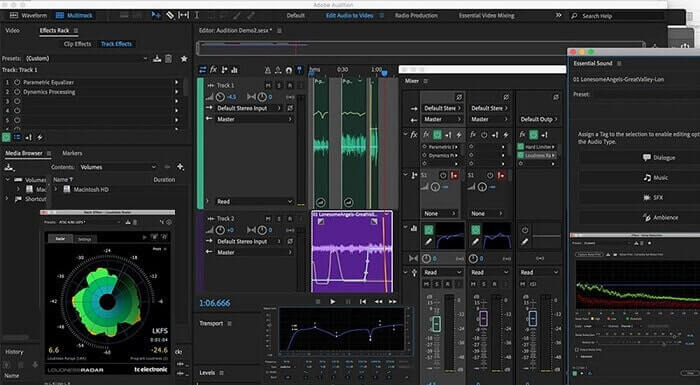
Le principal enregistrement audio qu'Adobe peut proposer aux utilisateurs est l'Adobe Audition. Il dispose d'un outil d'édition audio destructeur et non destructif qui est populaire dans le podcasting. Si vous recherchez un contenu professionnel conforme à la norme, celui-ci est fait pour vous. Aussi, en raison du support dédié qu'Adobe fournit aux outils.
Avantages
- Mixez très bien l'audio.
- Fonction antibruit.
- Différentes sections d'édition.
Les inconvénients
- Aucun outil de production musicale.
- C'est trop cher comme les autres logiciels d'Adobe.
7. Mixcraft 9
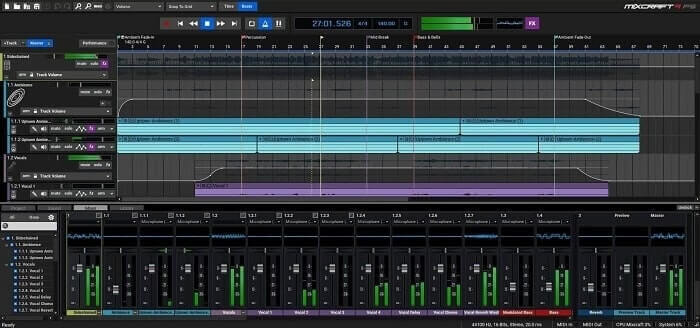
Un outil propriétaire développé par Acoustica est le Mixcraft 9. L'un des meilleurs enregistreurs audio pour les productions musicales disponibles sur le Web. Cet outil vous offre une variété différente de fonctionnalités, d'instruments et d'effets. Il dispose également d'un éditeur de rouleaux de piano et d'autres options. Si vous recherchez un enregistrement audio pour produire de la musique, c'est un autre choix.
Avantages
- Meilleure production musicale.
- Il comprend presque tous les instruments et plug-ins.
- Interface légère.
Les inconvénients
- Interface sombre. Ainsi, certains outils sont illisibles.
- Pas le meilleur choix pour un débutant en raison des options écrasantes.
Partie 3. Tableau de comparaison
| Caractéristiques de l'outil | FVC Enregistreur Audio Gratuit | Enregistreur d'écran FVC | Audace | Wavosaure | Boo audio | Wavepad | Adobe Audition | Mixcraft 9 |
| Enregistrement audio |  | | | | | | | |
| Outil d'édition |  | | | | | | | |
| Suppression du bruit | | | | | | | | |
| Format disponible | MP3 et M4A | MP3, WMA, AAC, M4A, FLAC, OGG, Opus et bien d'autres. | WAV, AIFF et MP3 | WAV et MP3 | MP3 | AAC, M4A, MP4, DCT | AC-3, M4A, MAT, VOX, W64, WAV et bien d'autres | WMV et AVI |
Partie 4. FAQ sur l'enregistreur M4A
Pourquoi un enregistreur Android utilise-t-il des fichiers M4A ?
Chaque enregistreur Android utilise des fichiers .m4a car ils sont mieux compressés que mp3. Appareils mobiles Android comme LG, Huawei et bien d'autres. Mais tous les androïdes n'utilisent pas ce type de format de fichier.
Puis-je convertir M4A vers un autre format audio ? Comment dois-je le convertir ?
To convert an M4A audio file, you may use this M4A Converter and choose what audio format you like. Open the link and click the launcher of the tool, then choose the desired audio format, like MP3.
Pourquoi ne puis-je pas lire mon fichier M4A dans ma bibliothèque musicale Android ?
The main reason why you can't play the M4A audio file. First, it is not supported by your original music player but you may as well use other M4A players.
Conclusion
Pour résumer les détails ci-dessus, chaque enregistreur vocal M4A a ses caractéristiques uniques en tant qu'enregistreur audio. Certains d'entre eux produisent un format M4A et d'autres non. Mais en fin de compte, nous devons choisir quel est le meilleur enregistreur que nous devons utiliser. Parce que si vous choisissez un outil compliqué qui vous offre de nombreuses options dont vous n'avez peut-être pas besoin en tant qu'utilisateur, cela commencera à être pénible pour vous. Mais si vous choisissez le moyen simple d'enregistrer qui produit le même format audio, vous pouvez le reconsidérer.
FVC Screen Recorder is a multipurpose recorder that you may use now and in the near future. This tool might not be complicated but the audio it will produce is the same as the other can do. Instead of making your life so hard, why don't you use this tool? To make it simple, this is the cheat code for the other tools. So, choose what's the best for you and that best is the FVC Screen Recorder.
-
 Top 5 des meilleurs enregistreurs de souris et de clavier pour Windows et Mac
 Voici les cinq meilleurs programmes d'enregistreurs de souris et de clavier qui peuvent enregistrer vos mouvements de souris et vos clics de clavier, et répéter les événements.
-
 Top 4 des enregistreurs d'écran AVI gratuits pour capturer des vidéos d'écran sous forme de fichiers AVI
 Pour enregistrer l'écran dans des fichiers AVI de haute qualité, l'article identifie et partage les 4 meilleurs enregistreurs d'écran AVI gratuits dans cet article. Apprenez-en plus pour trouver celui souhaité en conséquence.
-
 Action! Examen de l'enregistreur d'écran - inconvénients, avantages et sa meilleure alternative
 Action Screen Recorder est-il le logiciel d'enregistrement de jeu souhaité pour capturer des vidéos de jeu ? Apprenez simplement plus de détails à partir de la revue et de son alternative à partir de l'article.
