


 Video Converter Ultimate
 Enregistreur d'écran
 Réparation vidéo
4 des meilleurs enregistreurs AIFF prenant en charge une qualité audio sans perte
La plupart des gens pensent que les appareils iPhone frôlent la perfection en matière de sécurité, de qualité vidéo et audio, ainsi que de performances constantes. On peut dire que c’est vrai, y compris pour la qualité de l’écran. Dans la mesure du possible, Apple développe des fonctionnalités pleinement compatibles avec les appareils iOS. Il en va de même pour les formats, les codecs et la configuration vidéo. C’est ainsi qu’a été développé le format AIFF, afin de proposer un format audio non compressé et de haute qualité. Un fichier non compressé est généralement de meilleure qualité, car il n’est pas limité par une forte réduction de données. Partant de là, vous pouvez ressentir le besoin d’utiliser un enregistreur de son AIFF gratuit pour produire ce type de format. Générer ce genre de fichier n’est pas un problème : il existe des applications et des outils gratuits accessibles sur le web. Pour aller plus loin, cet article est fait pour vous. Consultez notre liste des meilleurs enregistreurs AIFF ci‑dessous pour en savoir plus.

Partie 1.Top 2 des enregistreurs AIFF en ligne
FVC Enregistreur Audio Gratuit
Grâce à l’outil FVC Free Audio Recorder, vous pouvez désormais obtenir une qualité audio irréprochable, comparable à l’AIFF. Même si cet outil ne génère pas exactement ce format de fichier, la qualité obtenue est tout aussi satisfaisante. L’outil est accessible via un navigateur et peut être utilisé à tout moment de la journée, tant que vous disposez d’une connexion Internet, chez vous ou en déplacement. Si vous êtes souvent en mouvement et que vous devez enregistrer pour votre vlog, c’est une bonne option. Même à l’extérieur, vous pouvez enregistrer sans trop vous soucier des bruits de fond environnants. De plus, vous bénéficiez d’un enregistrement fluide sur votre iPhone. Cela dit, commencez dès maintenant : essayez l’outil et suivez le guide ci‑dessous.
Qu’est‑ce que cela vous apporte ?
● Il s'agit d'un site Web d'accès gratuit.
● Vous pouvez enregistrer des fichiers musicaux même à partir de YouTube pour créer des listes de lecture sur votre galerie musicale.
● Enregistrer de l'audio sans limite de temps et sans limite de durée.
● Accédez à tout moment et n'importe où.
Étape 1. Accédez à l’outil et activez‑le en visitant FVC Free Audio Recorder, puis cliquez sur le bouton Start Recording.
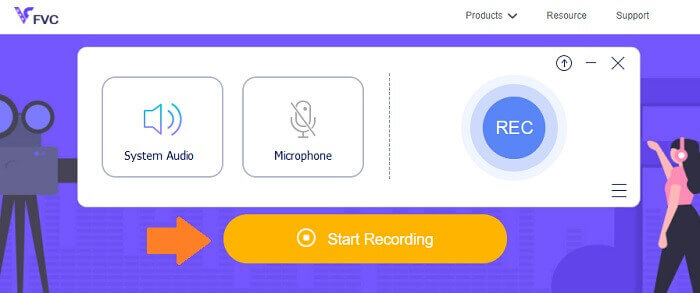
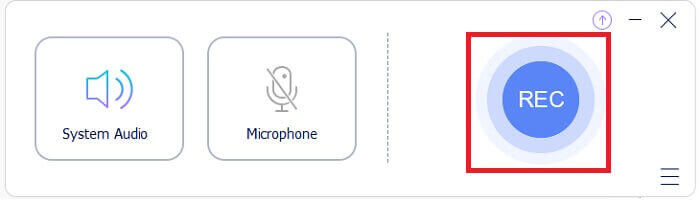
Étape 2. Activez ensuite l’audio si ce n’est pas déjà fait. Par défaut, il devrait être activé. Pour démarrer l’enregistrement, cliquez sur le bouton REC.
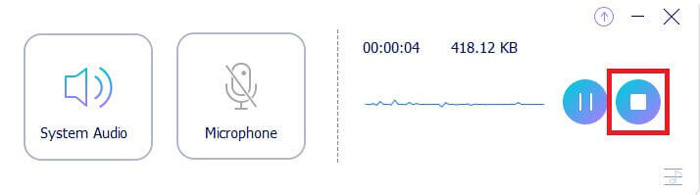
Étape 3. Quand vous avez terminé, cliquez sur le bouton bleu en forme de carré : le fichier sera automatiquement enregistré sur votre PC.
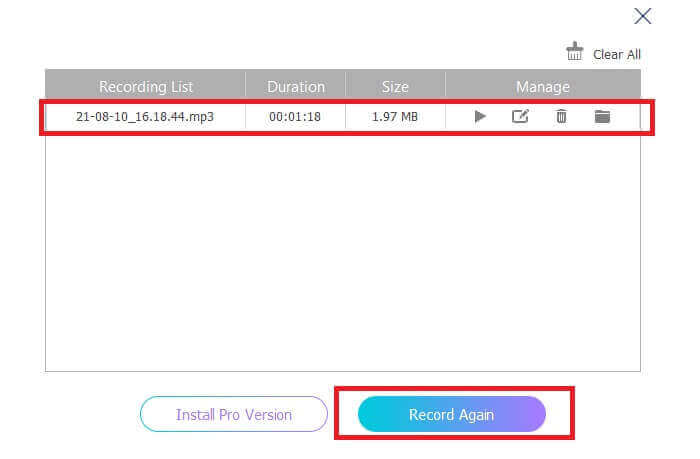
Étape 4. Pour prévisualiser le fichier, cliquez sur la liste située sous la barre flottante.
Capture d'écran.com
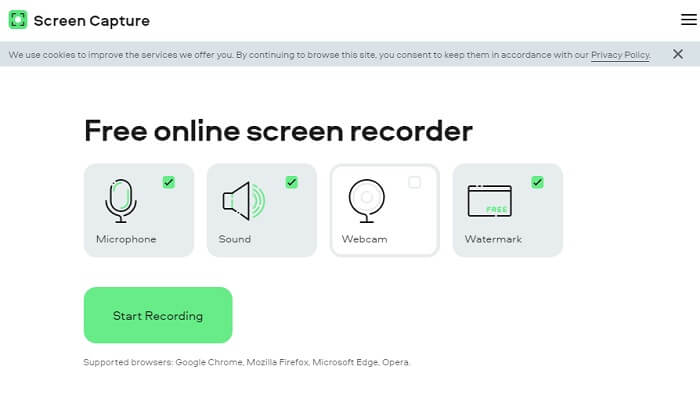
Un autre outil que vous pouvez envisager pour enregistrer de l’audio en ligne est Screencapture.com. De la même façon, il s’agit d’un site gratuit qui vous permet d’enregistrer directement l’audio et l’écran sans créer de compte. Dès que vous cliquez sur le bouton de démarrage de l’enregistrement, l’outil enregistre automatiquement l’écran et le son système de l’ordinateur. À votre arrivée sur la page principale, quatre onglets apparaissent : cochez‑les en fonction de vos besoins. Puisque nous voulons uniquement l’audio, décochez tout le reste et laissez l’audio activé. À partir de là, cliquez sur le bouton Start Recording, puis téléchargez le fichier une fois l’enregistrement terminé.
Qu’est‑ce que cela vous apporte ?
● Accès gratuit.
● Site accessible et fiable.
● Sécurisé.
● Peut enregistrer, audio, vidéo et les deux en même temps.
Partie 2.Top 2 des logiciels d'enregistrement AIFF pour Windows et Mac
Enregistreur d'écran FVC
En ce qui concerne les principaux outils, FVC Screen Recorder est votre logiciel de référence pour l'enregistrement d'écran et l'enregistrement audio. Il est développé spécialement pour couvrir ce genre de besoin. En seulement trois étapes simples, vous serez en mesure de produire une qualité audio similaire à AIFF et au format lui-même. Avec FVC Screen Recorder, vous pouvez enregistrer sans être limité et avoir la liberté d'ajuster le débit binaire pour obtenir la meilleure qualité que vous désirez. De plus, il n'y a pas de limite au nombre de fois que vous l'utilisez par jour. Utilisation illimitée tant que vous y êtes inscrit.
Qu’est‑ce que cela vous apporte ?
● Bon service client.
● Avec un bon support technique qui peut résoudre vos problèmes.
● Continue la mise à jour de l'outil.
● Avec la fonction de verrouillage de fenêtre qui vous permet d'enregistrer une fenêtre spécifique sans déranger ce que vous faites.
Étape 1. Téléchargez et installez l’application en utilisant les boutons ci‑dessous.
Téléchargement gratuitPour Windows 7 ou version ultérieureTéléchargement sécurisé
Téléchargement gratuitPour macOS 10.7 ou version ultérieureTéléchargement sécurisé
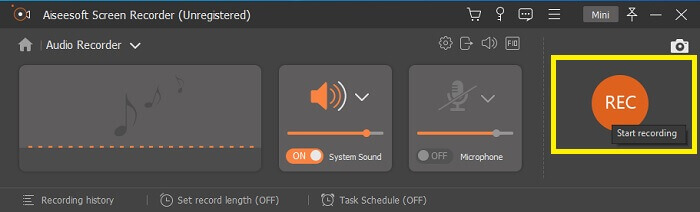
Étape 2. Lancez l’application et activez le son système. Cliquez ensuite sur le bouton REC pour commencer l’enregistrement.
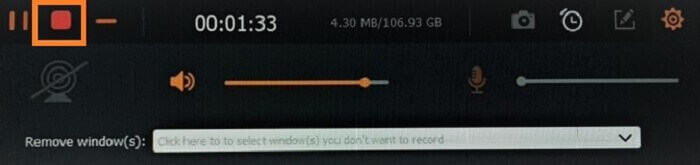
Étape 3. Une fois l’enregistrement terminé, cliquez sur le bouton d’arrêt. L’icône est un carré rouge.
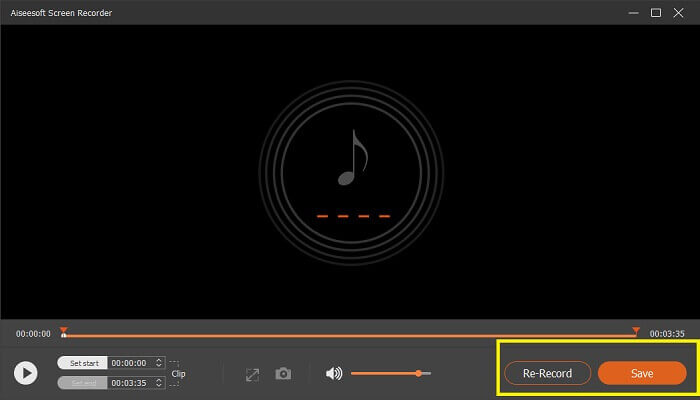
Étape 4. L’outil vous proposera alors de save (enregistrer) ou de re-record (réenregistrer).
Audace
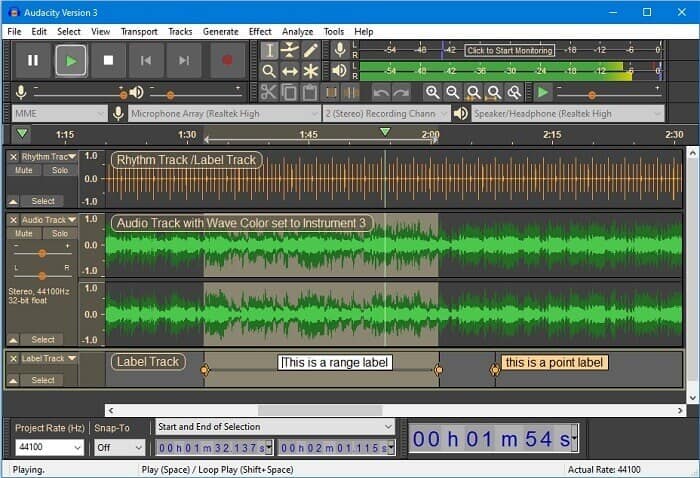
Enfin, nous avons Audacity. Il est considéré depuis un certain temps comme l'un des enregistreurs audio les plus demandés. Cela est dû à la flexibilité de l'outil. La plupart des professionnels utilisent cet enregistrement en raison de sa fiabilité dans l'enregistrement audio, même avec des connexions tierces telles que des sons provenant de mélangeurs, d'ordinateurs, de cassettes et bien plus encore.
Qu’est‑ce que cela vous apporte ?
● C'est un logiciel open source.
● C'est un enregistreur et un éditeur.
● Pris en charge par la plupart des systèmes d'exploitation.
Partie 3. Tableau de comparaison
| traits | FVC Enregistreur Audio Gratuit | Enregistreur d'écran FVC | Capture d'écran.com | Audace |
| Plate-forme | Basé sur le Web | Application de bureau | Basé sur le Web | Application de bureau |
| Prix | Libre | Payé | Libre | Payé |
| Prend en charge la haute qualité audio |  | | | |
| Débit binaire réglable | | |  | |
| Recommandé | | | | |
| Utilisation illimitée | | | | |
| Aucune limite de durée | | Oui sur souscription | | Oui sur souscription |
Partie 4. FAQ sur l'enregistreur AIFF
Quelle est la différence entre AIFF et WAV ?
Comme mentionné, AIFF est principalement utilisé par les utilisateurs d'Apple. Cependant, cela ne signifie pas qu'il s'agit d'une limitation. Parce que ce format de fichier est également pris en charge par d'autres lecteurs multimédias. Pendant ce temps, WAV est développé spécifiquement pour les PC. Il est limité aux ordinateurs de bureau uniquement. Quand on parle de technicité et de type d'encodage, ils ont tous deux des tailles de fichiers relativement importantes. Ils sont donc exactement le contraire de MP3 et MP4.
AIFF, est-ce sans perte ?
La réponse est qu'il est sans perte mais non compressé. Ce format de fichier n'est pas compressé. Il ne perd pas en qualité et purement comment il est développé pour apporter de bons résultats audio au lieu de compromettre la qualité.
Windows Media Player peut-il lire les fichiers AIFF ?
Pour répondre à ta question, oui! Vous pouvez également le lire à l'aide du lecteur VLC et d'autres lecteurs de musique.
AIF et AIFF, y a-t-il une différence ?
Peu importe ce qui est utilisé, cela n'a pas d'importance, et ils sont exactement les mêmes. Que vous ajoutiez un suffixe ou un affixe.
Conclusion
Pour conclure, AIFF est un bon format pour les ordinateurs Mac car il est spécifiquement conçu pour Mac. Bien que ce fichier soit bon, nous ne pouvons pas nier le fait qu'il consomme beaucoup de mémoire sur votre ordinateur. Les applications examinées ci-dessus peuvent le prendre en charge et ne pas le prendre en charge, mais certaines proposent d'excellentes alternatives pour ce type de fichier. En attendant, si vous voulez vraiment avoir ce genre de fichier, vous pouvez également envisager d'utiliser un convertisseur gratuit.
FVC propose également un convertisseur audio en ligne gratuit. Il vous suffit d’ajouter les fichiers, d’attendre la fin du processus de conversion et, en un rien de temps, votre audio est converti. Vous pouvez en apprendre davantage en visitant sa page officielle. Pour vous donner un aperçu, voici quelques formats pris en charge : MP3, WMA, AAC, WAV, AC3, AIFF et FLAC.
-
 Meilleur enregistreur 3GP pour capturer un 3GP dans un nouveau format sur Windows et Mac
 Le format de fichier 3GP stocke le multimédia de 3e génération et est développé par le Third Generation Partnership Project. Pour plus d'informations, procédez ci-dessous.
-
 7 des meilleurs enregistreurs AAC pour Windows et Mac [2021]
 Découvrez ce qu'est l'AAC et les enregistreurs AAC les mieux notés que vous pouvez utiliser gratuitement et téléchargeables sur les ordinateurs Mac et Windows.
-
 Guide Spot-On: Quels sont les meilleurs enregistreurs M4A pour Windows et Mac
 M4A sont des conteneurs de fichiers ACA et ALAC encodés pour une compression avec perte. La liste ci-dessous répertorie les outils d'enregistrement M4A que vous pouvez utiliser. Lisez attentivement ce qui suit.
