


 Video Converter Ultimate
 Enregistreur d'écran
 Réparation vidéo
Choisissez le meilleur convertisseur GIF en AVI disponible sur PC et Mac
La conversion de votre format de fichier GIF au format AVI est devenue possible à l'aide de ces outils incroyables. Sans aucune perte de qualité et en quelque sorte pour l'améliorer. Mais certains des convertisseurs que vous pourriez utiliser ne peuvent pas vous fournir la meilleure qualité que vous souhaitez utiliser. Donc, ne vous inquiétez pas si vous souhaitez remplacer votre GIF par un format AVI. Convertissez votre vidéo au format AVI sans perte de qualité en suivant l'étape fournie ci-dessous et choisissez le meilleur convertisseur que vous devriez utiliser.

Partie 1. Le logiciel gratuit et professionnel pour convertir GIF en AVI avec des étapes détaillées
1. Free Way - FVC Free Video to GIF Maker
FVC Free Video to GIF Maker est le meilleur convertisseur gratuit de GIF en AVI proposé par FVC. Vous pouvez également convertir gratuitement n’importe quelle vidéo ou piste audio dans un nouveau format avec l’aide de cet outil. Cet outil fournit spécifiquement l’un des meilleurs convertisseurs gratuits. Même si la plupart des fonctionnalités majeures de la version payante ne sont pas disponibles gratuitement, il reste tout aussi performant pour la conversion. Pour savoir comment utiliser cet outil gratuit, suivez les étapes ci‑dessous afin d’apprendre à convertir votre GIF.
Étape 1. Installez l’outil sur votre ordinateur de bureau.
Téléchargement gratuitPour Windows 7 ou version ultérieureTéléchargement sécurisé
Téléchargement gratuitPour macOS 10.7 ou version ultérieureTéléchargement sécurisé
Étape 2. Voici un exemple d’interface que vous verrez une fois l’outil téléchargé.
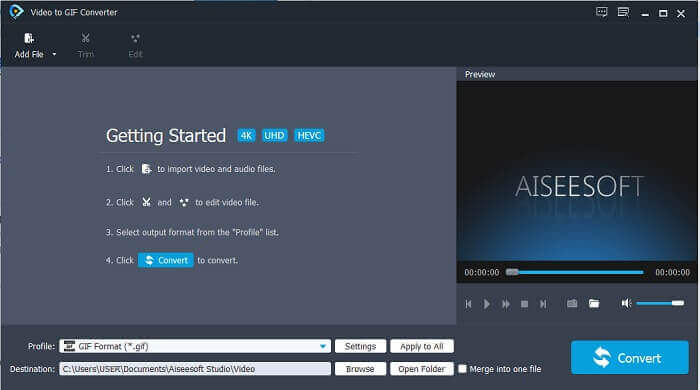
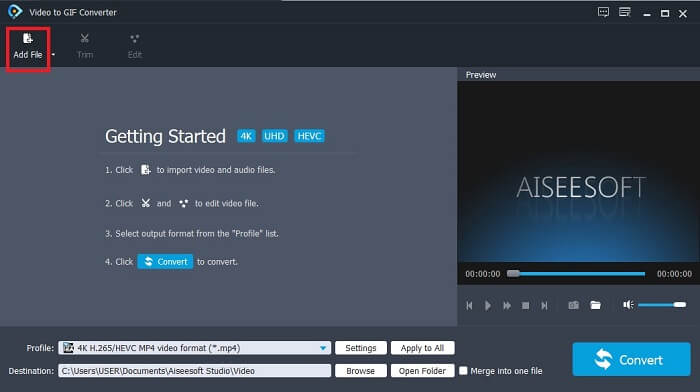
Étape 3. Cliquez sur Add File et sélectionnez le fichier GIF que vous voulez convertir. Si le fichier est déjà sélectionné, cliquez sur Open pour l’insérer dans l’interface.
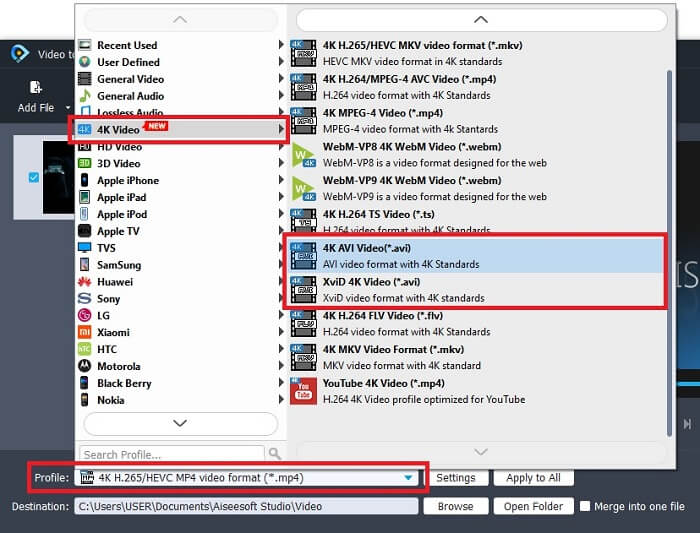
Étape 4. Modifiez le format en AVI dans le menu Profile. Dans la section 4K Video, cliquez sur le format AVI. Si tout est prêt, cliquez sur Convert pour lancer la conversion.
Étape 5. La conversion du GIF ne prendra pas beaucoup de temps. Vous pouvez maintenant profiter de votre fichier final.
2. Manière professionnelle - Video Converter Ultimate
Vous vous demandez peut‑être comment transformer un GIF en AVI ou l’inverse, et s’il existe un outil particulier qui rend votre conversion optimale. Cet outil, c’est Video Converter Ultimate, car il prend en charge davantage de formats que l’outil gratuit et que d’autres convertisseurs payants. Il offre aussi plus de fonctionnalités que vous pouvez utiliser pour améliorer votre vidéo ou votre audio. En utilisant ce convertisseur ultime, vous pouvez donner vie à votre GIF. Apprenez à convertir votre GIF au format AVI sans perte de qualité et en améliorant la vidéo si elle devient un peu floue. Suivez les étapes ci‑dessous pour connaître la bonne méthode afin de convertir votre GIF préféré.
Étape 1. Cliquez sur le bouton de téléchargement correspondant à votre système d’exploitation. Installez‑le sur le disque de votre ordinateur et modifiez les préférences avant de lancer l’outil.
Téléchargement gratuit pour Windows 7 ou version ultérieure Téléchargement sécurisé
Téléchargement gratuit pour macOS 10.7 ou version ultérieure - Téléchargement sécurisé
Étape 2. Si l’outil est déjà en cours d’exécution sur votre machine, vous verrez cette mini interface Ultimate s’afficher, ce qui signifie qu’il est lancé.
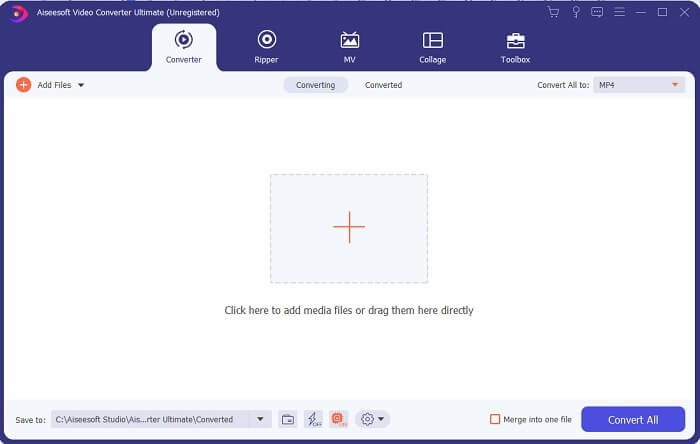
Étape 3. Cliquez sur le bouton en forme de plus pour ajouter le fichier ou faites simplement glisser le fichier à cet endroit.
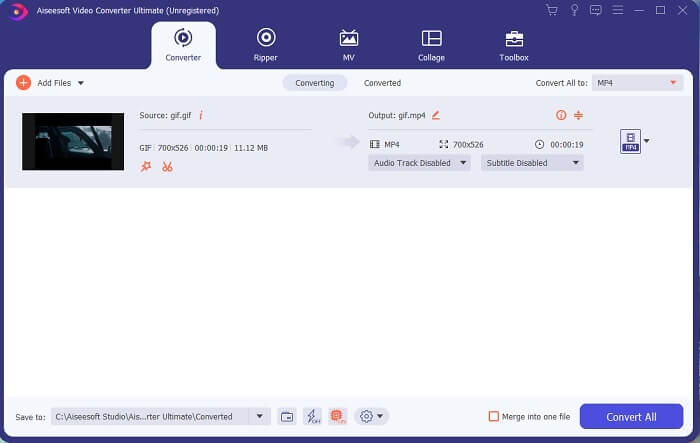
Étape 4. Cliquez sur le bouton drop-down pour changer le format et sélectionnez AVI. Vous pouvez également choisir l’encodeur, la résolution et la qualité de la sortie. Une fois tout réglé, cliquez sur Convert All pour lancer le processus de conversion.
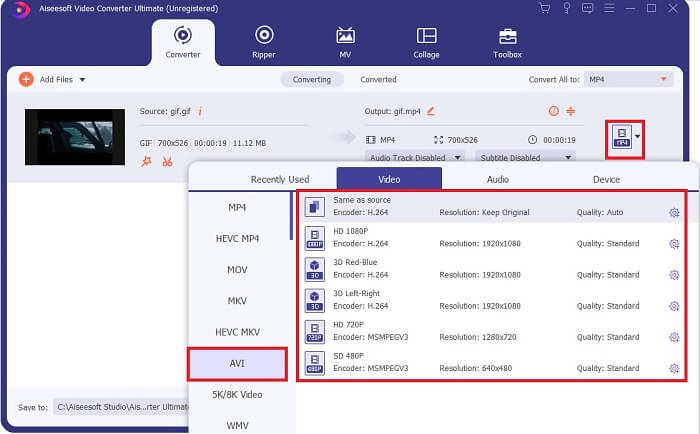
Étape 5. Cet outil offre une conversion 30 fois plus rapide que l’outil gratuit et 100 fois plus rapide que l’autre outil, vous n’aurez donc pas à attendre longtemps. Une fois la conversion terminée, un gestionnaire de fichiers s’ouvrira automatiquement sur votre écran.
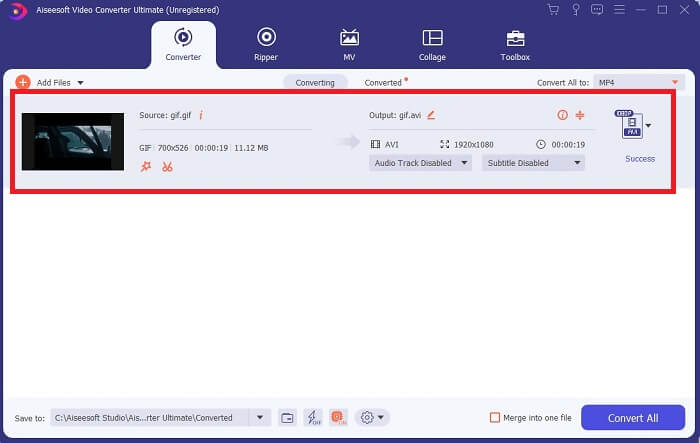
Outil bonus et étapes pour améliorer la vidéo
Tous les convertisseurs payants ne proposent pas ce type de fonctionnalité. Dans certains cas, si vous convertissez un GIF en AVI, le résultat sera un peu flou parce que le nombre d’images par seconde (fps) d’un GIF est inférieur à celui d’un AVI. Mais il existe un moyen d’améliorer votre vidéo pour obtenir un meilleur rendu. Suivez ces étapes pour améliorer la vidéo que vous avez déjà convertie.
Étape 1. Dans la section Toolbox du logiciel, cliquez sur Video Enhancer.
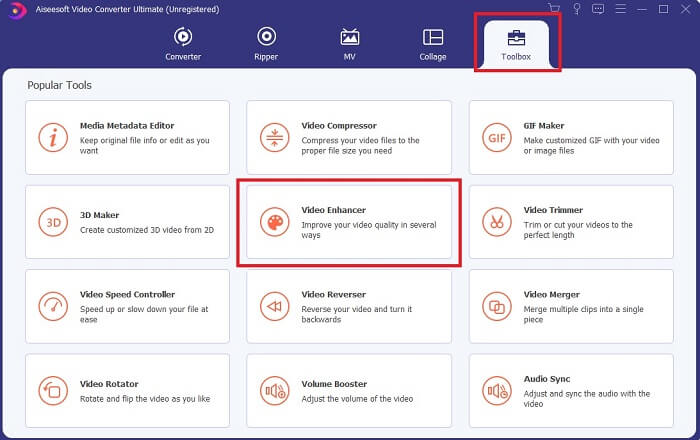
Étape 2. Cliquez sur le bouton plus et sélectionnez la vidéo que vous souhaitez améliorer. Cliquez sur Upscale Resolution pour renforcer la qualité de la vidéo ; vous pouvez cocher les autres options pour encore améliorer la qualité. Puis cliquez sur Enhance pour lancer le processus.
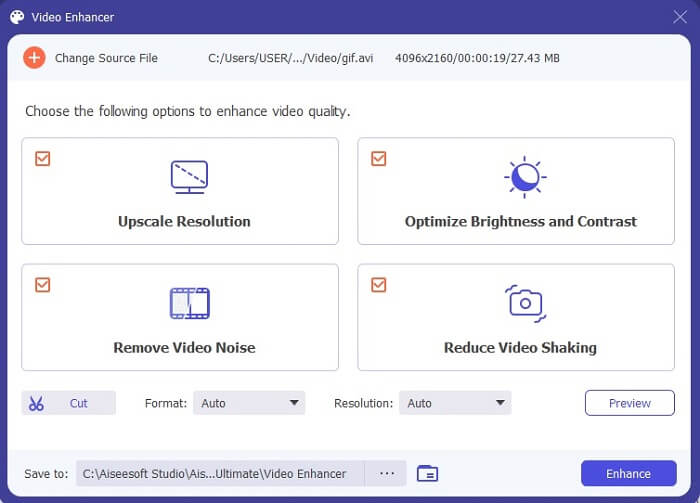
Étape 3. L’amélioration de la vidéo sera prête presque immédiatement. Une fois le processus terminé, le gestionnaire de fichiers s’ouvrira automatiquement et vous pourrez cliquer sur la vidéo pour regarder un contenu de bien meilleure qualité.
Partie 2. Top 3 : Meilleurs convertisseurs en ligne disponibles sur le Web.
1. CloudConvert
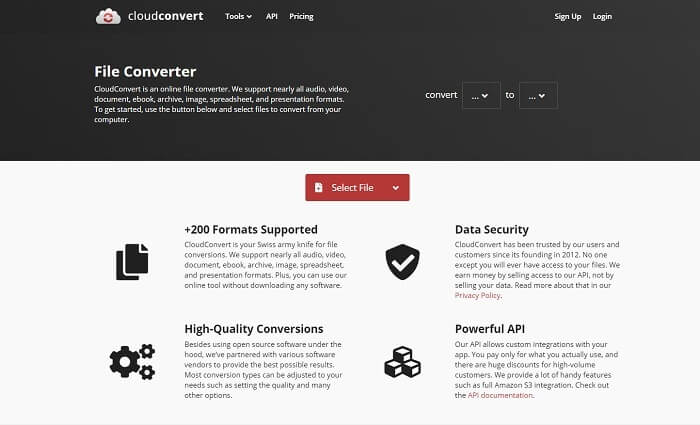
Le meilleur convertisseur GIF vers AVI en ligne est Cloud Convert. Cet outil prend en charge presque tous les formats de vidéos, d’audios, de documents, d’eBooks, de feuilles de calcul, de présentations et aussi d’images. Vous pouvez utiliser cet outil sans l’installer, car il s’agit d’un service en ligne ; cela signifie toutefois que si vous n’avez pas de connexion Internet, vous ne pourrez pas l’utiliser, contrairement aux deux autres outils ci‑dessous. L’interface web est beaucoup plus informative que celle d’AnyConv. De plus, elle est bien mieux conçue et très agréable à utiliser.
2. AnyConv
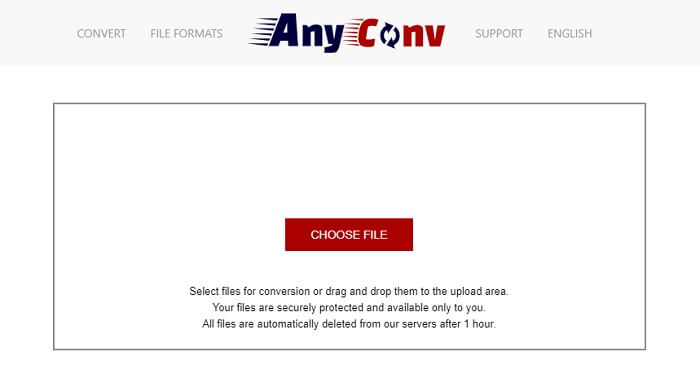
La façon la plus sûre de convertir votre vidéo est d’utiliser AnyConv. Vous pouvez créer facilement votre format GIF animé vers AVI. Il est reconnu comme le convertisseur le plus sûr, car vous êtes la seule personne à pouvoir accéder à vos fichiers convertis. Et tous les fichiers qui ont été convertis avec cet outil en ligne sont automatiquement supprimés après la conversion. Le site de l’outil est un peu pauvre en informations, ce qui peut prêter à confusion en raison du manque de précisions.
3. en ligne-convert.com
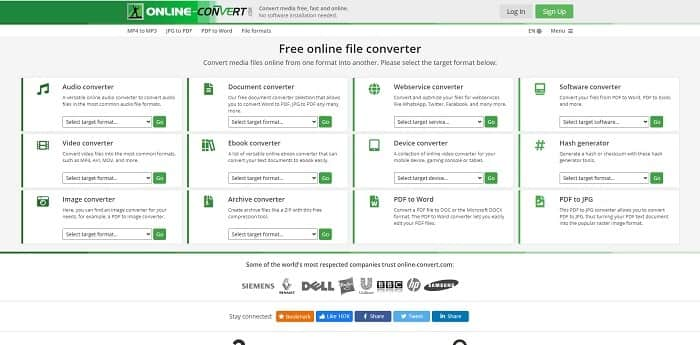
Un autre outil que vous pouvez utiliser comme convertisseur est online-convert.com. Cet outil permet à ses utilisateurs, comme vous, de convertir n’importe quelle vidéo, audio, image et plus encore. Il est également possible de convertir des services web, des appareils et des logiciels avec cet outil. Vous pouvez aussi l’utiliser pour convertir un AVI en GIF animé ou l’inverse. La page web de l’outil est informative : elle présente une brève description de chaque outil et explique comment bien les utiliser. Mais son interface est plutôt décevante, notamment à cause de la dominante de vert qui donne une impression peu attrayante à l’utilisateur.
Partie 3. FAQ sur GIF en AVI
Quel est le meilleur outil de recadrage GIF disponible dans tous les logiciels ? et comment faire ?
Le rogneur de GIF vous permet de recadrer votre GIF avec une grande précision. Cliquez sur ce lien pour en savoir plus.
Le format AVI est-il compressé ou non compressé ?
Il est bien connu que le format AVI produit une qualité vidéo plus élevée que les MPEG ou les MOV. Mais ce format est non compressé, attendez‑vous donc à des fichiers de grande taille. Même une vidéo d’une minute peut occuper plus de 1,5 Go, voire davantage, de votre espace de stockage. Vous voulez compresser vos gros fichiers AVI ? Cliquez ici pour en savoir plus.
Qui a développé AVI ?
Le développeur du format AVI est Microsoft ; sa sortie initiale était novembre 1992.
Conclusion
Pour conclure les détails, on sait que choisir le bon outil pour le bon travail est un must notamment en transformation. Parce que la conversion d'un fichier dans un nouveau format est un peu sensible, ce qui signifie que si vous utilisez le mauvais convertisseur, vous risquez de perdre des données. Mais si vous utilisez Ultimate Converter, vous pouvez convertir n'importe quel fichier même sans connexion Internet ni perte de données. Cet outil est le bon choix à utiliser car il n'est pas seulement excellent pour faire un travail, mais c'est aussi le meilleur parmi les autres.
-
 5 meilleures options pour enregistrer le format GIF avec des enregistreurs GIF pour PC et Mac
 Quel est le meilleur enregistreur GIF que vous devriez utiliser pour enregistrer des GIF ? La liste ci-dessous fournit des preuves sur lequel est le meilleur enregistreur d'écran.
-
 Comment convertir MPG au format GIF [En ligne et hors ligne]
 Vous voulez exprimer une bien meilleure émotion ? Ensuite, vous devez utiliser GIF à la place. Cet article vous apprendra comment convertir un fichier MPG en GIF pour mieux exprimer votre sentiment.
-
 [Mise à jour 2021] 9 meilleurs éditeurs GIF pour PC, Mac, iOS et Android
 Besoin d'ajouter une touche personnelle à votre GIF pour qu'il devienne plus expressif ? Continuez à lire cet article pour savoir comment éditer et le meilleur outil pour le travail.
