


 Video Converter Ultimate
 Enregistreur d'écran
 Réparation vidéo
Meilleurs convertisseurs TS en GIF pour changer TS en GIF en ligne et hors ligne
Les fichiers TS sont connus sous le nom de flux de transport MPEG, ou plus simplement « transport stream ». Ce type de fichier apparaît le plus souvent sur les DVD, car il permet de synchroniser plusieurs lectures. Bien que le fichier TS soit un support de stockage numérique standard pour le MPEG, le TS est plus « plat » que d’autres formats. La plupart des extraits vidéo sur les DVD sont enregistrés dans un format .ts afin de faciliter leur transfert à l’échelle mondiale. Cependant, certains lecteurs multimédias ne peuvent pas lire les fichiers .ts à cause du multiplexage de la vidéo, de l’audio et des autres flux, et la taille des fichiers est souvent très importante. Pour résoudre ce problème, et aussi pour économiser de l’espace de stockage sur votre disque, il faut les convertir. Découvrons comment convertir TS en GIF afin de les rendre lisibles grâce à cet outil, et comprenons la différence entre ces deux formats.

Partie 1. TS contre GIF
TS et GIF sont tous deux des conteneurs de fichiers multimédias, mais ils présentent des différences majeures, en particulier le format de fichier.
Par exemple, les fichiers TS sont souvent disponibles sur DVD, Blu-ray et autres diffusions et streaming en ligne. Mais les données de flux de transport ont un élément différent qui a été assemblé pour devenir l'un des formats efficaces lors de la lecture.
Ces éléments sont
● VIDEO_TS.VOB – conteneur de données pour l'audio et la vidéo.
● VIDEO_TS.BUP – conteneur de données pour sauvegarder les informations.
● VIDEO_TS.ISO - des données comme le menu, les légendes, les sous-titres et plus sont ici.
● AUDIO_TS – données le plus souvent vides.
Mais les GIF n'ont pas d'élément comme le fichier TS. Mais les GIF sont plus faciles d'accès que ce fichier et sa taille est également beaucoup plus petite par rapport à l'autre format. Mais l'inconvénient des fichiers GIF est que vous ne pouvez pas contenir de fichiers audio ici. Parce que GIF ne contient pas de fichiers audio et qu'il est moins sur des palettes de couleurs avec moins de fps.
Partie 2. Comment convertir TS en GIF sur PC et Mac [Programme et outils Web]
1. Vidéo gratuite FVC vers GIF Maker
Créez et convertissez des GIF dans FVC Free Video en GIF Maker. Cet outil est bien meilleur que n'importe quel convertisseur en ligne que vous rencontrez déjà sur le Web. Bien que l'outil prenne en charge des formats limités, il reste l'un des meilleurs convertisseurs répertoriés ici, à côté du convertisseur ultime. Le processus de conversion apporté par cet outil est beaucoup plus rapide et plus sûr que CloudConvert et Convertio, mais si vous voulez un processus beaucoup plus rapide, passez à l'outil suivant ci-dessous. Parce qu'il est 30 fois plus rapide que cet outil et 100 fois plus rapide que n'importe quel outil Web ou basé sur un programme. Donc, pour tester la conversion de ce convertisseur TS en GIF, vous devez suivre les étapes ci-dessous.
Étape 1. Téléchargez l’outil sur votre disque et installez‑le.
Téléchargement gratuitPour Windows 7 ou version ultérieureTéléchargement sécurisé
Téléchargement gratuitPour macOS 10.7 ou version ultérieureTéléchargement sécurisé
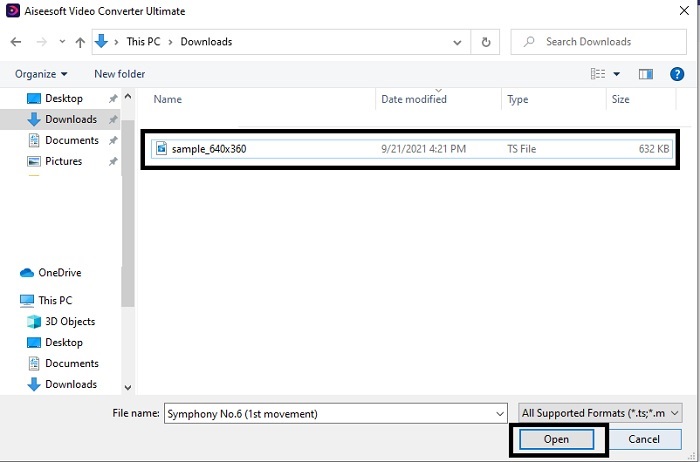
Étape 2. Après avoir modifié le paramétrage et lancé le programme, cliquez sur le bouton Add File en haut à gauche de l’interface, puis sur open pour importer le fichier GIF.
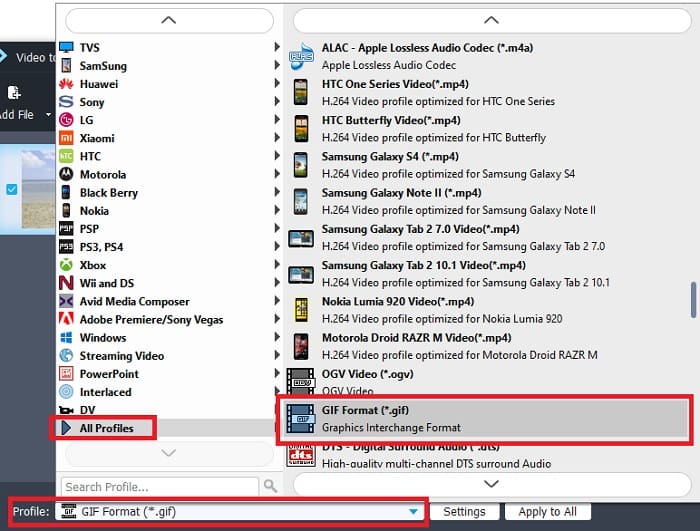
Étape 3. Dans l’interface principale, vous verrez en bas l’option Profile, cliquez dessus. Vous pouvez maintenant changer le fichier .ts en le format de votre choix.
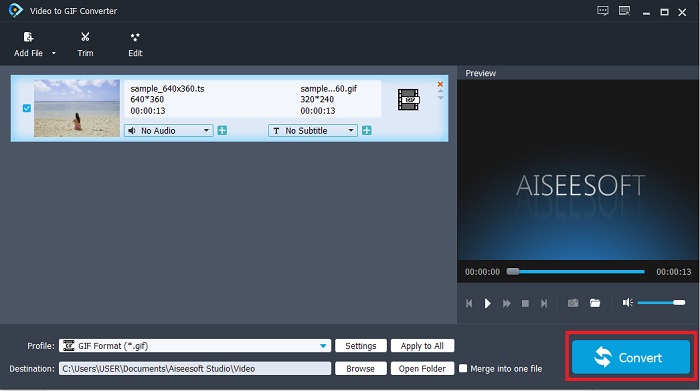
Étape 4. Pour commencer la conversion du fichier .ts, cliquez sur le bouton Convert et poursuivez.
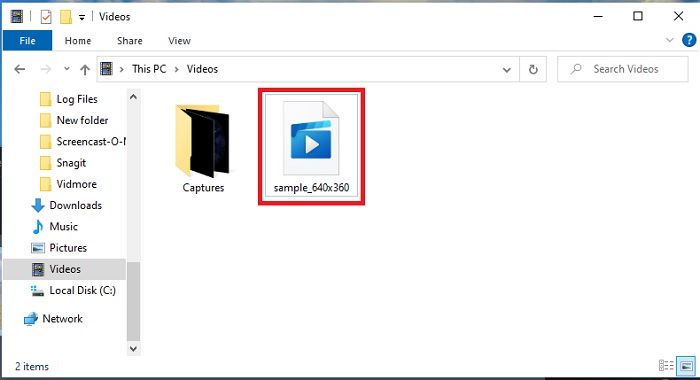
Étape 5. Attendez quelques minutes le temps que la conversion se termine. Ensuite, localisez le fichier .gif dans l’explorateur de fichiers et profitez‑en.
2. Convertisseur vidéo FVC ultime
Si la conversion pose problème, alors FVC Video Converter Ultimate est la meilleure solution. Il résout toujours les différents problèmes de conversion que vous pouvez rencontrer. Cet outil peut transformer un format illisible en format lisible, puis l’améliorer par la suite. Ce convertisseur ultime a déjà été utilisé par plus d’un million d’utilisateurs en ligne, qui l’apprécient. Mais tout outil offrant ce type de performances est payant, et si vous n’aimez pas les produits coûteux, celui‑ci est fait pour vous. En plus d’avoir un prix abordable, cet outil peut aussi transformer une vidéo en l’un des meilleurs GIF que vous ayez vus. Sans plus attendre, passons aux étapes détaillées pour convertir le format TS en GIF en suivant les instructions spécialement fournies pour vous.
Étape 1. La première étape pour disposer du convertisseur ultime est de le télécharger sur le disque de votre PC ou Mac. Installez‑le, modifiez son paramétrage si vous le souhaitez, puis cliquez sur « Finish » pour enregistrer les changements.
Téléchargement gratuit pour Windows 7 ou version ultérieure Téléchargement sécurisé
Téléchargement gratuit pour macOS 10.7 ou version ultérieure - Téléchargement sécurisé
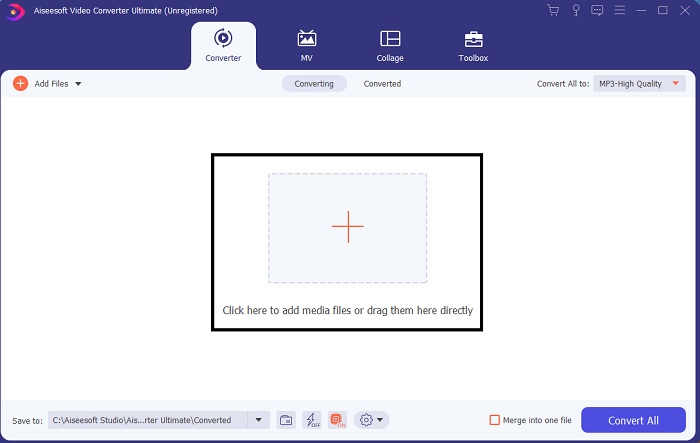
Étape 2. Cliquez sur le signe plus au centre de l’interface. Repérez le fichier .ts que vous voulez convertir en GIF et cliquez sur open pour l’ajouter à l’interface de l’outil. Information supplémentaire : vous pouvez ajouter de nombreux fichiers .ts ou d’autres formats en même temps. Vous pouvez également les convertir tous vers le même format ou les modifier individuellement.
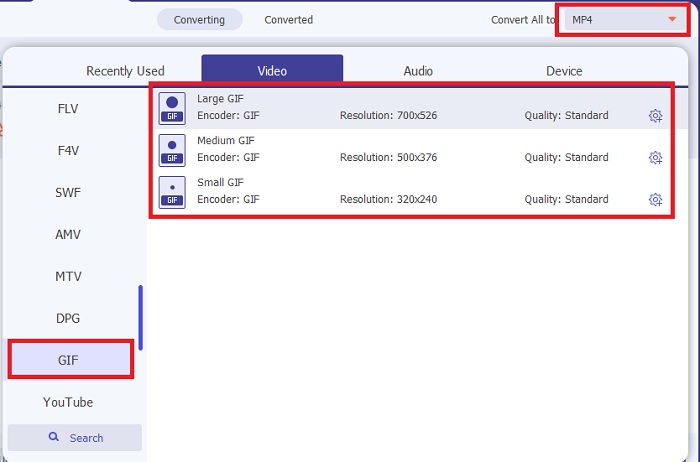
Étape 3. Dans l’interface principale, cliquez sur le bouton drop-down à gauche. Choisissez le format GIF ou un autre format souhaité.
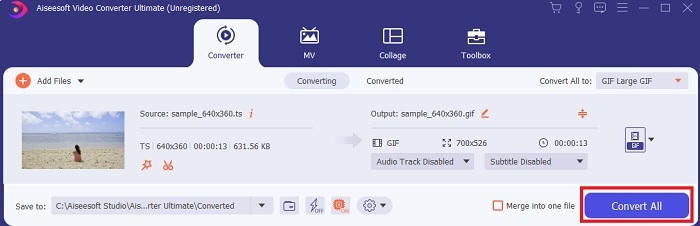
Étape 4. Après avoir choisi le format GIF, cliquez sur le bouton Convert All pour lancer la conversion du fichier TS.
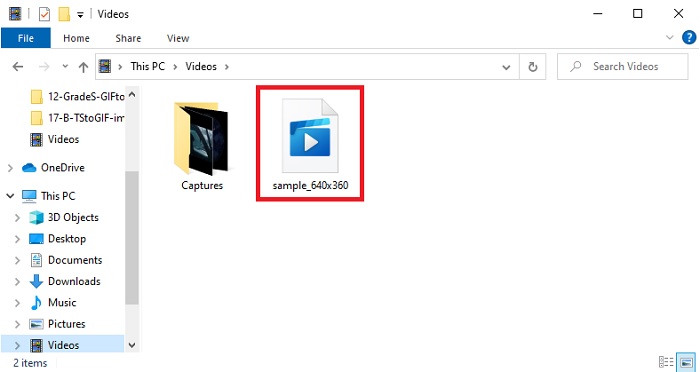
Étape 5. Une fois la conversion terminée, un dossier s’ouvrira automatiquement à l’écran. Cliquez sur le fichier que vous venez de convertir et visionnez‑le immédiatement.
3. CloudConvert
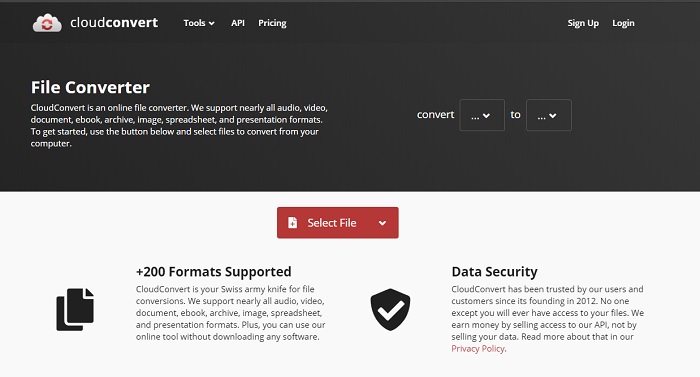
Si vous ne souhaitez pas télécharger les logiciels mentionnés ci‑dessus, vous pouvez utiliser CloudConvert. Contrairement aux deux premiers convertisseurs, cet outil en ligne dépend d’Internet. Ainsi, pour y effectuer des conversions, vous devez disposer d’une connexion Internet stable afin d’éviter les interruptions ou les pertes de données, comme pour l’outil suivant. Mais CloudConvert prend aussi en charge les conversions et formats de base. Il ne propose aucune fonction d’édition, contrairement aux deux outils précédents. L’avantage est que vous n’avez pas besoin de le télécharger sur votre espace de stockage.
4. Convertio
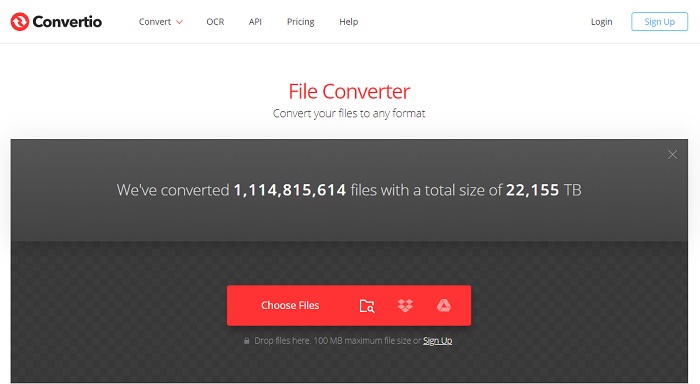
Avec cet outil, vous pouvez effectuer plusieurs conversions TS en GIF si vous le souhaitez, mais vous devrez d’abord vous inscrire. En effet, la limite imposée par Convertio pour des conversions simultanées est de deux fichiers seulement. Cependant, souvenez‑vous que si vous vous inscrivez sur cet outil, vous communiquez des données personnelles. Bien qu’aucune fuite de données n’ait été signalée à ce jour, il vaut mieux prévenir que guérir. De plus, ce service en ligne offre une très bonne compression et conversion, mais il prend en charge moins de formats que l’outil ultime.
Partie 3. FAQ sur TS à GIF
Les fichiers TS sont-ils compressés ?
Oui, il s'agit de données vidéo compressées car elles utilisent la compression .mpeg pour protéger et assurer un transfert sécurisé si vous souhaitez qu'elles soient transférées ultérieurement.
Où puis-je lire des fichiers .ts ?
La plupart du temps, vous ne pouvez pas lire les fichiers .ts avec votre lecteur multimédia natif, ni même avec certains outils tiers. Toutefois, il existe un lecteur multimédia que vous pouvez utiliser pour lire les fichiers .ts comme si vous regardiez un film au cinéma. Blu‑ray Player est l’un des lecteurs multimédias révolutionnaires qui prennent en charge tous les formats et lisent leurs contenus. Téléchargez l’outil en cliquant sur les liens ci‑dessous et regardez vos fichiers .ts. Télécharger Blu-ray Player pour PC Télécharger Blu-ray Player pour Mac
Quel format est le meilleur pour convertir en fichier TS ?
D’après nos recherches, les fichiers TS synchronisent la lecture audio et vidéo, tout comme le MP4. Bien que le MP4 ne stocke pas de fichiers synchronisés, cela reste toutefois le meilleur format vers lequel convertir un fichier .ts. Après avoir converti des fichiers TS en MP4, ceux‑ci deviennent lisibles sur toutes les plateformes et tous les lecteurs multimédias.
Conclusion
Pour conclure, il était prévu que FVC Video Converter Ultimate soit le grand gagnant de cette « bataille » de conversion. Même si tous les outils listés ici peuvent convertir des fichiers TS en GIF, le convertisseur ultime reste le plus remarquable de tous. Donc, si vous voulez une conversion parfaite, téléchargez‑le et profitez de vos conversions.
-
 [Guide] Comment convertir des vidéos M4V en GIF animés sous Windows/Mac
 Si vous souhaitez créer des fichiers GIF animés à partir de vos vidéos M4V préférées, vous pouvez découvrir 2 manières simples et efficaces de convertir des vidéos M4V en GIF avec des paramètres personnalisés.
-
 WebM en GIF - 3 convertisseurs WebM en GIF gratuits pour créer vos propres GIF
 WebM est-il un GIF ? Comment transformer une vidéo en GIF ? Existe-t-il un convertisseur WebM en GIF gratuit ? Cet article partage 3 manières gratuites de vous aider à convertir WebM en GIF.
-
 Comment convertir des vidéos MKV en GIF animés sans Photoshop/FFmpeg
 Après avoir téléchargé et regardé des films MKV sur votre ordinateur, vous voudrez peut-être partager des moments merveilleux avec des amis ou sur Internet sous forme de GIF. Dans cet article, vous pouvez découvrir les 2 manières les plus simples de convertir MKV en GIF.
