


 Video Converter Ultimate
 Enregistreur d'écran
 Réparation vidéo
 Téléchargement sécurisé
Comment convertir M2TS en formats compatibles iPad sur Windows / Mac / en ligne
Pouvez-vous lire un fichier M2TS directement sur iPad ? Malheureusement, la réponse est non. Le format M2TS n’est pas compatible avec l’iPad. Si vous voulez lire un M2TS sur iPad, vous devez installer une application de lecture M2TS sur l’iPad, ou bien vous pouvez convertir le M2TS pour l’iPad. Évidemment, cet article choisit la deuxième solution. Lisez simplement la suite pour apprendre comment changer le format vidéo M2TS en format compatible iPad.

Partie 1: Comment convertir M2TS en iPad sur Windows et Mac
Quels formats l'iPad prend-il en charge? En fait, l'iPad accepte les formats vidéo courants H.264, MP4, M4V, MOV, MPEG-4 et M-JPEG. Pour mettre M2TS sur iPad, vous devez d'abord convertir M2TS au format vidéo iPad.
Comment convertir M2TS en iPad sur Windows gratuitement
FVC Free M2TS Converter est un convertisseur M2TS vers iPad par lot entièrement gratuit. Vous pouvez convertir en batch des fichiers M2TS vers iPad jusqu’à 50 fois plus vite qu’avec les convertisseurs M2TS classiques. Ainsi, même si vous devez convertir en masse de gros fichiers vidéo M2TS pour l’iPad, ce n’est pas un problème. Ce convertisseur gratuit M2TS vers iPad peut parfaitement s’en charger.
De plus, vous pouvez fusionner des fichiers M2TS et ajouter des thèmes avant la conversion M2TS vers iPad. La fenêtre d’aperçu en temps réel vous montre instantanément les effets vidéo. En un mot, vous pouvez monter et convertir des fichiers AVCHD M2TS vers iPad sur Windows gratuitement, en une seule solution complète.

Convertisseur M2TS Gratuit
113,456+ Téléchargements- Convertir M2TS en iPad H.264, MP4, MOV, MPEG-4 et autres formats compatibles.
- Vitesse 50 fois plus rapide avec la prise en charge de la conversion par lots.
- Maintenez le haut niveau de qualité lors de la conversion en iPad à partir de tous les caméscopes HD.
- Le convertisseur M2TS vers iPad fonctionne avec un ordinateur Windows 10/8/7.
Téléchargement gratuitPour Windows 7 ou version ultérieureTéléchargement sécurisé
Téléchargement gratuitPour macOS 10.7 ou version ultérieureTéléchargement sécurisé
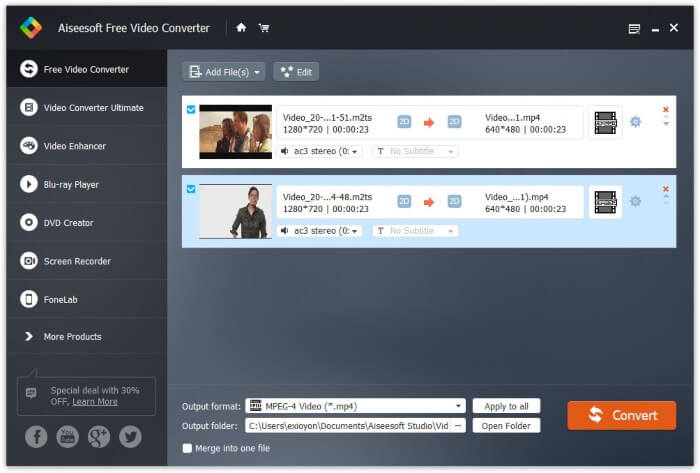
Étape 1 : Téléchargez gratuitement, installez et lancez FVC Free M2TS Converter. Glissez-déposez les fichiers M2TS dans l’interface principale.

Étape 2 : Déroulez la liste Format de sortie en bas de la fenêtre. Pour convertir un M2TS vers iPad sous Windows, vous pouvez définir directement le format de sortie dans la catégorie Apple iPad.

Étape 3 : Cliquez sur l’icône d’engrenage Paramètres pour ajuster l’encodeur vidéo, la fréquence d’images et d’autres options. Enfin, cliquez sur Convertir pour convertir la vidéo du format M2TS vers un format iPad.
Comment convertir M2TS en iPad sur Mac gratuitement
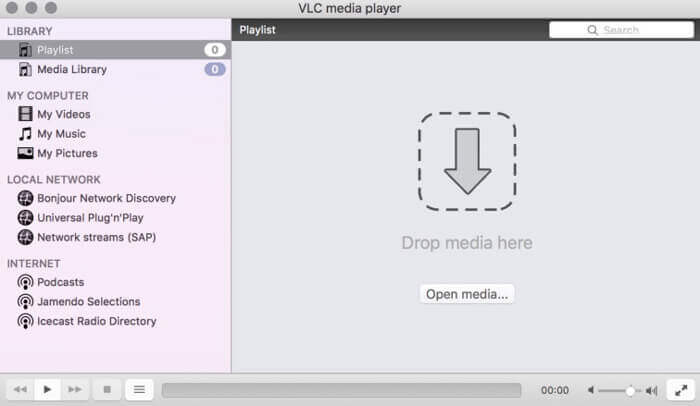
Si vous souhaitez convertir gratuitement une vidéo M2TS en iPad sur Mac, VLC Media Player peut être votre bon choix. C'est un lecteur et un convertisseur M2TS gratuit et open source pour multiplateforme.
Étape 1 : Ouvrez VLC Media Player sur Mac. Choisissez Convertir/Enregistrer dans le menu déroulant Média.
Étape 2 : Cliquez sur Ajouter pour importer un fichier M2TS. Puis sélectionnez le fichier et cliquez sur Ouvrir en bas pour continuer.
Étape 3 : Cliquez sur Convertir/Enregistrer en bas pour passer à la fenêtre suivante.
Étape 4 : Choisissez un format iPad dans la liste déroulante Profil. Vous pouvez cliquer sur l’icône Outils à côté pour ajuster les paramètres vidéo.
Étape 5 : Cliquez sur Démarrer pour commencer à convertir le fichier M2TS vers un format iPad sur Mac via VLC.
Partie 2: Comment convertir M2TS en iPad en ligne
Pour les utilisateurs mobiles, l'utilisation d'un convertisseur M2TS vers iPad en ligne est également un bon choix. Vous pouvez convertir un fichier M2TS en iPad gratuitement sans obligation de téléchargement, d'installation ou d'enregistrement.
Étape 1 : Ouvrez un convertisseur M2TS vers iPad en ligne, par exemple FVC Free Online Video Converter.

Étape 2 : Téléchargez le lanceur FVC en cliquant sur Add Files to Convert puis installez-le.

Étape 3 : Recherchez sur votre ordinateur le fichier M2TS à convertir. Et n’oubliez pas de choisir le format de sortie.

Étape 4 : Cliquez sur Start Converting pour convertir gratuitement le M2TS vers iPad en ligne.
Partie 3: FAQ sur la conversion de M2TS en iPad
Que se passe-t-il si soudainement aucun son dans les fichiers M2TS dans iMovie?
M2TS n'est pas pris en charge nativement par les appareils Apple. Vous devez convertir M2TS au format Mac pour résoudre le problème.
Comment ouvrir des fichiers M2TS sur iPhone et iPad?
AVCHD M2TS n'est pas compatible avec les appareils iOS. Si vous insistez pour lire des vidéos M2TS sur iPad, vous pouvez utiliser l'application VLC Media Player pour obtenir la lecture vidéo.
Une bonne application de lecteur vidéo pour iPad?
Vous pouvez obtenir un écran plus grand sur iPad que sur iPhone. Ainsi, l'expérience de visionnage vidéo sera également meilleure. Les lecteurs vidéo recommandés incluent PlayerXtreme Media Player, KMPlayer, VLC, AirPlayer et plus encore. Vous pouvez choisir n'importe lequel pour obtenir des commandes vidéo de manière flexible.
Voilà tout ce qu’il faut pour convertir un M2TS pour l’iPad avec des outils en ligne et hors ligne. Ces convertisseurs vidéo M2TS sont gratuits et sûrs à utiliser. Quel que soit le nombre de fichiers M2TS que vous souhaitez convertir dans des formats compatibles avec l’iPad, vous pouvez bénéficier ici de la vitesse de conversion la plus élevée.
-
 Comment convertir M2TS en MP4 sans réduire la qualité
 Vous voulez convertir la vidéo d'un caméscope HD en MP4 commun? Voici 4 façons simples et gratuites de changer le fichier M2TS en MP4 sur Windows et Mac.
-
 Comment convertir M2TS en MKV sans perte de qualité
 Vous souhaitez convertir M2TS en MKV tout en conservant la qualité d'origine? Cet article vous montre des méthodes gratuites et en ligne pour changer M2TS en MKV sans perte.
-
 Quelle est la différence entre MTS et M2TS
 Qu'est-ce que le fichier MTS ou M2TS? Quelle est la différence entre M2TS et MTS? Comment puis-je regarder le fichier MTS ou M2TS enregistré par le caméscope? Trouvez toutes les réponses dans cet article.
