


 Video Converter Ultimate
 Enregistreur d'écran
 Réparation vidéo
 Téléchargement sécurisé
Un guide complet pour créer une sonnerie à partir d'un mémo vocal
Cependant, de nombreux développeurs ont créé des logiciels de création de sonneries. Cela signifie que vous êtes libre de prendre des extraits de vos chansons préférées ou d’enregistrer votre voix pour en faire une sonnerie. Dans cet article, nous allons expliquer comment transformer un mémo vocal en sonnerie. Nous espérons que vous trouverez la réponse que vous cherchez.

Partie 1. La meilleure façon de transformer un mémo vocal en sonnerie
Si vous recherchez également un créateur de sonneries complet, choisissez le logiciel sélectionné FVC, Video Converter Ultimate, le leader même sur le marché très concurrentiel des logiciels de montage multimédia. Différents modèles de smartphones peuvent prendre en charge différents formats de sonnerie, mais ce n’est pas un problème avec Video Converter Ultimate. Comme vous pouvez le deviner d’après son nom, sa fonction principale est de convertir le format des fichiers. Ainsi, quel que soit le format dans lequel vous enregistrez ou téléchargez des mémos vocaux, vous pouvez les convertir pour les adapter au format de votre téléphone. Vous pouvez même l’utiliser pour extraire directement l’audio des vidéos, ce qui ouvre un large éventail de possibilités de sonneries. Vous pouvez également modifier le volume, la piste, la durée, etc., de l’audio cible. Avec Video Converter Ultimate, faire d’un mémo vocal une sonnerie à volonté ne sera plus un rêve.
Téléchargement gratuit pour Windows 7 ou version ultérieure Téléchargement sécurisé
Téléchargement gratuit pour macOS 10.7 ou version ultérieure - Téléchargement sécurisé
Ici, nous vous expliquerons comment modifier vos mémos vocaux enregistrés ou téléchargés afin que vous puissiez les utiliser comme sonnerie.
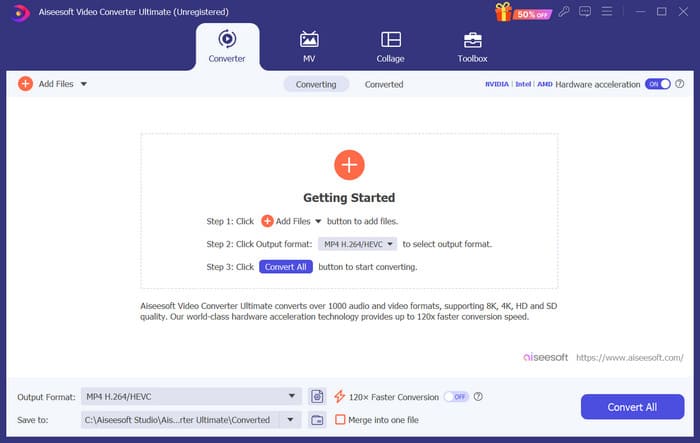
Étape 1. Téléchargez et installez Video Converter Ultimate sur votre ordinateur. Ensuite, lancez-le sur votre bureau.
Étape 2. Cliquez sur Ajouter des fichiers pour importer l’audio que vous souhaitez modifier.
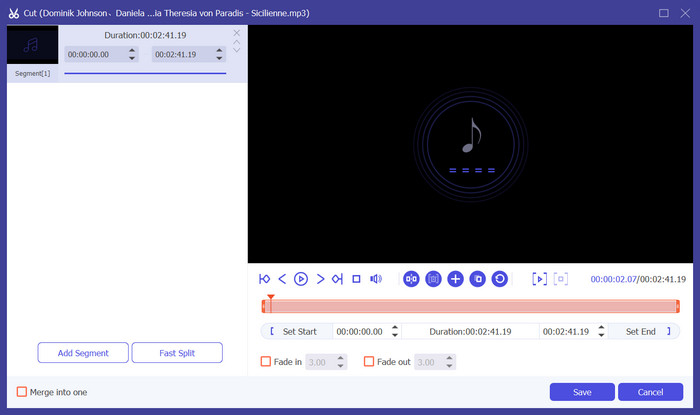
Étape 3. Pour découper l’audio, cliquez sur Couper. Vous pouvez ajuster la durée du fichier. Une fois le découpage terminé, cliquez sur Enregistrer.
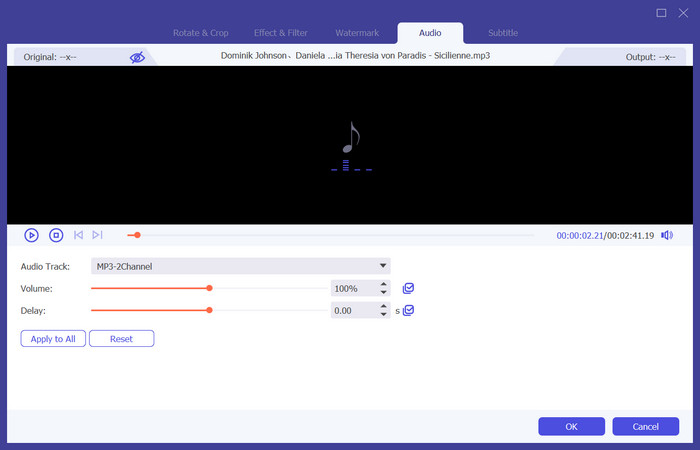
Étape 4. Pour modifier le volume et la piste audio de vos mémos vocaux, cliquez sur Éditer. Dans la fenêtre qui s’ouvre, vous pouvez effectuer les réglages souhaités. Lorsque vous avez terminé le montage, cliquez sur OK.
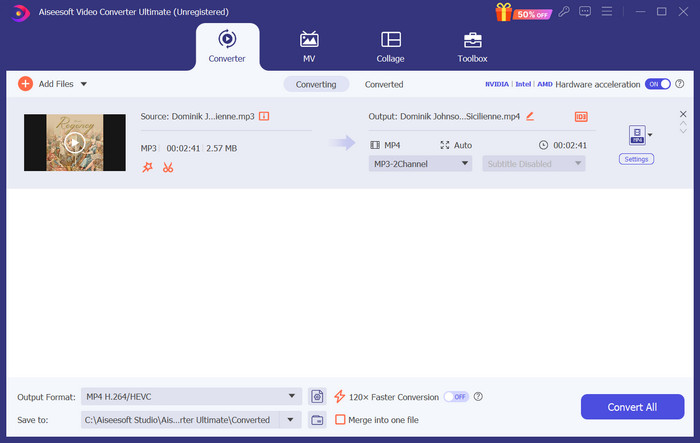
Étape 5. Si vous devez changer le format de votre fichier, déroulez le menu à côté de Format de sortie. Ici, vous pouvez choisir le format de sortie de votre audio.
Étape 6. Lorsque vous souhaitez exporter la sonnerie modifiée, cliquez sur Convertir tout.
Partie 2. Comment transformer un mémo vocal en sonnerie sur iPhone
Nous recommandons GarageBand si vous souhaitez créer une sonnerie de mémo vocal sur votre iPhone. Il s'agit d'une application développée par Apple. Les utilisateurs peuvent l'utiliser pour créer de la musique sur leurs appareils iOS. Elle dispose de nombreux outils pour la production, l'enregistrement, l'édition et le mixage de musique. GarageBand peut également s'intégrer à d'autres logiciels Apple. Cela signifie que nous pouvons facilement transférer des projets entre GarageBand et d'autres logiciels pour une édition ultérieure. Cette application est populaire parmi les utilisateurs professionnels et débutants en raison de son interface conviviale, de ses nombreuses fonctionnalités et de son accessibilité. Tous les réglages peuvent être effectués sur le téléphone sans l'aide d'un autre appareil.
Voici ce que vous devez faire pour transformer un mémo vocal en sonnerie.
Étape 1. Avant de régler vos sonneries, vous devez ouvrir l’app Dictaphone sur votre iPhone pour sélectionner un mémo vocal.
Étape 2. Après avoir choisi le mémo vocal souhaité, appuyez sur l’icône représentant trois points. Choisissez Enregistrer dans Fichiers, puis appuyez de nouveau sur Enregistrer pour confirmer votre action.
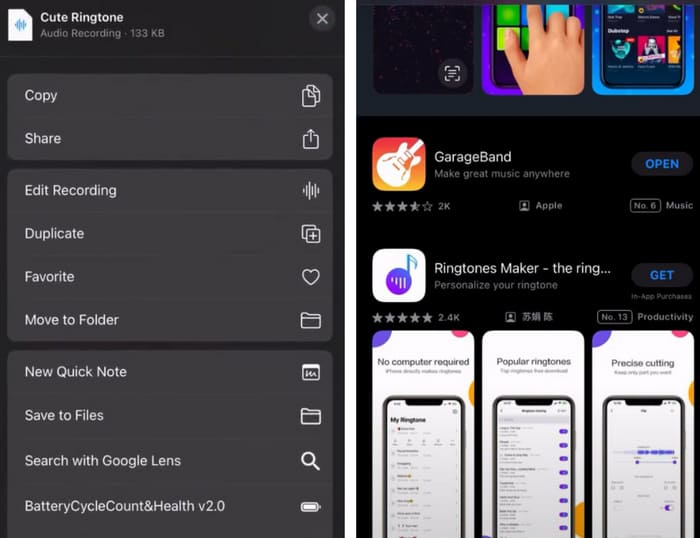
Étape 3. Ouvrez GarageBand sur votre iPhone, puis touchez Projet.
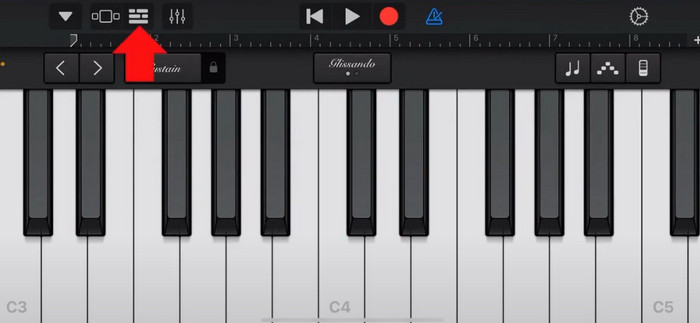
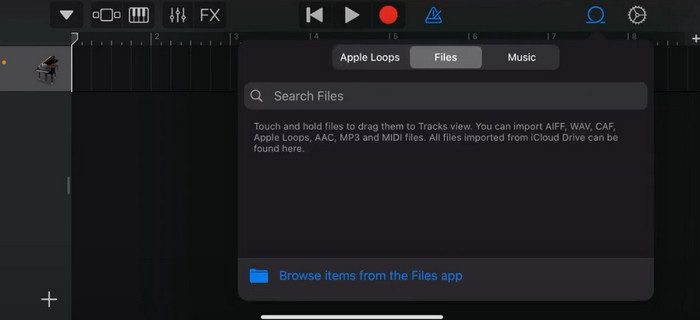
Étape 4. Choisissez Boucle > Fichiers. Ensuite, touchez Parcourir les éléments depuis l’app Fichiers pour sélectionner le mémo vocal souhaité.
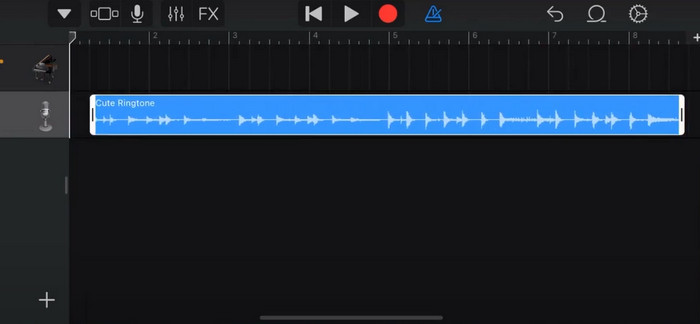
Étape 5. Faites glisser et déposez le fichier sur la ligne de temps.
Étape 6. Désactivez le métronome, puis touchez l’icône de flèche vers le bas > Mes morceaux.
Étape 7. Touchez et maintenez le clip, puis choisissez Partager.
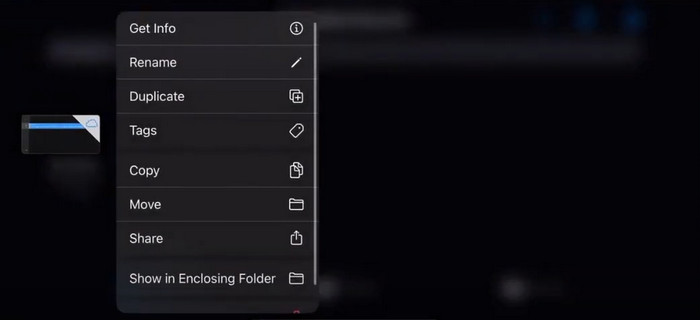
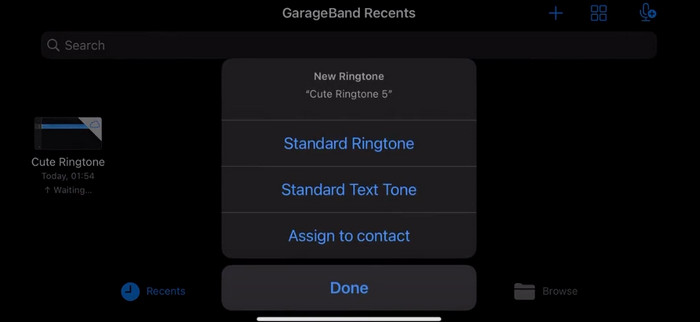
Étape 8. Choisissez Sonnerie parmi toutes les options, puis appuyez sur Exporter. Enfin, touchez Utiliser le son comme > Sonnerie par défaut. Vous avez ainsi créé avec succès une sonnerie à partir d’un mémo vocal.
Partie 3. Comment transformer un enregistrement vocal en sonnerie sur Android
Si vous utilisez un téléphone Android et que vous souhaitez transformer la musique enregistrée en sonnerie, vous pouvez le faire directement dans l'application Paramètres de votre téléphone. La procédure est très simple et il n'est pas nécessaire de télécharger un logiciel pour ce processus. Cependant, si vous souhaitez modifier votre audio enregistré, vous pouvez choisir un logiciel de montage audio et vidéo professionnel comme FVC-picked Video Converter Ultimate.
Ensuite, nous allons vous expliquer comment créer une sonnerie à partir d’un enregistrement vocal sur Android. Dans cette partie, nous prendrons un smartphone Samsung comme exemple. Avant de commencer, vous devez vous assurer que vous avez enregistré le fichier audio dans l’app Enregistreur vocal.
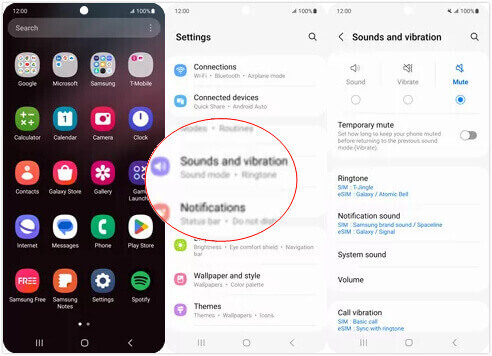
Étape 1. Ouvrez les Réglages de votre téléphone, puis choisissez Sons et vibrations.
Étape 2. Assurez-vous que l’option Son est sélectionnée sous Mode sonore. Ensuite, choisissez le son de notification.
Étape 3. Sélectionnez le fichier audio que vous avez enregistré. Enfin, revenez à l’écran d’accueil pour appliquer les paramètres.
Partie 4. FAQ sur la transformation d'un mémo vocal en sonnerie
Quel est le format des sonneries pour Android ?
Les sonneries pour appareils Android peuvent être disponibles dans différents formats de fichiers audio, mais les formats les plus couramment pris en charge sont MP3, AAC, M4A, OGG et WAV.
Comment enregistrer un mémo vocal sous forme de chanson sur mon iPhone ?
Ouvrez l'application Mémos vocaux sur votre iPhone et recherchez le mémo vocal que vous souhaitez enregistrer sous forme de chanson. Appuyez sur le mémo vocal pour l'ouvrir, puis appuyez sur l'icône de partage pour voir les options de partage disponibles. Vous pouvez choisir d'enregistrer le mémo vocal dans l'application Fichiers. Après cela, vous pouvez ouvrir une application musicale sur votre iPhone qui prend en charge l'importation de fichiers audio. Des applications comme GarageBand ou Music Memos sont adaptées.
Comment enregistrer l'audio sur Android Samsung ?
Pour enregistrer de l’audio sur un appareil Android Samsung, utilisez l’Enregistreur vocal intégré. Ouvrez-le et touchez Enregistrer pour commencer l’enregistrement. Une fois l’enregistrement terminé, vous pouvez enregistrer le fichier audio et lui donner un nom pour y accéder facilement.
Conclusion
Dans cet article, nous répondons à la question de savoir comment transformer un mémo vocal en sonnerie. Nous vous proposons l’un des meilleurs outils d’édition de sonneries, FVC Video Converter Ultimate. Les méthodes pour transformer un mémo vocal en sonnerie sur iPhone et sur téléphones Android sont présentées. Nous fournissons également des instructions détaillées étape par étape pour chaque section au cas où vous rencontreriez des problèmes.
-
 Les 3 meilleures solutions pour compresser les fichiers WAV dans une taille plus petite
 Si vous cherchez également des moyens de compresser la taille des fichiers audio WAV, lisez notre contenu. Nous vous présenterons différents outils sous trois aspects.
-
 Tutoriel approfondi sur la compression audio en 2024 (étape par étape)
 Avez-vous besoin de compresser l'audio mais avez-vous besoin d'aide pour savoir par où commencer ? Dans cet article, nous présenterons les meilleurs choix pour réduire la taille du fichier de vos pistes.
-
 Compresseurs audio efficaces pour les utilisateurs hors ligne et en ligne
 Vous avez des problèmes avec les fichiers audio volumineux ? Il existe de nombreux compresseurs de fichiers audio disponibles pour les utilisateurs hors ligne et en ligne. Découvrez-les ici.
