


 Video Converter Ultimate
 Enregistreur d'écran
 Réparation vidéo
 Téléchargement sécurisé
Comment convertir M2TS en WMV sur Windows / Mac / en ligne (totalement gratuit à utiliser)
Certains appareils photo Canon et Sony utilisent M2TS comme format de sortie par défaut. Les vidéos M2TS sont volumineuses en taille de fichier. La compatibilité du format M2TS n'est pas non plus bonne. Si vous souhaitez importer des fichiers M2TS dans Windows Movie Maker pour des modifications supplémentaires, vous devez d'abord convertir M2TS en vidéo WMV.
Cet article va vous présenter, étape par étape, des méthodes en ligne et hors ligne pour convertir des vidéos du format M2TS en WMV. Ainsi, vous pourrez changer le format vidéo M2TS en WMV facilement, que ce soit sur votre téléphone ou sur votre ordinateur.

Partie 1: Comment convertir M2TS en WMV sous Windows et Mac
Si vous souhaitez simplement changer de format vidéo, un convertisseur vidéo gratuit M2TS en WMV suffit. Vous n'avez pas besoin de payer pour des fonctionnalités supplémentaires dont vous n'avez pas besoin. Voici 2 logiciels gratuits de conversion M2TS en WMV que vous pouvez choisir.
Convertissez M2TS en WMV sur Windows gratuitement
Pour convertir des fichiers M2TS en WMV sur votre ordinateur Windows, vous pouvez utiliser FVC Free M2TS Converter. Il s’agit d’un convertisseur M2TS par lots qui peut convertir des fichiers M2TS en WMV, MOV, MP4 et d’autres formats vidéo et audio en série. Les outils d’édition vidéo intégrés sont également gratuits. Vous pouvez modifier et personnaliser vos vidéos M2TS avant la conversion. Voici les principales fonctionnalités de ce logiciel gratuit de conversion M2TS vers WMV.

Convertisseur M2TS Gratuit
112,356+ Téléchargements- Convertissez gratuitement M2TS en WMV sous Windows 10/8/7 / Vista / XP.
- Prise en charge de la conversion par lots M2TS en WMV.
- Vitesse de conversion 50x plus rapide.
- Compressez, fusionnez et appliquez d'autres effets vidéo aux fichiers M2TS.
- Ajoutez des thèmes spéciaux à vos fichiers M2TS, tels que la famille, l'anniversaire, les vacances, etc.
Téléchargement gratuitPour Windows 7 ou version ultérieureTéléchargement sécurisé
Téléchargement gratuitPour macOS 10.7 ou version ultérieureTéléchargement sécurisé
Étape 1 : Téléchargez gratuitement, installez et lancez FVC Free M2TS Converter. Cliquez sur Add File(s) pour importer plusieurs fichiers vidéo M2TS.

Étape 2 : Dans la liste des formats de sortie, parcourez et définissez WMV comme format vidéo de sortie.

Étape 3 : Si vous souhaitez modifier une vidéo M2TS, cliquez simplement sur Edit en haut. Vous pouvez ensuite modifier le titre, l’auteur et l’horodatage de la partie d’ouverture et de fin de la vidéo M2TS dans FVC Free M2TS Converter.

Étape 4 : Cliquez sur Convert pour convertir gratuitement M2TS en WMV sur Windows.
Convertissez M2TS en WMV sur Mac gratuitement
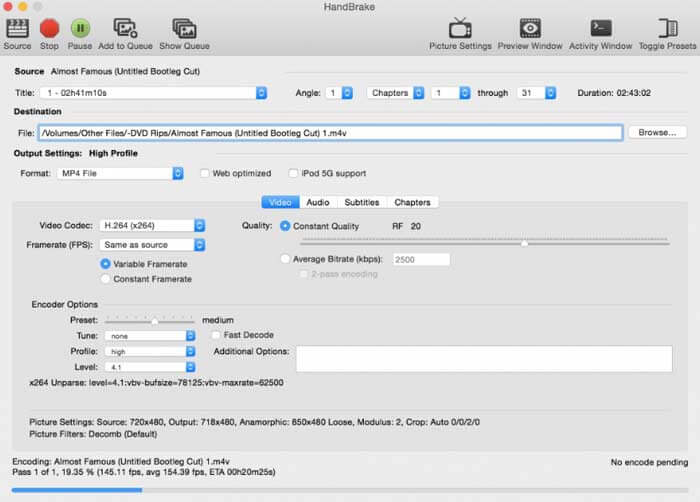
Pour les utilisateurs de Mac, vous pouvez utiliser HandBrake comme convertisseur gratuit M2TS vers WMV. Voici les étapes détaillées pour convertir gratuitement M2TS en WMV sur Mac à l'aide de HandBrake.
Étape 1 : Lancez HandBrake. Dans la fenêtre contextuelle Source, sélectionnez votre fichier M2TS puis cliquez sur Open.
Étape 2 : Déroulez la liste Format. Sélectionnez WMV comme format vidéo.
Étape 3 : Cliquez sur Browse pour changer le dossier de destination.
Étape 4 : Cliquez sur Start pour terminer la conversion vidéo M2TS en WMV sur Mac.
Partie 2: Comment convertir M2TS en WMV en ligne
Si vous ne voulez rien installer sur votre ordinateur, vous pouvez aussi utiliser un convertisseur vidéo en ligne. Cette section prendra FVC Free Online Video Converter comme exemple.
Étape 1 : Rendez-vous sur FVC Free Online Video Converter dans votre navigateur.

Étape 2 : Si vous n’avez pas encore téléchargé le FVC launcher, cliquez d’abord sur Add Files to Convert pour le télécharger. Puis installez le lanceur et mettez-le à jour.

Étape 3 : Ouvrez et ajoutez le fichier M2TS. Choisissez ensuite le format WMV avant de lancer la Convert.

Étape 4 : Après avoir confirmé le dossier d’enregistrement, patientez jusqu’à l’obtention de votre fichier WMV.
Partie 3: FAQ sur la conversion de M2TS en WMV
Android peut-il lire les fichiers M2TS?
Non. Vous pouvez utiliser VLC Media Player comme application de lecture M2TS. Ou vous pouvez convertir M2TS au format WMV pour une lecture facile sur Android et iPhone.
Y a-t-il une différence entre MTS et M2TS?
En réalité, la réponse est non. Il n’y a aucune différence fonctionnelle entre MTS et M2TS. Ce sont tous deux des fichiers vidéo haute définition associés au format AVCHD.
Le M2TS est-il meilleur que le WMV?
M2TS est spécialement conçu pour les caméscopes. Les fichiers M2TS sont donc en haute définition et de grande taille. Vous pouvez réduire la taille de la vidéo en convertissant M2TS en WMV. Comparé au M2TS, WMV est un format vidéo courant et largement pris en charge. Si vous souhaitez compresser M2TS et passer à un format vidéo populaire, c'est un bon moyen de convertir M2TS au format WMV.
Voilà tout ce qu’il faut savoir pour convertir des vidéos du format M2TS en WMV. Vous pouvez changer de format vidéo et appliquer des effets vidéo de base gratuitement sous Windows, Mac et en ligne. C’est totalement gratuit et sûr à utiliser, sans risque potentiel ni achat intégré. Vous pouvez donc convertir librement vos fichiers M2TS au format WMV.
-
 Comment convertir M2TS en MOV sur Windows / Mac
 Besoin de convertir M2TS en MOV pour lire des fichiers vidéo sur un certain nombre de lecteurs et de plates-formes? Cet article vous aidera à trouver la meilleure méthode en ligne / hors ligne pour convertir M2TS en MOV sur Windows / Mac.
-
 Comment convertir des fichiers M2TS en MP3 gratuitement
 Un fichier M2TS peut-il être converti en MP3? Dans cet article, nous avons répertorié les 6 meilleurs moyens gratuits et en ligne pour vous aider à convertir M2TS en formats MP3, AAC, AIFF et plus.
-
 5 façons simples de convertir TS en AVI / MKV / MOV / WMV sur Windows / Mac
 Vous voulez convertir rapidement des fichiers TS en AVI / MKV / MOV / WMV? Cet article présente les convertisseurs vidéo en ligne et hors ligne avec un guide complet. Peut-être que vous pouvez obtenir le meilleur convertisseur TS gratuit ici.
