


 Video Converter Ultimate
 Enregistreur d'écran
 Réparation vidéo
Comment convertir rapidement et gratuitement MTS en MKV
En bref, pour le système de transport MPEG, le fichier MTS est un format de fichier standard qui prend en charge les vidéos 720p et 1080i. Cependant, la taille de sortie de ce format peut être très importante. Par conséquent, vous devez le convertir dans un format de fichier largement pris en charge et plus léger, comme le format MKV. Et dans cet article, nous présentons les meilleures méthodes pour convertir gratuitement un fichier MTS en MKV.

Partie 1. 2 meilleurs outils en ligne gratuits qui convertissent MTS en MKV
FVC Convertisseur Vidéo Gratuit en Ligne
De nos jours, les gens préfèrent utiliser un convertisseur en ligne plutôt que d’installer un logiciel de conversion. FVC Free Online Video Converter est un convertisseur en ligne qui vous permet de convertir des fichiers comme MTS en MKV, MP4, WMV, AVI, FLV, et bien d’autres. Bien qu’il s’agisse d’un convertisseur en ligne gratuit, il ne compromet pas la qualité de votre fichier pendant la conversion. Néanmoins, il dispose de fonctions permettant de modifier la résolution ainsi que le débit binaire de la vidéo ou de l’audio.
Voici les étapes à suivre pour convertir votre fichier MTS en MKV à l'aide de cet outil en ligne gratuit :
Étape 1. Pour utiliser ce convertisseur, cliquez sur ce lien afin d’être redirigé vers sa page Web.
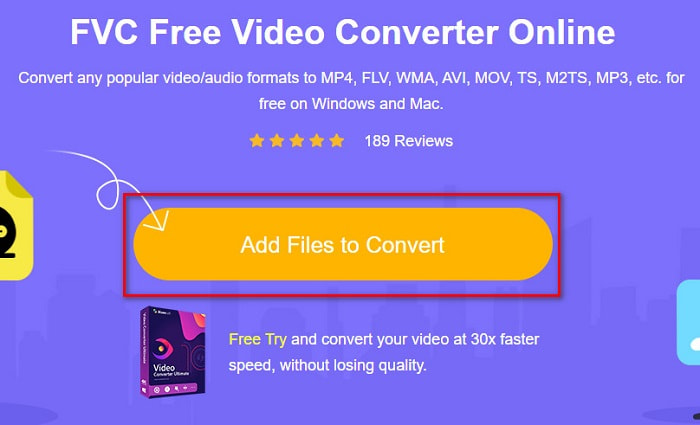
Étape 2. L’étape suivante consiste à cliquer sur le bouton Add Files to Convert pour télécharger le lanceur. Une fois le lanceur téléchargé, les fichiers de votre ordinateur s’afficheront : choisissez alors votre fichier MTS à importer.
Étape 3. Après avoir choisi votre fichier MTS, cliquez sur le fichier MKV sous l’interface du logiciel.
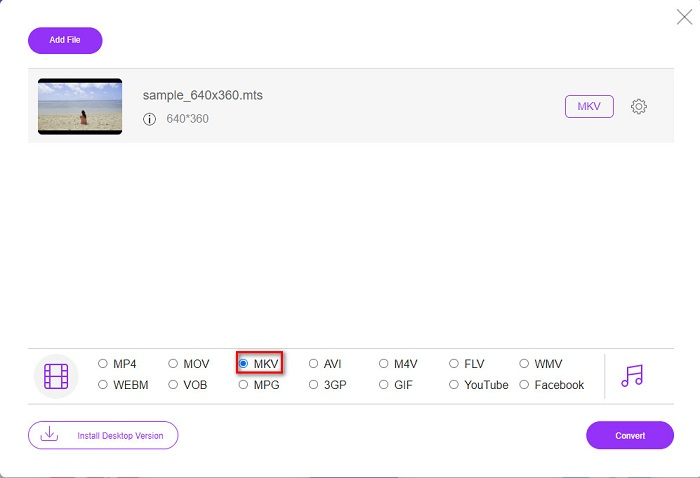
Étape 4. Enfin, cliquez sur le bouton Convert pour convertir votre fichier MTS en fichier MKV. Puis patientez le temps que votre fichier soit converti.
En suivant ces étapes simples, vous pouvez convertir MTS en MKV gratuitement et en ligne.
AnyConv
Un autre convertisseur en ligne que vous pouvez utiliser pour convertir des fichiers sans perte de qualité est AnyConv File Converter. Ce convertisseur prend également en charge de nombreux formats, notamment MTS vers MKV, AVI, MP4, MOV, MPEG, etc. Cependant, il ne propose que des fonctions limitées. Vous ne pouvez pas modifier ou ajuster la résolution de votre fichier. Il est également basé sur le Web ; par conséquent, vous pouvez rencontrer une conversion lente. Néanmoins, il est utilisé par de nombreuses personnes en raison de sa praticité.
Étapes à suivre pour utiliser AnyConv File Converter :
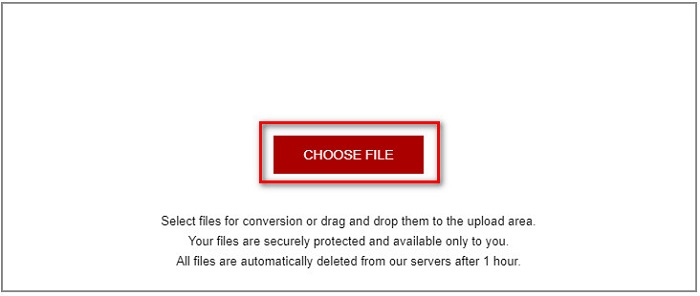
Étape 1. Recherchez AnyConv File Converter sur votre navigateur. Après avoir accédé à leur site Web, cliquez sur le bouton Choose Files pour sélectionner votre fichier MTS dans les fichiers de votre ordinateur.
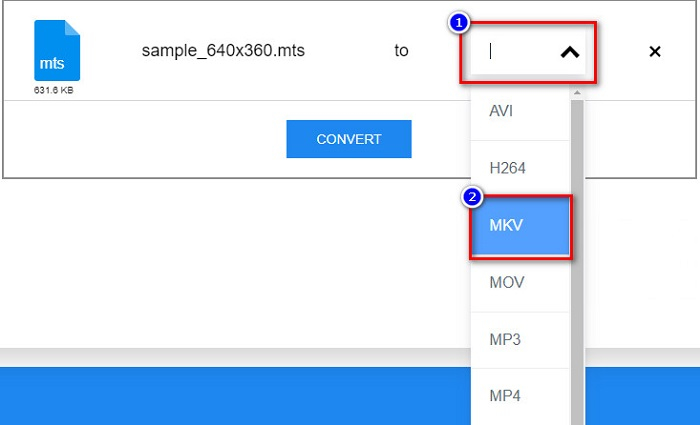
Étape 2. Après avoir sélectionné votre fichier MTS, cliquez sur le bouton drop-down et choisissez le format de fichier MKV.
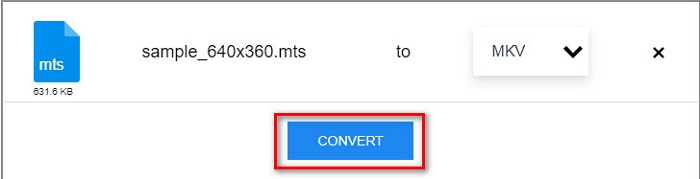
Étape 3. Pour terminer, cliquez sur le bouton Convert pour lancer la conversion de votre fichier MTS en MKV.
Partie 2. Convertir MTS en MKV sur Windows 10/11 sans perte
Si vous recherchez un convertisseur pour votre Windows 10/11, FVC Video Converter Ultimate est le meilleur outil pour vous. Il prend en charge divers formats de fichiers et peut convertir MTS en MKV, MP4, WebM, VOB, MPG, AVI et bien d'autres. De plus, ce convertisseur dispose d'une fonction permettant de créer des GIF et même de créer une vidéo 3D. Vous pouvez également convertir MTS en MKV rapidement et sans effort sans perdre la qualité de votre fichier.

Convertisseur vidéo FVC Ultimate
Plus de 5 689 200 téléchargements- Vous pouvez convertir vos fichiers par lots avec ce convertisseur.
- Vous permet de convertir divers formats de fichiers tels que MTS, MKV, MP4, WMV, etc.
- A une fonctionnalité qui vous permet d'avoir une conversion ultra-rapide.
Téléchargement gratuit pour Windows 7 ou version ultérieure Téléchargement sécurisé
Téléchargement gratuit pour macOS 10.7 ou version ultérieure - Téléchargement sécurisé
Voici comment vous pouvez utiliser FVC Video Converter Ultimate en suivant ces étapes simples :
Étape 1. Commencez par télécharger l’application en cliquant sur le bouton Download ci‑dessous pour Windows. Puis exécutez le logiciel pour passer à l’étape suivante.
Téléchargement gratuit pour Windows 7 ou version ultérieure Téléchargement sécurisé
Téléchargement gratuit pour macOS 10.7 ou version ultérieure - Téléchargement sécurisé
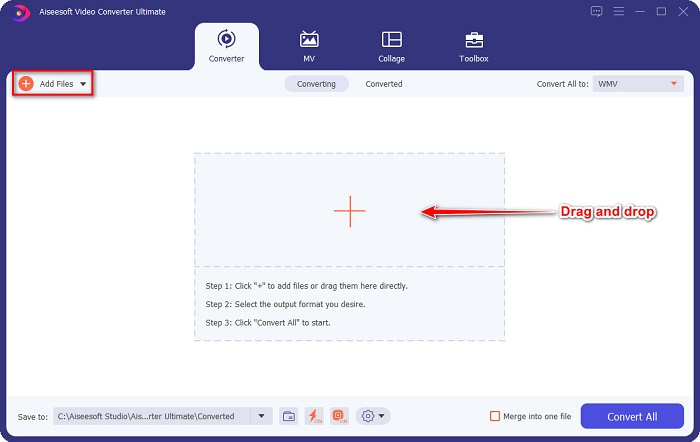
Étape 2. Après avoir ouvert le convertisseur, cliquez sur le bouton Add Files, ou vous pouvez glisser-déposer votre fichier sur le bouton avec le signe + pour importer votre fichier MTS. Votre fichier sera alors ajouté à la liste.
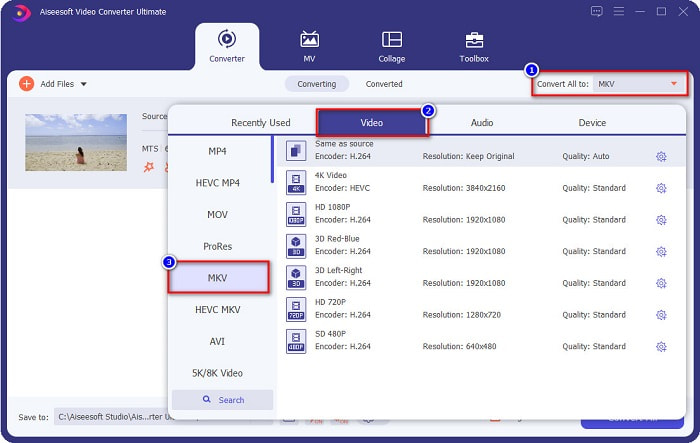
Étape 3. Pour choisir le format dans lequel vous souhaitez convertir votre fichier MTS, cliquez sur le bouton Convert All to et sélectionnez le fichier MKV.
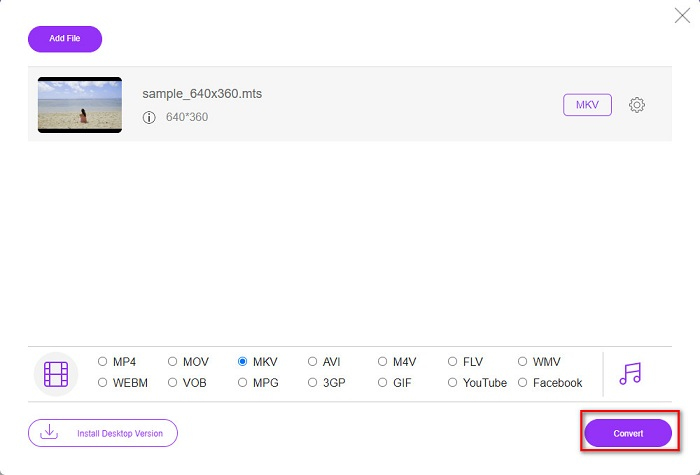
Étape 4. Pour finir, cliquez sur le bouton Convert All pour commencer à convertir votre fichier MTS en fichier MKV. Et voilà ! En quelques secondes, votre fichier converti est prêt.
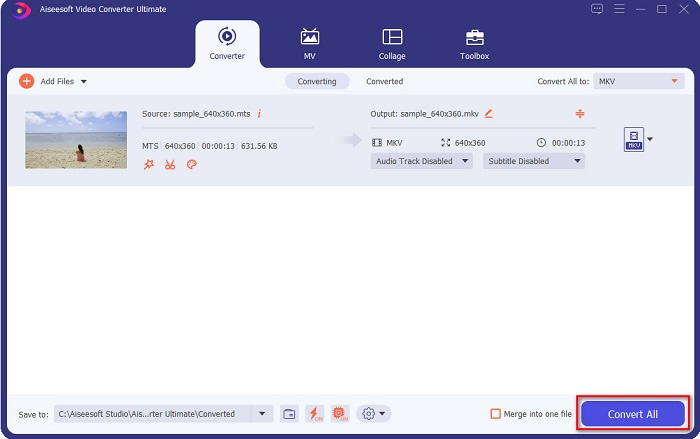
En suivant ces étapes simples, vous pouvez convertir MTS en MKV aussi rapidement que 1-2-3 !
Partie 3. Pourquoi convertir un fichier MTS au format de fichier MKV
Le fichier MTS, en abrégé MPEG Transport System, est un format de fichier standard principalement utilisé par les caméscopes SONY et Panasonic HD. C'est un fichier qui utilise la compression vidéo MPEG4/H.264. De plus, il prend en charge les vidéos 720p et 1080i, que les autres formats de fichiers ne prennent pas en charge. Depuis que Panasonic et Sony ont développé ce fichier, il utilise un fichier de codage audio avancé lié au format de fichier AVCHD. D'autre part, le fichier MKV ou Matroska est un format de fichier standard qui prend en charge de nombreux codecs audio et vidéo. Il est généralement utilisé pour stocker de courts clips vidéo et des films.
De plus, il prend également en charge les pistes de sous-titres. C'est pourquoi de nombreuses personnes utilisant ce format de fichier utilisent ce format de fichier. Alors pourquoi convertir MTS en MKV ? Tout simplement parce que la taille du fichier MKV est inférieure à celle contenue dans le format de fichier MTS.
Partie 4. Tableau de comparaison sur les convertisseurs en ligne et hors ligne
| CARACTÉRISTIQUES | Convertisseur en ligne gratuit FVC | Convertisseur de fichiers AnyConv | Convertisseur vidéo FVC Ultimate |
| Vitesse de conversion | Ordinaire | Ordinaire | Très vite |
| Formats de fichiers à convertir | MKV, MP4, MTS, MPG, MOV, AVI, WMV, FLV et autres formats de fichiers | MTS, MKV, AVI, MOV, MP4, MPEG et autres formats | Prend en charge plus de 1000 formats de fichiers |
| Modification des fonctionnalités | – | – |  |
| Conversion par lots | – | – | |
| Connexion Internet | Nécessaire | Nécessaire | Pas besoin |
Partie 5. FAQ sur la conversion de MTS en MKV
Pouvez-vous réduire la taille de fichier d'un fichier MTS ?
Oui. Vous pouvez compresser la taille d’un fichier MTS à l’aide d’un outil de compression disponible en ligne et hors ligne, comme Free Video Compressor.
Où pouvez-vous lire les formats de fichiers MKV ?
Vous pouvez lire des fichiers MKV dans Windows Media Player, VLC Media Player, DivX Player, MX Player, et bien d’autres. Vous pouvez également utiliser des codecs multimédias pour encoder et décoder les fichiers. Ou vous pouvez convertir votre fichier MKV au format MP4, qui est un format largement utilisé.
Pouvez-vous convertir MTS en MKV dans Handbrake ?
Oui. Ce convertisseur vous permet également de convertir votre fichier MTS au format de fichier MKV. Cependant, il ne prend pas en charge plusieurs fichiers et ne peut pas les combiner en un seul.
Conclusion
Il existe aujourd’hui de nombreux convertisseurs en ligne et hors ligne disponibles sur le marché. Et les convertisseurs que nous avons listés ci‑dessus font partie de ceux qui sont le plus utilisés et qui se sont révélés être d’excellents outils. De plus, ces convertisseurs ont des fonctions et des capacités différentes pour convertir gratuitement des fichiers MTS en MKV en ligne. Mais si vous recherchez un convertisseur pratique et performant, nous vous recommandons d’utiliser FVC Video Converter Ultimate. Ce convertisseur ultra‑rapide ne décevra pas vos attentes. Alors, si vous êtes prêt à convertir des fichiers, téléchargez‑le dès maintenant !
-
 [Gratuit et en ligne] 6 façons de convertir MTS en MP4 en haute qualité
 Vous ne savez pas comment convertir un fichier MTS en MP4? Dans ce guide, vous trouverez 6 moyens gratuits et simples de changer le format MTS en MP4 sur Windows ou Mac sans perte de qualité.
-
 Comment convertir MTS en WMV sans perdre en qualité
 Avez-vous du mal à regarder votre émission préférée car votre lecteur multimédia ne prend pas en charge le format vidéo MTS ? Essayez de le convertir en WMV avec ces nouveaux et meilleurs convertisseurs présents dans cet article.
-
 Comment convertir MTS en MP3 sans perte de qualité (AVCHD en MP3)
 Vous avez besoin d'extraire l'audio MP3 d'un fichier MTS mais vous ne savez pas comment? Quel est le meilleur convertisseur MTS en MP3? Cet article partage 2 façons simples de vous aider à convertir MTS / M2TS en MP3 avec une qualité audio élevée.
