


 Video Converter Ultimate
 Enregistreur d'écran
 Réparation vidéo
Apprenez à convertir MTS en WMV de différentes manières

Partie 1. Meilleur outil qui convertit MTS en WMV en ligne
La plupart d’entre nous préfèrent éviter les désagréments, c’est pourquoi nous ne voulons pas installer de logiciel de conversion. Ils recherchent un convertisseur en ligne capable de convertir leurs types de fichiers. FVC Free Video Converter Online est un convertisseur vidéo en ligne entièrement gratuit. Même si ce programme est gratuit, vous n’avez pas à vous inquiéter pour la qualité, car FVC Free Video Converter ne la compromet pas durant la conversion.
Étape 1 : Pour commencer, cliquez sur ce lien, qui vous redirigera vers le site. De là, cliquez sur le bouton Add Files to Convert pour télécharger le lanceur ; vous devrez ensuite téléverser les fichiers que vous souhaitez convertir.
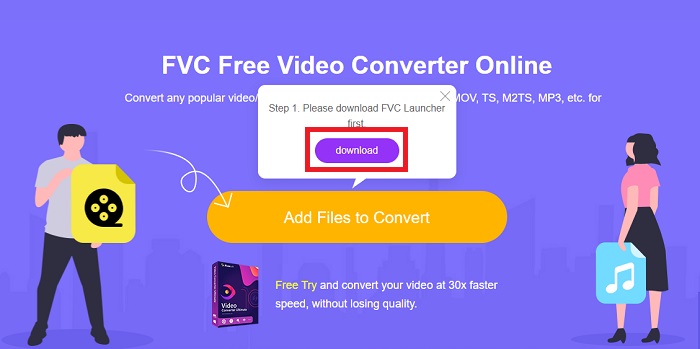
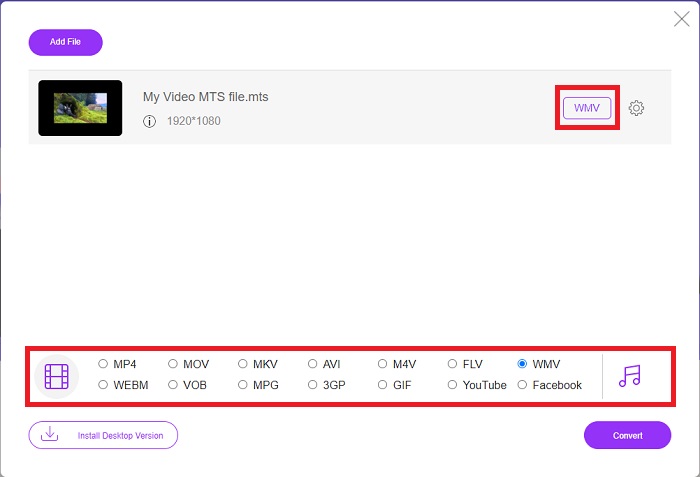
Étape 2 : Après cela, vous pouvez de nouveau cliquer sur le bouton pour importer le fichier vidéo. Vous verrez tous les formats proposés en bas et sélectionnerez WMV parmi les autres.
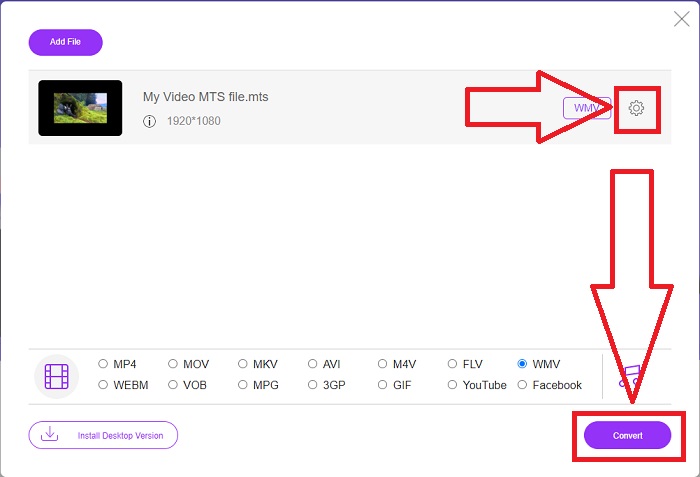
Étape 3 : Les options supplémentaires sont toujours disponibles. Cliquez sur l’icône d’engrenage, et toutes les modifications possibles pour votre vidéo s’afficheront. Cliquez simplement sur OK une fois que vous avez déjà choisi un format pour enregistrer les changements, puis cliquez sur Convert pour lancer enfin la conversion.
Partie 2. Comment convertir MTS en WMV avec le meilleur convertisseur hors ligne
Lors du choix d’un convertisseur, nous devons tenir compte de la simplicité, car nous ne voulons pas d’un convertisseur coûteux et difficile à utiliser. Nous sommes heureux de vous présenter le Video Converter Ultimate et son interface. Ce convertisseur possède l’interface la plus simple et, comme elle est épurée, elle est également la plus facile à utiliser. De plus, vous pouvez ajouter rapidement vos fichiers et voir les types de fichiers pris en charge. Vous trouverez ici davantage de fonctionnalités fiables qui rendront votre expérience de montage plus pratique. Si vous souhaitez l’utiliser directement, suivez ces étapes simples :
Étape 1 : Commencez par installer le logiciel lui-même. Pour ce faire, téléchargez le fichier .exe en cliquant sur le bouton Free Download ci‑dessous pour Windows ou Mac. Attendez la fin du téléchargement, puis ouvrez-le pour lancer le processus d’installation. Cliquez sur Start Now et lancez enfin le logiciel.
Téléchargement gratuit pour Windows 7 ou version ultérieure Téléchargement sécurisé
Téléchargement gratuit pour macOS 10.7 ou version ultérieure - Téléchargement sécurisé
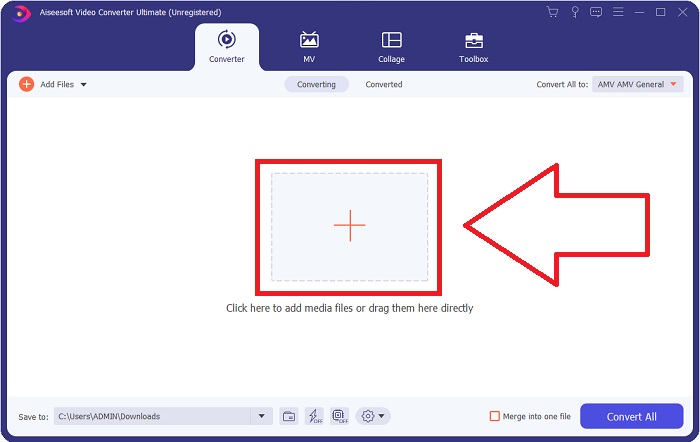
Étape 2 : Une interface avec un bouton + au centre apparaîtra à l’ouverture. Cliquez dessus pour importer le fichier vidéo MTS que vous souhaitez convertir, ou faites simplement glisser et déposez le fichier pour une utilisation plus rapide.
Étape 3 : Si le processus a réussi et que le fichier apparaît sur l’interface, vous pouvez voir, sur la droite, le format actuel de votre vidéo. Cliquez sur la flèche déroulante, et tous les formats disponibles s’afficheront. Faites défiler et sélectionnez WMV ou tapez-le simplement dans la barre de recherche. En complément, vous pouvez choisir la qualité souhaitée dans le panneau de droite de l’onglet.
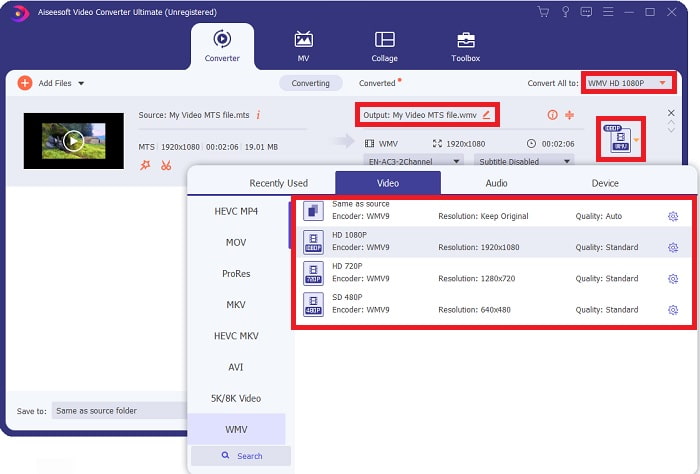
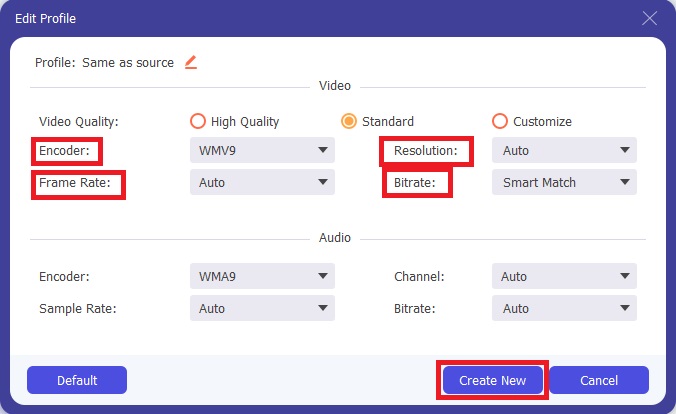
Étape 4 : Pour plus d’options, cliquez sur l’icône d’engrenage située à droite de la qualité vidéo que vous avez sélectionnée. Vous pouvez y modifier plus en détail votre vidéo, comme la résolution, la fréquence d’images, le débit binaire, et bien d’autres paramètres. Cliquez simplement sur le bouton Create New lorsque vous avez terminé les réglages.
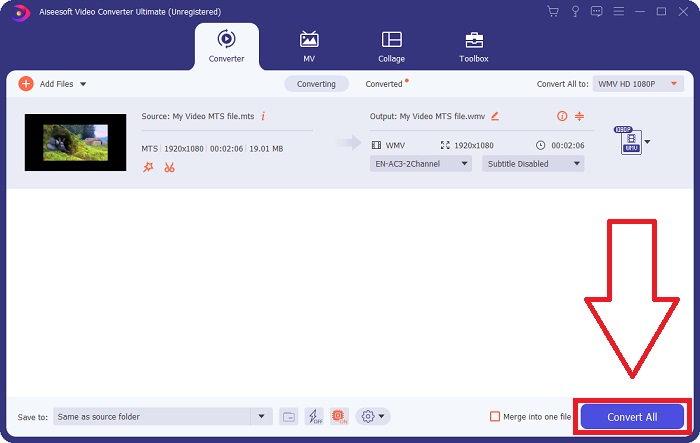
Étape 5 : Une fois tous les ajustements nécessaires effectués, cliquez sur le bouton Convert All situé dans le coin inférieur droit pour lancer correctement la conversion et attendez qu’elle se termine.
Partie 3. Connaissances approfondies sur MTS VS. WMV
| Extension de fichier | .mts | .wmv |
| La description | Advanced Video Coding High Definition (AVCHD) est un format vidéo qui utilise l'extension de nom de fichier MTS comme nom de fichier. Certaines marques de caméscopes, telles que JVC, Sony, Canon et Sanyo, utilisent le format vidéo HD MPEG et enregistrent leurs fichiers avec l'extension de nom de fichier .mts. | Dans le cadre du cadre Windows Media de Microsoft, WMV (Windows Media Video) comprend divers codecs vidéo et formats de codage. Au début, son objectif est de concurrencer le format RM sur les applications de streaming en ligne. Grâce à la technologie WMV, les vidéos peuvent être stockées, compressées et livrées sur Blu-ray/DVD. |
| Programmes associés | ◆ Roxio Creator NXT Pro 7 ◆ Mélangeur Lecteur multimédia VLC ◆ Apple Final Cut Pro X | Lecteur multimédia VLC ◆ Lecteur MP ◆ Lecteur multimédia classique ◆ Lecteur Windows Media |
| Développé par | Sony/Panason | Microsoft |
| Type de fichier | Vidéo/mp2t | Vidéo/x-ms-asf |
Partie 4. FAQ sur la conversion de MTS en WMV
Quel lecteur peut lire le fichier MTS ?
Si vous avez une vidéo MTS, vous pouvez l’éditer avec le logiciel fourni avec les caméscopes HD Sony et Panasonic, ou vous pouvez utiliser l’un des programmes listés ci‑dessous : Blender, pour mixer deux ingrédients ou plus (multiplateforme) ; MAGIX Vegas, une suite logicielle qui permet de créer différents types d’effets visuels (Windows) ; CyberLink PowerDirector, un programme de montage vidéo (Windows, Mac, Android).
Les fichiers MTS ont-ils de l'audio ?
Plusieurs facteurs peuvent entraîner une perte d'audio dans les fichiers MTS. Le plus courant est que le processus de conformité n'a pas été autorisé à se terminer, ce qui a entraîné l'absence d'audio ou la coupure de l'audio et l'échec de la copie de la structure complète du dossier (par opposition aux fichiers multimédias uniquement) à partir de la carte mémoire.
A quoi sert le WMV ?
Microsoft a introduit le format de fichier WMV comme une série de codecs vidéo dans Windows Media Player. WMV est l’abréviation de ' Windows Media Video ', un format de conteneur vidéo compressé développé pour être utilisé avec l’infrastructure Windows Media. Pour vendre des contenus vidéo en ligne ou via des disques HD DVD et Blu‑ray, les fichiers vidéo WMV sont le format le plus approprié. Pour lire des fichiers WMV, cliquez ici pour découvrir quelques lecteurs WMV utiles.
Conclusion
Tous les convertisseurs indiqués ci-dessus sont des outils fiables et recommandés pour convertir MTS en WMV. Video Converter Ultimate et Free Video Converter Ultimate sont les deux meilleurs convertisseurs incomparables aux autres outils et logiciels en ligne. Il propose différents types d'outils en vedette et les nombreux formats vidéo qu'il prend en charge.
-
 [Gratuit et en ligne] 5 méthodes pour convertir M2TS en MP4
 Vous voulez convertir la vidéo d'un caméscope HD en MP4 commun? Voici 5 façons simples et gratuites de changer le fichier M2TS en MP4 sur Windows et Mac.
-
 Comment convertir M2TS en MKV gratuitement et en ligne
 Vous souhaitez convertir M2TS en MKV tout en conservant la qualité d'origine? Cet article vous montre des méthodes gratuites et en ligne pour changer M2TS en MKV sans perte.
-
 [2021] Les 6 meilleures façons gratuites et en ligne de convertir M2TS en MP3
 Un fichier M2TS peut-il être converti en MP3? Dans cet article, nous avons répertorié les 6 meilleurs moyens gratuits et en ligne pour vous aider à convertir M2TS en formats MP3, AAC, AIFF et plus.
