


 Video Converter Ultimate
 Enregistreur d'écran
 Réparation vidéo
 Téléchargement sécurisé
Top 4 des méthodes efficaces pour convertir TS en 3GP
L’article est consacré à la façon de convertir un fichier TS en 3GP. De nos jours, les téléphones portables sont très répandus. C’est l’un des moyens les plus utilisés pour regarder vos vidéos préférées. Mais il arrive malheureusement que les fichiers TS ne soient pas pris en charge par les téléphones. Le format courant que vous pouvez utiliser pour lire des vidéos sur mobile est le format 3GP. Ainsi, la seule solution consiste à convertir votre fichier TS au format 3GP. Si c’est votre cas, cet article pourra répondre à vos besoins. Lisez-le pour apprendre comment convertir TS en 3GP.

Partie 1 : Applications téléchargeables gratuites pour convertir TS en 3GP
Video Converter Ultimate
Si vous souhaitez une application gratuite à télécharger sur Windows et Mac pour convertir facilement TS en 3GP, Video Converter Ultimate est faite pour vous. Ce logiciel vous permet de convertir TS en 3GP aisément et rapidement. Il autorise également la conversion de plusieurs fichiers en un seul clic. De plus, vous pouvez convertir vos fichiers très vite, car Video Converter Ultimate bénéficie d’une vitesse de conversion élevée, jusqu’à 30 fois plus rapide que d’autres convertisseurs. Tous les utilisateurs peuvent s’en servir, grâce à son interface conviviale et à ses méthodes simples. En outre, ce convertisseur offre plus de fonctionnalités que vous ne l’imaginez. Il peut aussi convertir des formats d’image comme JPG, PNG, BMP, TIFF, et bien d’autres. Et si vous souhaitez faire pivoter votre vidéo, vous pouvez aussi compter sur cette application. Vous pouvez retourner votre vidéo horizontalement et verticalement. Consultez les détails ci‑dessous pour découvrir d’autres fonctions.
Fonctionnalités
◆ Convertissez les formats vidéo, tels que MP4, M4V, 3GP, FLV, AVI, MOV, MKV, etc.
◆ Fiable dans la création d'un merveilleux collage.
◆ Offre un processus de conversion par lots.
◆ Le créateur de clips vidéo est disponible.
◆ Il peut ajuster la vitesse vidéo de 0,125x jusqu'à 8x plus rapide.
◆ Offre des outils d'édition, tels que l'amélioration vidéo, le compresseur, la fusion, le trimmer, etc.
Avantages
- Également bon pour convertir des fichiers image.
- Pas besoin de connexion internet.
- Parfait pour les débutants et possède une interface simple.
- Il a la capacité de personnaliser des vidéos 3D à partir de 2D.
Les inconvénients
- Achetez la version pro pour profiter de fonctionnalités exceptionnelles.
Pour convertir TS au format 3GP, utilisons Video Converter Ultimate en suivant le guide détaillé ci‑dessous.
Étape 1 : Cliquez sur le bouton de téléchargement ci‑dessous pour télécharger gratuitement Video Converter Ultimate sur votre Windows ou Mac. Installez‑le, puis lancez le convertisseur.
Téléchargement gratuit pour Windows 7 ou version ultérieure Téléchargement sécurisé
Téléchargement gratuit pour macOS 10.7 ou version ultérieure - Téléchargement sécurisé
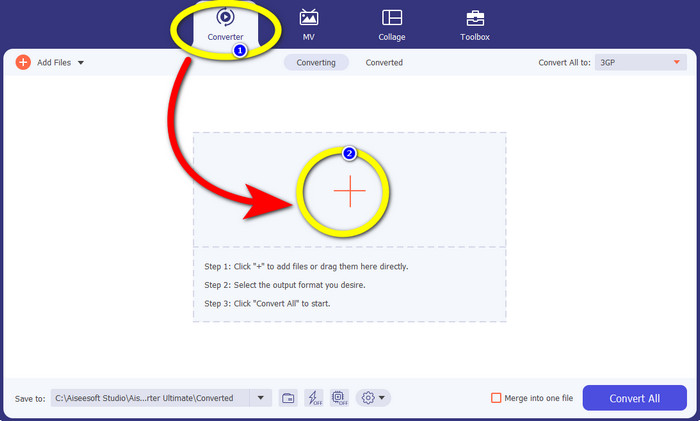
Étape 2 : Sélectionnez l’onglet Convertisseur et cliquez sur le signe + pour importer le fichier TS que vous souhaitez convertir au format 3GP.
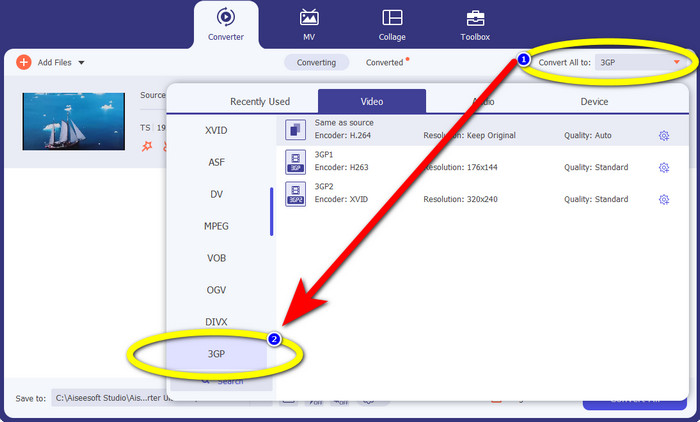
Étape 3 : Après avoir importé le fichier TS, cliquez sur le bouton Tout convertir en. Les options de format apparaîtront, puis cliquez sur le format de fichier 3GP.
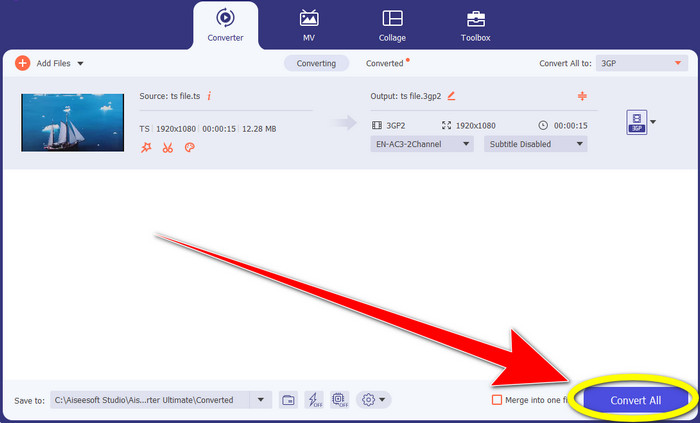
Étape 4 : Pour terminer, cliquez sur le bouton Tout convertir. Le processus de conversion ne prend que quelques secondes, et vous pouvez déjà enregistrer votre vidéo finale sur votre Windows ou Mac.
Convertisseur vidéo HitPaw
Un autre outil gratuit à télécharger pour convertir TS en 3GP est HitPaw Video Converter. Ce convertisseur est également excellent pour convertir différents fichiers, comme MKV, M4V, VOB, WEBM, FLV, XVID, M2TS, TS, 3GP, et bien plus. Vous pouvez aussi convertir des formats audio facilement avec cet outil. En outre, il dispose de nombreux outils d’édition, comme couper, fusionner, rogner et faire pivoter, filigrane, vitesse, filtres, etc. De plus, HitPaw Video Converter vous permet de télécharger des vidéos depuis plus de 1000 sites comme YouTube, BiliBili, Facebook, etc. Cependant, même s’il s’agit d’une application téléchargeable gratuitement, ses fonctions sont limitées : vous devez donc acheter la version complète. De plus, le processus de téléchargement et d’installation sur Windows et Mac est complexe et comporte de nombreuses étapes. Suivez les étapes ci‑dessous si vous voulez utiliser HitPaw Video Converter pour convertir TS en 3GP.
Étape 1 : Téléchargez HitPaw Video Converter sur votre Windows ou Mac. Suivez la procédure d’installation, puis ouvrez‑le.
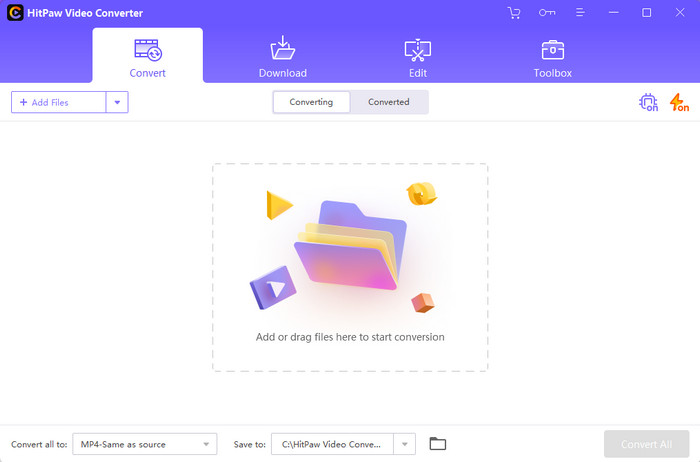
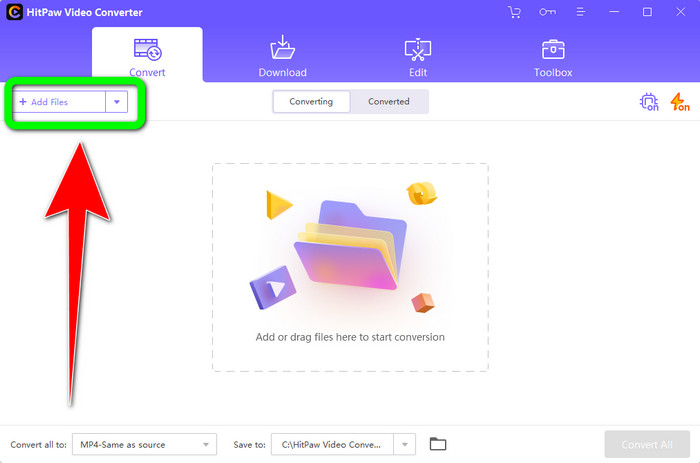
Étape 2 : Cliquez sur le bouton Ajouter des fichiers pour importer le fichier TS.
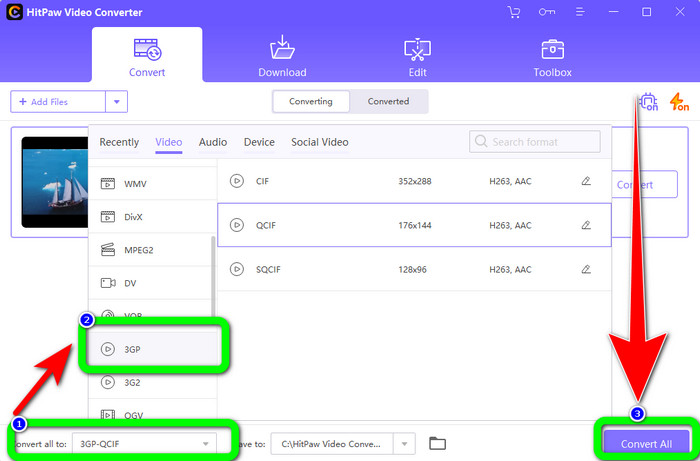
Étape 3 : Cliquez sur le bouton Tout convertir en. Les options de format apparaîtront alors à l’écran. Sélectionnez le format de fichier 3GP, puis cliquez sur le bouton Tout convertir pour enfin convertir et enregistrer votre vidéo finale.
Partie 2 : Incroyables convertisseurs TS vers 3GP en ligne
FVC Convertisseur Vidéo Gratuit en Ligne
Pour les convertisseurs en ligne, il y a FVC Free Video Converter Online. Cette application permet de convertir TS en 3GP facilement et sans à‑coups. Elle peut également vous aider à convertir d’autres fichiers, comme MP4, AVI, WMA, TS, M2TS, XVID, FLV, et bien plus. De plus, ce convertisseur est simple à utiliser et convient à tous les utilisateurs. Vous pouvez également employer ce logiciel gratuit en ligne aussi bien sur Windows que sur Mac. Il est disponible sur presque tous les navigateurs, comme Google, Mozilla Firefox, Microsoft Edge, etc. Suivez ces étapes simples pour convertir un fichier TS au format 3GP avec FVC Free Video Converter Online.
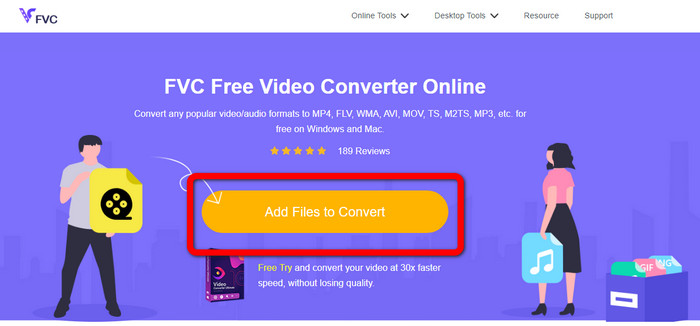
Étape 1 : Rendez‑vous sur le site de FVC Free Video Converter Online. Cliquez sur le cadre orange au centre pour importer le fichier TS.
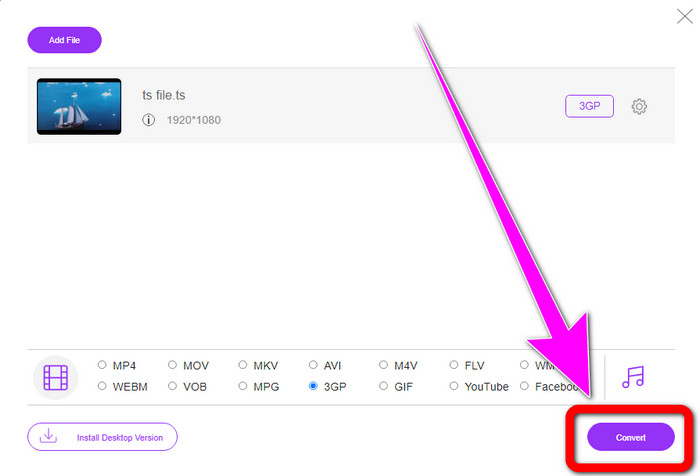
Étape 2 : Après avoir importé le fichier TS, vous verrez de nombreuses options de format dans la partie inférieure de l’interface. Choisissez alors le format de fichier souhaité, à savoir le format 3GP.
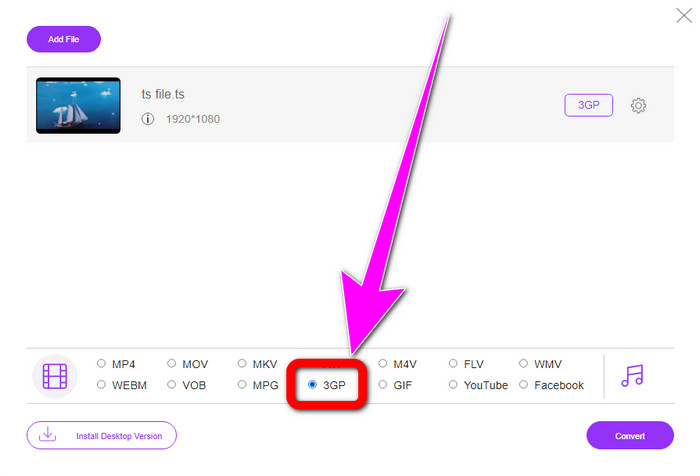
Étape 3 : Une fois que vous avez terminé de choisir le format 3GP, cliquez sur le bouton Convertir. Ensuite, téléchargez et enregistrez le fichier vidéo final.
Convertio
Convertio est un autre outil en ligne permettant de convertir TS en 3GP. Comme les applications ci‑dessus, ce convertisseur est facile à utiliser : il ne nécessite que trois clics pour convertir divers fichiers, tels que MOV, AVI, FLV, MKV, MPG, MP4, et bien d’autres. Outre la conversion vidéo, Convertio permet aussi de convertir des fichiers audio, des documents et des présentations. Mais il présente un inconvénient, surtout si vous utilisez la version gratuite : la taille maximale des fichiers est limitée à 100 Mo, vous ne pouvez donc pas convertir un nombre illimité de fichiers. Vous devez passer à la version payante pour profiter de performances optimales. Suivez les étapes ci‑dessous pour convertir TS au format 3GP.
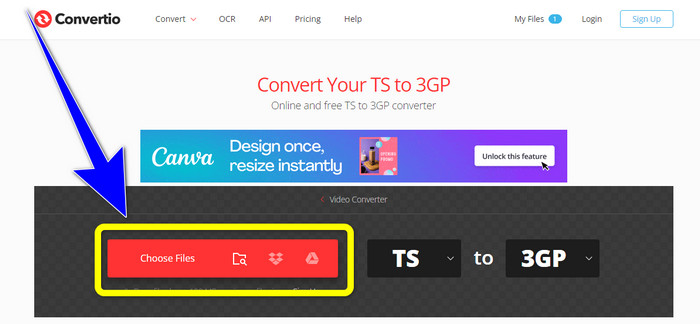
Étape 1 : Visitez le site de Convertio. Puis cliquez sur le bouton Choisir les fichiers pour insérer votre fichier TS.
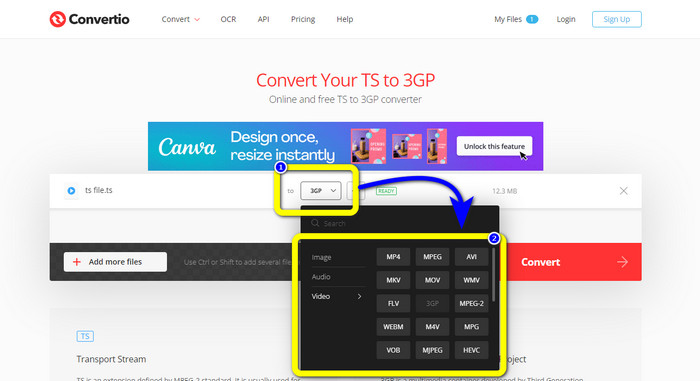
Étape 2 : Cliquez sur les options de format et sélectionnez le format de fichier 3GP.
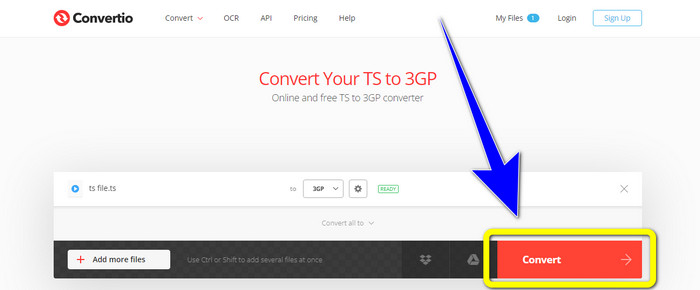
Étape 3 : Pour la dernière étape, appuyez sur le bouton Convertir. Patientez pendant le processus, puis enregistrez votre résultat. Vous pouvez également utiliser cet outil pour convertir TS en FLV.
Partie 3 : TS contre 3GP
| Fichier | TS | 3GP |
| Extension de fichier | .ts | .3gp |
| La description | La spécification MPEG-2 définit TS comme une extension. En règle générale, il est utilisé pour la diffusion, la diffusion en continu de médias Internet et le stockage de musique et de vidéos sur DVD. Lorsqu'un défaut de transmission de données survient, les flux élémentaires de ce conteneur multimédia sont enregistrés sous une forme permettant une lecture rapide et une synchronisation audio/vidéo. | Pour les téléphones GSM (Global System for Mobile Communications), le projet de partenariat de troisième génération a créé le conteneur multimédia 3GP en 1998. Le conteneur est parfait pour les téléphones mobiles car il utilise moins de données, de bande passante et de stockage. Il s'agit d'un conteneur commun pour les fichiers MMS (Multimedia Messaging Service). |
| Développé par | Le groupe d'experts en images animées | Projet de partenariat de troisième génération |
| Programmes associés | QuickTime Player, Windows Films et TV VLC Media Player | Lecteur Windows Meda, lecteur multimédia VLC |
Partie 4 : FAQ sur la conversion de TS en 3GP
TS est-il meilleur que MP4 ?
Les fichiers MP4 et TS ont la même qualité vidéo. La principale distinction entre les fichiers TS et MP4 est que les fichiers TS sont plats, mais les fichiers MP4 commencent par un index. En revanche, les bits vidéo à l'intérieur des fichiers sont identiques. Par conséquent, les fichiers TS, M2TS et MP4 ont tous la même qualité vidéo.
Puis-je télécharger des fichiers TS sur YouTube ?
Malheureusement, non. Vous pouvez télécharger des fichiers TS sur Facebook mais pas sur YouTube. Le meilleur programme pour ouvrir les fichiers TS est VLC Media Player.
Qu'est-ce que MPEG TS et PS ?
TS signifie « Transport Stream », utilisé pour les applications de communication et de diffusion. PS signifie « Program Stream », qui peut être utilisé pour le stockage, comme sur les DVD.
Conclusion
Voici les quatre méthodes les plus efficaces pour convertir TS en 3GP. Mais certaines applications ne sont pleinement exploitables qu’avec la version payante. Si vous cherchez un convertisseur gratuit sans aucune limitation, utilisez FVC Free Video Converter Online.
-
 TS en GIF : comment transformer un fichier TS en GIF animés
 Apprenez à modifier les fichiers TS au format GIF à l'aide de cet article. La liste ci-dessous indique différentes idées sur TS et GIF et comment convertir TS en GIF.
-
 Comment convertir DIVX en 3GP sur Windows, Mac et en ligne
 Comment convertir DIVX en 3GP ? Si vous cherchez une réponse, lisez cet article. Nous vous montrerons d'excellentes procédures à l'aide de différents convertisseurs.
-
 4 meilleures façons de convertir SWF en 3GP sur Windows, Mac et en ligne
 Voici les méthodes les plus utiles pour convertir instantanément SWF en 3GP. En outre, cet article vous montrera quelques outils Windows et en ligne efficaces que vous pouvez utiliser.
