


 Video Converter Ultimate
 Enregistreur d'écran
 Réparation vidéo
 Téléchargement sécurisé
Comment convertir vos fichiers vidéo DAT au format FLV gratuitement
Étant donné qu’il existe de nombreux formats vidéo, vous pouvez avoir besoin d’en convertir un vers un autre. Cet article explique comment convertir un fichier DAT en FLV sur ordinateur et en ligne gratuitement. Un fichier avec l’extension DAT n’est pas un format standard, mais un fichier de données qui stocke des informations. Par conséquent, aucun programme spécifique n’est chargé d’ouvrir les fichiers DAT. Si un fichier vidéo est stocké de cette manière, un bon convertisseur DAT vers FLV peut vous aider à l’ouvrir.

Partie 1 : Meilleurs moyens gratuits de convertir des fichiers DAT en FLV
Façon 1: Convertissez DAT en FLV avec Free FLV Converter
FVC Free FLV Converter est un puissant convertisseur vidéo bien qu’il soit gratuit. Cela signifie que vous pouvez bénéficier de fonctionnalités proches de celles d’un logiciel professionnel sans dépenser un centime.
Principales fonctionnalités du meilleur convertisseur DAT vers FLV gratuit
- 1. Conversion par lots des fichiers DAT au format FLV rapidement.
- 2. Produisez une sortie de haute qualité en utilisant une technologie de pointe.
- 3. Incluez un large éventail d'outils bonus, comme le montage vidéo.
Téléchargement gratuitPour Windows 7 ou version ultérieureTéléchargement sécurisé
Téléchargement gratuitPour macOS 10.7 ou version ultérieureTéléchargement sécurisé
Comment convertir un fichier DAT en FLV gratuitement
Étape 1 : Ouvrir les fichiers DAT
Lancez le meilleur convertisseur DAT vers FLV gratuit une fois que vous l’avez installé sur votre ordinateur. Pour protéger vos données, il est préférable de le télécharger depuis le site officiel. Cliquez sur le gros bouton Add File(s) dans l’interface d’accueil, recherchez et sélectionnez les fichiers vidéo DAT puis ouvrez-les. Ils apparaîtront alors dans la zone de bibliothèque.

Étape 2 : Définir FLV comme format de sortie
Allez en bas de la fenêtre, cliquez sur l’option Output format et déployez-la. Accédez à l’onglet General Video dans la liste, faites défiler vers le bas et sélectionnez FLV ou un format apparenté. Vous pouvez également réinitialiser la fréquence d’images, la résolution et d’autres paramètres en cliquant sur l’icône Gear sur chaque titre.

Étape 3 : Convertir DAT en FLV
Ensuite, cliquez sur le bouton Open Folder et modifiez le dossier de destination selon vos préférences. Par défaut, le convertisseur DAT vers FLV enregistrera le résultat dans votre vidéothèque. Enfin, cliquez sur le bouton Convert pour commencer immédiatement la conversion de DAT en FLV sur votre ordinateur. La conversion ne prend que quelques minutes.

Façon 2: Comment convertir DAT en FLV par VLC
VLC est un autre moyen de convertir gratuitement DAT en FLV. Le lecteur multimédia open source peut ouvrir un fichier vidéo avec l'extension DAT et le convertir en fichiers vidéo standard. Compte tenu de la procédure compliquée, nous partageons les étapes de base ci-dessous.
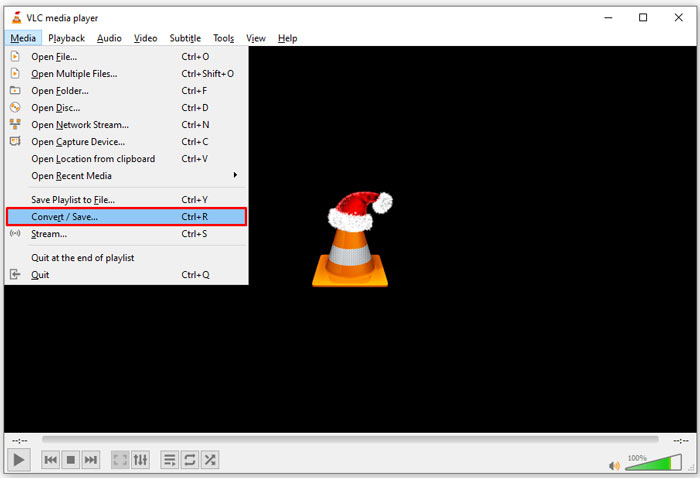
Étape 1 : Ouvrez VLC et cliquez sur l’option Convert/Save dans le menu Media en haut. La boîte de dialogue Ouvrir un média s’affichera alors.
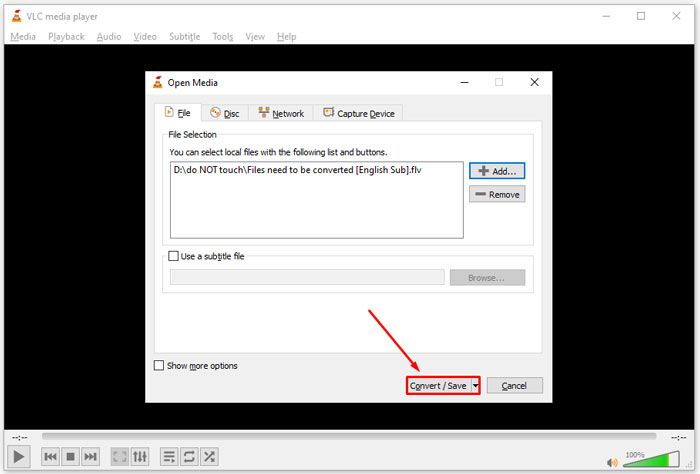
Étape 2 : Cliquez sur le bouton Add et importez les fichiers vidéo DAT dans VLC. Cliquez sur le bouton Convert/Save pour continuer.
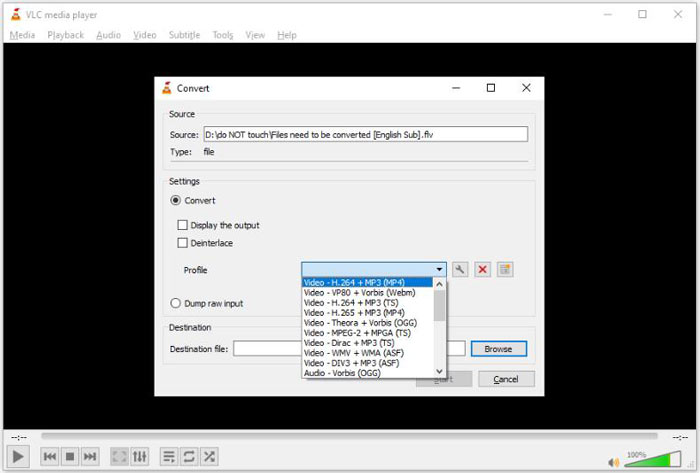
Étape 3 : Déroulez la liste Profile et définissez FLV comme format de sortie. Cliquez sur le bouton Browse pour choisir un dossier de sortie dans la section Destination.
Étape 4 : Cliquez sur le bouton Start pour lancer la conversion de DAT en FLV. La conversion dans VLC prend un temps équivalent à la durée de votre fichier vidéo.
Partie 2 : Comment convertir DAT en FLV en ligne
FVC Free Online Video Converter est un moyen simple de convertir un fichier DAT en FLV en ligne gratuitement. Par rapport à d’autres convertisseurs vidéo en ligne, il vous permet de réaliser cette tâche sans aucune limite, que ce soit en termes de taille de fichier, d’inscription, de filigrane, etc.
Étape 1 : Ouvrez un navigateur et rendez-vous sur https://www.free-videoconverter.net/free-online-video-converter/. Cliquez sur le bouton Add Files to Convert pour télécharger le lanceur.

Étape 2 : Cliquez sur le bouton Add File dans le lanceur et importez les fichiers vidéo DAT depuis votre ordinateur. Puis allez dans la section des formats en bas et sélectionnez FLV.

Étape 3 : Appuyez sur le bouton Convert pour lancer la conversion de DAT en FLV en ligne. Une fois la conversion terminée, téléchargez les fichiers vidéo sur votre disque dur.
Vous aimerez peut-être aussi :
Convertissez vos fichiers TS au format FLV
Partie 3 : FAQ sur les fichiers DAT vers FLV
Puis-je convertir des fichiers DAT en FLV à partir d'Internet Explorer ?
Si les fichiers DAT d'IE stockent des contenus vidéo, vous pouvez les convertir en vidéos standard. Cependant, DAT stocke non seulement des données vidéo, mais également d'autres informations. Pour les autres données, vous ne pouvez pas convertir en vidéos.
Comment ouvrir les fichiers DAT ?
Un fichier DAT est un fichier de données qui contient des informations sur le programme auquel il est associé. Vous pouvez essayer d'ouvrir un fichier DAT en double-cliquant dessus. Votre système peut distribuer le programme approprié.
Puis-je convertir DAT en QuickTime ?
Cela dépend de ta situation. Premièrement, les fichiers DAT doivent stocker des données vidéo. Ensuite, vous avez également besoin d'un convertisseur vidéo prenant en charge DAT et QuickTime.
Conclusion
Ce guide a partagé trois façons de convertir votre DAT en FLV sur votre bureau ou en ligne. VLC est un moyen gratuit de faire le travail sur Windows, Mac et Linux. Cependant, FVC Free FLV Converter offre plus de fonctionnalités de niveau professionnel avec demande de paiement. Si vous avez d'autres questions, veuillez laisser un message sous ce post.
-
 MP4 à FLV | Top 3 des convertisseurs gratuits (en ligne / Mac / Windows)
 Cet article est le guide détaillé de la conversion MP4 en FLV. Vous pouvez utiliser les 3 meilleurs convertisseurs gratuits pour changer facilement MP4 en FLV en ligne, sur un ordinateur Windows ou Mac.
-
 3 solutions pour convertir MTS en FLV gratuitement et en ligne
 Vous voulez convertir MTS en FLV ? Voici 3 logiciels de conversion gratuits de MTS en FLV que vous pouvez essayer de convertir de MTS en FLV sur Mac OS X et Windows 10/8/7.
-
 Top 4 des moyens gratuits pour convertir des vidéos FLV en MP4 sur le bureau et en ligne
 Ce guide partage quatre méthodes gratuites pour convertir vos fichiers vidéo FLV au format MP4 sur Windows 10/8/7 / XP et Mac OS X, afin que vous puissiez profiter des vidéos sur tous les appareils.
