


 Video Converter Ultimate
 Enregistreur d'écran
 Réparation vidéo
Découvrez quels sont les 3 meilleurs convertisseurs FLV vers MKV pour convertir vos fichiers FLV en MKV
Êtes-vous fatigué de parcourir Internet à la recherche de la meilleure façon de convertir gratuitement un FLV en MKV ? Ce n’est peut‑être pas un hasard, mais aujourd’hui nous avons trouvé les meilleurs convertisseurs FLV que vous pouvez utiliser ; bien sûr, nous n’avons sélectionné que les meilleurs. Pour rendre votre exploration beaucoup plus simple, poursuivez votre lecture ci‑dessous : vous en apprendrez beaucoup sur les formats FLV et MKV, ainsi que sur les convertisseurs que vous pouvez utiliser.

Partie 1. 2 façons de convertir gratuitement FLV en MKV
1ère Voie. Utilisez le convertisseur en ligne pour convertir FLV en MKV
Ce convertisseur en ligne est sans aucun doute l’un des grands transcodeurs pour convertir un FLV en MKV en ligne. FVC Free Video Converter Online est un convertisseur simple et facile à comprendre que vous pouvez utiliser directement sur le web. Mais cet outil dépend d’Internet, ce qui signifie que si vous n’avez pas de connexion, il ne pourra plus vous dépanner pour la conversion. Même s’il est basé en ligne, il n’affiche aucune publicité sur son interface susceptible de vous déranger, et il est exempt de malware. Maintenant, si vous voulez le tester par vous‑même, suivez les étapes ci‑dessous.
Étape 1. Cliquez sur ce lien pour ouvrir FVC Free Video Converter Online dans un nouvel onglet.
Étape 2. Cliquez sur le bouton Add Files to Convert pour ouvrir le dossier de l’ordinateur que vous utilisez. Choisissez le fichier FLV que vous souhaitez convertir et appuyez sur Open pour téléverser le fichier.
Téléchargez la version de bureau pour convertir des fichiers par lots.
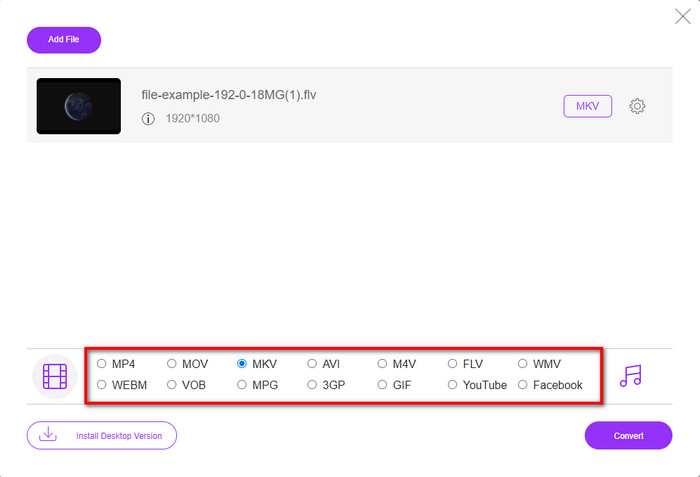
Étape 3. Sélectionnez le format MKV dans la liste des formats présentée ci‑dessous.
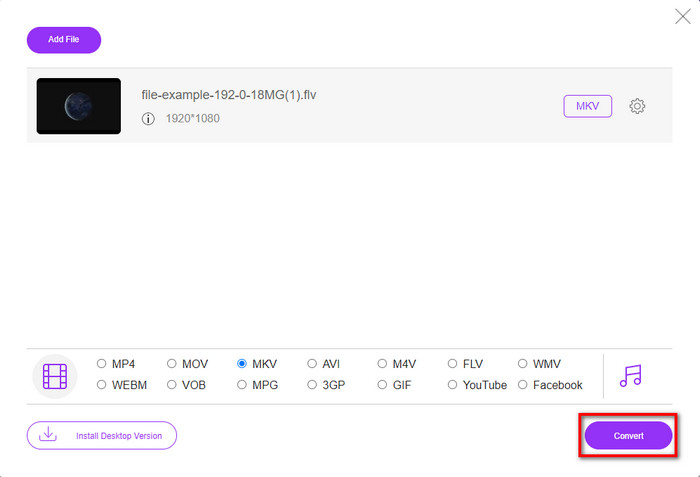
Étape 4. Lancez le processus de conversion en cliquant sur le bouton Convert ; le fichier converti sera ensuite automatiquement enregistré sur le disque de votre ordinateur.
2ème Voie. Utilisez le convertisseur gratuit disponible en téléchargement sur Windows et Mac
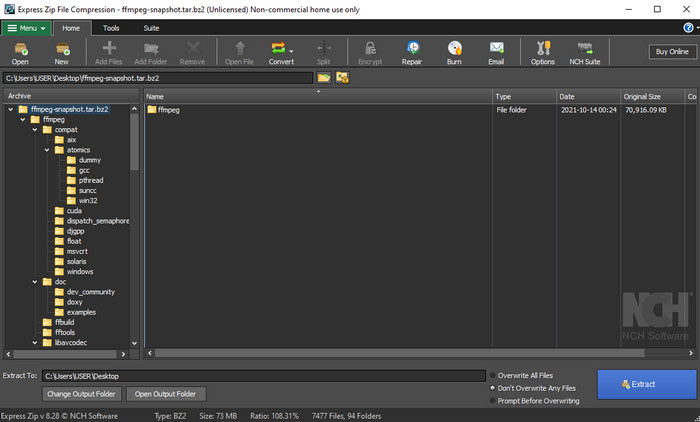
FFmpeg n’est pas le convertisseur classique que vous utilisez déjà. Même s’il ne s’agit pas d’un convertisseur habituel, il peut tout de même convertir votre fichier FLV. Ce qui rend cet outil différent, c’est qu’il utilise une interface en ligne de commande (CLI), ce qui signifie qu’avant d’effectuer la conversion, vous devez lui donner des instructions en encodant, ou plus simplement en tapant des commandes. Si ce convertisseur vous semble intéressant, lisez les informations ci‑dessous pour utiliser ce FFmpeg FLV vers MKV en suivant les étapes.
Étape 1. Téléchargez et ouvrez FFmpeg.exe.
Étape 2. Ouvrez l’invite de commande (Command Prompt) sur votre ordinateur.
Étape 3. Parcourez le fichier FLV à l’aide du CMD. Puis copiez ce code et collez‑le dans l’invite de commande : ffmpeg -i input.flv -vn -ar 44100 -ac 2 -b:a 192k output.mkv, puis appuyez sur Entrée sur votre clavier pour lancer le processus.
Partie 2. Convertir FLV en MKV avec le meilleur convertisseur FLV en MKV sans perte
3ème manière. Utilisez le convertisseur professionnel pour convertir FLV en WMV
Vous n’êtes toujours pas satisfait des deux premiers convertisseurs présentés ci‑dessus ? Dans ce cas, vous devez essayer FVC Video Converter Ultimate. Pourquoi ? Parce qu’il fournit un résultat professionnel même si vous ne fournissez pas beaucoup d’efforts pour la conversion. De plus, il prend en charge davantage de formats pour convertir votre fichier FLV en MKV, AVI, MOV, AVI, MP4 et plus de 200 autres formats. Toujours pas impressionné ? Vous voulez peut‑être ajouter une touche de magie à votre vidéo ? Dans ce cas, vous avez de la chance d’avoir ce convertisseur, car il offre des fonctions avancées de montage vidéo que vous pouvez utiliser. Vous doutez de cet outil parce qu’il pourrait vous paraître complexe à utiliser ? Si oui, suivez les étapes ci‑dessous pour découvrir et apprendre à utiliser ce convertisseur FLV vers MKV.
Étape 1. Avant d’utiliser ce convertisseur, vous devez d’abord le télécharger en cliquant sur le bouton de téléchargement ci‑dessous. Suivez ensuite les instructions d’installation après le téléchargement, puis lancez‑le.
Téléchargement gratuit pour Windows 7 ou version ultérieure Téléchargement sécurisé
Téléchargement gratuit pour macOS 10.7 ou version ultérieure - Téléchargement sécurisé
Étape 2. Pour ajouter le fichier FLV que vous voulez convertir, appuyez sur le bouton +. Recherchez le fichier FLV dans le dossier qui s’affichera sur votre interface, puis cliquez sur Open pour passer à l’étape suivante.
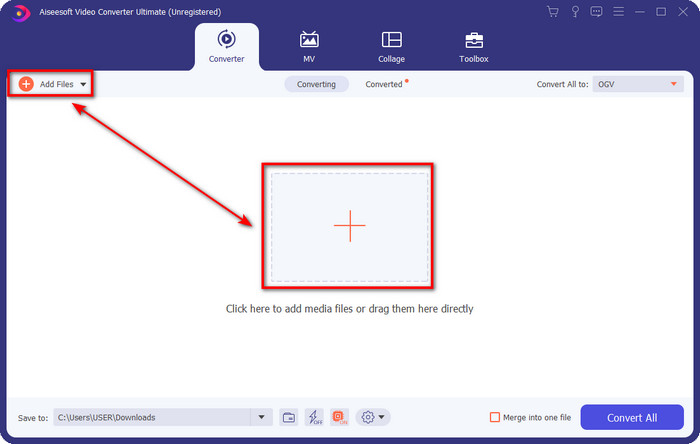
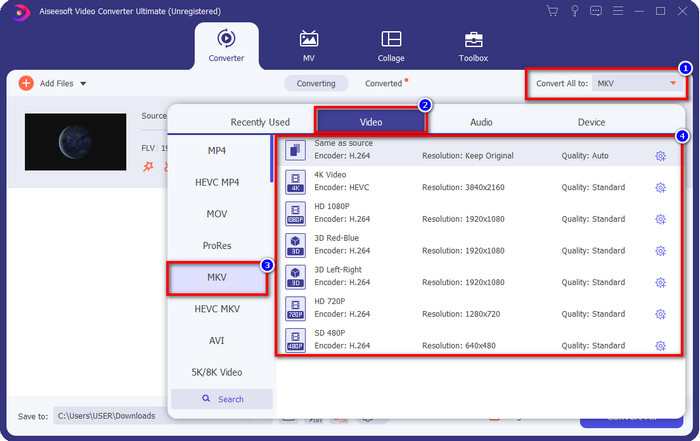
Étape 3. Ensuite, changeons le format en MKV en cliquant sur le bouton drop-down situé dans la partie supérieure droite de l’interface utilisateur.
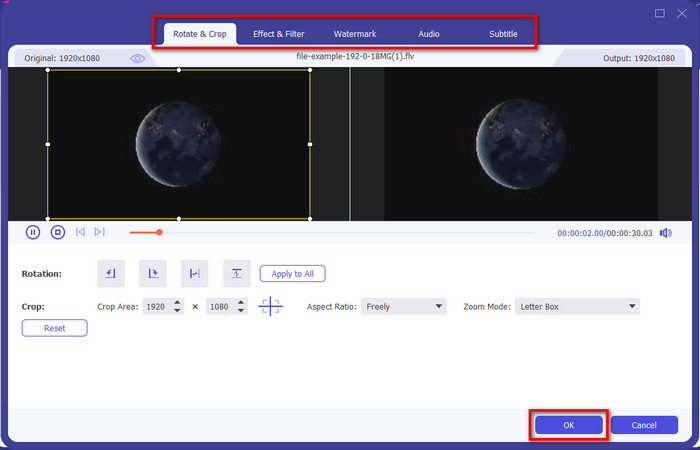
Optionnel. Si vous avez besoin de monter la vidéo, vous pouvez cliquer sur le bouton en forme de baguette magique si vous le souhaitez. Une nouvelle interface va s’afficher ; vous pourrez faire pivoter, rogner, appliquer des effets, des filtres, un filigrane, modifier l’audio et les sous-titres dans cette interface. Ne bridez pas votre imagination, faites ce que vous voulez, puis pour appliquer toute la magie que vous avez créée, cliquez sur OK.
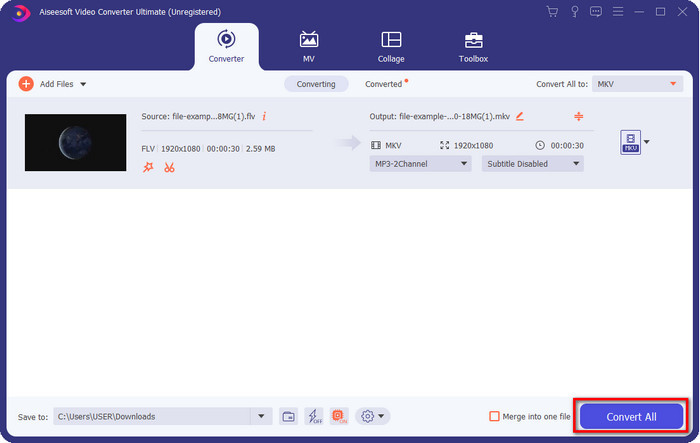
Étape 4. Pour finir, cliquez sur Convert All pour convertir le FLV au format MKV. Le processus ne prendra que moins d’une minute, vous n’aurez donc pas à attendre longtemps. Un dossier s’affichera à l’écran avec le FLV converti.
En rapport:
Partie 3. Quelle est la différence entre FLV et MKV
FLV et MKV sont connus pour être parmi les meilleurs conteneurs que tout le monde connaisse. Mais avant toute chose, comparons et voyons des informations plus détaillées sur les deux formats.
FLV est connu sur tous les sites Web car il est populaire sur les pages Web, principalement parce qu'Adobe l'a créé. De plus, .flv lit les flux vidéo en ligne car ils sont beaucoup plus faciles à charger que l'autre format. De plus, ce format nécessite un plug-in-play avant de pouvoir visionner ou regarder la vidéo sur ce format, ou vous pouvez facilement télécharger le Flash Player. Même si le format est excellent, les plug-ins qu'il utilise ont déjà décollé, ce qui signifie que le format n'est pas le meilleur choix. Cependant, de nombreux lecteurs multimédias prennent toujours en charge ce format et les utilisateurs qui l'utilisent encore.
MKV est connu pour être le format le plus futuriste disponible. Ce format ne ressemblerait à aucun autre format dans beaucoup de sens si nous étions sur le point de le comparer. Par exemple, la structure construite dans ce format n'est pas la même que celle du MP4 ou de l'AVI, mais elle est différente. La conception et son stockage unique de fichiers multimédias le rendent plus impressionnant. De nos jours, il est difficile de choisir quel format est obsolète, et l'un est le MKV.
Si nous approfondissons les détails, nous trouverons de nombreuses raisons pour lesquelles vous devez convertir FLV en MKV. Bien que les deux formats contiennent du contenu multimédia, MKV est plus puissant que FLV. Donc, si vous voulez avoir la puissance unique du MKV, vous devez convertir votre fichier dans ce format.
FLV contre MKV
Adobe Flash Player a utilisé FLV pour diffuser du contenu vidéo comme des films et des émissions de télévision. Aujourd'hui, Adobe ne développe plus le lecteur et recommande aux utilisateurs de le désinstaller pour des raisons de sécurité. Cependant, vous pouvez toujours utiliser le format FLV sur de nombreux programmes autres qu'Adobe/Macromedia.
Le format de conteneur multimédia Matroska, sorti en 2002, est un format open source qui peut inclure un certain nombre de pistes vidéo, audio, image et sous-titres. Ainsi, vous pouvez l'utiliser pour stocker facilement de courts clips vidéo, des émissions de télévision et des films. Il est très populaire pour les fans d'anime.
Partie 4. FAQ sur la conversion FLV en MKV
Est-il sûr de convertir FLV en MKV en ligne ?
Eh bien, la conversion du format devrait être sûre si vous utilisez un outil Web. Cependant, tous les convertisseurs en ligne ne sont pas sûrs pour convertir votre format de fichier. Parce qu'il y a certaines tendances, il y aura de nombreuses erreurs inattendues lorsque vous utilisez le mauvais convertisseur. Par exemple, la perte de qualité est un problème répandu, les virus lors du téléchargement du fichier après la conversion, les multiples publicités contextuelles, les logiciels malveillants infectieux et bien d'autres. Donc, si vous voulez avoir un processus de conversion sécurisé en ligne, vous devez utiliser le FVC Free Video Converter Online à la place.
La conversion FLV prendra-t-elle du temps ?
Le processus de conversion dépendra de nombreux facteurs, et l'un d'entre eux est l'outil que vous utilisez et la taille du fichier. Si vous avez un gros fichier FLV, vous devez utiliser FVC Video Converter Ultimate, surtout si vous êtes pressé. Parce que cet outil fournit un processus ultra-rapide, vous n'aurez pas besoin d'une connexion Internet pour l'utiliser. Et maintenant, si vous recherchez un convertisseur capable de traiter votre format plus rapidement, l'outil ultime est le choix.
Pourquoi ne puis-je pas ouvrir mon fichier FLV ?
Il existe plusieurs raisons pour lesquelles vous ne pouvez pas ouvrir vos fichiers FLV. Prendre note; ce détail suivant est l'une des centièmes raisons pour lesquelles vous ne pouvez pas ouvrir le fichier FLV. Tout d'abord, vous ne pouvez pas ouvrir un FLV si le fichier est fissuré ou s'il contient un virus. Deuxièmement, le problème le plus courant est que le fichier vidéo n'est pas pris en charge par l'application que vous utilisez. Troisièmement, si vous téléchargez un fichier FLV sur Internet, il se peut que le fichier perde des informations vitales pour le lire. Bien que ce soit un problème, nous pouvons toujours vous aider en convertissant votre FLV dans un autre format. Mais n'oubliez pas que vous ne pouvez pas restaurer le FLV en modifiant le format s'il est endommagé ou incomplet.
Conclusion
Nous avons appris ce qu’il fallait savoir pour convertir un FLV en MKV de plusieurs façons. Les outils ci‑dessus sont excellents à utiliser si nous voulons convertir le format en une nouvelle version. Désormais, c’est à vous de choisir la solution qui, selon vous, convient le mieux pour transformer votre format. Quel que soit l’un des trois outils ci‑dessus que vous choisirez, votre réussite est assurée ; mais si vous souhaitez un rendu professionnel et tirer le meilleur parti de votre fichier vidéo, vous devez opter pour FVC Video Converter Ultimate. Aucune explication n’est nécessaire, car cet outil comblera toutes vos attentes.
-
 3 solutions sur la façon de convertir FLV en PSP sans perte
 Comment convertir FLV en PSP ? Ici, vous obtiendrez le guide étape par étape pour convertir des vidéos Flash aux formats pris en charge par PSP (WMV, MP4, AVI, FLV, etc.) sur Windows et Mac.
-
 2 méthodes pour convertir FLV en audio WMA [gratuit et en ligne]
 Vous voulez extraire l'audio WMA d'une vidéo FLV ? Voici 2 extracteurs audio WMA gratuits pour convertir FLV (Flash Video) en WMA (Windows Media Audio) avec une vitesse de conversion rapide sur Mac OS X et Windows 10/8/7.
-
 [Résolu] Comment convertir des vidéos FLV en fichiers GIF animés gratuitement
 Si vous souhaitez créer des GIF à partir des segments vidéo FLV pour un meilleur envoi, vous pouvez en savoir plus sur la façon de convertir facilement des vidéos FLV en fichiers GIF à partir de cet article.

