


 Video Converter Ultimate
 Enregistreur d'écran
 Réparation vidéo
 Téléchargement sécurisé
3 façons gratuites de convertir FLV en MPG
MPG, normalisé par le Moving Picture Experts Group, est un format vidéo courant qui contient des formats vidéo MPEG-1 ou MPEG-2, ainsi que des formats audio. Il est pris en charge par toutes les plates‑formes informatiques, y compris Windows et macOS. Savez‑vous comment convertir un FLV en MPG ?

De nombreux convertisseurs vidéo disponibles sur le marché peuvent vous aider à convertir FLV en MPG facilement. Cet article va vous présenter 3 excellents outils parmi eux pour transformer gratuitement vos fichiers FLV en MPG.
Partie 1. Comment convertir gratuitement FLV en MPG
Un convertisseur gratuit sera toujours votre premier choix lorsque vous souhaitez convertir FLV en MPEG. Dans cette première partie, nous souhaitons vous présenter un Free FLV Converter simple d’utilisation pour effectuer la conversion vidéo de FLV vers MPG. Il prend en charge tous les formats vidéo et audio les plus courants, notamment FLV, MPG, MKV, MP4, MOV, WMV, WAV, AAC, MP3, M4A, FLAC et bien d’autres. Il vous permet de convertir FLV en MPG sans perte de qualité.

- Convertissez n'importe quel fichier FLV en MPG, MP4, MOV, AVI, MKV, MP3, AAC, etc.
- Proposez divers thèmes pour éditer et personnaliser le fichier FLV.
- Processeurs multicœurs avancés et accélérations GPU pour convertir rapidement FLV en MPG.
- Prend en charge iPhone 12/11/XS/XR/X/8/7, iPad Pro, Samsung Galaxy S21, HUAWEI, SONY, LG, etc.
- Convertissez un ou plusieurs fichiers FLV sans aucune perte de qualité d'image ou de son.
Téléchargement gratuitPour Windows 7 ou version ultérieureTéléchargement sécurisé
Téléchargement gratuitPour macOS 10.7 ou version ultérieureTéléchargement sécurisé
Étape 1. Ce convertisseur FLV vous permet de convertir FLV en MPG aussi bien sur un PC Windows 10/8/7 que sur Mac. Vous pouvez choisir la bonne version en fonction de votre système, puis l’installer gratuitement sur votre ordinateur.
Étape 2. Ouvrez ce convertisseur FLV en MPG puis cliquez sur Ajouter des fichiers pour charger votre ou vos fichiers FLV.

Étape 3. Choisissez MPEG comme format de sortie dans la liste déroulante Format de sortie. Vous pouvez cliquer sur l’icône Paramètres à côté du format de sortie pour personnaliser davantage les paramètres du profil. À cette étape, vous pouvez également sélectionner un dossier de destination adapté pour le fichier MPG converti.
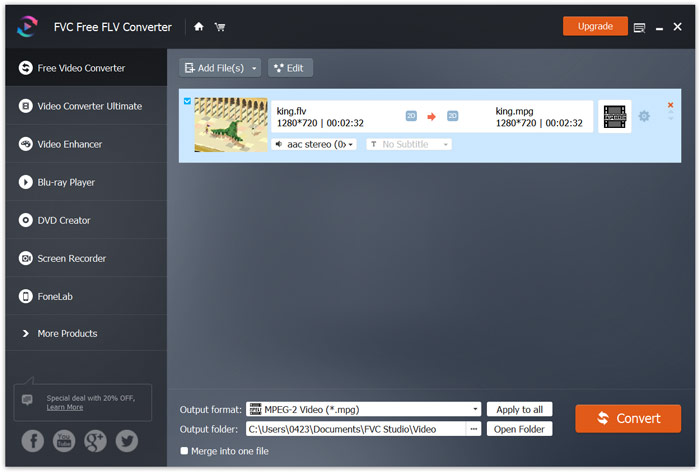
Étape 4. Comme mentionné ci‑dessus, ce convertisseur FLV en MPG gratuit est doté de nombreuses fonctions de montage. Ainsi, avant la conversion, vous pouvez les utiliser pour éditer votre vidéo. Ensuite, vous pouvez cliquer sur le bouton Convertir pour lancer cette conversion gratuite de FLV en MPG.
Partie 2. Comment changer FLV en MPG en ligne
Lorsque vous recherchez sur Google comment convertir FLV en MPG, vous pouvez voir de nombreux convertisseurs en ligne parmi les 20 premiers résultats. Nous vous recommandons vivement ici le populaire Free Online Video Converter. Il est compatible avec de nombreux formats vidéo et audio courants. Il ne nécessite aucune inscription et n’impose aucune limite de taille de fichier. Vous pouvez vous rendre directement sur ce site de conversion FLV en MPG en ligne et commencer la conversion.
Étape 1. Ouvrez votre navigateur, comme IE, Chrome, Firefox ou Safari, puis accédez à cette page convertisseur FLV en MPG en ligne.
Téléchargez la version de bureau pour convertir des fichiers par lots.
Étape 2. Cliquez sur Ajouter des fichiers à convertir puis sur le bouton Télécharger pour installer rapidement un lanceur pour la conversion FLV en MPEG. Lorsque le lanceur est prêt, vous pouvez parcourir vos dossiers et charger votre fichier FLV via la fenêtre contextuelle.

Étape 3. Vous serez alors dirigé vers la fenêtre du convertisseur. Plusieurs formats vidéo populaires comme MP4, MPG, MOV, AVI, FLV, MKV, WMV et d’autres y sont listés. Définissez MPG comme format cible.
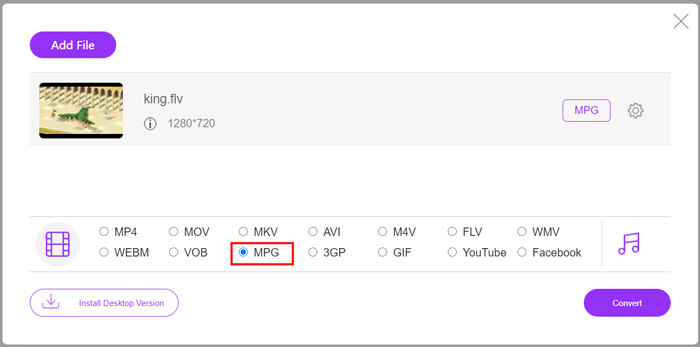
Étape 4. Pour plus de paramètres vidéo et audio, vous pouvez cliquer sur l’icône Paramètres à côté du format de sortie. Puis cliquez sur le bouton Convertir pour démarrer la conversion vidéo de FLV en MPG.
Partie 3. Comment convertir gratuitement FLV en MPG avec Aconvert
Aconvert est un autre convertisseur en ligne populaire pour les vidéos, l’audio, les documents, les images et les fichiers PDF. En tant que convertisseur de fichiers tout‑en‑un, il vous permet de transformer gratuitement vos fichiers FLV en MPG en ligne. Le guide suivant vous montrera comment l’utiliser.
Étape 1. Recherchez et accédez au site officiel d’Aconvert. Une fois sur la page, cliquez sur Video dans le panneau de gauche. Vous serez alors redirigé vers la page Convert video online.
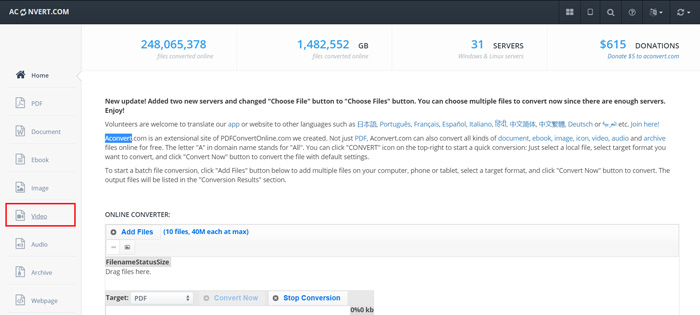
Étape 2. Cliquez sur le bouton Select File pour parcourir et téléverser votre fichier FLV. Puis choisissez MPG comme format de sortie. Pour plus d’options, vous pouvez cliquer sur Options et sélectionner Change size, bitrate ou frame rate.
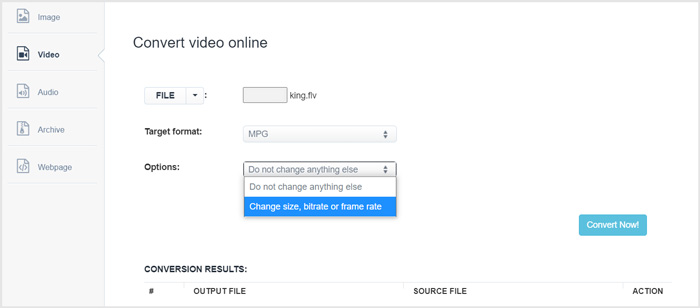
Étape 3. Cliquez sur le bouton Convert Now pour lancer la conversion FLV en MPG en ligne. Ce convertisseur FLV en MPG en ligne va commencer à téléverser puis convertir votre fichier. Par rapport au convertisseur vidéo en ligne présenté ci‑dessus, il lui faudra plus de temps pour terminer l’ensemble du processus ; soyez patient.
FLV contre MPG
Adobe Flash Player a utilisé FLV pour diffuser du contenu vidéo comme des films et des émissions de télévision. Aujourd'hui, Adobe ne développe plus le lecteur et recommande aux utilisateurs de le désinstaller pour des raisons de sécurité. Cependant, vous pouvez toujours utiliser le format FLV sur de nombreux programmes autres qu'Adobe/Macromedia.
Fabriqué par le Moving Picture Experts Group (MPEG), MPG est un format vidéo numérique courant pour stocker des informations vidéo, audio et de métadonnées. Il est très utile lors de la création de films à partager sur Internet. Ces fichiers en MPG contiennent généralement une compression vidéo/audio MPEG-1 ou MPEG-2.
Partie 4. FAQ sur la conversion de FLV en MPG
Question 1. Quels sont les inconvénients du FLV ?
Premièrement, la création de contenu flash prend du temps et coûte cher. Les fichiers FLV ne peuvent pas être reconnus par les robots des moteurs de recherche. Ainsi, ils ne seront pas ajoutés à l'optimisation d'un site. Dans ce cas, vous avez besoin de temps d'attente plus longs pour accéder à une page Web avec flash.
Question 2. Puis-je lire des fichiers FLV dans Windows Media Player ?
Oui. Windows Media Player peut ouvrir les fichiers FLV. Mais vous devez télécharger et installer le codec CCCP ou d'autres codecs nécessaires pour lire les fichiers FLV.
Question 3. Quel est le meilleur lecteur FLV ?
VLC Media Player peut être le meilleur lecteur pour lire les fichiers FLV aussi bien sur un PC Windows que sur Mac. Bien sûr, de nombreux autres lecteurs vidéo disponibles sur Internet peuvent vous aider à ouvrir des fichiers FLV. Découvrez davantage de lecteurs FLV ici.
Conclusion
Nous avons principalement expliqué dans cet article comment convertir FLV en MPG. Trois convertisseurs vidéo gratuits sont recommandés pour vous aider à convertir vos fichiers FLV. Si vous connaissez une meilleure méthode de conversion FLV, veuillez la partager dans les commentaires avec les autres lecteurs.
-
 MP4 en MPEG: les 4 meilleures façons de convertir MP4 en MPEG (gratuit)
 Cet article est le guide étape par étape pour convertir MP4 en MPEG. Vous pouvez utiliser les 4 meilleurs convertisseurs vidéo gratuits pour changer MP4 en MPEG-1 ou MPEG-2 comme vous le souhaitez.
-
 Comment compresser des fichiers MPEG-4 en ligne - pas de téléchargement, pas de filigrane
 Vous n'avez pas assez de stockage de fichiers pour conserver tous vos fichiers MPEG-4 ? Voici quelques solutions qui pourraient vous aider à réduire la taille de vos fichiers vidéo.
-
 Top 4 des moyens gratuits pour convertir des vidéos FLV en MP4 sur le bureau et en ligne
 Ce guide partage quatre méthodes gratuites pour convertir vos fichiers vidéo FLV au format MP4 sur Windows 10/8/7 / XP et Mac OS X, afin que vous puissiez profiter des vidéos sur tous les appareils.

