


 Video Converter Ultimate
 Enregistreur d'écran
 Réparation vidéo
Découvrez les 4 meilleurs convertisseurs SWF vers FLV hors ligne et en ligne sur Windows et Mac
Je recherche actuellement une solution pour télécharger mes fichiers SWF sur des sites de partage de vidéos tels que Youtube, Facebook, MySpace, etc. Pouvez-vous m'aider à trouver le moyen le plus rapide de résoudre ce problème ?
Ce problème est courant, surtout si votre vidéo est au format avec l’extension de fichier .swf. Toutefois, même si ce format est habituel sur le web, le partage du fichier sur une plateforme de partage de vidéos ne fonctionne pas. De plus, si vous souhaitez partager vos fichiers SWF, vous devez convertir ce format en un format bien plus pris en charge, comme le FLV. Sur ce, découvrons quatre pépites cachées, des convertisseurs SWF vers FLV hors ligne et en ligne que vous pouvez utiliser en lisant cet article.

Partie 1. Convertir SWF en FLV en ligne gratuitement avec le convertisseur vidéo gratuit FVC en ligne
FVC Free Video Converter Online est le convertisseur vidéo incomparable que vous pouvez utiliser pour convertir SWF en FLV en ligne et gratuitement. Cet outil web est spécialisé dans la conversion de fichiers vers un nouveau format sans avoir à télécharger le programme sur votre ordinateur. En plus de sa capacité de conversion, vous pouvez également modifier les spécifications vidéo et audio selon vos besoins. Vous voulez savoir comment utiliser ce convertisseur web léger ? Alors, copiez les étapes écrites ci-dessous.
Étape 1. Cliquez sur ce lien pour ouvrir un nouvel onglet qui vous mènera à la page officielle de FVC Free Video Converter Online.
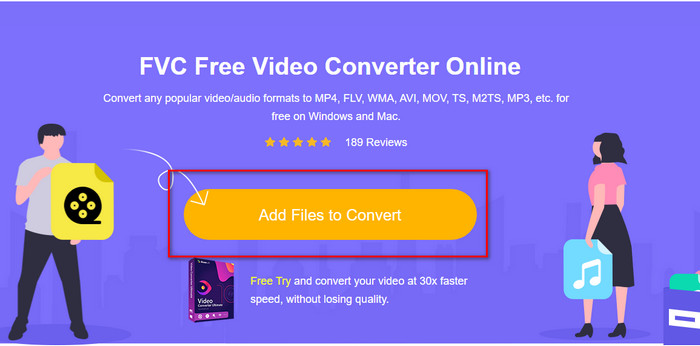
Étape 2. Sur le site, cliquez sur Add Files to Convert, un dossier de votre ordinateur s’affichera ; sélectionnez le fichier .swf et appuyez sur Open.
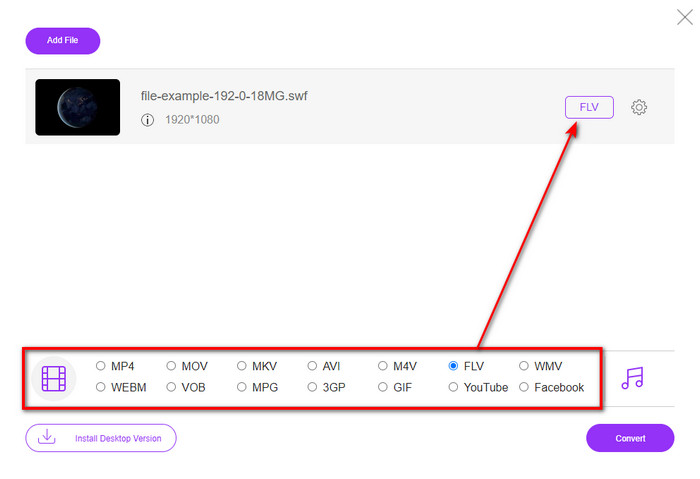
Étape 3. Après avoir inséré le fichier, sous la liste des formats, choisissez le format FLV.
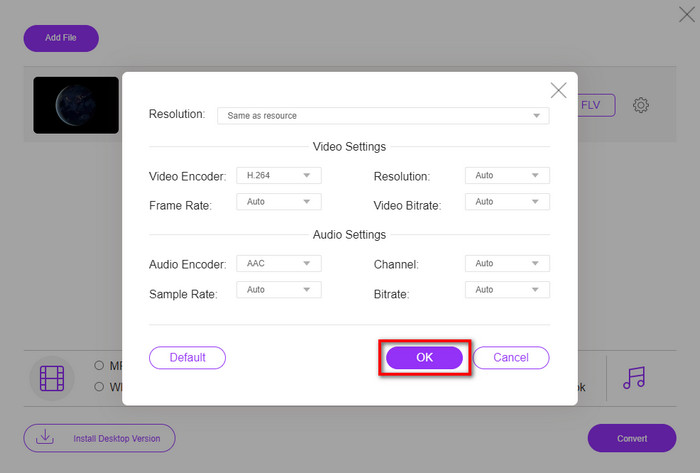
Pour modifier les spécifications vidéo et audio, cliquez sur le bouton en forme de roue dentée.
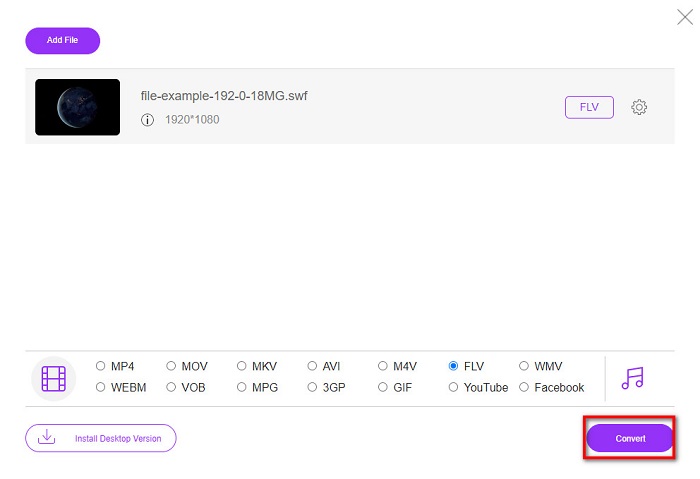
Étape 4. Pour lancer le processus de conversion, cliquez sur le bouton Convert.
Partie 2. Convertir SWF en FLV avec FFmpeg
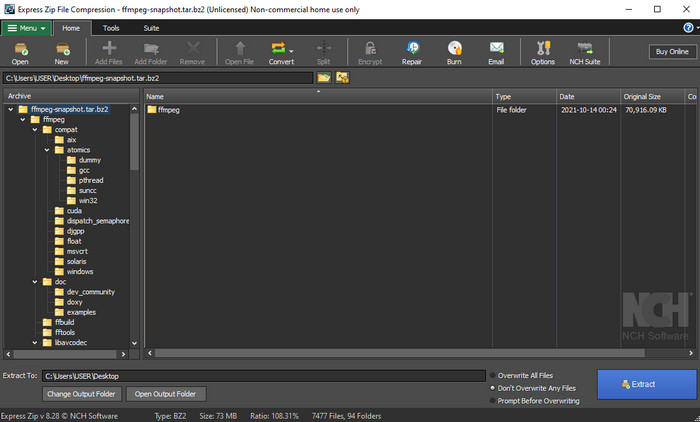
FFmpeg possède une interface et des commandes uniques pour convertir gratuitement SWF en FLV. Si vous connaissez déjà ce convertisseur, vous savez comment l’utiliser ; cependant, ce n’est pas le cas de tout le monde. En bref, ce convertisseur n’est pas un convertisseur vidéo classique, déjà prêt à être utilisé sur le web ou après téléchargement. Au lieu d’utiliser des boutons pour donner des ordres, vous aurez besoin d’une invite de commande pour le contrôler.
Étape 1. Téléchargez le convertisseur FFmpeg sur votre disque, puis ouvrez-le.
Étape 2. Sur votre ordinateur, ouvrez l’invite de commandes.
Étape 3. Accédez dans l’invite de commandes au dossier où se trouve votre fichier SWF, puis insérez-le. Copiez cette commande et collez-la dans l’invite de commandes : ffmpeg -i input.swf -vn -ar 44100 -ac 2 -b:a 192k output.flv puis appuyez sur Entrée pour lancer le processus.
Partie 3. Convertir SWF en FLV en Flash
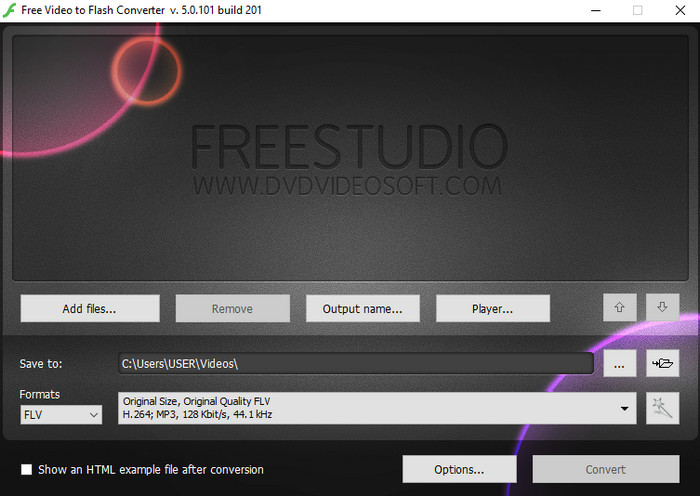
Free Video to Flash Converter est un convertisseur gratuit à télécharger sur Windows. Ce convertisseur propose deux formats au choix. Il est précisément conçu pour convertir des fichiers uniquement en FLV ou en SWF. Donc, si vous cherchez à convertir vos fichiers SWF en AVI, MP4, MOV, MKV, et plus encore, vous ne pourrez pas le faire ici. Découvrons sans plus tarder comment convertir SWF en FLV dans Flash.
Étape 1. Téléchargez la version officielle du logiciel Flash Converter sur votre PC Windows et lancez l’application.
Étape 2. Cliquez sur Add Files pour importer le fichier dans le convertisseur. Puis appuyez sur Formats, recherchez le format FLV, et vous pouvez aussi choisir la qualité.
Étape 3. Démarrez la conversion en cliquant sur le bouton Convert en bas à droite de l’interface.
Partie 4. Comment convertir SWF en FLV à l'aide du meilleur convertisseur SWF sur Windows et Mac
Vous n’êtes toujours pas satisfait des trois premiers convertisseurs SWF vers FLV en ligne et hors ligne présentés ci‑dessus ? Dans ce cas, essayez d’utiliser FVC Video Converter Ultimate. Ce convertisseur dépasse les attentes de tous les utilisateurs, notamment par la rapidité du processus de conversion qu’il offre. En plus de ses performances remarquables en conversion, il dispose aussi de fonctions de montage avancées pour améliorer vos vidéos, ainsi que d’une Boîte à outils pour d’autres usages. De plus, le guide ci-dessous vous garantit une réussite à 101% dans la conversion de votre fichier.
Étape 1. Avant d’utiliser l’outil, vous devez le télécharger sur votre disque Windows ou Mac, suivre le processus d’installation et le lancer.
Téléchargement gratuit pour Windows 7 ou version ultérieure Téléchargement sécurisé
Téléchargement gratuit pour macOS 10.7 ou version ultérieure - Téléchargement sécurisé
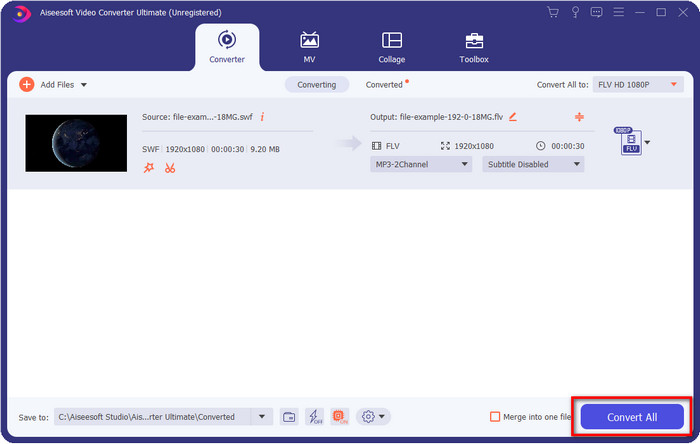
Étape 2. Une fois le programme lancé sur votre système, cliquez sur Add Files pour importer les fichiers SWF que vous souhaitez convertir.
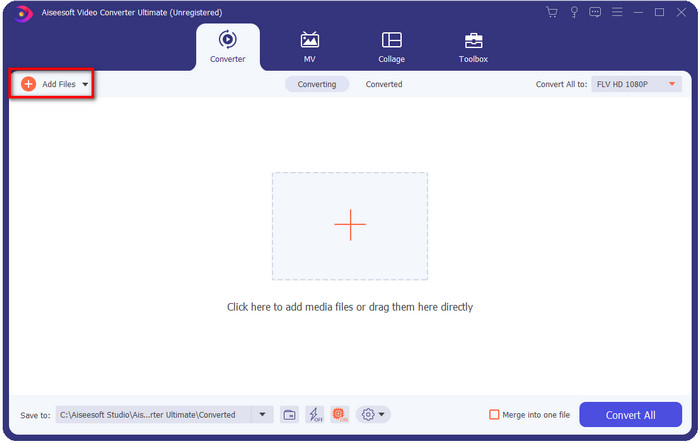
Étape 3. Cliquez sur l’option Convert All to et choisissez le format FLV. Vous pouvez également sélectionner la qualité en haute définition ou conserver la version d’origine.

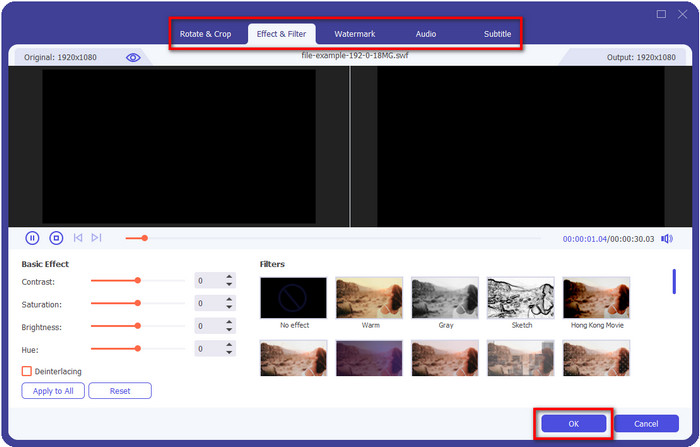
Si vous souhaitez encore améliorer le rendu de votre vidéo, cliquez sur le bouton en forme de baguette magique. Vous accéderez ainsi aux différents outils d’édition disponibles, tels que Crop, Rotate, Add Effects, Subtitle, Audio et Watermark. Pour enregistrer les modifications effectuées, cliquez sur OK.
Étape 4. Cliquez sur Convert All et le processus commencera. La conversion de SWF en FLV ne prendra que peu de temps ; à la fin, un dossier s’ouvrira sur votre écran contenant le fichier FLV converti.
Partie 5. Connaissance approfondie de SWF et FLV
ShockWave File ou SWF est un format Adobe, mais Macromedia l'a créé. Il est connu pour conserver les animations vectorielles et les sons utilisés sur le Web. De plus, comme il s'agit d'une base vectorielle, vous pouvez facilement ajuster la mise à l'échelle graphique pour s'adapter ou zoomer. En dehors de l'animation vectorielle, la taille du fichier est si petite pour charger la vidéo plus rapidement même si vous avez une connexion Internet lente. Mais le format n'est pas pris en charge si vous souhaitez les partager sur les plateformes de partage de vidéos.
Bien que FLV soit également sous Adobe, ce format est meilleur que SWF. Le format FLV ou FlashVideo est le format vidéo standard sur la plupart des sites Web. Ce format peut contenir deux codecs différents destinés à la vidéo et à l'audio. Et tout comme le fichier SWF, ce format est petit pour charger le fichier plus rapidement sur le Web ; une fois que vous avez téléchargé le fichier FLV sur votre lecteur, vous pouvez le lire sur votre lecteur multimédia même s'il n'est pas encore terminé.
Cela aiderait si vous convertissiez le SWF en FLV car le SWF a beaucoup d'imperfections que vous pouvez trouver sur le format FLV. Surtout si le fichier vidéo est long, car .swf ne peut contenir qu'une image limitée par seconde, il y aura une chance que vous ne puissiez pas l'utiliser. Mais FLV peut facilement contenir de longues vidéos. De plus, si vous voulez vous concentrer sur la qualité, FLV a une meilleure qualité que SWF.
Partie 6. FAQ sur la conversion SWF en FLV
Le fichier SWF prend-il en charge la transparence ?
Comme PNG et GIF, ce format prend également en charge les niveaux de gris avec de vraies couleurs ou attribue une couleur pour le rendre transparent.
Où puis-je regarder des vidéos SWF ?
Pour l’instant, vous ne pouvez pas lire de fichiers SWF avec votre lecteur multimédia par défaut, car ce format n’est pas pris en charge. Cependant, vous pouvez cliquer sur ce lien et en savoir plus sur les 4 meilleurs lecteurs SWF pour Windows et Mac.
Puis-je enregistrer le .swf de mon téléphone ?
Il est possible d'enregistrer des fichiers SWF sur votre téléphone, mais pas de les lire sur votre lecteur multimédia local. Parce que ce format n'est pas pour la compatibilité téléphonique mais pour le web. Donc, si vous téléchargez un fichier sous cette extension, attendez-vous à ne pas pouvoir l'utiliser ; cependant, vous pouvez le convertir dans un format lisible comme MP4 sur votre téléphone.
Conclusion
Cet article dévoile les pépites de convertisseurs que vous pouvez utiliser pour convertir SWF en FLV sans dégrader la qualité du SWF. En rassemblant tous ces convertisseurs, nous avons découvert que FVC Video Converter Ultimate est la perle rare que vous recherchiez pour résoudre ce problème. Il offre les meilleurs résultats et le processus de conversion le plus rapide parmi tous les outils mentionnés. Il ne vous reste plus qu’à choisir le « trésor » que vous voulez utiliser pour vos besoins de conversion, en téléchargeant ou en accédant à l’outil sur le web.
-
 Convertisseurs DV en FLV utiles pour convertir DV en FLV [2022]
 Si vous recherchez les meilleurs outils faciles à utiliser pour convertir DV en FLV, voici le meilleur article à lire. Ayez un excellent aperçu en fouillant dans toutes les informations de cet article.
-
 Comment convertir MPG en FLV sans perte de qualité [Éprouvé]
 Vous devez regarder votre film préféré sur ce lecteur multimédia, mais il ne prend pas en charge MPG. Essayez de convertir votre fichier MPG en FLV en utilisant ces convertisseurs présentés dans cet article.
-
 Convertissez TRP en FLV avec les méthodes hors ligne et en ligne les plus simples
 Voulez-vous convertir votre fichier vidéo TRP en FLV rapidement et sans tracas ? Lisez cet article pour vous fournir le meilleur logiciel et service en ligne qui convient le mieux à la situation.
