


 Video Converter Ultimate
 Enregistreur d'écran
 Réparation vidéo
Comment convertir GIF en WebM avec des étapes et des outils détaillés [gratuit et coûteux]
Les GIF sont devenus populaires grâce aux contenus amusants qu’ils nous offrent. Au lieu d’utiliser des images fixes pour rendre nos messages plus vivants, nous utilisons des GIF, qui ajoutent du mouvement et permettent d’exagérer les émotions. Cependant, toutes les plateformes ne prennent pas en charge les GIF, car ce format a plus de 30 ans. Et dans certains cas, lorsque vous ajoutez un fichier GIF sur votre site web, sa qualité n’est pas correctement prise en charge. Ainsi, la meilleure façon de partager des GIF est de les convertir au format WebM. Ce format WebM est beaucoup plus léger en termes de compression et de taille, tout en produisant une haute qualité, ce qui le rend idéal pour tout le monde. Ce type de format est la meilleure alternative aux GIF sur le long terme, car tout comme les GIF, il peut stocker des images statiques et des animations. Pour découvrir quels sont les meilleurs convertisseurs GIF en WebM, poursuivez votre lecture ci‑dessous et choisissez celui qui vous convient le mieux.

Partie 1. Comment convertir GIF en WebM pour le Web et le bureau gratuits
1. Vidéo gratuite FVC vers GIF Maker
Pour mener à bien la tâche, il est essentiel de choisir le bon outil. Et si votre tâche est de convertir un GIF en WebM, vous pouvez essayer FVC Free Video to GIF Maker. Créer un GIF devient simple avec ce logiciel, tout comme convertir des GIF. Ainsi, l’apprentissage de son utilisation est facile. Tout cela grâce au guide clair et précis fourni par FVC. Un débutant comme un utilisateur expérimenté peut donc l’utiliser facilement tout en obtenant un excellent résultat. Pour savoir comment utiliser l’outil, suivez les étapes ci‑dessous, préparées spécialement pour vous.
Étape 1. Installez cet outil gratuit sur votre disque. Choisissez le système d’exploitation adapté à votre ordinateur.
Téléchargement gratuitPour Windows 7 ou version ultérieureTéléchargement sécurisé
Téléchargement gratuitPour macOS 10.7 ou version ultérieureTéléchargement sécurisé
Étape 2. Cliquez sur l’icône de l’outil qui vient d’être téléchargé pour le lancer. Si l’outil fonctionne déjà en arrière‑plan, l’interface devrait être exactement comme ceci.
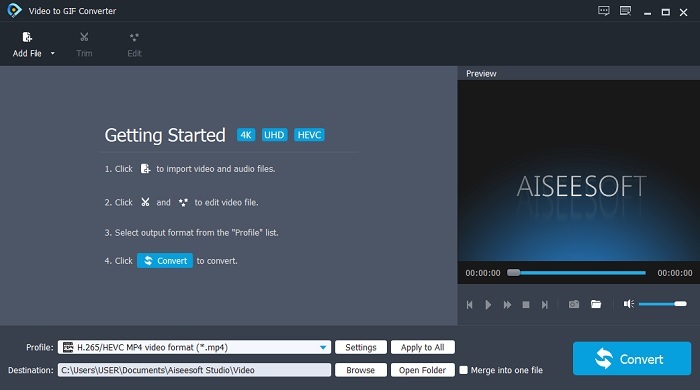
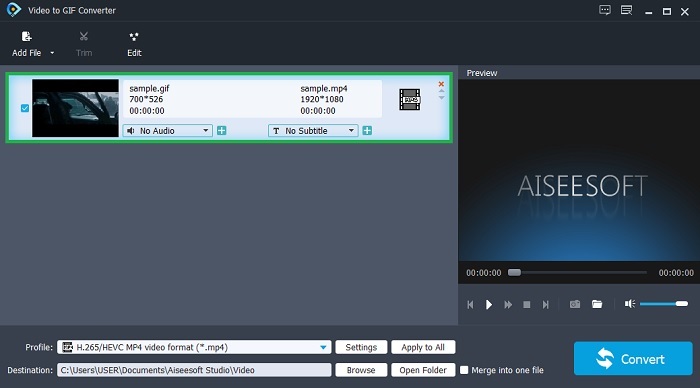
Étape 3. Cliquez sur Add File et sélectionnez le GIF que vous souhaitez convertir. Dans l’interface, vous pouvez aussi modifier ou découper la vidéo.
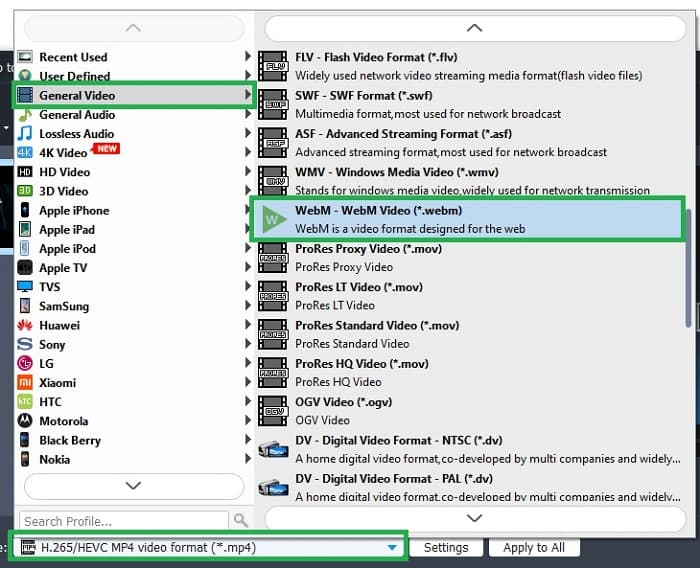
Étape 4. Dans le bouton déroulant, choisissez le fichier WebM ou tout autre format vers lequel vous souhaitez convertir. Lorsque vous êtes prêt à lancer la conversion, appuyez sur Convert.
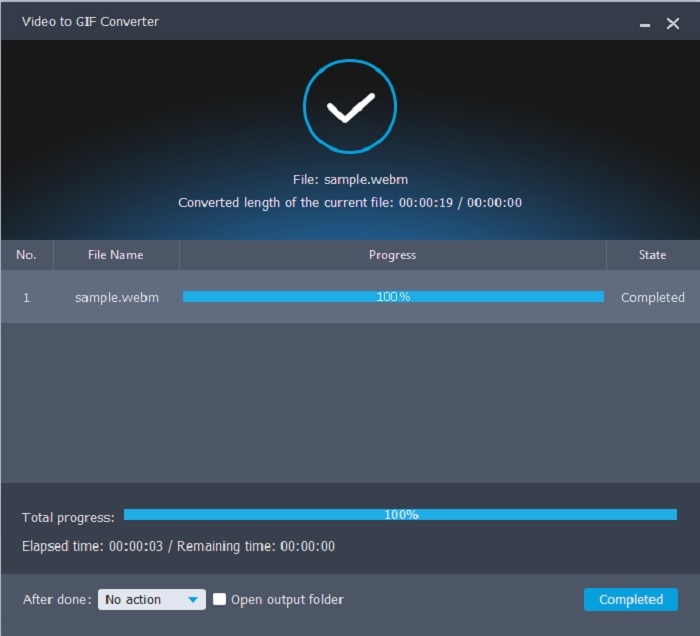
Étape 5. Le processus de conversion ne prendra pas plus d’une minute. Une fois la conversion terminée, vous pouvez vérifier le résultat final dans le gestionnaire de fichiers.
Avantages
- Il est excellent pour créer et convertir des GIF.
- Des outils sur-point pour que le processus d'apprentissage de l'utilisation de cet outil soit très facile à tous les âges.
- Pas besoin d'Internet pour utiliser l'outil.
Les inconvénients
- La plupart des fonctionnalités principales de l'outil ultime ne sont pas disponibles ici.
- Il doit être installé sur votre bureau.
2. OnlineConverter.com
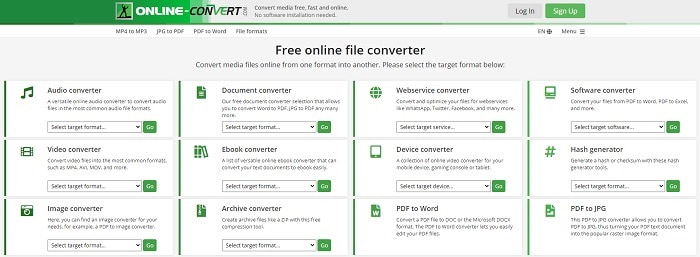
Transformez vos fichiers .webm en .gif avec l’aide d’OnlineConverter.com. Si vous voulez un outil dédié spécifiquement à la conversion, vous devez essayer celui‑ci. Cet outil prend en charge différents types de conversion comme les documents, les e‑books et les archives. Mais l’inconvénient est qu’il ne propose aucune fonction d’édition, même basique. Donc, si vous voulez savoir comment utiliser cet outil, suivez les étapes ci‑dessous.
Étape 1. Recherchez la page principale de l’outil dans votre moteur de recherche préféré.
Étape 2. Cliquez sur le convertisseur vidéo et importez le fichier.
Étape 3. Pour lancer la conversion, cliquez sur « start conversion » et attendez la fin du processus.
Avantages
- Accès facile qui peut être utilisé par n'importe qui en ligne.
- Aucun fichier supplémentaire nécessaire à utiliser.
- Il prend également en charge différentes conversions.
Les inconvénients
- Le processus de conversion en ligne prend plus de temps que les outils de bureau.
- Il contient quelques publicités et une interface Web ennuyeuse.
3. Convertio
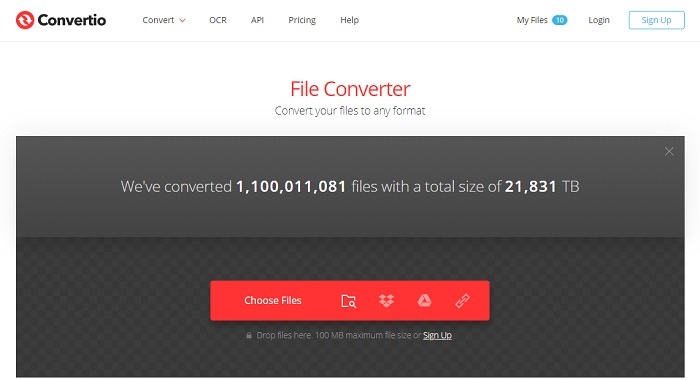
Si vous voulez savoir comment convertir un WebM en GIF ou l’inverse, il vous suffit d’utiliser le service en ligne Convertio pour tout convertir. Si la conversion est un problème pour vous, cet outil peut être la solution. Certes, ce service en ligne affiche de la publicité et ne propose pas de fonctions d’édition, mais il reste l’un des meilleurs convertisseurs en ligne que vous puissiez trouver. Si vous souhaitez l’essayer, suivez les étapes ci‑dessous.
Étape 1. Trouvez la page principale de Convertio en ligne puis cliquez sur le lien.
Étape 2. Une fois sur l’interface principale, sélectionnez le GIF que vous voulez convertir.
Étape 3. Pour démarrer le processus, cliquez sur « convert ».
Avantages
- Facile à utiliser grâce à la précision de son utilisation.
- Il prend également en charge différentes plates-formes.
- Peut être facilement accessible sur Internet.
Les inconvénients
- A de grandes chances de perdre des données lors de la conversion si Internet a été interrompu.
- Annonces sur le site Web lui-même, ce qui pourrait être un peu ennuyeux.
Partie 2. Meilleur moyen de transformer GIF en WebM avec l'aide de l'outil Ultimate
Video Converter Ultimate
Mais vous pouvez envisager d'utiliser ce Video Converter Ultimate développé par le FVC. Si la version gratuite de cet outil vous offre le meilleur résultat, cet outil est bien plus que cela. Il peut améliorer la qualité de la vidéo et y ajouter des effets. Si vous souhaitez améliorer la qualité audio, vous pouvez également utiliser cet outil pour l'améliorer. Donc, si vous voulez faire passer votre conversion au niveau supérieur, vous devez utiliser cet outil comme votre choix personnel. Parce que c'est le bon outil qui fournit une sortie finale ultime pour impressionner vos amis, votre famille ou n'importe qui. Lisez les étapes détaillées ci-dessous pour savoir comment utiliser cet outil ultime pour créer une sortie ultime.
Étape 1. Pour commencer à utiliser l’outil, vous devez télécharger le programme adapté sur votre ordinateur. Cliquez sur le bouton de téléchargement, suivez l’assistant d’installation et modifiez les paramètres si nécessaire. Cliquez sur « finish » pour lancer l’outil.
Téléchargement gratuit pour Windows 7 ou version ultérieure Téléchargement sécurisé
Téléchargement gratuit pour macOS 10.7 ou version ultérieure - Téléchargement sécurisé
Étape 2. Une mini‑interface comme celle‑ci apparaîtra sur votre écran.
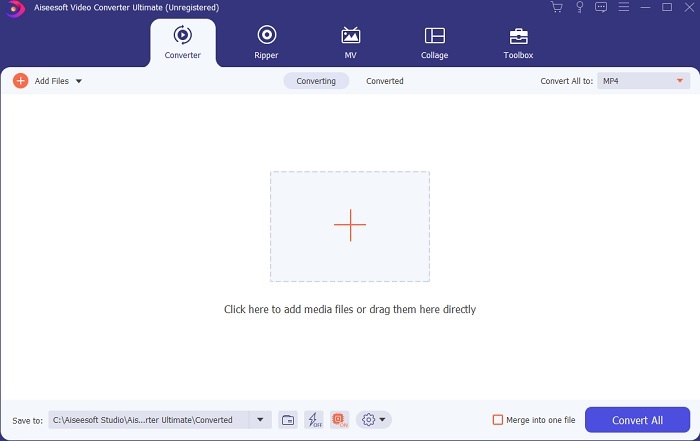
Étape 3. Cliquez sur le signe plus au centre de l’interface pour ajouter un fichier. Si vous souhaitez convertir de nombreux fichiers GIF, il est encore plus simple de faire un glisser‑déposer dans l’interface.
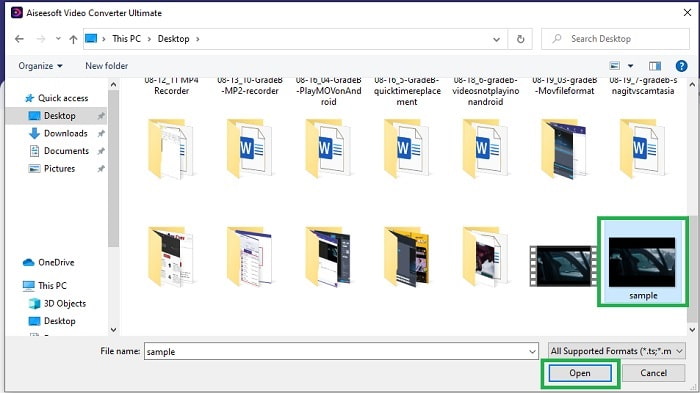
Étape 4. Après avoir déroulé le menu Convert All to, choisissez le format souhaité. Quand tout est prêt, cliquez sur Convert All pour lancer la conversion.
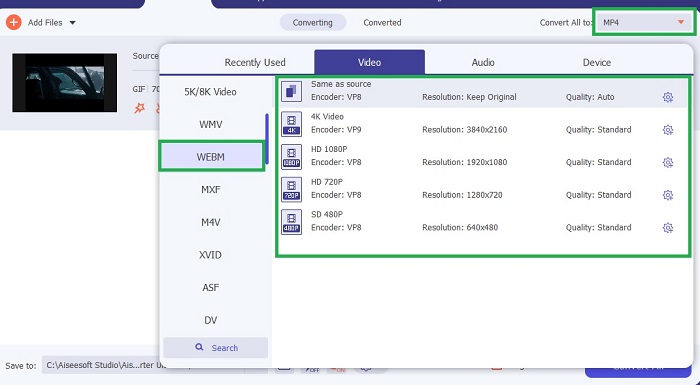
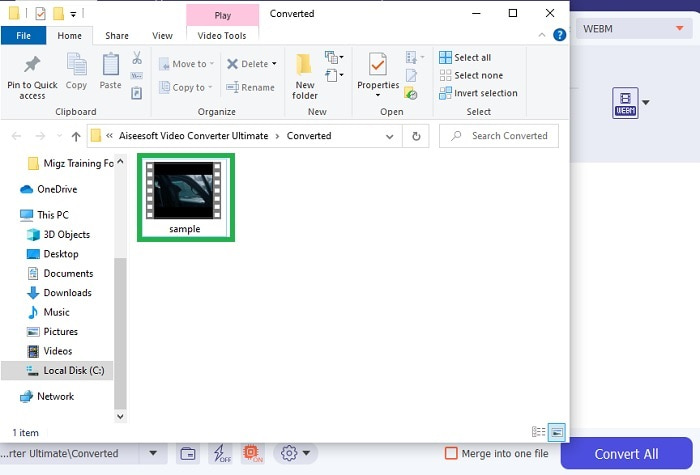
Étape 5. Le processus de conversion ne vous prendra pas beaucoup de temps, car il est 30 fois plus rapide que l’outil gratuit et 100 fois plus rapide que les autres outils. Une fois le processus terminé, un gestionnaire de fichiers apparaîtra sur votre écran : cliquez sur la vidéo pour la visionner. Vous pouvez aussi améliorer le résultat plus tard à l’aide de la barre d’outils, si vous le souhaitez.
Avantages
- Fournit plus de fonctionnalités pour améliorer votre vidéo convertie.
- Il fournit tous les formats que vous connaissez ou non.
- Le processus de conversion est ultra-rapide plutôt que n'importe quel outil de conversion disponible ici.
Les inconvénients
- Vous devez télécharger des fichiers supplémentaires avant de lancer l'outil, sinon il ne se lancera pas.
- C'est un outil de paiement avant utilisation.
Partie 3. FAQ sur GIF to WebM
Pourquoi mes WebM ne sont-ils pas jouables sur le Web ?
C’est très simple : votre navigateur est obsolète. Aucun fichier WebM ne peut être lu sur les anciennes versions du web, comme par exemple Internet Explorer. Cliquez ici pour en savoir plus sur les lecteurs WebM disponibles.
Quel est le meilleur, GIF ou WebM ?
Si vous souhaitez contenir des vidéos avec audio, WebM est un bien meilleur format. Mais si le format GIF d'images statiques est votre choix.
Qui a développé le format WebM ?
Les premiers sont On2, Xiph et Matroska et plus tard Google le développe.
Conclusion
Il est désormais plus clair que convertir un GIF en WebM est indispensable si vous souhaitez obtenir un fichier de petite taille tout en conservant une haute qualité vidéo. Et le meilleur outil pour cette conversion est Video Converter Ultimate. Plus important encore, il prend aussi en charge la conversion de WebM en GIF facilement et rapidement. Si vous avez des doutes concernant l’outil gratuit, il vaut mieux utiliser cet outil premium. En plus d’être sûr, il garantit un taux de réussite 100 fois supérieur pour la conversion et le montage. Cet outil est votre allié, tout simplement. Utilisez le meilleur convertisseur pour obtenir une excellente conversion.
-
 Choisissez le meilleur recadrage GIF en ligne et hors ligne pour recadrer les GIF [2021]
 Choisir le meilleur outil de recadrage est un must et certains des fabricants de GIF n'ont pas fourni cette fonctionnalité. Mais quel est le meilleur outil de recadrage GIF à utiliser et comment l'utiliser ?
-
 5 meilleures options pour enregistrer le format GIF avec des enregistreurs GIF pour PC et Mac
 Quel est le meilleur enregistreur GIF que vous devriez utiliser pour enregistrer des GIF ? La liste ci-dessous fournit des preuves sur lequel est le meilleur enregistreur d'écran.
-
 Comment convertir MPG au format GIF [En ligne et hors ligne]
 Vous voulez exprimer une bien meilleure émotion ? Ensuite, vous devez utiliser GIF à la place. Cet article vous apprendra comment convertir un fichier MPG en GIF pour mieux exprimer votre sentiment.
