


 Video Converter Ultimate
 Enregistreur d'écran
 Réparation vidéo
 Téléchargement sécurisé
Comment enregistrer un GIF sous forme de vidéo sur iPhone de 5 manières incroyables
Qui aurait cru que l’on pourrait interagir de façon expressive en ligne grâce au Graphics Interchange Format, ou GIF ? Ces fichiers ont été conçus avec une petite résolution et sous forme de clips vidéo animés. Que vous souhaitiez donner du style à un message amusant ou envoyer des câlins à vos proches, les GIF seront vos meilleurs alliés. Dans cet article, nous avons sélectionné plusieurs sites de réseaux sociaux où vous pouvez accéder à des milliers de GIF et nous vous expliquons comment enregistrer des GIF animés sur iPhone.

Partie 1 : Comment enregistrer des GIF sur iPhone [iOS16/17]
1. Safaris
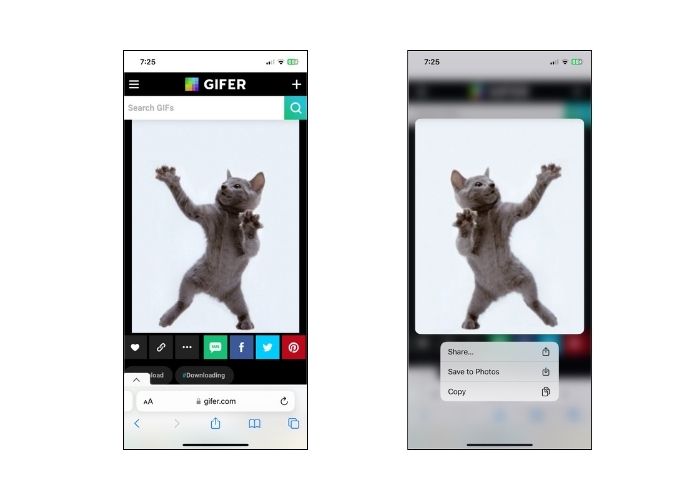
N'allons pas dans l'autre sens et commençons d'abord par le navigateur natif de n'importe quel modèle d'iPhone, Safari. Suivez les étapes pour enregistrer des GIF sur iPhone à partir de Safari.
Étape 1. Ouvrez l’application Safari sur votre téléphone et recherchez le GIF que vous souhaitez.
Étape 2. Touchez et maintenez le GIF ciblé sur le site de partage de GIF de votre choix.
Étape 3. Ensuite, touchez Enregistrer dans Photos dans le menu ; il sera alors enregistré dans votre application Photos.
2. Twitter
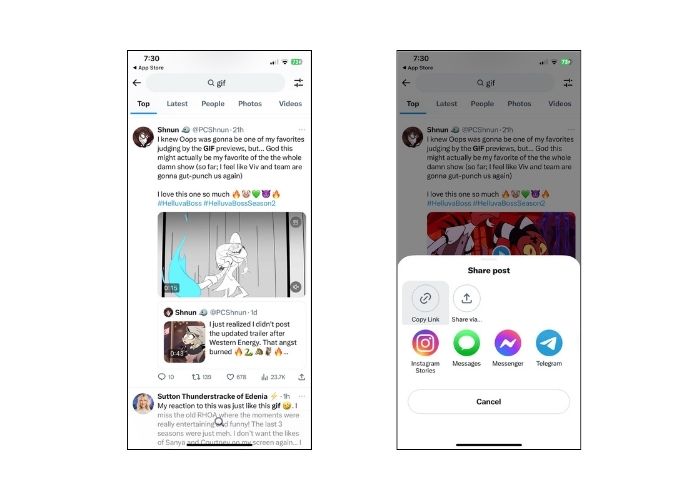
Si vous souhaitez trouver des GIF uniques et expressifs, essayer certains sites de réseaux sociaux en ligne comme Twitter, connu aujourd'hui sous le nom de X, est une excellente option. À partir des tweets des gens, vous aurez en effet une option complète sur laquelle sélectionner. Comment enregistrer un GIF sur un iPhone depuis Twitter ? Suivez le guide ci-dessous.
Étape 1. Ouvrez l’application Twitter sur votre iPhone et allez jusqu’au GIF que vous voulez récupérer.
Étape 2. Après avoir choisi le tweet contenant le GIF, touchez le Menu et copiez le lien.
Étape 3. Enfin, collez le lien dans le téléchargeur de GIF et appuyez sur Enregistrer dans la bibliothèque.
3.Google
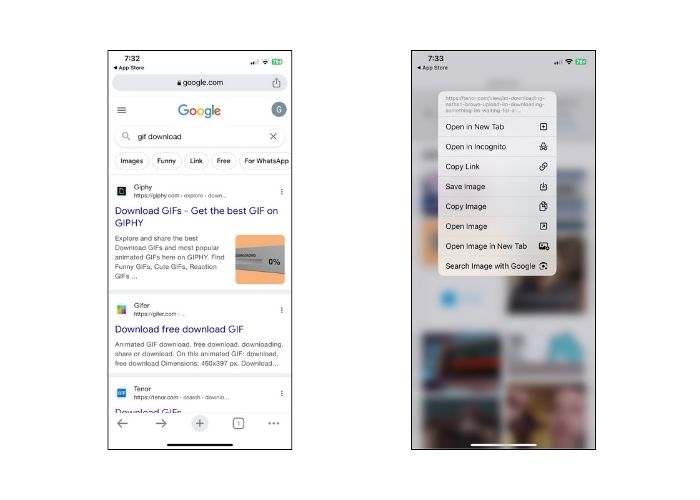
En ce qui concerne les moteurs de recherche, Google est peut-être considéré comme l’un des plus populaires au monde. En plus de cela, ce moteur de recherche vous permet de visualiser des millions de GIF sur tout le Web et de vous proposer celui dont vous avez besoin. Voici comment enregistrer des GIF sur un iPhone depuis Google.
Étape 1. Ouvrez Google Chrome sur votre iPhone. Dans la barre de recherche, tapez le GIF que vous souhaitez enregistrer.
Étape 2. Une fois le GIF trouvé, touchez le Menu puis Enregistrer l’image.
Étape 3. Une fenêtre doit alors vous demander si vous autorisez l’ajout du GIF à votre application Photos ou non. Touchez OK pour continuer.
4. GIPHY
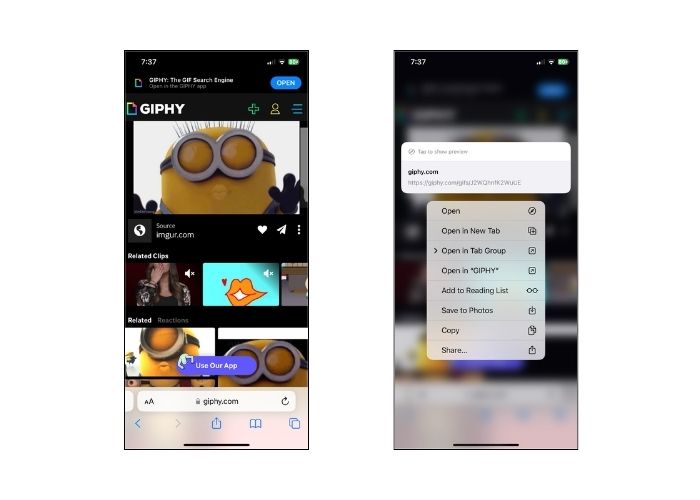
GIPHY est un site Web en ligne qui permet aux utilisateurs d'accéder à une réserve de GIF pour toute occasion. Si vous souhaitez savoir comment enregistrer un GIF de GIPHY sur iPhone, suivez le guide ci-dessous.
Étape 1. Ouvrez votre navigateur Web et rendez-vous sur le site officiel de GIPHY. Ensuite, recherchez le GIF que vous ciblez à l’aide d’un mot‑clé ou cliquez sur une catégorie spécifique dans la liste.
Étape 2. Après avoir choisi le GIF, touchez-le et maintenez-le jusqu’à l’apparition des options de sélection.
Étape 3. Pour finir, sélectionnez Enregistrer dans Photos et le GIF sera ajouté à votre stockage local.
5. WhatsApp
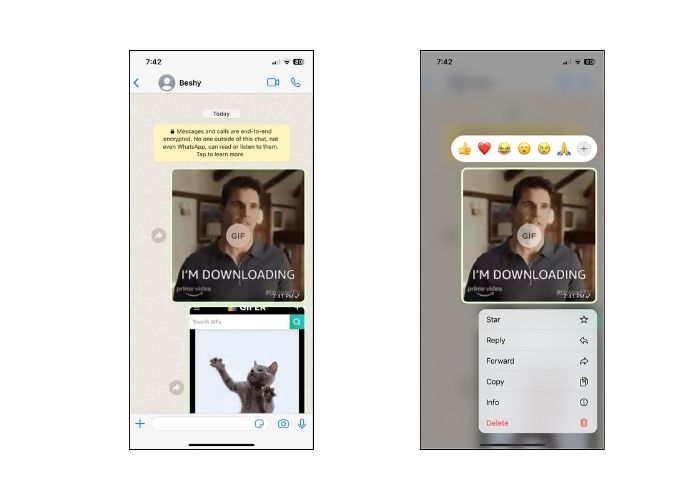
WhatsApp est une autre plateforme de communication en ligne très connue aujourd’hui. Comme tout autre outil de communication numérique, WhatsApp est également idéal pour recevoir des GIF d’amis et de proches. Nous avons également expliqué comment enregistrer un GIF de WhatsApp sur iPhone.
Étape 1. Accédez à la conversation ou au groupe contenant le GIF.
Étape 2. Après avoir fait défiler les Médias enregistrés ou le chat, touchez le GIF et maintenez pendant 3 secondes jusqu’à l’apparition du Menu.
Étape 3. Choisissez Enregistrer pour ajouter le GIF à vos fichiers.
Partie 2 : Pourquoi ne puis-je pas enregistrer de GIF sur iPhone ?
Plusieurs facteurs doivent être pris en compte en cas d'échec des tentatives d'enregistrement de GIF sur l'iPhone. Consultez les raisons suivantes ci-dessous et essayez de déterminer quel est le coupable.
1. Si vous ne pouvez pas enregistrer de GIF sur iPhone, votre connexion Internet peut en être la cause. Dans ce cas, vérifiez si votre connexion fonctionne en allant dans Réglages > Wi‑Fi.
2. Si vous ne parvenez pas à télécharger ou même à prendre des captures d'écran, essayez de redémarrer votre iPhone. Dans ce cas, votre téléphone sera réinitialisé.
3. Forcer la fermeture de l’application peut également être utile. Il existe des cas où le problème sera résolu après avoir quitté l'application.
4. Enfin, vérifiez votre stockage. Si vous êtes chargé de fichiers, vous devrez peut-être libérer de l'espace en supprimant des photos, des vidéos et même en désinstallant certaines applications inutilisées.
Partie 3. Comment enregistrer un GIF sur iPhone sous forme de vidéo
1. Convertisseur vidéo ultime
Parfois, nous avons besoin de transformer un GIF en vidéo, mais dans ce cas, tous les créateurs de GIF ne le permettent pas. C’est pourquoi voici une excellente plateforme pour vous aider. Video Converter Ultimate est un outil accéléré par GPU qui convertit un GIF en fichier vidéo de façon fluide et rapide. Vous pouvez également convertir une vidéo vers une autre extension de fichier comme MOV, FLV, MP4, ASV et bien d’autres. Par-dessus tout, cet outil est remarquable pour conserver une qualité à ratio 1:1 de vos séquences.
Étape 1. Installer le meilleur transcodeur GIF vers vidéo
Commencez par cliquer sur les boutons de Téléchargement ci‑dessous correspondant à votre système d’exploitation. Ensuite, exécutez le fichier pour lancer le programme sur votre ordinateur.
Téléchargement gratuitPour Windows 7 ou version ultérieureTéléchargement sécurisé
Téléchargement gratuitPour macOS 10.7 ou version ultérieureTéléchargement sécurisé
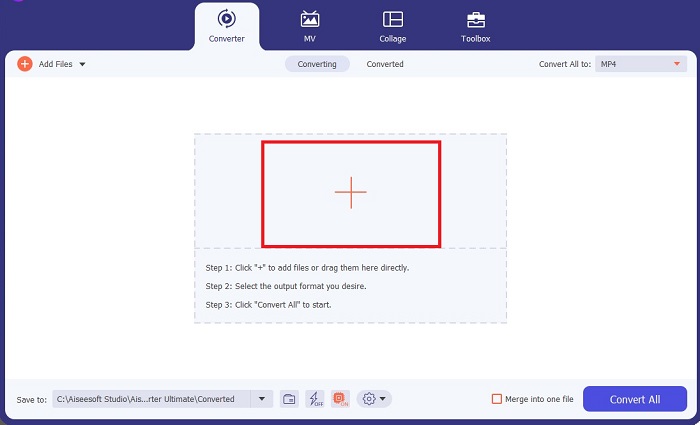
Étape 2. Importer le fichier GIF
Pour importer votre fichier GIF, cliquez sur le bouton Plus au centre de l’écran. Vous pouvez aussi convertir plusieurs GIF en même temps en important un dossier.
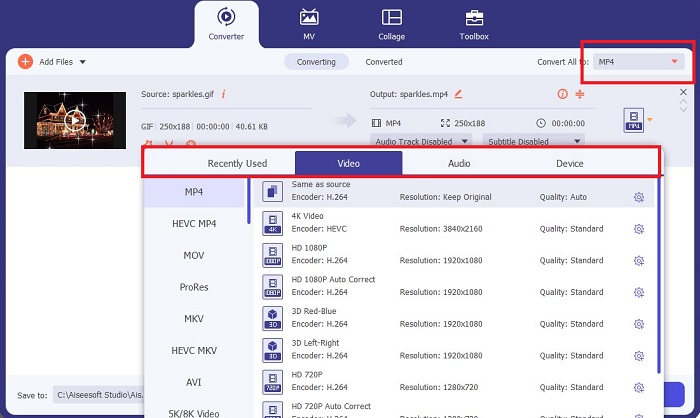
Étape 3. Choisir le format vidéo
Une fois que votre GIF apparaît à l’écran, déroulez l’onglet Sortie pour accéder à la liste des formats vidéo. Pour maintenir une large compatibilité de votre fichier, choisissez MP4.
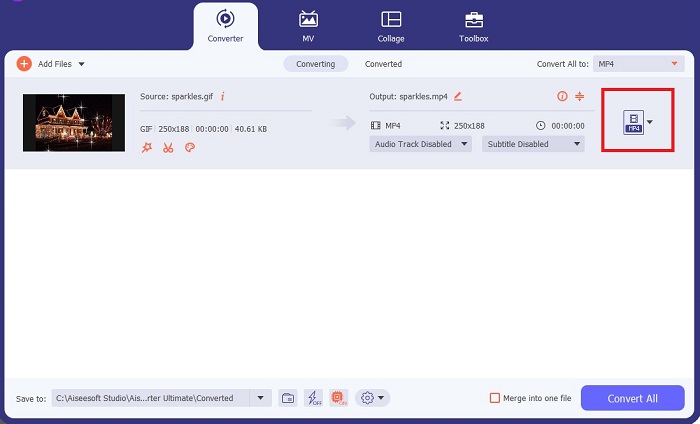
Étape 4. Enregistrer le projet
Enfin, cliquez sur le bouton Convertir en bas de l’écran pour lancer la conversion. Vous pouvez également vérifier votre fichier en cliquant sur l’icône Dossier pour accéder au répertoire local où vos GIF convertis sont enregistrés.
Pour aller plus loin :
Les méthodes imparables pour ajouter du texte à un GIF (toutes plateformes)
Suppression de l’arrière‑plan d’un GIF avec des outils efficaces et utiles
Partie 4. FAQ sur les moyens d'enregistrer un GIF sur iPhone
Pouvez-vous enregistrer un GIF sur votre iPhone à partir d’un e-mail ?
Absolument! Vous pouvez enregistrer n’importe quel GIF provenant d’un e-mail sur votre pellicule. Appuyez simplement sur l'icône Partager sur votre e-mail et cliquez sur Enregistrer le fichier.
Puis-je publier des GIF sur Twitter sur mon iPhone ?
Les GIF peuvent être partagés sur les sites de réseaux sociaux, y compris Tweeter. Vous pouvez le faire de la même manière que vous publiez une image.
Où trouver les GIF enregistrés sur iPhone
Une fois les GIF enregistrés, vous pouvez accéder à votre explorateur de fichiers sur votre iPhone ou actualiser l'application Photos.
Puis-je enregistrer un GIF sur ma pellicule sur iPhone
Absolument! Si vous souhaitez enregistrer un fichier GIF sur votre pellicule, vous pouvez l'enregistrer comme vous le faites sur une image typique. Appuyez sur l'image pendant 3 secondes ou appuyez sur le Menu. Ensuite, cliquez sur Enregistrer l'image.
Comment enregistrer les gifs Reddit sur iPhone ?
Vous pouvez enregistrer des GIF depuis Reddit en suivant les mêmes étapes mentionnées ci-dessus. Après avoir enregistré votre GIF sur l'appareil photo, ouvrir votre répertoire de fichiers est le meilleur moyen de trouver un GIF enregistré sur iPhone. C'est la chose la plus pratique à faire car il arrive parfois que vos photos ou GIF téléchargés n'apparaissent pas sur l'application Photos.
Conclusion
Savoir manipuler les GIF, y compris les convertir en vidéo, est indispensable si vous voulez briller dans l’ère numérique. Vous disposez maintenant de plusieurs méthodes expliquant comment enregistrer des GIF sur iPhone à travers différents sites de réseaux sociaux et applications.
-
 Comment transformer une vidéo en GIF pour créer des GIF accrocheurs
 Découvrez comment convertir sans effort vos vidéos en GIF attrayants avec nos convertisseurs vidéo en GIF triés sur le volet et notre processus vidéo en GIF facile à suivre.
-
 Examen complet d'Ezgif des fonctionnalités et des alternatives
 Si vous utilisez Ezgif et que vous ne savez toujours pas ce qui vous attend. Cette revue Ezgif vous aidera à résoudre ce problème. Continuez à lire pour en savoir plus.
-
 Les 10 meilleurs compresseurs GIF pour les utilisateurs de bureau et en ligne
 Dans cet article, vous découvrirez les meilleurs compresseurs GIF pour vous aider à résoudre votre problème avec les gros fichiers GIF. Consultez-les et obtenez les meilleures informations.
